Every platform team eventually hits the same wall: the staging cluster costs more than production, the CI pipeline needs a real API server to test controllers against, and three product teams want their own cluster without three separate bills. Throwing more nodes at the problem is how you end up paying $400/month for an idle control plane that serves exactly zero traffic on weekends.
There are now three genuinely different answers to this problem, and they are constantly confused with each other: KWOK fakes the whole data plane, k3k runs real K3s clusters inside your existing cluster, and Kamaji extracts the control plane into a shared management cluster. They look similar in a feature table. Operationally they are nothing alike, and picking wrong costs you weeks.
TL;DR — Quick Verdict
- You need hundreds of fake nodes to test a scheduler, autoscaler, or controller → use KWOK. Nothing else scales to 5,000 simulated nodes on a laptop.
- Your teams need actual working clusters — real kubelets, real pods, real CNI → use k3k. It is K3s nested inside K3s, so workloads genuinely run.
- You want one management cluster serving many tenant control planes, each with its own API server and etcd replacement → use Kamaji. It is the closest open-source equivalent to a managed Kubernetes service you operate yourself.
Do not use KWOK to validate anything that requires a container to actually execute. Do not use Kamaji when your tenants need node-level access. And do not use k3k if your only goal is a cheap API endpoint — you will pay for kubelets you never needed.
Side-by-Side Comparison (data pulled 2026-11-26)
| Dimension | KWOK | k3k | Kamaji |
|---|---|---|---|
| GitHub stars | 3,236 | 928 | 2,103 |
| Last commit | 2026-11-24 | 2026-11-26 | 2026-11-25 |
| Language | Go | Go | Go |
| Latest release | v0.8.0 | v1.2.1 | 26.11.5-edge |
| What it creates | Simulated nodes and pod lifecycles | Real K3s clusters inside a host cluster | Real control planes, no worker nodes |
| Runs containers? | No | Yes | Only if you attach your own workers |
| API server | Real (kube-apiserver, optionally with --kube-controller-manager) | Real, one per nested cluster | Real, one per tenant |
| etcd | Not required | Embedded in K3s | Pluggable: etcd, MySQL, PostgreSQL |
| Typical use | Controller and scheduler testing at scale | Dev/staging clusters, multi-tenancy | Hosted Kubernetes as a product |
| Resource footprint per cluster | ~100 MB RAM | 1–3 GB RAM | 300–600 MB RAM |
| Minimum viable host | Laptop, kind, or any cluster | RKE2/K3s with privileged pods | Any CNCF-conformant cluster + a datastore |
| Hard dependency | None | Privileged containers, RKE2 recommended | cert-manager, a relational DB or etcd |
The star gap is misleading. k3k is the newest of the three and the narrowest in scope, while KWOK’s 3,236 stars come mostly from CI engineers who use it as a test fixture rather than as infrastructure.
Decision Matrix: Pick in Ten Seconds
| Your situation | Recommended tool | Why |
|---|---|---|
| Testing a custom controller against 1,000 nodes | KWOK | Simulates node heartbeats and pod phases without a kubelet |
| Validating cluster-autoscaler or descheduler logic | KWOK | You can lie about node capacity, taints, and conditions |
CI job needs a throwaway Kubernetes API for helm install tests | KWOK (kwokctl) | Cluster in ~10 seconds, no containers |
| Team needs a real cluster to run apps on, but infra must stay shared | k3k | Nested K3s with real kubelets and CNI |
| Running workshops, demos, or per-branch preview environments | k3k | Full cluster per branch, delete when done |
| Selling or internally offering “Kubernetes as a service” | Kamaji | One control plane per tenant, datastore-backed |
| Migrating off a managed cloud control plane to save cost | Kamaji | Keeps per-tenant API isolation without per-tenant VMs |
| Multi-tenant isolation with strict node separation | None of these | Use separate clusters, vCluster, or namespace-level isolation |
KWOK — Simulating the Cluster You Cannot Afford
KWOK stands for Kubernetes WithOut Kubelet. It runs a real kube-apiserver (and optionally a controller manager and scheduler) and then impersonates every node in the cluster. Nodes report capacity, conditions, and heartbeats. Pods get scheduled and move through phases. Nothing ever pulls an image.
The control loop is driven by Stage CRDs (Stage, ClusterStage), which let you script exact pod lifecycles — for instance, force every pod into CrashLoopBackOff after 30 seconds to see how your alerting behaves.
The fastest way in is kwokctl, which provisions a full simulated cluster locally:
| |
To attach KWOK to an existing cluster instead of a local one, install the controller with kustomize on the release branch:
| |
Then declare simulated capacity explicitly, which is the whole point — you are not bound by real hardware:
| |
The trap: every pod on a KWOK node is a lie. kubectl exec fails, logs are empty, PVCs bind but never mount, and readiness probes are simulated by stage rules rather than executed. Teams burn whole sprints debugging a “flaky deployment” that was never running containers. If your test asserts on application logs or real network traffic, KWOK is the wrong tool — use k3k.
k3k — Real Clusters, Nested
k3k (Kubernetes in Kubernetes) takes the opposite approach: each tenant cluster is a real K3s cluster whose server and agent processes run as pods in the host cluster. Two modes matter:
- Shared mode — the K3s control plane and agents run as pods scheduled loosely across the host, and the nested cluster shares the host’s networking more aggressively. Cheapest, least isolated.
- Virtual mode — dedicated server and agent pods, giving stronger isolation and predictable resource accounting. This is what you want for per-team environments.
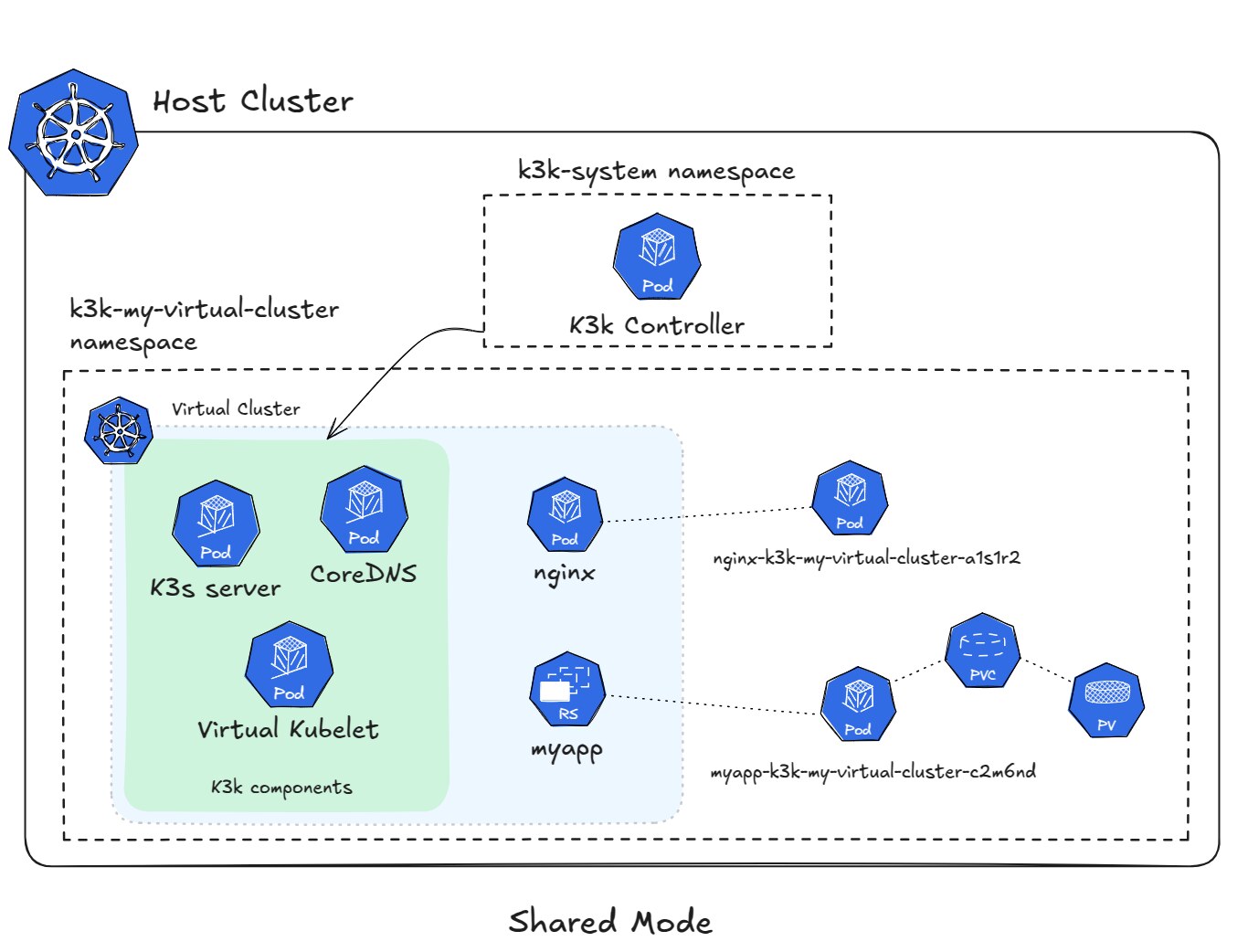
Installation is a two-command Helm operation against any RKE2 or K3s host cluster:
| |
Then create clusters with k3kcli, which also writes a working kubeconfig for you:
| |
Resource control is done the Kubernetes-native way, which is k3k’s real advantage over hand-rolled cluster-per-namespace tricks:
| |
The traps: the host cluster must allow privileged pods (K3s agents need it), and each nested cluster carries a full K3s server — roughly 1–3 GB RAM once agents are counted. Ten preview environments is a real bill. Also plan the version skew: nested K3s is pinned by the k3k release, so “upgrade Kubernetes next week” means upgrading k3k. And in shared mode, a noisy tenant can absolutely starve its neighbours; set spec.agents and resource limits or you have built a shared-fate system with extra steps.
Kamaji — Control Planes as a Service
Kamaji inverts the architecture again. Instead of nesting whole clusters, it runs only the control plane of each tenant cluster as pods in a management cluster: kube-apiserver, kube-controller-manager, kube-scheduler, and optionally konnectivity for worker connectivity. Tenants bring their own workers — VMs, bare metal, edge boxes — and join them through a Kubernetes datastore abstraction.
Two design decisions make it interesting. First, the datastore is pluggable: etcd, MySQL, or PostgreSQL. For a hundred small tenants, one managed PostgreSQL cluster is dramatically cheaper and easier to back up than a hundred etcd rings. Second, each TenantControlPlane gets its own API endpoint and certificate chain, so tenants see a normal cluster, not a namespace with a permission model.
| |
A tenant is a single custom resource — this is the whole product in one object:
| |
Workers join with kubeadm join against the tenant endpoint — nothing is simulated and nothing is nested. A tenant can be a single bare-metal box in a rack in Frankfurt; the control plane lives in your management cluster.
The traps: Kamaji requires cert-manager and a reachable datastore before anything works, and a shared PostgreSQL datastore is a shared failure domain — one bad max_connections setting and every tenant’s API server starts flapping. Also budget for the per-tenant control plane (three containers, roughly 300–600 MB RAM), plan the konnectivity path for worker-to-API traffic across networks, and remember that version upgrades are per tenant: two replicas per control plane is the minimum for seamless kube-apiserver rollouts.
Choosing Between Namespace Isolation, Nested Clusters, and Hosted Control Planes
It helps to place these three tools on a single axis of what gets duplicated. Namespace-level isolation duplicates nothing — one API server, one etcd, and RBAC does the rest. That is the right default for cooperative teams, and it is covered in depth in our Kubernetes namespace lifecycle management guide. k3k duplicates the whole stack including kubelets. Kamaji duplicates only the control plane, which is exactly the part that costs money in a managed service.
If your requirement is “tenants must not see each other’s CRDs, versions, or scheduler config,” namespace isolation is out and you need a separate API server — Kamaji or a nested cluster. If tenants also need different CNI plugins, kernel settings, or privileged DaemonSets, nested clusters win. Our vCluster vs Capsule vs Loft comparison covers the middle ground where you want a virtual API server without a full datastore per tenant.
A practical migration path that works well in production: start with namespaces, move noisy or customer-facing tenants to Kamaji once they need version independence, and keep k3k strictly for ephemeral environments — preview builds, workshops, integration tests. Reserve KWOK for the CI lane that only tests control-plane logic. Teams that blend all four end up with a cheap, fast pipeline and a boring bill.
FAQ
What is the difference between KWOK and a real Kubernetes cluster?
KWOK runs a real API server but impersonates nodes — no kubelet, no container runtime, no networking. Pods are scheduled and transition through phases according to Stage rules, so controllers and schedulers behave normally, but nothing executes. A real cluster runs kubelets that actually start containers. Use KWOK for control-plane behaviour at scale, never for application testing.
Can k3k run production workloads?
Yes, with caveats. k3k creates genuine K3s clusters with real kubelets, so workloads run normally. The constraints are operational: the host cluster must permit privileged pods, each nested cluster consumes 1–3 GB of RAM, and the nested Kubernetes version is pinned by the k3k release you installed. Many teams run internal tools and per-team environments on it; fewer run customer-facing production on nested clusters.
Does Kamaji require etcd for every tenant?
No — that is its main cost advantage. Kamaji supports etcd, MySQL, and PostgreSQL as datastores. A single managed PostgreSQL instance can back dozens of tenant control planes, which is far cheaper to operate than one etcd ring per tenant. The trade-off is that the datastore becomes a shared failure domain, so size connections and backups accordingly.
How much does each approach cost per cluster?
Roughly: KWOK ~100 MB RAM and no storage, k3k 1–3 GB RAM plus persistent volumes per nested cluster, Kamaji 300–600 MB RAM per tenant control plane plus datastore share. On a typical €30/month VPS with 16 GB RAM you can host dozens of KWOK-simulated clusters, three or four k3k clusters, or fifteen to twenty Kamaji tenant control planes.
Which tool should I use to test a custom Kubernetes operator?
KWOK, unless your operator’s logic depends on container output. It gives you thousands of nodes in seconds and lets you script failure conditions that are painful to reproduce on real hardware. If the operator must observe real pod behaviour — readiness probes, log parsing, volume mounts — test against a k3k cluster or a short-lived kind cluster instead.
Do these tools replace vCluster?
No. vCluster synthesizes a virtual API server backed by the host cluster’s storage and syncs a subset of objects, which is lighter than a nested cluster and more isolated than a namespace. Kamaji gives each tenant a real control plane with a real datastore; k3k gives each tenant real kubelets. Pick based on whether you need real kubelets (k3k), a real datastore per tenant (Kamaji), or a cheap virtual API (vCluster).
💰 想测试你的市场判断力?我用 Polymarket 做预测市场交易——这是全球最大的预测市场平台,从大选结果到技术监管时间线,什么都可以押注。和赌博不同,这是真正的信息市场:你懂的信息越多,胜率越高。我靠预测技术相关事件的走向已经赚了不少。用我的邀请链接注册:Polymarket.com