You want to reach your home lab, your office NAS, or a database on a VPS from a coffee shop — without exposing a single port to the public internet. You install WireGuard. Twenty minutes later you are hand-editing AllowedIPs, copying public keys through a chat window, and wondering why peer A can see peer B but not the subnet behind it.
That is the exact gap these three projects fill. All three sit on top of WireGuard’s ~4,000-line kernel implementation, and all three are self-hostable. But they solve three completely different problems, and picking the wrong one costs you a weekend of debugging. Here is the honest breakdown after running each of them.
Quick Verdict (TL;DR)
- wg-easy if you want a WireGuard server with a web UI and five minutes of setup — road-warrior VPN for a handful of devices, full-tunnel or split-tunnel, no mesh.
- Innernet if you want WireGuard to behave like a managed private network: invite-based onboarding, per-peer CIDR permissions, no shared config files, and a server that stays out of the data path.
- boringproxy if you do not want a VPN at all and just need to publish one HTTP service behind a public domain with automatic HTTPS — a friendlier, self-hosted ngrok.
If you only remember one sentence: wg-easy is a VPN, Innernet is a network, boringproxy is a tunnel. They are not interchangeable, and any “which is best” answer that ignores that is marketing.
How They Compare
| Dimension | wg-easy | Innernet | boringproxy |
|---|---|---|---|
| Model | WireGuard server + admin UI | WireGuard mesh with central control plane | Reverse tunnel (HTTP/TLS) |
| GitHub stars | 27,579 | 5,589 | 1,386 |
| Primary language | TypeScript | Rust | Go |
| Last commit | 2026-11-25 | 2026-11-11 | 2024-07-06 |
| Client software | Official WireGuard app | Innernet client (Rust binary) | boringproxy client binary |
| Onboarding | Download a config / QR code | Signed invitation file (invitation.toml) | Token + client name |
| Permission granularity | Server-level, per-config AllowedIPs | Per-CIDR associations per peer | Per-tunnel domain |
| Traffic path | Through your server | Peer-to-peer (direct WireGuard) | Through your tunnel server |
| Public IP required | One, on the VPN host | One, on the coordination server only | One, on the tunnel host |
| Auto HTTPS | No (VPN, not HTTP) | N/A | Yes (ACME/Let’s Encrypt) |
| Web UI | Yes, full | No (CLI only) | Yes, minimal admin UI |
| Maintenance risk | Low, very active | Low, active | Elevated — no commits since mid-2024 |
Star counts and commit dates pulled live from the GitHub API on 2026-11-26 — not copied from a blog post written two years ago.
Which One For Which Job
| Your situation | Pick | Why |
|---|---|---|
| 3–20 devices, one server, you want QR codes | wg-easy | UI-driven peer management, zero config editing |
| Team of 8 engineers, each needs access to different subnets | Innernet | CIDR-level associations, invitations instead of key files |
Expose grafana.internal:3000 to a client on a domain | boringproxy | Built for exactly this, ACME included |
| Multi-site lab-to-lab routing (site A ↔ site B ↔ cloud VPC) | Innernet | Mesh topology, direct peer traffic, no hub bottleneck |
| Temporary demo link for one afternoon | boringproxy | Tunnel spins up per domain, no client VPN install |
| You need a phone to reach a NAS at home | wg-easy | Native WireGuard apps, QR onboarding |
| You want to stop opening SMB/RDP to the internet | Either wg-easy (full tunnel) or Innernet (targeted) | Both remove public exposure |
wg-easy — The Admin UI That Made WireGuard Mainstream
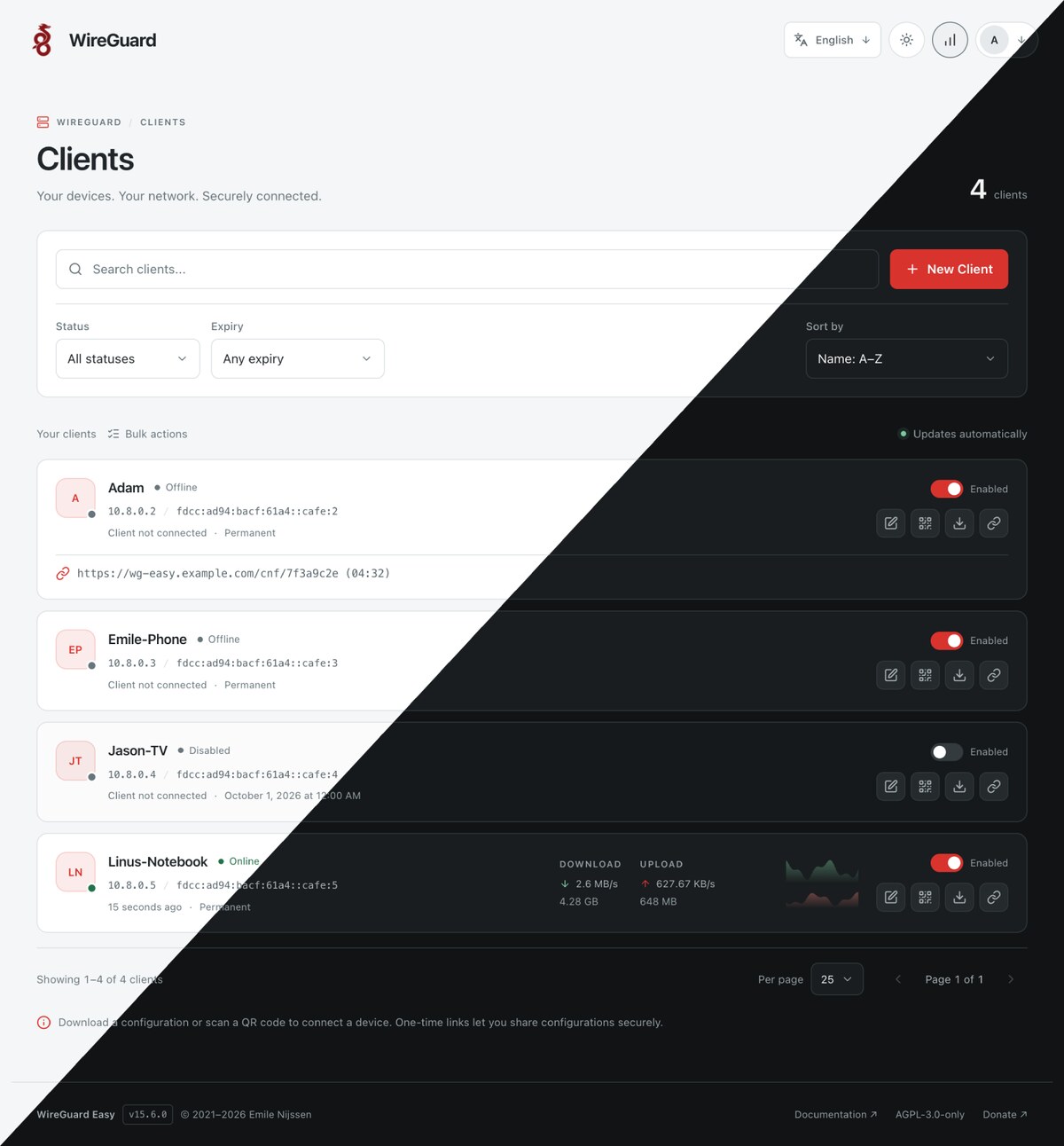
wg-easy wraps WireGuard and a small Node-based web panel into one container. You get a browser UI where you create clients, download configs, generate QR codes, and see handshake status. It is the fastest path from “nothing” to “my laptop is on the VPN”, and it is the project most homelab guides recommend for good reason.
The official compose file ships in the repository root. This is the real one, current as of image tag 15:
| |
Two ports matter: 51820/udp is the tunnel, 51821/tcp is the panel. Once the container is up, open http://<server-ip>:51821, create your first client, and scan the QR code with the WireGuard app. NET_ADMIN and SYS_MODULE are required; the read-only /lib/modules mount lets the container load the WireGuard module on hosts where it is not already loaded.
Where wg-easy stops being enough: it is a single-server model. Every client’s AllowedIPs is edited by hand if you want subnet-level routing, there is no notion of “peer groups”, and every device config is a static file you distribute out of band. At around ten devices with heterogeneous access needs, you start maintaining spreadsheets of who-can-reach-what. That is Innernet’s job.
Innernet — WireGuard as a Managed Private Network
Innernet flips the model. Instead of one server that all traffic flows through, a lightweight coordination server holds the network definition: which CIDR blocks exist, which peer owns which IPs, and which peers are allowed to talk to which blocks. Peers then connect directly over WireGuard. The server never sees your packets, which means no bandwidth bottleneck and no single point of inspection.
Setup is server-first. From the official README’s workflow:
| |
Each add-peer produces an invitation (*.toml). The client installs it and that is the entire configuration:
| |
Installation on the server and clients is either a distribution package or a Cargo build:
| |
The operational payoff is real: onboarding a new engineer means emailing a single invitation file that carries its own permissions; revoking them means sudo innernet disable-peer. No shared private keys, no “who has the old config?” audit. The cost is an extra concept (CIDR associations) and CLI-only administration — there is no dashboard, so this is a poor fit if you want to click.
NAT is handled with explicit endpoint overrides (innernet override-endpoint), which is honest but manual. If both sides are behind carrier-grade NAT, Innernet will not magically solve it — that is a limitation of direct peer-to-peer WireGuard, not a bug in the tool. If you need relayed connectivity, a zero-trust overlay is a better fit; our Headscale vs NetBird vs OpenZiti comparison covers those trade-offs.
boringproxy — The Boring Reverse Tunnel
boringproxy is not a VPN. It is a server plus client pair that publishes a local HTTP service on a public domain with automatic HTTPS — conceptually the self-hosted answer to ngrok. You run the server on a VPS with a wildcard DNS record, run the client next to the service, and click “add tunnel” in the admin UI.
The repository ships a compose file for the server side:
| |
The client connects with a token generated in the UI:
| |
After that, a tunnel entry like grafana.example.com -> localhost:3000 is a couple of form fields. ACME handles the certificate, so you never touch Certbot.
The catch is maintenance. The last commit to the repository is July 2024. It still builds and runs, but a two-year gap in a component that terminates TLS on the public internet deserves scrutiny: pin the binary, front it with a patched reverse proxy if you can, and do not put it in front of anything you would not expose on a VPS. For active alternatives in the same category, see our self-hosted tunnel comparison and the bore vs expose vs localtunnel breakdown.
The Pitfalls Nobody Documents
1. NET_ADMIN is not optional, and Podman is different. On Docker, wg-easy needs NET_ADMIN and SYS_MODULE. On rootless Podman you additionally need NET_RAW uncommented and the kernel module loaded on the host. Half the “container starts but no handshakes” reports are this.
2. MTU bites you on mobile networks. WireGuard defaults to 1420 bytes. Over PPPoE or some LTE links you need 1380 or lower, or SSH sessions hang while ping works. Set it in the client config, not the server, if only some clients are affected.
3. AllowedIPs is a routing table, not an ACL. It controls which destinations the client routes into the tunnel, and which source IPs the server accepts from a peer. If a peer can reach a subnet it should not, you edited the wrong side. Innernet makes this explicit with associations; wg-easy does not, which is the single biggest reason people leak access.
4. Do not expose the admin panel. wg-easy’s 51821/tcp should never be open to the internet. Bind it to localhost, put it behind a reverse proxy with authentication, or reach it only over the tunnel itself. The panel can hand out VPN configs — treat it like a root credential.
5. Run the coordination server somewhere boring. Innernet’s server does not carry traffic, so it does not need bandwidth — but if it dies, no new peers can be added and existing invitations cannot be reissued. Put it on a $4 VPS with backups.
6. DPI and throttling are real. WireGuard’s fixed handshake pattern is identifiable. If your ISP throttles it, wg-easy will look “broken” at exactly the same time each evening. That is a network policy problem, not a config problem, and obfuscation is a separate layer (see our WireGuard mesh guide for the topology side).
Why Self-Host Your Access Layer
Commercial VPN and tunnel services solve onboarding beautifully and fail on the thing that matters: they sit between you and your own infrastructure. Every packet to your NAS passes through a third party’s CPU, every certificate is issued under their domain policy, and every access decision is logged in a dashboard you do not control.
Self-hosting the access layer costs you one small VPS and an afternoon. In exchange, the trust boundary shrinks to “the machine you already own”, the per-seat pricing disappears permanently, and revocation is instant and verifiable. For a lab or a small engineering team, the economics are not close: wg-easy or Innernet on a $5 instance replaces a per-user subscription that costs more every time you hire.
The trade-off is operational ownership. WireGuard keys, ACME renewals, kernel modules, and firewall rules become your problems. That is the actual decision — not “which UI is prettier”.
FAQ
Is wg-easy a replacement for commercial VPN services?
Functionally yes, operationally no. wg-easy gives you a WireGuard server with a UI, which is what a commercial VPN sells — but you own the exit IP, the logs and the uptime. That is better for privacy and worse for “it must work in 40 countries”.
Can Innernet replace wg-easy entirely?
Only if every user is comfortable with a CLI and you are willing to model your network in CIDR blocks. Innernet has no web UI and no QR onboarding, so mixed-ability teams usually end up running wg-easy for phones and Innernet for engineering subnets.
Does boringproxy need a public IP?
Yes — the server side does, because it terminates TLS and holds the ACME certificate. The client side does not, which is the whole point: it dials out from behind NAT and the server forwards public requests down that connection.
Why does my WireGuard tunnel connect but nothing loads?
Almost always MTU or DNS. Drop the MTU to 1380 and check that the client’s DNS setting points at a resolver reachable through the tunnel. A tunnel that handshakes but cannot resolve names looks identical to “no VPN” from the browser.
Are these three tools safe to expose to the internet?
wg-easy’s tunnel port and boringproxy’s 80/443 are designed to be public. wg-easy’s admin panel is not — bind it privately. Innernet’s coordination server only needs its WireGuard port, never a web port. Treat every admin surface as a credential store, because that is what it is.
Which one has the best long-term maintenance outlook?
wg-easy (near-daily commits) and Innernet (active Rust project) are both healthy. boringproxy is functionally static since mid-2024 — usable, but budget time for a fork or migration if it breaks against a newer Go toolchain.
💰 想测试你的市场判断力?我用 Polymarket 做预测市场交易——这是全球最大的预测市场平台,从大选结果到技术监管时间线,什么都可以押注。和赌博不同,这是真正的信息市场:你懂的信息越多,胜率越高。我靠预测技术相关事件的走向已经赚了不少。用我的邀请链接注册:Polymarket.com