It is 3 a.m., your alert fires, and the message is nonsense: No space left on device. You run df -h and the volume is 39% used with 61 GB free. You retry the write. It fails again. Nothing in the dashboard explains it.
Nine times out of ten this is not a disk space problem at all — it is an inode exhaustion problem. Every file, directory, symlink and socket on a Linux filesystem consumes at least one inode, and on ext4 those inodes are allocated once, at mkfs time, in a fixed-size table you can never grow. A workload that creates millions of tiny files (mail queues, PHP sessions, container layers, cache shards) will run out of inodes long before it runs out of bytes.
This guide covers how the three mainstream Linux filesystems handle inodes, how to prove in 30 seconds that inodes are your problem, and the exact remediation playbook for each filesystem.
TL;DR: The 60-Second Verdict
- Seeing
ENOSPCwith free blocks? Rundf -i. IfIUse%is 100% (orIFreeis 0), you have inode exhaustion. Stop looking atdf -h. - On ext4? You cannot add inodes to a live filesystem. Delete or relocate the offending subtree, then rebuild with
mkfs.ext4 -T news(one inode per 4 KiB) when you next have a maintenance window. - On XFS? Inodes are dynamic, so real exhaustion is rare — but
imaxpct(default 25% of the data section) can cap inode space. Raise it withxfs_growfs -m 50 /mountpoint. - On Btrfs?
df -iis meaningless. You are almost certainly out of metadata space; rebalance withbtrfs balance start -m /mountpoint. - Want to find the culprit fast?
du --inodes -x -d1 /orduf— notdu -sh, which counts bytes and will point you at the wrong directory.
How Inodes Actually Work (and Why Bytes Do Not Matter)
An inode is the metadata record for one filesystem object: permissions, ownership, timestamps, size, block pointers, extended attributes. The directory entry maps a name to an inode number. Directories themselves are files containing those name→inode mappings.
The accounting consequence is what bites people:
| Resource | Consumed by | Reported by |
|---|---|---|
| Data blocks | File contents | df -h, du -sh |
| Inodes | File count (one per object) | df -i, du --inodes |
| Directory blocks | Number of entries per directory | du -sh on the directory |
A 1 KB file and a 1 GB file each consume exactly one inode. A directory with 2 million entries consumes one inode but a very large amount of directory block space — and directory lookup performance collapses along with it.
That is why a mail server storing 3 million 4 KB messages, or a Kubernetes node with 90 container layers of 200,000 files each, can die on a filesystem that is barely a third full.
Real-world numbers: a 60 GB ext4 volume created with defaults (inode_ratio = 16384, i.e. one inode per 16 KiB) gets roughly 3.9 million inodes. A busy PHP application writing one session file per request can burn through that in months.
ext4, XFS and Btrfs Compared
| Property | ext4 | XFS | Btrfs |
|---|---|---|---|
| Inode allocation | Fixed table written at mkfs | Dynamic, allocated per allocation group | No separate table; metadata only |
| Default density | 1 inode per 16 KiB of space | On demand | Effectively unlimited |
| Can you add inodes later? | No — only by growing the filesystem | Yes, automatically | N/A |
df -i usefulness | Excellent (IUse%) | Good (grows as needed) | Useless (reports 0) |
| Typical exhaustion symptom | ENOSPC with 50%+ free bytes | ENOSPC when imaxpct cap is hit | ENOSPC with free data space |
| Primary fix | Delete/relocate, then rebuild with smaller ratio | Raise imaxpct, grow the filesystem | btrfs balance start -m |
| Small-file performance | Good up to a few million files | Excellent, parallel allocation | Degrades with metadata pressure |
Step 1: Prove It Is Inodes in Under a Minute
Start with the check almost nobody runs first:
| |
Then confirm with a targeted comparison:
| |
On ext4, tune2fs -l gives you the provisioning detail, including whether the inode table can be expanded at all:
| |
Two numbers from that output determine your options: Inode count is fixed for the life of the filesystem, and Inode size (256 bytes is the default; -I 128 halves metadata overhead but loses nanosecond timestamps and extended attributes).
XFS: the confusing case
XFS allocates inodes dynamically, in chunks, so df -i usually looks healthy — until it does not. The hard cap is imaxpct: by default XFS will not let inode metadata consume more than 25% of the data section. On a filesystem holding tens of millions of tiny files, you hit that cap and get ENOSPC while df -h still shows free space.
| |
Do not raise imaxpct blindly on a nearly full filesystem: inode metadata competes with data blocks, and you can convert “out of inodes” into “genuinely out of space” within days. Raise it in steps and watch xfs_info plus df -h together.
Btrfs: where df lies twice
Btrfs has no inode table, so df -i reports zeros and tells you nothing. What actually runs out is metadata chunk space:
| |
A Btrfs filesystem with small files and many snapshots can report ENOSPC with 40 GB free because no unallocated device space remains for a new metadata chunk. btrfs filesystem usage -T shows Unallocated: — if that is near zero while Free (estimated) is not, a balance is the only fix.
Step 2: Find What Is Eating Your Inodes
du -sh will mislead you here: a directory holding 900,000 empty lock files is only a few hundred megabytes. Count files, not bytes.
| |
When du --inodes is too slow on a hot filesystem, use a scoped find with a depth limit instead of a full walk:
| |
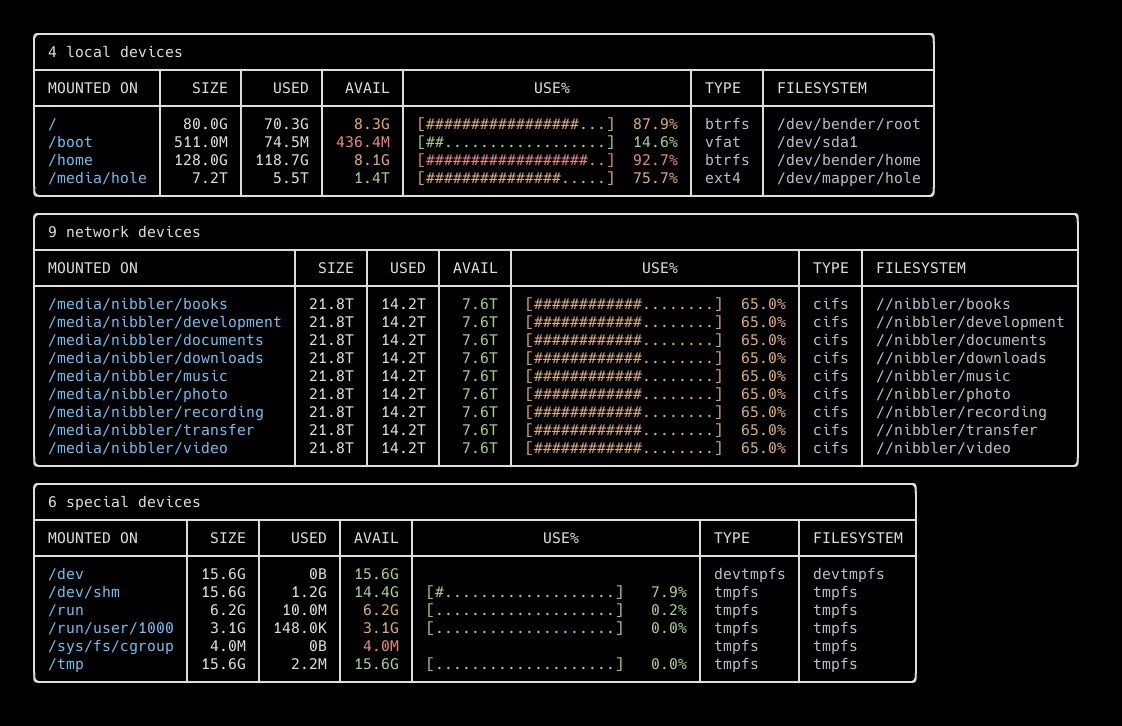
For interactive triage, duf is the tool to reach for: it prints inode usage right next to byte usage, so the mismatch is visible in one screen rather than two commands.
| |
The usual suspects, in order of frequency in production:
| Path | Typical cause | Safe cleanup |
|---|---|---|
/var/spool/postfix/* | Millions of queued/deferred messages | postsuper -d ALL deferred |
/var/lib/php/sessions | One file per request, no GC | Lower session.gc_maxlifetime, add tmpfs |
/var/lib/docker/overlay2 | Layer explosion from short-lived images | docker system prune -a, move to dedicated volume |
/var/cache/apt, /var/cache/dnf | Package cache fragments | apt clean / dnf clean all |
User caches (~/.cache) | Browser, build tool, language package caches | Per-user quotas, pip cache purge |
/tmp on ext4 | Build artifacts, temp uploads | systemd-tmpfiles --clean |
Step 3: Remediation Playbook
Case A — ext4 with a fixed, exhausted inode table
You have three options, in increasing order of effort:
Delete or relocate (minutes). Bind-mount a large subdirectory onto a different filesystem so its files stop consuming inodes on the full volume:
1 2 3 4 5 6 7 8# Move the churn-heavy subtree to a volume with headroom sudo systemctl stop php8.3-fpm sudo rsync -aHAX --info=progress2 /var/lib/php/sessions/ /srv/sessions/ sudo rm -rf /var/lib/php/sessions/* sudo mount --bind /srv/sessions /var/lib/php/sessions # Persist it echo '/srv/sessions /var/lib/php/sessions none bind 0 0' | sudo tee -a /etc/fstab sudo systemctl start php8.3-fpmMove the sessions to tmpfs (minutes). Sessions are ephemeral; RAM is the correct backing store, and tmpfs inode limits are tunable independently of any disk filesystem:
1 2 3 4 5 6# tmpfs inodes default to half of physical RAM pages; set explicitly sudo mount -o remount,nr_inodes=2000000 /dev/shm # Point PHP at it sudo sed -i 's#^session.save_path.*#session.save_path = "/dev/shm/php-sessions"#' \ /etc/php/8.3/fpm/php.ini sudo install -d -m 1733 -o www-data -g www-data /dev/shm/php-sessionsRebuild with a denser inode ratio (downtime). Only after the workload has moved, and only if you expect the file count to keep growing:
1
2
3
4
# One inode per 4 KiB instead of per 16 KiB = 4x the inode count sudo mkfs.ext4 -T news -L data /dev/vdb1 # Or be explicit: 4096 bytes per inode, 256-byte inodes sudo mkfs.ext4 -i 4096 -I 256 /dev/vdb1The trade-off is real: 4x the inodes means 4x the inode table, roughly 1 GB of metadata per 4 million inodes at 256 bytes each. On a 60 GB volume that is acceptable; on a 2 GB container volume it is not.
Case B — XFS hitting the imaxpct ceiling
| |
If raising the cap just converts the problem into byte exhaustion, the filesystem is genuinely undersized for the workload — grow the underlying volume (lvextend + xfs_growfs) rather than fighting the cap.
Case C — Btrfs metadata pressure
| |
Balances are I/O heavy. Run them with -dusage/-musage filters during off-peak hours, and never run a full unfiltered balance on a busy multi-terabyte volume.
Step 4: Monitor Inodes Before They Hit Zero
Byte-based alerting will never catch this. Add inode alerting with the metrics you probably already scrape:
| |
For hosts without a metrics stack, a five-line check in cron is enough and catches the problem weeks earlier than df -h monitoring:
| |
Run it from a systemd timer, and make the unit log to the journal so it shows up in your existing log pipeline.
Pitfalls That Waste Hours
df -handdu -shdisagree by gigabytes. Deleted-but-still-open files, filesystem-reserved blocks (ext4 defaults to 5%), and snapshots all explain the gap.sudo lsof +L1finds the open-but-deleted files holding space.- You cannot add inodes to ext4 without growing it.
resize2fsgrows the inode table proportionally when you enlarge the filesystem; there is notune2fsflag that adds inodes to a fixed-size ext4 volume. Plan the ratio atmkfstime for small-file workloads. du --inodescounts directories too. That is correct behavior — directories are real inodes — but it means a directory with a million subdirectories looks like a million “files”. Usefind -type fwhen you need the file count specifically.- Inode numbers on XFS are not stable identifiers across remounts. Do not key application state on
stat -c %ioutput. - Overlayfs layers count as real inodes. A node running 40 images with 150,000 files each needs 6 million inodes before it does any work. Size
/var/lib/docker(or containerd’s store) accordingly. df -ion Btrfs shows zero. Zero inodes reported is not zero inodes available — it means the filesystem does not expose the metric. Usebtrfs filesystem usage -T.- Freeing inodes does not free space. Deleting a million 4 KB files returns 4 GB and a million inodes; deleting a million empty files returns a million inodes and almost no space. Both matter, but the metric that fired was the inode one.
If your volume is byte-full rather than inode-full, the troubleshooting path is completely different — start with our block I/O latency tracing guide to find which process is writing, and consider disk quota management so a single tenant cannot repeat this at 3 a.m. Filesystem-level maintenance such as defragmentation on ext4, XFS and Btrfs is a separate problem with separate tools — do not defrag while hunting an inode leak.
FAQ
Why does No space left on device appear when df -h shows free space?
Because Linux filesystems track two independent resources: data blocks and inodes. df -h reports blocks only. When every inode is allocated, the kernel returns ENOSPC for any operation that needs to create a new filesystem object — even a zero-byte file — regardless of how many bytes remain. The same error also appears when XFS exhausts its inode space cap or Btrfs has no unallocated space for a new metadata chunk.
Can I add more inodes to an existing ext4 filesystem?
No, not without growing the filesystem. The inode table is written at mkfs time, sized by the bytes-per-inode ratio (-i, default 16384). tune2fs can change inode size defaults for future allocations in some cases, but it cannot expand a full inode table on a fixed-size volume. Your options are deleting files, relocating a subtree to another filesystem (including tmpfs), or rebuilding the volume with mkfs.ext4 -T news (one inode per 4 KiB).
How many inodes should I provision per gigabyte?
For ordinary server workloads, the ext4 default of one inode per 16 KiB is fine — that is about 65,000 inodes per gigabyte. If you know the workload creates many small files (mail, sessions, container layers, package caches, log shards), provision one inode per 4 KiB (-T news), which gives roughly 262,000 inodes per gigabyte. For archive or media volumes holding large files, -T largefile (one inode per 1 MiB) saves metadata overhead with no practical downside.
Is inode exhaustion a problem on XFS and Btrfs too?
On XFS, inodes are allocated dynamically, so classic exhaustion requires tens of millions of files. You can still hit the imaxpct limit (default 25% of the data section reserved for inode metadata), which produces ENOSPC with free bytes; xfs_growfs -m raises the cap online. On Btrfs there is no inode table at all — the practical failure mode is metadata chunk exhaustion, diagnosed with btrfs filesystem usage -T and fixed with a filtered balance.
How do I find which directory is consuming the most inodes?
Use sudo du --inodes -x -d1 / | sort -n | tail -15 for a top-level breakdown, then drill into the worst directory. du -sh will not help because it measures bytes, not file counts. For an interactive view, duf shows inode usage next to byte usage per mount point. On very large or hot filesystems, a depth-limited find with wc -l is often faster than a full du --inodes walk.
Does deleting files immediately free inodes?
Only if no process still holds them open. A deleted file whose file descriptor is still open keeps both its inode and its blocks allocated until the last handle closes — that is why restarting a log-heavy daemon sometimes “frees” gigabytes instantly. Check with sudo lsof +L1 and restart or signal the holding process.
💰 想测试你的市场判断力?我用 Polymarket 做预测市场交易——这是全球最大的预测市场平台,从大选结果到技术监管时间线,什么都可以押注。和赌博不同,这是真正的信息市场:你懂的信息越多,胜率越高。我靠预测技术相关事件的走向已经赚了不少。用我的邀请链接注册:Polymarket.com