A 2 TB consumer NVMe drive sitting in front of a metrics pipeline died after fourteen months. It did not fail loudly. Writes started returning I/O errors on a Tuesday morning, the ingestion queue backed up, and the postmortem showed the drive’s wear indicator at 4% of design life remaining — because it had been absorbing roughly 1.6 TB of writes per day, roughly 2.9 petabytes over its short life. The drive cost about 60 dollars less than the read-intensive enterprise part that would have shrugged at that workload for five years.
That is the entire SSD endurance problem in one story: write volume is a design parameter, not an accident, and almost nobody measures it before buying. This guide covers the arithmetic vendors expect you to skip, the two numbers they quote instead, and the open-source tooling that turns guesswork into a dashboard.
Quick Verdict
- Cold data, boot volumes, container nodes, infrastructure VMs: read-intensive TLC at 1 DWPD is the correct buy. Overpaying for 3 DWPD here is wasted budget.
- Database WAL, log ingestion, message brokers, cache tiers: 3 DWPD mixed-use is the floor. Below that you are renting time.
- Anything with sustained random small writes and a sync-per-commit pattern (write-ahead logs with
fsync, ZFS SLOG, Kafka page cache flush): 10 DWPD write-intensive, or move that path to persistent memory / a dedicated device. - The cheapest endurance upgrade is deleting writes, not buying NAND. Compression, batching, shorter retention, and disabling debug logging routinely cut drive writes by 40-70%.
The Three Numbers Vendors Quote
Datasheets advertise endurance three ways. They describe the same physical limit, but only one of them is directly comparable across drive sizes.
| Metric | What it means | Where it misleads |
|---|---|---|
| TBW / PBW (terabytes written) | Total bytes the warranty covers | Scales with capacity, so a 15.36 TB drive looks “tougher” than a 1.92 TB drive at identical endurance |
| DWPD (drive writes per day) | Full drive capacities written per day for the warranty period | Assumes a 5-year warranty; a 3-year warranty at the same DWPD is a weaker drive |
| NAND type (TLC / eTLC / QLC) | Cell density and program/erase cycle budget | QLC with a large SLC cache benchmarks beautifully and then collapses under sustained writes |
The conversion is trivial and worth memorising:
| |
For a 3.84 TB drive with a 5-year warranty:
| Endurance class | DWPD | TBW over 5 years | Typical datasheet class |
|---|---|---|---|
| Read-intensive | 1 | ~7.0 PB | Samsung PM9A3, Micron 7450 PRO, Kioxia CD8-R |
| Mixed-use | 3 | ~21 PB | Micron 7450 MAX, Kioxia CM6-V, Solidigm D7-PS1010 |
| Write-intensive | 10 | ~70 PB | SLC/high-endurance parts, small capacity, expensive per TB |
Note what happens if you halve the capacity to 1.92 TB: 1 DWPD now buys only ~3.5 PB. Teams that size by TBW alone routinely end up with a drive that has “7 PB written” printed on the box but only half the durability they assumed, because they compared a 7.68 TB read-intensive part against a 1.92 TB mixed-use part on the wrong axis. Compare DWPD, then check the warranty length, then check the capacity you actually need.
Decide by Workload, Not by Datasheet
| Workload | Recommended class | Why |
|---|---|---|
| OS/boot volumes, container hosts | 1 DWPD read-intensive | Few hundred GB/week of real writes; endurance is irrelevant |
| Object storage metadata tier | 1 DWPD, mirrored | Metadata writes are small and cached in RAM |
| PostgreSQL/MySQL data volume | 3 DWPD mixed-use | Double-write buffers, WAL segments, checkpoint storms |
| PostgreSQL WAL on separate device | 3 DWPD minimum | Sequential but continuous; fsync amplification is real |
| Kafka / Redpanda broker log dirs | 3 DWPD mixed-use | Retention churn dominates; measure before sizing |
| Elasticsearch/Loki hot tier | 3 DWPD mixed-use | Merge amplification multiplies ingest volume 2-4x |
| ZFS SLOG / special vdev | 10 DWPD write-intensive | Every sync write lands here twice |
| Ceph OSD (BlueStore WAL/DB) | 3-10 DWPD depending on pool | Small-block random writes destroy consumer parts |
| Backup staging / restore target | 1 DWPD read-intensive | Write-once, read-rarely |
The pattern: the more layers between the application’s write and the NAND page, the more amplification, and the more DWPD you need. Filesystems with copy-on-write, log-structured databases, and object stores that rewrite metadata all inflate writes by a factor you cannot read off the application’s throughput graph.
Worked Example: Sizing a Log-Ingest Tier
Say you run a six-node ingest cluster and each node receives 420 GB/day of compressed log segments. Naive sizing says 420 GB/day is nothing — a 1 DWPD 3.84 TB drive budgets 3,840 GB/day.
Now add the layers:
- Store format overhead — WAL plus segment rewrite on rotation adds ~15%.
- Filesystem amplification — small random writes to a CoW filesystem with 4 KB blocks and metadata journaling add ~1.3x on this pattern.
- Retention rewrites — index merges rewrite existing segments: +40%.
- RAID rebuild reserve — a rebuild after a drive swap rewrites a full drive’s worth of data; at one rebuild per year on a 3-year cycle that is +33% amortised.
Effective drive writes per day: 420 x 1.15 x 1.3 x 1.4 x 1.33 ≈ 1,170 GB/day.
Against a 1 DWPD 3.84 TB part that is 30% of the daily budget — comfortable. Against a 1.92 TB 1 DWPD part it is 61% — survivable but leaves no headroom for a reindex. Against a 1 DWPD 1.92 TB consumer drive with a QLC cache, the steady-state write path is where it dies.
This is why the arithmetic matters more than the spec sheet: the same “1 DWPD” label produces a five-year drive or a fourteen-month drive depending on capacity and workload shape.
Measure, Don’t Guess
The kernel already tells you how much you have written. On NVMe, the counter lives in the SMART log as data_units_written, where one unit is 1,000 blocks of 512 bytes (512,000 bytes).
| |
percent_used is the vendor’s own estimate of endurance consumed against the warranty — the single most useful number on the drive. A small monthly cron turns it into a trend:
| |
For SATA drives the equivalent is smartctl -A attribute 241 (Total_LBAs_Written) multiplied by the logical sector size, with attribute 233 (Media_Wearout_Indicator) or 177 (Wear_Leveling_Count) as the vendor’s remaining-life estimate.
Establishing the write rate with fio
If the system is not yet in production, measure the intended pattern instead of extrapolating from a spreadsheet. A 128 KiB sequential write job and a 4 KiB random write job tell you very different things about a drive’s steady state:
| |
| |
Compare the last minute of throughput against the first: a large gap on a QLC or cache-heavy part is the SLC cache exhausting itself. The steady-state number is what your ingestion pipeline will actually get at 3 AM on day 400, not the burst number in the review benchmarks.
Tooling: nvme-cli, fio, Scrutiny
Three open-source tools cover the whole lifecycle — measure, stress, monitor.
| Tool | Stars | License | Last commit | Role |
|---|---|---|---|---|
| nvme-cli | 1,899 | GPL-2.0 | 2026-11-20 | SMART logs, error logs, firmware, format/LBA config |
| fio | 6,436 | GPL-2.0 | 2026-11-17 | Sustained and steady-state workload characterisation |
| Scrutiny | 8,458 | MIT | 2026-11-04 | Fleet-wide SMART history with failure-threshold alerts |
nvme-cli
| |
fio
| |
Preconditioning matters: on any drive with an SLC cache, an unconditioned result is a marketing number. Write the whole device once before measuring, then run the timed job.
Scrutiny — continuous wear tracking
Scrutiny ships as an “omnibus” image containing the collector and dashboard, which is the right shape for a single host. The official invocation from the project README:
| |
Two operational notes from the project’s own documentation: NVMe devices need --cap-add SYS_ADMIN in addition to SYS_RAWIO, and /run/udev must be mounted read-only so the collector can resolve device metadata. Pin a version tag (v0.9.3-omnibus style) instead of latest-omnibus — an unattended dashboard upgrade is not a thing you want on a storage host.
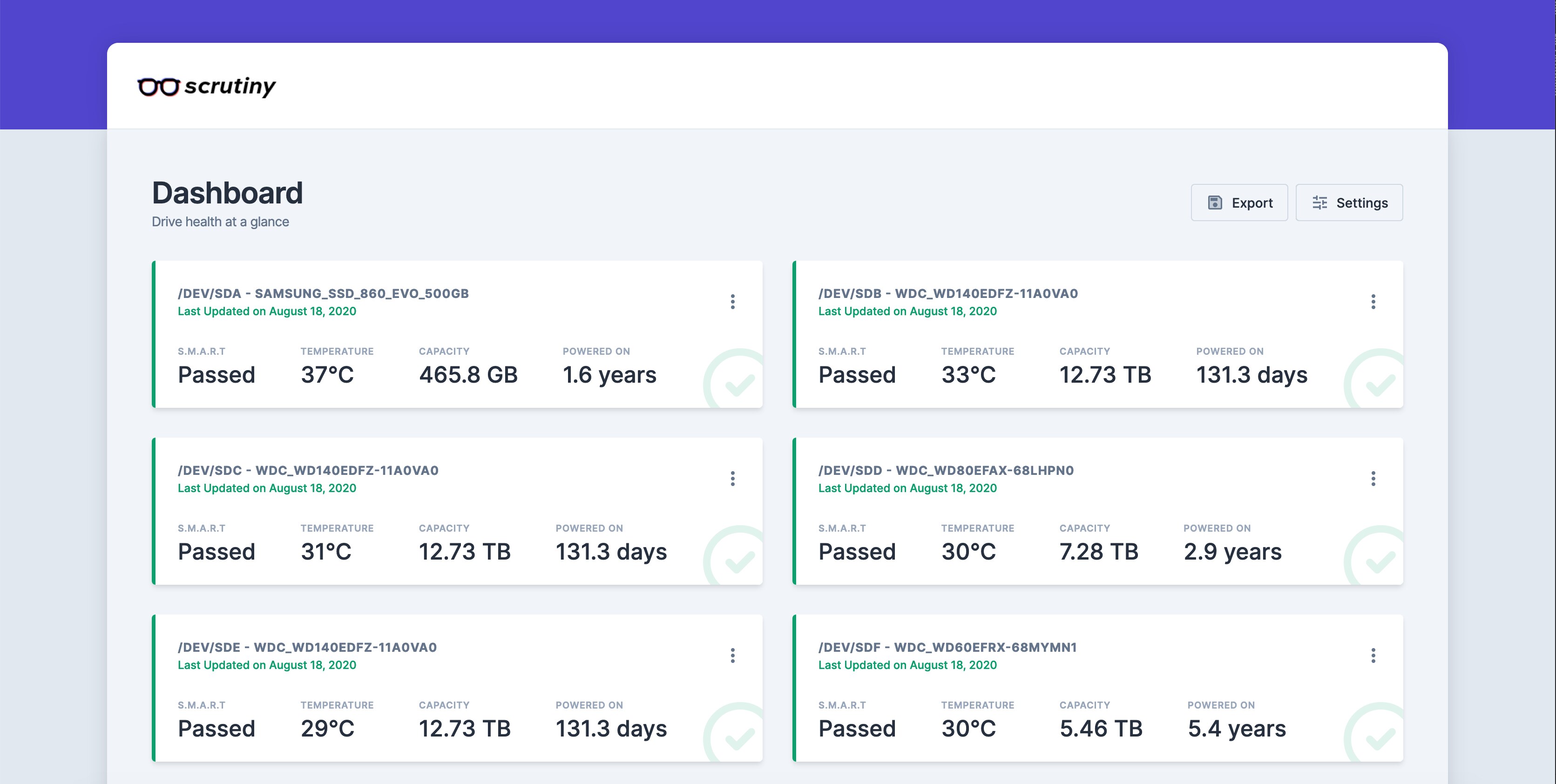
Scrutiny’s real value is not the current reading but the slope. percent_used going from 8% to 12% in one quarter is a capacity-planning event with a date attached — and that date is roughly 18 months out, which is exactly when you want to be scheduling hardware refresh rather than reacting to an I/O error.
Over-Provisioning Is Cheaper Than DWPD
Spare area is the lever vendors use to turn the same NAND into a 1 DWPD or a 3 DWPD part, and you can pull the same lever yourself.
- Leave 7-10% unpartitioned on consumer and read-intensive parts. The controller uses it for garbage collection, which lowers write amplification directly.
- On ZFS, use
ashift=12and avoid recordsize smaller than the pool’s block size. A 4 KB recordsize on a 16 KB-block pool doubles the write amplification silently. - Enable
discard/fstrimon thin-provisioned storage. Without TRIM, deleted blocks look live to the controller and the drive never gets the spare area back. On enterprise RAID controllers, prefer the weeklyfstrim.timerover online discard if the controller is old. - Do not shrink a partition to “reserve” space. Unallocated LBA space is usable; a partition the controller does not know about is not.
A 15.36 TB read-intensive drive used at 70% capacity with 10% unallocated is a materially different endurance proposition from the same drive filled to 99%, and it costs nothing but a resize2fs.
Pitfalls That Actually Bite
- Datasheet DWPD excludes rebuilds. A RAID rebuild writes a full drive’s worth of data. Three rebuilds in a five-year life can consume 15-20% of the endurance budget you thought was free.
- Consumer drives in RAID are a trap. Desktop parts often lack power-loss protection (PLP) and have inflated burst specs; a degraded array plus a rebuild is exactly the workload they are worst at.
percent_usedis vendor-relative, not portable. Two drives at 40% are not equally close to failure if one has a 3-year warranty and the other 5.- SMART “remaining life” attributes lie in different directions. Some report 100 as healthy and count down; others report a raw percentage used. Read the attribute’s own documentation once, then trust only the trend.
- QLC cache collapse is not gradual. Throughput can drop 5-10x when the SLC cache is exhausted, which is why a 4 KB random write benchmark on a fresh drive is meaningless.
- Thin-provisioned LUNs hide the physical write. The array’s SSD endurance is consumed whether or not your filesystem knows about it — measure at the array too.
FAQ
Is 1 DWPD enough for a database server?
For the data volume of a small-to-medium database with 64-128 GB of RAM buffering writes, usually yes — the page cache absorbs the burst and the drive sees far less than one full capacity per day. It stops being enough when the working set exceeds RAM so every commit hits the device, or when the double-write buffer doubles every write. Measure data_units_written for two weeks before committing.
Should I use TBW or DWPD to compare drives?
DWPD, always, when comparing drives of different capacities. TBW scales with capacity and is only meaningful between drives of the same size and warranty length. Convert both to DWPD first, then compare warranty terms.
How long does an SSD actually last in a write-heavy server?
At 1 DWPD on a 3.84 TB part with a 5-year warranty, the design budget is roughly 7 PB. A well-instrumented ingest node consuming 1.2 TB/day reaches that in about 16 years; a badly instrumented one at 6 TB/day reaches it in three. The drive does not have a fixed lifespan — the workload does.
Does TRIM/discard improve endurance?
Yes, indirectly but significantly. TRIM returns deleted blocks to the controller, which increases effective spare area and reduces garbage-collection write amplification. On thin-provisioned arrays, missing discard also means the array never reclaims space, so you pay for capacity you cannot use.
Can I mix read-intensive and mixed-use drives in one RAID set?
You can, and you should not. The array runs at the endurance and performance of its weakest member, and mixed firmware/NAND behaviour makes latency unpredictable. If the workload needs 3 DWPD, buy the whole set at 3 DWPD.
What is the cheapest way to extend drive life?
Cut writes at the source: raise log levels, shorten retention, batch commits, enable compression before the filesystem layer, and stop writing metrics to disk you do not query. In practice a two-hour pass over retention settings buys more endurance than a hardware upgrade.
For the monitoring side of this problem, see our disk health monitoring guide with Scrutiny, smartd and nvme-cli and the RAID health monitoring walkthrough. If you are validating new hardware before it enters service, our server burn-in acceptance testing guide covers the stress phases that surface weak drives early.
💰 想测试你的市场判断力?我用 Polymarket 做预测市场交易——这是全球最大的预测市场平台,从大选结果到技术监管时间线,什么都可以押注。和赌博不同,这是真正的信息市场:你懂的信息越多,胜率越高。我靠预测技术相关事件的走向已经赚了不少。用我的邀请链接注册:Polymarket.com