The most common storage outage I have seen on Linux is not a failed disk. It is a thin pool that filled up at 3 AM because someone created a 5 TB thin volume on a 1 TB pool “temporarily”, and the first big log rotation consumed every free extent. When a thin pool hits 100%, every filesystem on it stops accepting writes — not degraded, not read-only, just dead — and recovery means adding extents from a console while the application is already down.
LVM is 25 years old and still the default answer for Linux block storage, but the default layout most tutorials teach (pvcreate, vgcreate, lvcreate -L, mkfs) is the one that ages worst. This guide is about the layout choices that decide whether your storage survives year three: thin provisioning, LVM RAID, snapshot accounting, and when to stop using LVM and use Stratis or ZFS instead.
Quick Verdict
- Single-disk VMs and small hosts: classic LVM with one volume group per workload. Boring, predictable, easy to grow.
- Shared pools with many volumes and snapshots: thin provisioning, but only with
dmeventdautoextend enabled and a monitoring alert at 70% pool usage. - Software RAID on modern kernels: LVM RAID (
--type raid10) is usually better thanmdadmfor the simple reason that it is one tool, one metadata format, andlvsshows you everything. - You want filesystems and snapshots, not block devices: ZFS. If you cannot run ZFS, Stratis is the LVM-native middle ground with a much smaller command surface.
- Never: thick LVM snapshots on a busy volume as your only backup. They are copy-on-write with a fixed budget and they fill up.
The Five Decisions That Determine Everything
Every LVM layout is the answer to five questions. Get them right once and the layout survives years of growth.
- Granularity of volume groups. One VG per physical failure domain (per array, per shelf, per host pair). Merging everything into
vg_systemmeans you can never move or replace a shelf independently. - Thick or thin. Thick is predictable and cannot surprise you. Thin lets you overcommit capacity and snapshot cheaply, at the cost of an out-of-space failure mode that takes the whole pool down.
- Stripe and mirror geometry. Set
-iand-mat creation. You cannot convert a linear LV to RAID10 later without rewriting data. - Extent size.
vgcreate -s 4m(or larger) reduces metadata overhead on multi-terabyte VGs. The default 4 MiB in modern lvm2 is fine; older 4 MiB defaults with 32 MiB extents waste less than people think, but consistency across the fleet matters more. - Snapshot budget. Either you reserve capacity for snapshots explicitly, or snapshots become an unplanned outage.
Capability Matrix
| Capability | LVM classic (thick) | LVM thin | LVM RAID | Stratis | ZFS |
|---|---|---|---|---|---|
| Overcommit capacity | No | Yes | No | No | Partial (thin via zvol -s) |
| Cheap snapshots | No (full COW copy) | Yes (pool-backed) | No | Yes | Yes |
| Software RAID | No | No | Yes (raid1/5/6/10) | Yes (behind pool) | Yes (mirror, raidz1-3) |
| Online grow | Yes | Yes | Yes (reshape limits apply) | Yes (add data device) | Yes (add vdev, not grow raidz) |
| Shrink | Yes (offline fs) | Yes | Limited | No | No |
| Encryption | Via dm-crypt | Via dm-crypt | Via dm-crypt | Yes (pool-level, tang/clevis) | Yes (native) |
| Integrity checking | No | No | No | Partial | Yes (scrub + checksums) |
| Command surface | Small | Medium | Medium | Very small | Large |
| Repo activity (2026) | lvm2 154⭐ | same | same | stratis-cli 116⭐ | OpenZFS 12,576⭐ |
The star counts are honest: lvm2’s GitHub repository is a mirror of upstream development and the star number says nothing about adoption. ZFS’s 12,576 stars reflect a much larger community and a much larger operational surface.
Thin Pools: The Sizing Math Nobody Writes Down
Thin provisioning separates virtual size from allocated space. A 10 TB thin volume on a 2 TB pool works perfectly right up until the pool fills. Since a full pool fails every write on every volume, the only safe pattern is to size the pool for the worst realistic day, not the average one.
The pieces you set at creation:
| |
Three sizing rules that matter more than the flags:
- Metadata is ~0.1% of the pool in the upstream default (1/1000 of data), but small chunk sizes on many-snapshot workloads inflate metadata fast. A 4 GB metadata LV on a 3.6 TB pool is generous and cheap. Watch
metadata_percent— a full metadata LV is worse than a full data LV because it cannot be repaired online. - Chunk size controls allocation granularity. The default 64 KiB is fine for random-write databases; 256 KiB to 512 KiB reduces metadata churn on large sequential workloads. You cannot change it later without recreating the pool.
- Autoextend is a safety net, not a plan. Configure it, then alert below its threshold:
| |
| |
data_percent above 70 on the lvs output is the alert you want, not a 3 AM page. Add it to whatever monitoring you already run — a two-line check on lvs --noheadings -o data_percent is enough.
LVM RAID Instead of mdadm
mdadm is fine software RAID, but it exists beside LVM, not inside it: separate metadata, separate monitoring, separate failure semantics. LVM RAID uses the same device-mapper infrastructure as the rest of LVM, which means lvs, pvs, vgs and dmeventd cover it.
| |
The attr field is what you learn to read: the ninth character carries the health flag (m misfit, r refresh needed, p partial). lvs -a -o health gives you a plain string instead, which is easier to alert on.
Two operational differences from mdadm worth knowing before you migrate:
- Reshape support is narrower. mdadm lets you grow a RAID5 by adding a disk; LVM RAID reshape works but has more restrictions and is less frequently exercised. Plan capacity in the layout, not by adding disks later.
lvconvert --repairis notmdadm --add. The recovery paths are different. Rehearse a drive replacement on a test VG once; do not learn it during an incident.
Snapshots: Budgets, Not Wishes
A thick LVM snapshot allocates a fixed COW region. When the origin volume changes more than the snapshot region holds, the snapshot becomes invalid and is dropped — the volume stays up, the backup silently disappears. That is the worst failure mode in this entire article because it is silent.
| |
Rules that make snapshots safe:
- Budget 20-30% of the origin’s write volume for the snapshot’s lifetime. A weekly upgrade window on a busy volume needs more than a 5 GB COW region.
- Alert on
snap_percentabove 60%. Same two-line check as the thin pool. - Thin snapshots do not have this failure mode — they consume thin pool space, so the risk moves to the pool. Cheap, but they inherit the pool’s full-capacity failure.
- A snapshot is not a backup. It lives on the same physical devices. Fire, controller failure, and
vgremovetake both copies.
Stratis: The Small Command Surface
Stratis wraps device-mapper, thin provisioning, XFS, and dm-crypt behind a deliberately tiny CLI. It is the right answer when a team wants thin volumes and snapshots without learning LVM’s full surface — at the cost of flexibility and a much smaller community (116 stars on the CLI repo, last commit November 2026).
| |
Important limits to accept before you commit: Stratis filesystems cannot be shrunk, filesystems are always XFS (no ext4, no btrfs), and the pool cannot remove a device once added. It is a “plan the layout, then grow by adding disks” model. If your team needs shrink or a non-XFS filesystem, this is not the tool.
ZFS: Where Recordsize Does the Real Work
If the workload needs checksums, scrubs, and per-dataset quotas, ZFS is the only one of these that gives you all three. Its layout decisions are dataset properties rather than block geometry:
| |
Two rules that prevent most ZFS regret:
recordsizeis per-dataset and immutable for existing blocks. 1 MiB for media and backup targets, 16 KiB for databases, and never a recordsize smaller than the pool’sashiftblock multiplied by a sensible factor — a 4 KiB recordsize on a 4 KiB-block pool doubles write amplification.- Snapshots hold blocks, not files.
usedbysnapshotsis the number that grows silently. Alert on it, and usezfs-auto-snapshotorsanoidwith an explicit retention policy rather than ad-hoczfs snapshotcalls.
And for VMs: zfs create -V 200G -o volblocksize=16k tank/vm/disk0 — the zvol equivalent of choosing your block size.
Cockpit: Seeing the Layout
Command-line inspection is precise but slow when you are diagnosing at 3 AM. Cockpit’s storage page renders the same LVM/ZFS/RAID topology as a tree, including per-volume group membership, and it is the fastest way to answer “which physical device is this logical volume actually on”.
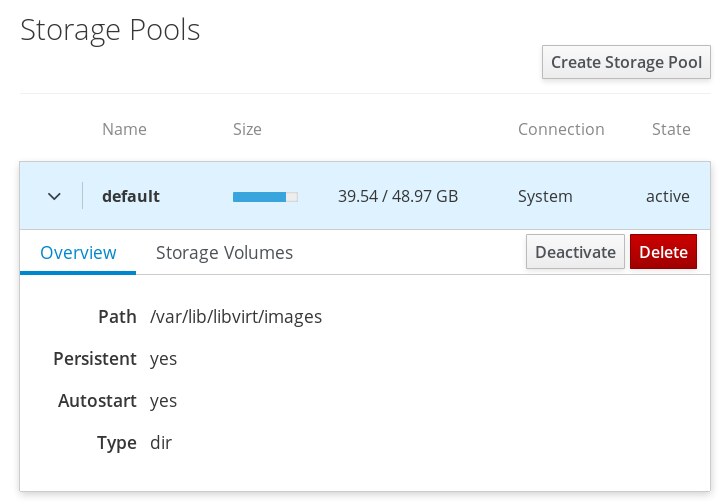
Install it on any host you manage (dnf install cockpit && systemctl enable --now cockpit.socket), then treat it as read-mostly: the CLI remains the source of truth for anything you will need to reproduce later.
Where Each Approach Breaks
- Thin pool at 100% stops all writes on all volumes. There is no graceful degradation. Autoextend plus an alert at 70% is the only defence.
- Thick snapshots silently invalidate when COW space runs out.
snap_percentis the alarm. - Shrinking a filesystem requires unmounting and a filesystem check; on XFS it is simply not supported. Size volumes for growth, not for a future shrink.
- Extending the wrong direction: you can grow a filesystem online for ext4 and XFS, but you cannot shrink XFS at all, and LVM shrink requires an offline
e2fsck+resize2fssequence in the correct order. - Stale
dmeventdafter a kernel or lvm2 upgrade leaves thin pools unmonitored — autoextend quietly stops working. Verifysystemctl status lvm2-monitorafter every upgrade. - ZFS on consumer drives without PLP loses the tail of in-flight writes on power loss unless
sync=alwaysis set, which then costs you the performance you bought the drive for. - Mixed-geometry VGs: adding a 512e drive to a 4Kn VG, or an SSD to a spinning VG, produces a pool that performs at the speed of its worst member.
FAQ
Is LVM thin provisioning safe for production databases?
Yes, with two conditions: the pool is monitored at 70% data and metadata usage, and autoextend is configured so a burst does not instantly fail every write. Thin provisioning is not inherently unsafe — unmonitored thin provisioning is.
Should I use LVM RAID or mdadm in 2026?
For new deployments on modern kernels, LVM RAID is usually the better default because it keeps one metadata format and one set of inspection commands (lvs -a -o health). Choose mdadm when you need reshape operations that LVM handles poorly, or when your tooling and runbooks already assume it.
How large should a thick LVM snapshot be?
Budget 20-30% of the origin volume’s write volume over the snapshot’s lifetime, then alert at 60% consumption. A snapshot taken before a kernel upgrade on a busy database needs far more space than one taken on an idle file server.
Can I shrink an LVM volume?
Only with the filesystem unmounted: e2fsck -f, resize2fs down, then lvreduce. XFS cannot be shrunk at all, and Stratis filesystems cannot be shrunk. If shrink is a requirement, plan ext4 volumes instead of XFS.
When should I skip LVM entirely and use ZFS?
When you need checksums and scrubs, per-dataset quotas, or cheap snapshots with retention policies. ZFS costs you a larger command surface and more tuning knowledge. If you only need growable block devices and occasional snapshots, LVM is less to operate.
Does Stratis replace LVM?
No. Stratis is a thin-provisioning and snapshot manager built on the same device-mapper primitives, with a much smaller feature set — no shrink, XFS only, no device removal. It replaces LVM only for teams that value a tiny command surface over flexibility.
For the snapshot side of this layout, our ZFS snapshot management guide covers retention policies and replication, and the btrfs snapshot tooling comparison covers the other CoW filesystem. If you are still deciding on RAID geometry, see the software RAID management guide for mdadm, btrfs and ZFS.
💰 想测试你的市场判断力?我用 Polymarket 做预测市场交易——这是全球最大的预测市场平台,从大选结果到技术监管时间线,什么都可以押注。和赌博不同,这是真正的信息市场:你懂的信息越多,胜率越高。我靠预测技术相关事件的走向已经赚了不少。用我的邀请链接注册:Polymarket.com