Every documentation stack looks fine at ten pages. The breakage starts around the point where you have four product versions, three repositories, two review workflows, and a PDF deliverable that a customer contract requires. That is where Markdown-plus-a-static-generator stops being a convenience and starts being a set of workarounds, and where the AsciiDoc family earns its keep.
This is a practical comparison of the three serious options in that family: Asciidoctor (the converter), Antora (the multi-repo documentation site generator built on top of it), and DocBook (the XML vocabulary with XSL stylesheets that predates all of them and still produces the best print output).
TL;DR: the 30-second verdict
- Single repo, need HTML + PDF + slides from the same source? Use Asciidoctor directly. It is a converter, not a site generator, and that is exactly why it is fast and predictable.
- Docs spread across many repositories, with per-product versioning and a docs team that owns the site? Use Antora. It aggregates components at build time and gives you versioned URLs for free.
- You must produce print-quality PDFs, EPUB, man pages, and HTML from one canonical source, and the content is long-lived? Use DocBook XSL. Nothing else in this list handles print semantics as rigorously.
- You are on Markdown and happy? Stay there. Do not migrate for aesthetics; migrate when versioned multi-repo aggregation or print output becomes a hard requirement.
Side-by-side comparison
| Dimension | Asciidoctor | Antora | DocBook XSL |
|---|---|---|---|
| What it is | converter (AsciiDoc → HTML5, DocBook, PDF, man) | site generator + content aggregator | XML vocabulary + XSLT stylesheet suite |
| GitHub stars | 5,226 (asciidoctor/asciidoctor) | hosted on GitLab (gitlab.com/antora/antora) | stylesheets packaged by every distro (docbook-xsl) |
| Last upstream activity | 2026-11-16 | active, GitLab pipelines | stable, rarely needs changes |
| Current line | 2.0.22 | 3.x | 1.79.x |
| Language / runtime | Ruby (JRuby, JS ports exist) | Node.js | XSLT 1.0 processor (xsltproc, Saxon) |
| License | MIT | MPL-2.0 | MIT-style |
| Input format | AsciiDoc | AsciiDoc | DocBook XML |
| Versioned docs | manual | built in (/component/2.0/page/) | manual |
| Multi-repo aggregation | no | yes (content.sources) | no |
| PDF output | asciidoctor-pdf (commercial-grade) | via Asciidoctor PDF, wired by CI | best in class (FOP, dblatex) |
| Learning curve | low | medium (playbook + component descriptors) | high (XML schema, XSL params) |
| Best fit | single-repo docs, books, reports | product docs across repos | standards, print, long-lived archives |
The numbers tell a simple story: Asciidoctor is the healthiest project of the three by a wide margin, DocBook XSL is stable-to-the-point-of-frozen, and Antora’s value is architectural rather than measurable in stars.
Scenario decision matrix
| Your situation | Pick | Why |
|---|---|---|
| One repo, you need HTML and a PDF manual | Asciidoctor | One tool, two backends, zero site architecture |
| 5 product repos, each with 3 supported versions | Antora | Versioned URLs and cross-component xrefs without custom scripting |
| API reference generated from source plus hand-written guides | Antora | Components can mix generated and authored pages |
| You publish a printed book or a regulated standard | DocBook XSL | FOP/dblatex print semantics, index generation, proper footnotes |
| You need EPUB and man pages from one source | DocBook XSL | Native stylesheets for both |
| You want diagrams and math in the same document | Asciidoctor | asciidoctor-diagram, STEM blocks, extensions |
| Your team refuses to learn a new syntax | none of these | keep Markdown, revisit when versioning hurts |
Asciidoctor: the converter that does the actual work
Asciidoctor is the engine. Everything else in this article either calls it or predates it. It reads AsciiDoc and emits HTML5, DocBook XML, PDF, man pages, and reveal.js slides, and it does so as a library or a CLI with no server, no daemon, and no plugin registry required.
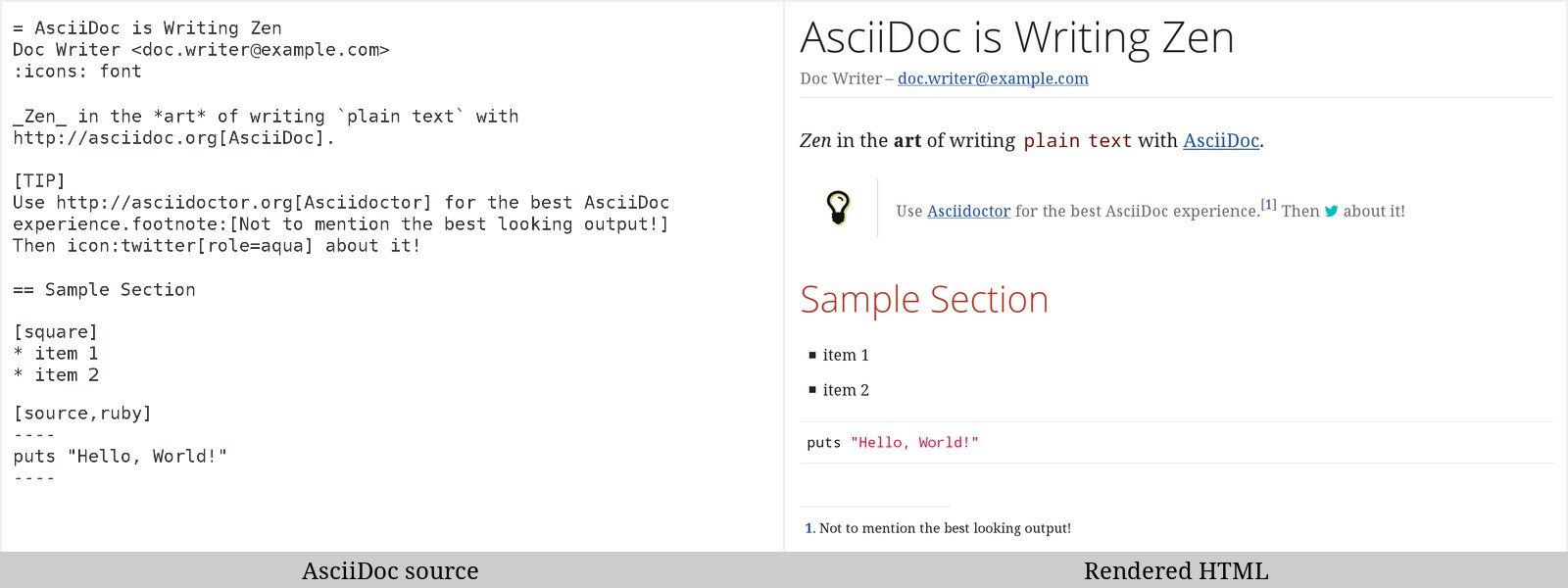
A document that exercises the features you actually need in a manual:
| |
Build it three ways from the same source:
| |
The dependencies are a Gemfile, and for reproducible CI you should pin them:
| |
| |
Where Asciidoctor pulls decisively ahead of every Markdown-based generator is structured authoring: include:: with tag filtering, cross-references that fail loudly when the target is missing, tables with column specs and cell spanning, admonition blocks, footnotes, index terms, and a real extension API in Ruby if you need to generate content at build time.
The official container keeps CI simple:
| |
The honest limitation: Asciidoctor has no concept of a site. No navigation tree, no versioned URLs, no search index, no multi-repo content model. If you need those, you add Antora — which is exactly what Antora is.
Antora: aggregation and versioning, solved
Antora assumes a specific, opinionated content model: a playbook describes the site and where content comes from; each content repository carries a component descriptor (antora.yml) that declares a name, a version, and a navigation file. At build time Antora clones the sources, resolves cross-references across components, and writes a static site.
A real playbook, using the same keys the project’s own demo site uses:
| |
Each content repository needs one descriptor at the content root:
| |
Build with Node installed, or with the official image:
| |
The payoff is versioning without effort. Content on branch v2.0 becomes /server/2.0/..., branch main becomes /server/latest/..., and a cross-reference like xref:cli::commands.adoc[] resolves across repositories at build time. If a target disappears, the build fails instead of shipping a dead link — the single most valuable property a docs pipeline can have.
Antora also does not care that the content is AsciiDoc files in git: source branches can be generated by CI (OpenAPI to AsciiDoc, database schema dumps, release notes), so hand-written guides and machine-generated reference live in the same navigation tree.
Costs are real: you now own a UI bundle (Antora’s default UI is a separate repository you build with Node), a playbook per environment, and a CI job that clones multiple repositories. That is a bigger operational surface than asciidoctor -b html5.
DocBook: still the only serious print pipeline
DocBook is an XML vocabulary, and the docbook-xsl stylesheets turn DocBook documents into HTML, XSL-FO (for print PDF via Apache FOP), man pages, and EPUB. It is old, verbose, and unfashionable — and it remains the only option here that treats print as a first-class target rather than an export.
| |
Validate, then transform:
| |
On Debian/Ubuntu the stylesheets come from docbook-xsl and docbook-xsl-ns, with fop and libsaxonhe-java for the FO step. Saxon is worth the extra dependency when documents get large: xsltproc is fast but Saxon-HE handles the deep recursion and extension functions that big books trigger.
What DocBook buys you: index generation, real footnotes with numbering rules, table continuation across pages, running headers, callouts, and a level of typographic control that Asciidoctor PDF approximates but does not match. Regulated industries still require this, which is why the vocabulary refuses to die.
What it costs: XML authoring is verbose, the schema is unforgiving, and the XSL parameter surface (--stringparam options) is enormous. Most teams wrap it in a Makefile and never touch it again:
| |
Migration pitfalls worth knowing before you commit
AsciiDoc is not Markdown with extra syntax. A line break requires a trailing +, lists need blank lines before and after, and an unterminated ---- block swallows the rest of the file. Converters that claim one-to-one conversion produce documents that build and read wrong.
Antora’s branch model is the product. If your content lives on a single branch and always will, Antora adds a UI bundle and a multi-repo build for no benefit. The versioned-URL payoff only exists when you actually maintain parallel branches.
Antora xrefs fail at build time by design. A missing xref: target breaks CI. This is a feature, but it means a documentation-only change in one repository can block a release pipeline in another. Plan permissions accordingly.
DocBook’s XSLT 1.0 toolchain needs a processor decision up front. If you build with xsltproc and later need an extension function that only Saxon provides, you will rewrite parts of your pipeline. Decide before you write the first Makefile.
PDF theming is the hidden cost in both stacks. Asciidoctor PDF themes are YAML (approachable), DocBook FO customization is XSLT parameter overrides (powerful, opaque). Budget real time for either.
Do not mix generators on the same content root. Antora copies and processes content itself; running asciidoctor over the same tree to produce a “quick PDF” leads to duplicate output directories and stale artifacts in CI caches.
If you are still deciding at the site-generator level, our Markdown documentation generator comparison covers MkDocs, Docusaurus and VitePress, and the Markdown parser internals comparison explains what those generators do under the hood. Teams that also generate contracts or reports from templates should see the document automation comparison.
FAQ
Is Asciidoctor better than Markdown for documentation?
For single-page or small-repo docs, Markdown is fine and has better tooling ubiquity. Asciidoctor wins when documents grow structure: includes with tag filtering, cross-references that validate, tables with column specs, footnotes, index terms, and multiple output formats (HTML, PDF, DocBook, man) from one source. The migration cost is real, so make the move when a specific requirement forces it.
Do I need Antora if I already use Asciidoctor?
No. Antora is a site generator that uses Asciidoctor internally. You need Antora when documentation spans multiple repositories, when you must publish several versions side by side, or when you want cross-repository cross-references validated at build time. For a single repository with one version, plain Asciidoctor produces the same HTML with far less machinery.
Can Antora build PDFs?
Not directly. Antora produces a static HTML site. PDFs are produced by running Asciidoctor PDF over the source documents, typically as a separate CI step that pulls the same repositories the playbook lists. Many teams generate a per-component PDF from the same .adoc files that Antora publishes as HTML.
Is DocBook dead?
The vocabulary is stable rather than growing, but the toolchain is not dead: docbook-xsl is packaged in every major distribution, FOP and Saxon still ship, and standards bodies, airlines, and hardware vendors still publish DocBook. If you need print-quality PDF, indexes, and EPUB from one source, it remains the most rigorous option available.
How long does an AsciiDoc migration take?
For a 50-page guide with a handful of authors, expect one to three weeks: syntax conversion, fixing cross-references, rebuilding the CI pipeline, and theming the PDF. The conversion itself is fast with Pandoc; the time goes into the parts Pandoc cannot infer, such as which sections should become include files and which tables need column specs.
What about Sphinx and reStructuredText?
Sphinx is excellent if your documentation is Python-adjacent and you want autodoc from docstrings. It is weaker than Antora at multi-repo aggregation with per-product version branches, and its PDF path (LaTeX) is heavier than Asciidoctor PDF. Choose Sphinx for the Python ecosystem, Antora for product docs across repositories.
💰 想测试你的市场判断力?我用 Polymarket 做预测市场交易——这是全球最大的预测市场平台,从大选结果到技术监管时间线,什么都可以押注。和赌博不同,这是真正的信息市场:你懂的信息越多,胜率越高。我靠预测技术相关事件的走向已经赚了不少。用我的邀请链接注册:Polymarket.com