You open a DAW, load a soft synth, and hear a crackle every four seconds. top shows nothing wrong; CPU is at 12%. What you are fighting is not your computer — it is the audio server’s scheduling contract with the kernel. On Linux, that contract is defined by whichever sound server owns /dev/snd, and in 2026 there are three credible answers: PipeWire, JACK2 and PulseAudio.
Choosing between them is not a religious argument about audio quality. It is an engineering decision about API compatibility, realtime scheduling, routing topology and how much of the stack you want to own. Here is how they actually differ in practice.
TL;DR: The 30-Second Verdict
- Building a new machine for music production, streaming or a studio? Use PipeWire. It speaks the PulseAudio, JACK and ALSA APIs simultaneously, so every application works, and its graph-based routing is what JACK users always wanted.
- Running an existing JACK studio with hardware DSP and deterministic routing? Stay on JACK2. It is still the most predictable option for a fixed, low-latency signal chain, and its network backend is more battle-tested than PipeWire’s.
- Managing desktop audio, a headless media box or a fleet of thin clients? PulseAudio still works and remains simpler for plain playback and per-application volume — but it is in maintenance mode relative to PipeWire.
One sentence: PipeWire is the generalist that won, JACK2 is the specialist that still wins on determinism, PulseAudio is the legacy default you inherit rather than choose.
Comparison at a Glance
| Dimension | PipeWire | JACK2 | PulseAudio |
|---|---|---|---|
| Licence | MIT | GPL-2.0 (libjack under LGPL-2.1) | LGPL-2.1 |
| Language | C | C++ | C |
| Design | Graph-based media server with per-node scheduling | Synchronous graph for pro audio | Per-stream mixer for desktop playback |
| API compatibility | PulseAudio + JACK + ALSA | JACK | PulseAudio, ALSA (via plugins) |
| Session manager | WirePlumber | Internal (jackd) | Internal |
| Network audio | RTP/AES67 modules, experimental-ish | NetJack2 (mature) | module-tunnel-* (basic) |
| Typical latency | 128–512 frames comfortably | 64–128 frames routinely | Not designed for < 10 ms |
| Realtime scheduling | RTKit or rt limits | Requires rtprio/memlock limits | RTKit |
| GitHub stars | 2,172 | 2,459 | 526 |
| Last commit | 2026-11-18 | 2026-01-07 | 2026-11-16 |
| Default on | Fedora, Ubuntu 22.10+, RHEL 9+, Arch | Opt-in | Ubuntu ≤ 22.04, Debian 11 |
Star counts and dates were read from GitHub at publish time. Note that PipeWire and PulseAudio’s GitHub repositories are mirrors of their upstream GitLab/freedesktop hosting — commit dates there track the mirror, not developer activity.
Decision Matrix
| Your situation | Choose | Why |
|---|---|---|
| DAW + browser + video call on one desktop | PipeWire | One server serves PulseAudio and JACK clients at the same time |
| Fixed studio rack with hardware DSP | JACK2 | Deterministic period scheduling, minimal moving parts |
| Audio across two machines on a LAN | JACK2 | NetJack2 is mature and well understood |
| Headless media server with many clients | PulseAudio | Simple network tunnelling and per-stream control |
| Need per-application routing into OBS | PipeWire | Graph routing plus pw-link scripting |
| Distro default, minimal maintenance | PipeWire | Already installed and integrated with systemd user services |
| Ultra-low latency guitar monitoring | JACK2 or PipeWire | Both can do it; JACK2 is easier to reason about |
PipeWire: The Graph Server That Replaced Everything
PipeWire models audio as a graph of nodes and ports. Applications create nodes; hardware creates nodes; you connect ports. Because the server also implements the PulseAudio protocol (pipewire-pulse), the ALSA userspace interface (pipewire-alsa) and the JACK API (via a libjack replacement), one daemon can serve a browser tab, a JACK-native DAW and a legacy ALSA game at the same time.
The default configuration lives in /usr/share/pipewire/pipewire.conf and should never be edited. Override it instead:
| |
Day-to-day operation is done with small CLI tools rather than a control panel:
| |
Session policy — which device becomes default, how streams are routed, what happens when a USB interface is plugged in — is handled by WirePlumber, not PipeWire itself. Most “PipeWire ignores my device” reports are actually WirePlumber policy issues, and are fixed in ~/.config/wireplumber/wireplumber.conf.d/.
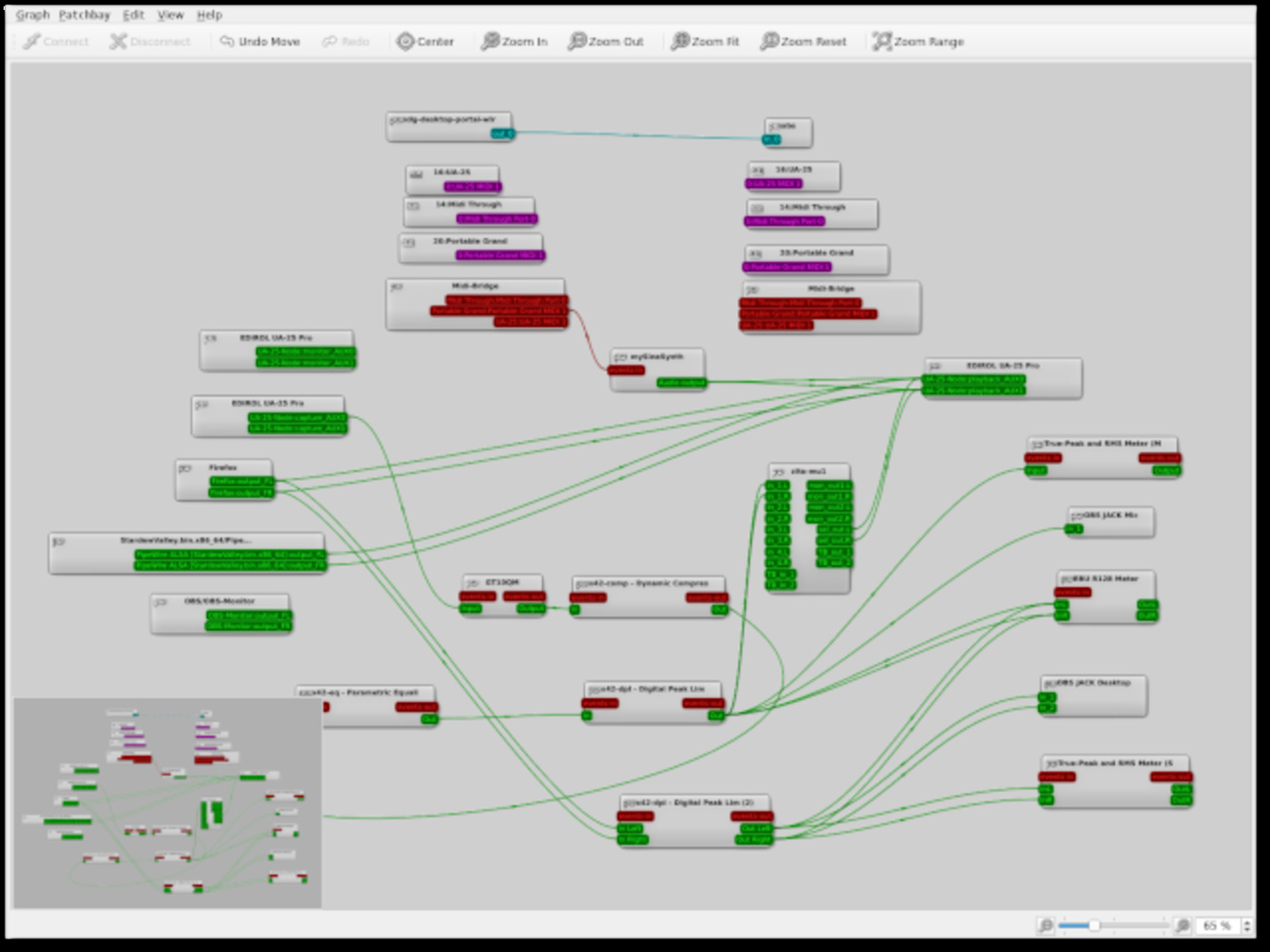
Where it hurts: PipeWire’s flexibility means more indirection. A JACK application launched without pw-jack will try to connect to a real jackd and fail; a PulseAudio client that starts before pipewire-pulse may fall back to ALSA directly. When latency is unstable, the culprit is usually a node negotiating a larger quantum than you configured — check pw-top before touching the config file.
JACK2: The Deterministic Specialist
JACK2 was designed around one promise: every client in the graph is processed in the same cycle, in dependency order, within a fixed period. That synchronous model is why pro audio on Linux worked at all, and it remains the clearest mental model when your signal chain is fixed: interface in, preamp, DSP, DAW, interface out.
Starting a JACK2 server directly on an ALSA device is still one command:
| |
For network audio, JACK2 ships NetJack2. The master runs a network manager, the slave connects to it:
| |
Both machines must agree on sample rate and period size, and the link needs a wired network — Wi-Fi jitter will destroy the timing budget faster than any buffer setting can compensate.
Where it hurts: JACK2 is exclusive by design. When jackd owns the device, the desktop’s normal audio path is blocked unless you bridge it (via alsa_in/alsa_out or a loopback). That exclusivity is exactly the problem PipeWire solved, and it is why most distributions moved away from raw JACK sessions. JACK2’s last upstream commit was in January 2026 — it is stable rather than fast-moving, which is fine for a protocol but means new hardware quirks get fixed slowly.
PulseAudio: The Legacy Default You Inherit
PulseAudio introduced the per-stream mixer model that desktop Linux still uses: each application gets a sink input, volume is per-application, and devices can be moved between sinks at runtime. It is genuinely good at that job, and on a headless box serving a handful of network clients it is still the least surprising option.
| |
Where it hurts: PulseAudio was never designed for sub-10 ms round trips. Its latency is measured in tens of milliseconds, and attempts to force it lower produce dropouts rather than tighter timing. The project is in maintenance: security and bug fixes land, architectural work does not. New deployments should treat it as a compatibility layer that PipeWire already provides.
The Configuration Traps That Cause Xruns
- Realtime limits are not optional. Without
@audio - rtprio 95and@audio - memlock unlimitedin/etc/security/limits.d/, neitherjackd -Rnor PipeWire’s RT thread can preempt normal tasks. Symptoms: periodic crackle that disappears when the machine is idle. - Do not run two servers on one device.
pulseaudio --killandsystemctl --user mask pulseaudio.service pulseaudio.socketbefore switching to PipeWire, or the two will fight over the ALSA device and produce “device busy” errors. - Sample rate mismatch causes hidden resampling. A 44.1 kHz project on a 48 kHz server inserts a resampler into the graph. Set the project rate to match the server rate, or force the server with
clock.force-rate. - USB interfaces dislike large quanta. Bus-powered interfaces often glitch above 512 frames. Drop the quantum, not the sample rate.
- WirePlumber restarts reset your routing. Scripted
pw-linkconnections are not persistent unless declared as links in WirePlumber config or saved by a session tool. - Check
ERRinpw-top, not CPU usage. A high DSP load with zero errors is fine; a low load with growing errors means the scheduling deadline is being missed.
If you are tuning the room rather than the server, our DSP room correction guide covers CamillaDSP, Brutefir and LSP plugins that sit inside this graph. For getting audio out of the machine without a cable, the Bluetooth audio receiver comparison covers librespot, Shairport Sync and balenaSound. And if the endpoint is a streaming server rather than a sound card, see the self-hosted music streaming comparison.
FAQ
Is PipeWire better than JACK for music production? For most people, yes — it provides the JACK API with modern device handling, and you no longer lose desktop audio while your DAW is open. For a fixed studio rack where determinism matters more than flexibility, JACK2 remains a defensible choice.
Can I run JACK applications on PipeWire?
Yes, with the pw-jack wrapper (or by installing PipeWire’s libjack replacement, which many distributions do by default). Applications that hard-code a path to the real libjack.so need to be launched through pw-jack.
Does PulseAudio still receive updates? It receives maintenance updates — the repository shows commits in November 2026 — but no major architectural development. Distribution defaults have moved to PipeWire, and new features land there.
What latency can I realistically achieve?
With a decent USB or PCIe interface and correct realtime limits, 128 frames at 48 kHz (about 2.7 ms per period) is routine on both PipeWire and JACK2. Going below 64 frames usually requires a kernel with PREEMPT_RT and careful IRQ tuning.
How do I move audio between two Linux machines?
On JACK2 use NetJack2 (jack_load netmanager on the master, jackd -d net on the slave). On PipeWire, use the RTP modules for standards-based transport (RTP/AES67) or a JACK-over-network bridge; for simple playback, PulseAudio’s tunnel modules still work under pipewire-pulse.
Which one should a headless media server use? Whichever the distribution ships by default — usually PipeWire. If you need many independent network clients with per-stream volume and minimal configuration, PulseAudio’s tunnel model is still the simplest to operate.
💰 想测试你的市场判断力?我用 Polymarket 做预测市场交易——这是全球最大的预测市场平台,从大选结果到技术监管时间线,什么都可以押注。和赌博不同,这是真正的信息市场:你懂的信息越多,胜率越高。我靠预测技术相关事件的走向已经赚了不少。用我的邀请链接注册:Polymarket.com