You push a tag, wait nine minutes, and the pipeline hands you a .deb that only installs on Ubuntu 24.04 — because that is the only container in your CI matrix. Meanwhile three users on Fedora 42 and one on Debian 12 file issues you cannot reproduce. Building packages in CI containers is fine until you need eight distributions, four architectures, signed repositories and reproducible chroots; at that point you are no longer running CI, you are running a build service.
Three open-source systems solve that problem at different layers: Open Build Service (OBS), Copr and Koji. They are frequently lumped together as “package builders”, but they were designed for different owners. Understanding who each one was built for saves months of integration pain.
TL;DR: The 30-Second Verdict
- Shipping for many distributions from one source definition? Choose Open Build Service. It builds RPM and DEB packages for openSUSE, SLE, Fedora, RHEL, Debian, Ubuntu and Arch from a single project, and its publishing model gives you signed repositories per distribution.
- Building RPMs for Fedora and EPEL with minimal infrastructure? Choose Copr. It is a thin layer over
mock: cheap to run, easy to self-host, and the CLI is friendly enough that developers will actually use it. - Mirroring how Fedora itself composes a release? Choose Koji. It is a tag-and-target build system with real provenance tracking — more machinery than most teams need, but the right answer if you build a distribution rather than a handful of packages.
The one-line rule: OBS builds for everyone, Copr builds for RPM users, Koji builds a distribution.
Comparison at a Glance
| Dimension | Open Build Service | Copr | Koji |
|---|---|---|---|
| Licence | Apache-2.0 (GPL parts in backend) | GPL-2.0 | GPL-2.0 / LGPL-2.1 |
| Frontend stack | Ruby on Rails | Python / Flask | Python (hub) + PostgreSQL |
| Package formats | RPM and DEB, plus AppImage, containers, kiwi images | RPM only | RPM, plus images via appliance/compose tooling |
| Build isolation | build workers with per-repo chroots | mock chroots | mock on registered builders |
| Multi-distro targets | Excellent (openSUSE, SLE, Fedora, RHEL, Debian, Ubuntu, Arch, Mageia) | Good (Fedora, EPEL, openSUSE chroots) | Fedora / RHEL family targets |
| Signing and repo publishing | Built in, per-project signing keys | Built in, per-project repo + key | Via tags, signing in compose/repo tooling |
| Web UI | Yes (full project UI) | Yes (project/build pages) | Yes (koji-web) |
| Official container images | Yes (registry.opensuse.org/obs/...) | No — Ansible deployment | No — package install |
| GitHub stars | 1,093 | 175 | n/a (canonical repo on Pagure) |
| Last commit | 2026-11-18 | 2026-11-13 | actively developed by Fedora release engineering |
Stars and last-commit dates were read from GitHub at publish time. Koji’s canonical repository lives on Pagure rather than GitHub, which is one reason it looks “less maintained” in star-based comparisons — it is not.
Decision Matrix
| Your situation | Recommended | Why |
|---|---|---|
| Ship the same tool for Ubuntu, Debian, Fedora and openSUSE | OBS | One source tree, many build targets, signed repos per distro |
| Internal RPM repo for Fedora/EPEL packages | Copr | Lowest operational overhead, mock isolation, simple CLI |
| Need DEB and RPM from one project definition | OBS | Copr and Koji cannot emit .deb |
| Rebuild Fedora packages with your own patches | Koji | Tag/target model tracks provenance properly |
| Want a web UI your developers self-serve | OBS or Copr | Both expose per-user projects and build logs |
| Limited hardware, single host | Copr | Runs comfortably on one VM; OBS and Koji want workers |
| Distribution release engineering with composes | Koji | Built for exactly that workflow |
Open Build Service: One Source, Many Distributions
OBS is the most complete of the three and the only one that treats Debian packaging as a first-class citizen. A project holds packages; a package holds sources plus a .spec or debian/ directory; and the project declares build targets such as openSUSE_Tumbleweed, xUbuntu_24.04 or Fedora_42. The scheduler then dispatches jobs to workers, each running in a chroot built from the target’s repository metadata.
The other thing OBS gets right is publishing: every project can expose a repository with its own signing key, so zypper addrepo or a Debian sources.list.d entry is all your users need.
The repository ships a complete development stack as Compose — this is the real file, and it is the fastest way to understand the component layout:
| |
Day-to-day work happens through osc:
| |
osc build runs the same recipe the server would, so a clean local build is a strong signal. For production, do not run the development Compose stack — deploy the OBS Appliance image (an OVA for openSUSE Leap or SLES) and add workers, or follow the packaged installation for your distribution.
Where it hurts: the backend is opinionated about filesystem layout and permissions, and workers with privileged: true are doing real mount/chroot work — do not try to run them in a restrictive Kubernetes pod without a privileged security context. Repository metadata regeneration after large uploads is also heavier than people expect; a project with hundreds of packages can spend minutes republishing.
Copr: The Pragmatic RPM Builder
Copr (“community projects”) is what you get if you take mock, wrap it in a queue, and put a Flask UI on top. Each project has a set of chroots (fedora-42-x86_64, epel-9-x86_64, opensuse-tumbleweed-x86_64), each build runs in a fresh chroot, and results land in a per-project DNF repository with a generated signing key.
The developer experience is the strongest argument for Copr:
| |
On the consumer side, enabling the repo is a single command:
| |
Self-hosting is done with the Ansible tree in the repository (ansible/), which deploys the frontend, backend workers, dist-git and keygen components. Compared with OBS this is a much smaller footprint: a frontend VM, a PostgreSQL database, a dist-git host and one or more backend workers with plenty of disk.
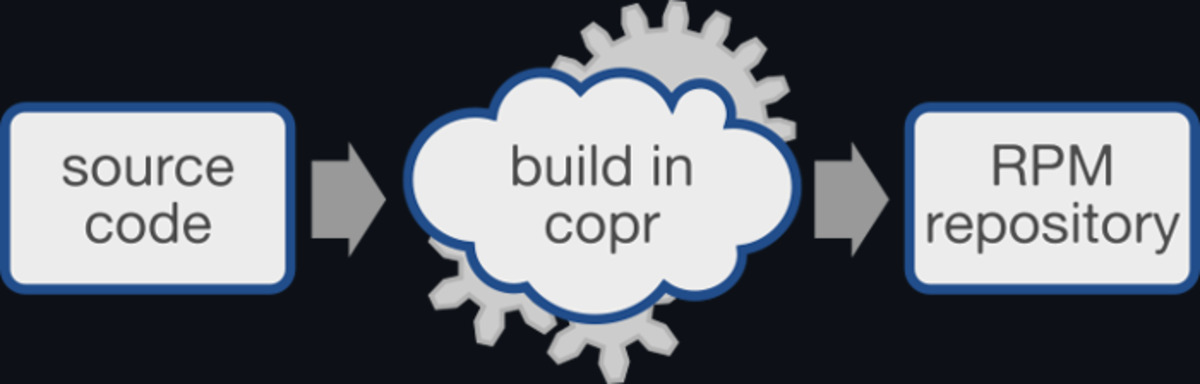
Where it hurts: Copr is RPM-only. If your product ships a .deb, Copr cannot help, and no amount of chroot configuration changes that. Backend workers also accumulate build directories aggressively — a busy instance will fill a disk long before CPU becomes the limit, so put /var/lib/copr on its own volume and monitor it.
Koji: Distribution-Grade Provenance
Koji is Fedora’s build system, and it is the only one of the three designed around tags and targets rather than projects. A build is submitted against a target (which maps to a tag plus a buildroot), lands in that tag, and only enters a released repository when release engineering moves the tag. That indirection is what gives Koji its provenance guarantees: every RPM can be traced to a task, a source commit and a builder.
The architecture is a hub and builders. The hub (koji-hub) stores state in PostgreSQL and talks to registered builders running kojid, which execute mock builds. Authentication is typically Kerberos or SSL client certificates — which is the main friction point for small teams.
| |
A minimal self-hosted setup is: PostgreSQL, koji-hub behind Apache, koji-web, at least one builder with kojid, and a certificate authority for client/builder auth. There are no official container images, so plan on configuration management rather than Compose.
Where it hurts: Koji’s model assumes you have release-engineering processes. Running it for five internal packages means maintaining tag inheritance rules, targets and a CA for the privilege of building RPMs that a Copr instance would have produced in an afternoon. Its strength — strict provenance — is only worth the cost when other people depend on your package lineage.
Pitfalls Before You Deploy
- Signing keys are your most valuable secret. Rotate carefully: publish the new key alongside the old one for at least one release cycle, or every existing user’s package manager will refuse updates. Keep the private key off the build workers if your tooling allows it.
- Workers need to be disposable. Every one of these systems executes arbitrary build scripts. Treat builders as cattle, rebuild them on a schedule, and never store credentials on them. This is why OBS marks workers
privilegedyet still expects you to isolate them from your internal network. - Disk is the real bottleneck. Chroots, build artifacts and repository metadata consume hundreds of gigabytes on a moderately active instance. Provision 2–3× what you estimate and alert at 70%.
- Chroot freshness matters more than tooling. All three rely on
mock-style chroots bootstrapped from upstream repositories. If your mirror is stale, your packages will fail to build for reasons unrelated to your code. Monitor the chroot bootstrap step separately from the build step. - Do not build untrusted pull requests on production workers. A fork can change the spec file and run arbitrary commands during
%build. Use ephemeral workers with no network egress, or a separate scratch instance. - Repository metadata is a release artifact. Snapshot it. When a rebuild silently changes a dependency version, the metadata diff is how you find out.
For the repository layer that consumes these builds, our Debian package repository comparison covers aptly, reprepro and apt-mirror. If you also mirror container images, the binary repository guide compares Artifactory OSS, Nexus and Pulp. And once your artifacts exist, the SBOM analysis guide shows how to track what actually went into them.
FAQ
Is Open Build Service free for internal company use? Yes. OBS is Apache-2.0 licensed and can be self-hosted without licence fees, including for internal-only projects. You pay for the infrastructure and the people who run it — typically a database host, a frontend host and one or more worker machines.
Can Copr build Debian packages?
No. Copr is built on mock and produces RPMs plus DNF/YUM repositories only. If you need both DEB and RPM output from one source definition, Open Build Service is the correct tool.
Do I need Kerberos for Koji? Not strictly, but it is the common deployment. Koji supports SSL client certificate authentication as an alternative, which is simpler to bootstrap for a small installation. Either way, builders must authenticate before they can accept tasks.
How much RAM and disk does a build worker need? For typical C/C++ or Go packages, 4 vCPU and 8 GB RAM per worker is a reasonable start, with 100 GB of disk if you keep chroots and artifacts locally. Large projects with heavy linking steps (browsers, office suites) need substantially more — profile the largest package you intend to build and size accordingly.
Which system produces signed repositories out of the box?
Open Build Service and Copr both generate a project signing key and publish signed repository metadata as part of the build pipeline. Koji itself focuses on builds and tags; signing usually happens in the compose or repository tooling downstream, such as sigul-based signing in Fedora’s release process.
Can I migrate from Copr to OBS later?
Yes, and the migration is mostly mechanical: .spec files carry over unchanged, and you re-declare build targets in the OBS project metadata. The work is in re-creating signing keys, repository paths and any CI hooks that called copr-cli.
💰 想测试你的市场判断力?我用 Polymarket 做预测市场交易——这是全球最大的预测市场平台,从大选结果到技术监管时间线,什么都可以押注。和赌博不同,这是真正的信息市场:你懂的信息越多,胜率越高。我靠预测技术相关事件的走向已经赚了不少。用我的邀请链接注册:Polymarket.com