You bought a ZNS SSD — or you are about to — and then you discovered the fine print: every zone must be written sequentially, from the first block to the last, or the write fails outright. No random overwrites, no in-place updates, no “just rsync your old data over.” That single constraint invalidates most of the storage stack you have been running for fifteen years, and it is the reason so many teams plug a ZNS drive into a server, see it in lsblk, and then quietly move it to the “shelf” pile.
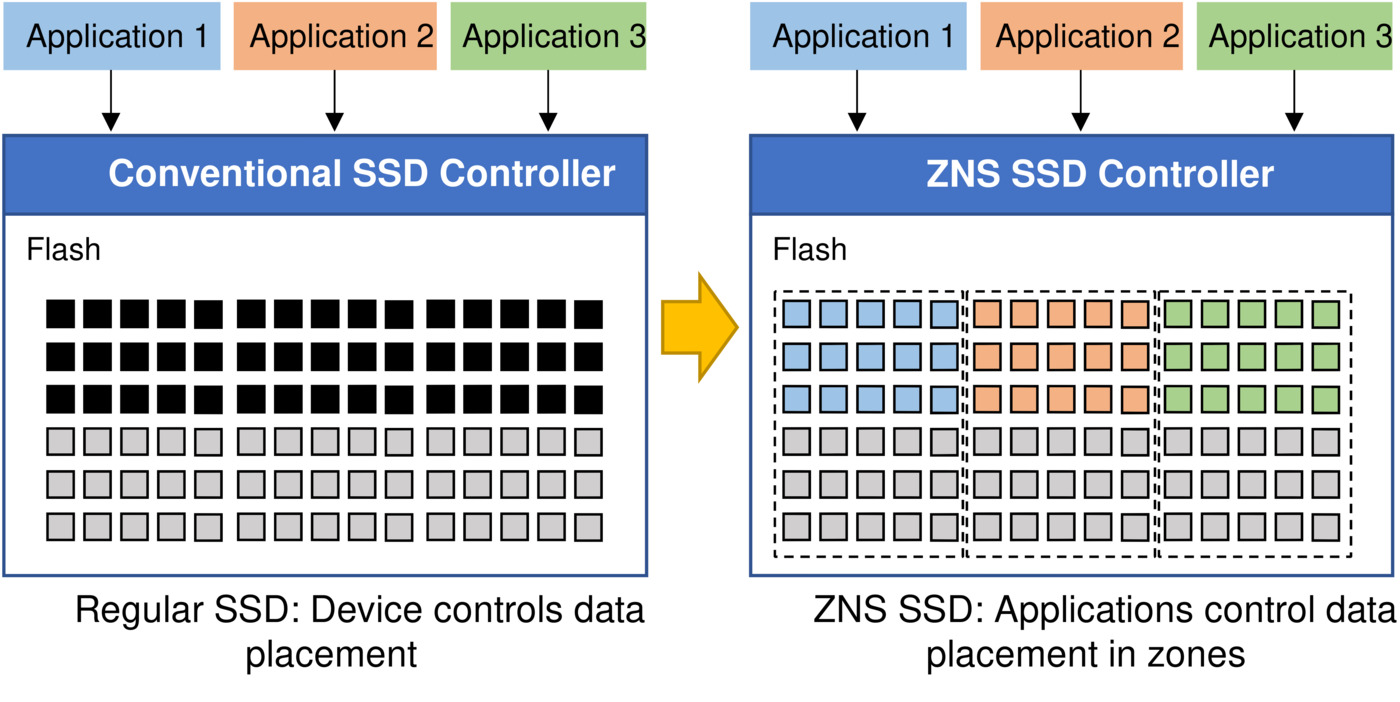
The economics, though, are hard to ignore. By exposing the flash translation layer’s real constraints to the host instead of hiding them behind an emulated block device, ZNS removes the garbage-collection tax that conventional SSDs pay internally. Vendors quote meaningful write-throughput gains and steadier tail latency, and the host gets a device that never surprises it with a multi-second GC stall during a checkpoint.
This guide compares the three realistic ways to put a zoned namespace to work on Linux in 2026 — zonefs, f2fs in zoned mode, and btrfs (plus the dm-zoned shim that makes it possible) — with real commands, real limitations, and a blunt recommendation for each workload.
TL;DR — Quick Verdict
If you want the least friction and your workload is append-oriented (logs, metrics, object chunks, WAL segments), use zonefs. It exposes each zone as a plain file, the kernel handles the append pointer, and there is no formatter to run and no filesystem metadata to corrupt.
If you need a real POSIX filesystem on a zoned drive and your writes are mostly sequential already, use f2fs in zoned mode. It is the only general-purpose filesystem in mainline Linux that was designed with zoned block devices as a first-class target.
If you need btrfs — snapshots, subvolumes, checksums, send/receive — you cannot mount it on a zoned device directly. Use dm-zoned to present the drive as a conventional block device, and accept that you have handed the sequential-write problem back to a shim. Do not expect ZNS performance benefits through that path.
Side-by-Side Comparison
| Dimension | zonefs | f2fs (zoned mode) | btrfs + dm-zoned |
|---|---|---|---|
| Mainline kernel support | Yes, purpose-built for zoned block devices | Yes, zoned support since the 4.10 era, actively developed | btrfs: no native zoned support; dm-zoned target required |
| Random writes | Not possible — append-only per zone file | Handled internally via sequential block allocation | Yes, at the cost of an emulation layer |
| POSIX semantics | Deliberately minimal: no rename, no random overwrite, one file per zone | Full POSIX filesystem | Full POSIX filesystem |
| Needs a formatter | No — mount the raw device | Yes, the volume must be created zoned-aware | Yes, both the dm-zoned metadata and the btrfs volume |
| Zone Append | Used by the kernel for efficient large writes | Supported | Abstracted away |
| Best workload | Log/store append, metrics, object chunks, WAL | Container root, media stores, sequential-heavy general use | Legacy workloads that must keep snapshots |
| Operational risk | Very low — no metadata to lose | Low to medium — zoned misconfiguration is punished at mount time | Medium — two layers, two failure modes |
| Current project activity | Maintained in-tree with the block layer | Very active | dm-zoned maintained; btrfs zoned support still absent |
Decision Matrix: Pick in Ten Seconds
| Your situation | Use | Why |
|---|---|---|
| New append-only data store, you control the writer | zonefs | Each zone is a file; the kernel tracks the write pointer for you |
| You want a normal filesystem on ZNS without shims | f2fs zoned | The only in-tree general-purpose filesystem built for zoned devices |
| Existing btrfs deployment with snapshots that must move to ZNS | btrfs + dm-zoned | The only supported path, but you lose the performance argument |
| You are benchmarking or developing against ZNS without hardware | null_blk zoned emulation | Reproduces zone semantics on any machine in one modprobe |
| You need a GUI to inspect zone states on a fleet | gzbd from libzbd | Reads zone reports straight from the device |
| You need object storage on ZNS | zonefs + your own object layer | Do not force a POSIX filesystem onto an append-only device |
Setting Up a Zoned Test Bed Without Hardware
Before touching production, reproduce the semantics locally. The null_blk driver can expose a host-managed zoned block device — the same mode a ZNS namespace reports — with zone size and conventional-zone count you control:
| |
/sys/block/nullb0/queue/zoned reporting host-managed is the signal you want. If it says none, you are testing a conventional device and every conclusion you draw afterwards will be wrong.
A word on terminology that trips people up: zone_size is the address-space size of the zone, while zone capacity is how much of it you can actually write. ZNS allows capacity to be smaller than size (it lets vendors align zones to real erase-block geometry without forcing power-of-two erase blocks). Blocks between capacity and the end of the zone are unmapped — writes there error out, reads behave like reads of unwritten blocks, and the zone transitions to full once you hit capacity, not size. Any capacity-planning spreadsheet that ignores this overstates usable space.
zonefs — One File Per Zone, Nothing Else
zonefs is the minimal answer to “what if the filesystem just got out of the way?” Each zone becomes a file named seq (or seqNNN when there are several), and the kernel maintains the write pointer as you append.
| |
What you get is honest: seq files accept sequential appends, and that is essentially it. There is no rename, no truncate-and-rewrite in the middle, no directory hierarchy worth the name. The trade is stark and, for the right workload, excellent — zero metadata to corrupt, zero journal to replay, zero allocation decisions to get wrong. On a power loss, the worst case is a partially written tail in the zone you were appending to, which is exactly the failure mode an append-only writer is already designed to handle.
The gotcha is that your application must be the one that respects zone boundaries. An append that would cross into the next zone does not silently spill over; it fails. A log shipper that flushes 8 MB buffers into 256 MB zones is fine. A writer that emits a 300 MB record is not, and no amount of dd flags will save it.
Persistence is a plain fstab line — this is a filesystem, just a strange one:
| |
f2fs in Zoned Mode — A Real Filesystem That Speaks Zones
f2fs is the pragmatic middle path. It understands zoned block devices from the ground up and keeps its own metadata placement zone-aware, so you get a genuine POSIX filesystem — directories, permissions, container root filesystems — while the device model stays intact.
The zoned awareness shows up in defaults you should know about. On a blkzoned device, f2fs sets discard_unit=section by default rather than discard_unit=block, specifically so that large SMR and ZNS devices do not have to keep per-block discard metadata in memory. That is a sensible default, and it is also why discard behaviour differs from what you see on a conventional NVMe drive.
The operational rules are unforgiving in a specific way: the volume has to be created with the device’s geometry in mind, so you cannot take an f2fs image built on a conventional SSD and mount it on a ZNS namespace. Storage teams that treat filesystem creation as an afterthought discover this at the worst possible moment — during a migration window, with the old array already half-drained.
Inspect what the kernel actually did before you trust it:
| |
The practical sweet spot for f2fs on ZNS is a container host or media cache where most writes are already large and sequential. Under a workload with heavy random 4 KB overwrites, f2fs will spend its time converting your randomness into sequential placement, and the ZNS advantage evaporates — the device is doing exactly what you asked, you just asked for the wrong thing.
btrfs and dm-zoned — The Honest Compromise
Here is the sentence that saves you a weekend: btrfs has no native zoned block device support. It never shipped it, and presenting a ZNS namespace to btrfs directly gets you a mount failure, not a degraded mode.
The supported workaround is the device-mapper dm-zoned target, which layers conventional block semantics on top of a zoned device using a small amount of conventional storage for metadata and random-write buffering. That conventional storage is the crux: you are spending real capacity — and real write amplification — to pretend the drive is not zoned. It works, it is maintained, and if you must keep btrfs snapshots and send/receive, it is the path.
But be clear-eyed about what you bought. The performance case for ZNS comes from the host cooperating with the media; an emulation shim that reintroduces random writes, garbage collection, and metadata indirection gives most of that back. Teams that benchmark dm-zoned against the conventional NVMe drive they replaced are frequently disappointed, and the disappointment is not a bug — it is the design.
Two layers also means two failure modes. A corrupted dm-zoned metadata area takes the whole stack with it, and recovery tooling is far less forgiving than btrfs check. Treat the metadata device as something you can rebuild from backup, not something you patch at 3 a.m.
Avoiding the Traps That Cost People Weeks
Zone Append is not optional in practice. The specification makes Zone Append optional, but Linux support for zoned block devices requires that the device implements it. A drive or emulated device without Zone Append is not “slightly worse” — it is unsupported.
Open-zone and active-zone limits are hard limits. Devices report how many zones may be simultaneously open and how many may be active. Blow past the open-zone limit with a hundred concurrent writers and your writes fail with errors that look like hardware faults but are really queue-discipline problems. Funnel writers, or reduce concurrency.
Never benchmark a zoned device with a conventional fio job. Use the zoned mode so the workload generator honours zone boundaries instead of firing writes the device must reject:
| |
Reset state, not just data. Zones carry state — empty, implicit open, explicit open, closed, full, read-only, offline. Deleting files does not return a zone to empty; a zone reset does. Provisioning scripts that rm -rf and restart will fail on the second run.
Pick tooling that reports real zone state. The libzbd project (78 stars, last pushed May 2024 — maintenance mode, so budget for it being stable rather than fast-moving) ships zbdinfo for reporting and gzbd for a GUI view of zone conditions. Useful for a sanity check, not something to depend on for hot-path automation.
Watch the capacity/size gap in your monitoring. Usable capacity is the sum of zone capacities, and the namespace reports the larger number. Alert thresholds based on reported capacity will fire late on any device where capacity is below size.
If your storage layer sits on fabrics rather than local PCIe, the same zone-boundary discipline applies over the network — our NVMe over Fabrics deployment guide covers the transport side, and the persistent memory management comparison is worth reading if you are weighing byte-addressable media against ZNS for the same tier. For multi-path SAS and NVMe deployments around these devices, see our dm-multipath configuration guide.
FAQ
Is ZNS worth it for a small self-hosted setup?
Usually not yet. ZNS pays off when you control the writer and your I/O is large and append-heavy. For a homelab running a handful of containers on a single NVMe drive, a conventional SSD plus a journalled filesystem is simpler, cheaper per usable gigabyte, and has no zone-boundary failure modes. The exception is deliberately learning the model — spin up null_blk in zoned mode and test before you spend money.
Can I mount ext4 or XFS on a ZNS device?
No. Neither filesystem understands zoned block devices, and there is no in-tree support path. Your options are a filesystem designed for zones (zonefs, f2fs in zoned mode) or an emulation shim such as dm-zoned that presents conventional semantics — which negates most of the reason to buy the drive.
What happens if I write out of order inside a zone?
The write is rejected. Zoned devices require sequential writes within each zone, starting at the zone write pointer; an out-of-order write returns an error rather than silently corrupting neighbours. This is a feature — you find the bug at write time instead of during a rebuild — but it means library code that assumes random overwrite will fail loudly and often.
Does zonefs support directories and normal file operations?
Only minimally. zonefs exposes each zone as a file and supports appending to it; you should not expect rename, truncate, or in-place overwrite. It is best understood as an append-log interface with filesystem naming, not as a general-purpose filesystem.
How do I know whether my drive is really zoned?
Check /sys/block/<dev>/queue/zoned. host-managed means the device requires the host to respect zones; none means it is conventional. lsblk -z gives you the same answer with zone counts. Do this before any benchmark, and again after any firmware or kernel change.
💰 想测试你的市场判断力?我用 Polymarket 做预测市场交易——这是全球最大的预测市场平台,从大选结果到技术监管时间线,什么都可以押注。和赌博不同,这是真正的信息市场:你懂的信息越多,胜率越高。我靠预测技术相关事件的走向已经赚了不少。用我的邀请链接注册:Polymarket.com