Somewhere between your fifth container and your fiftieth, the homelab stops being a hobby and becomes an operations job. You have a startpage — Homer, Heimdall, Flame, pick one — and it is a beautiful wall of links. It is also completely useless at 11 p.m. when Plex has wedged itself again and the only tool that can fix it is an SSH session from your phone, in bed, with a soft keyboard and a 40-character container name.
Three projects attack that gap from different angles, and none of them is a startpage. OliveTin turns shell commands into buttons. Sablier stops containers entirely and starts them when a request arrives. Dockpeek gives you one authenticated page that reaches every container web UI on every host, with update status attached.
TL;DR / Quick Verdict
Want a “restart Plex” button your family can press without a terminal? Install OliveTin. It is 3,880 stars of Go, a few megabytes of RAM, and one YAML file between you and never explaining docker restart again.
Want your 40 idle containers to actually stop consuming RAM until someone opens them? Deploy Sablier. It is the only one of the three that changes resource consumption rather than just surfacing it, and it integrates with Traefik, Caddy, and Nginx instead of replacing them.
Want one page that jumps to every container UI across three hosts, plus tells you which images are stale? Use Dockpeek. It is the closest thing here to a replacement for the startpage, but with authentication and real container state behind it.
They compose well: Sablier reduces what is running, Dockpeek is how you find and open things, OliveTin is how you fix things when opening them is not enough.
Side-by-Side Comparison
All figures from the projects’ GitHub repositories on 2026-11-09.
| Dimension | OliveTin | Sablier | Dockpeek |
|---|---|---|---|
| Stars | 3,880 | 3,119 | 2,117 |
| Language | Go | Go | JavaScript |
| License | AGPL-3.0 | AGPL-3.0 | MIT |
| Last commit | 2026-10-24 | 2026-11-08 | 2026-08-07 |
| Core idea | Web UI for predefined commands | Start containers on demand | Container web UI index |
| Changes resource use | No | Yes, scales to zero | No |
| Needs Docker socket | Optional | Yes (provider mode) | Yes, read-only |
| Auth model | Local users + LDAP/OAuth | None (delegated to proxy) | Single admin user |
| Reverse proxy integration | Standalone | Traefik, Caddy, Nginx, Envoy | Standalone |
| Container image | ghcr.io/olivetin/olivetin | sablierapp/sablier:1.10.5 | dockpeek/dockpeek:latest |
| Typical RAM | ~10 MB | ~20 MB | ~80 MB |
| Best fit | Family and junior-admin access | Memory-constrained hosts | Multi-host homelabs |
Use Case Decision Matrix
| Your situation | Use this | Why |
|---|---|---|
| Family keeps asking you to restart Jellyfin | OliveTin | Buttons with confirmation dialogs, no shell access granted |
| 8 GB VPS runs 30 containers and swaps constantly | Sablier | Idle services stop; RAM is returned to the host |
| Three Docker hosts, dozens of web UIs | Dockpeek | One authenticated index across all hosts |
| You want wake-on-LAN from your phone | OliveTin | Native action, no scripting required |
| Services are used twice a week for 20 minutes | Sablier | Session-based start matches the usage pattern |
| You need to know which images are outdated | Dockpeek | Update badges per container |
| You run Traefik already | Sablier | Middleware integration, no new entry point |
OliveTin — Turn Shell Commands Into Buttons
OliveTin is a single Go binary that reads a YAML file, renders every entry as a touch-friendly button, and executes the associated shell command when pressed. That is the entire product, and it is more useful than it sounds.
The configuration lives in config.yaml:
| |
Two lines in that file matter more than the rest. The arguments block with type: ascii_identifier is what makes the form safe: the value is validated against a restricted character set before it is substituted into the command. Using type: raw instead hands any visitor arbitrary command injection, which is exactly the vulnerability you were trying to avoid by not giving them SSH.
Deployment is a container with a config mount:
| |
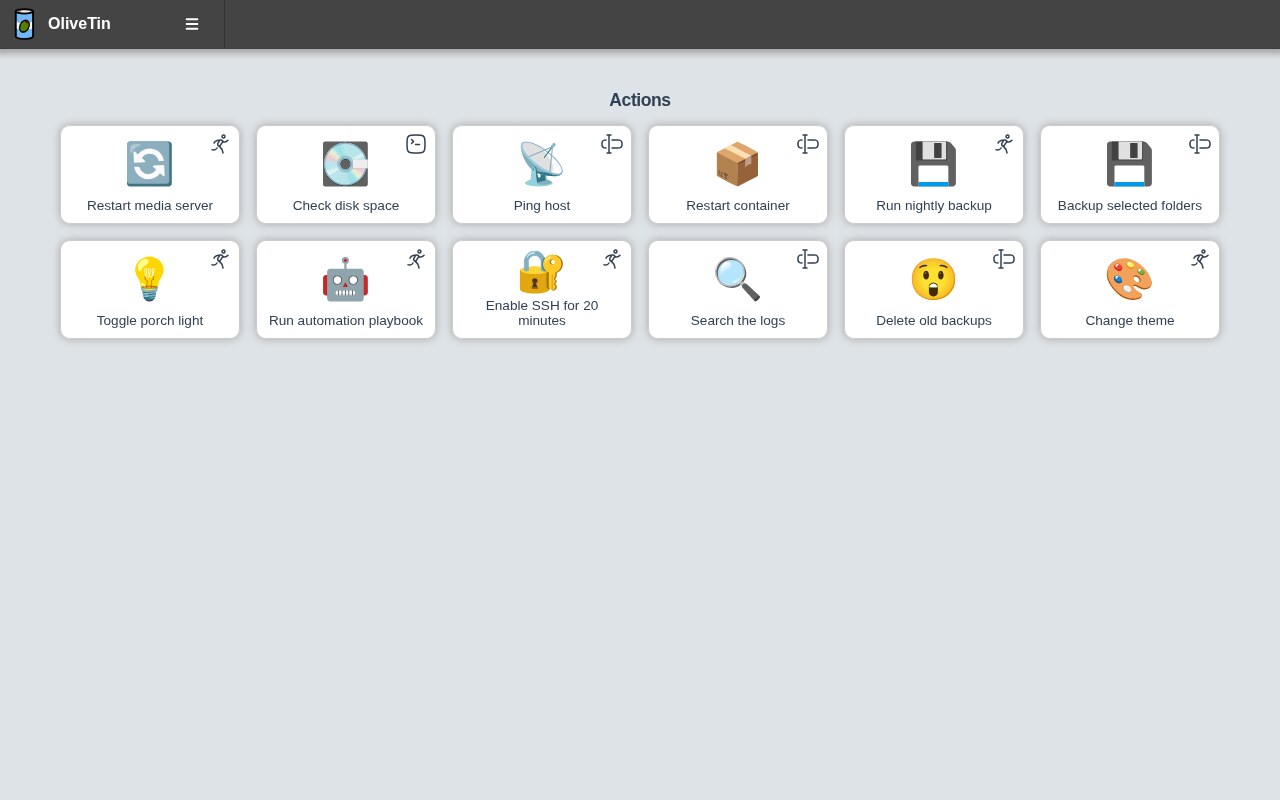
The socket mount is optional and only needed for actions that talk to Docker. When you do mount it, mount it read-only — an action that needs docker restart works fine with :ro because restart goes through the daemon API, not the socket file’s write path. What you lose is the ability to run docker run, which is a feature, not a limitation, if other people are pressing these buttons.
Where OliveTin shines is delegation. A wall-mounted tablet in the kitchen with three buttons — restart media, restart music, wake the backup server — is a legitimate interface for a household. The execution log keeps a record of who pressed what, so the “it broke by itself” conversation becomes shorter.
Where it struggles is growth. Every action is a shell string in one file, and after thirty actions you are effectively maintaining a small internal CLI with no tests. That is fine; just do not pretend it is configuration management.
Sablier — Scale to Zero Without Changing Your URLs
Sablier attacks the actual cost of a homelab: idle containers holding memory. Instead of a startpage link that expects the service to be running, Sablier sits behind your reverse proxy and starts a container when a real HTTP request arrives, then stops it after a period of inactivity.
The deployment model is two labels on the container you want to suspend:
| |
And the Sablier server itself:
| |
The --provider.auto-stop-on-startup flag is the one people miss. Without it, containers that were running when you restarted the host stay running forever, and you never actually reach the steady state you deployed Sablier for.
Sessions are requested through a small HTTP API, which is what your reverse proxy middleware calls on your behalf:
| |
The blocking strategy holds the request open until the container is healthy, so the browser sees a slow first paint instead of a 502. The non-blocking strategy returns immediately and expects your proxy to serve a loading page. For most self-hosters, blocking plus a 60-second timeout is the right default.
The healthcheck is not optional. Sablier cannot distinguish “container started” from “application ready to serve requests” without one. A container with no HEALTHCHECK will receive traffic the moment the process forks, and users will get connection refused on cold start. Sablier’s own documentation calls this out as the number one misconfiguration.
Sablier works with Docker, Docker Swarm, Podman, Kubernetes, Proxmox LXC, systemd units, AWS ECS, and Nomad. That breadth is the reason it beat a pile of shell-scripted alternatives: the same labels work whether the workload is a Compose stack or a Nomad job.
The trade-off is debuggability. When a service is down because nobody requested it, “is it broken or is it sleeping?” becomes a real question. That is precisely the gap Dockpeek fills.
Dockpeek — One Page, Every Container, Every Host
Dockpeek is the newest and smallest-scoped of the three: it connects to one or more Docker daemons, discovers every container that publishes a web port, and renders them as tiles with direct links plus state, logs, and update badges.
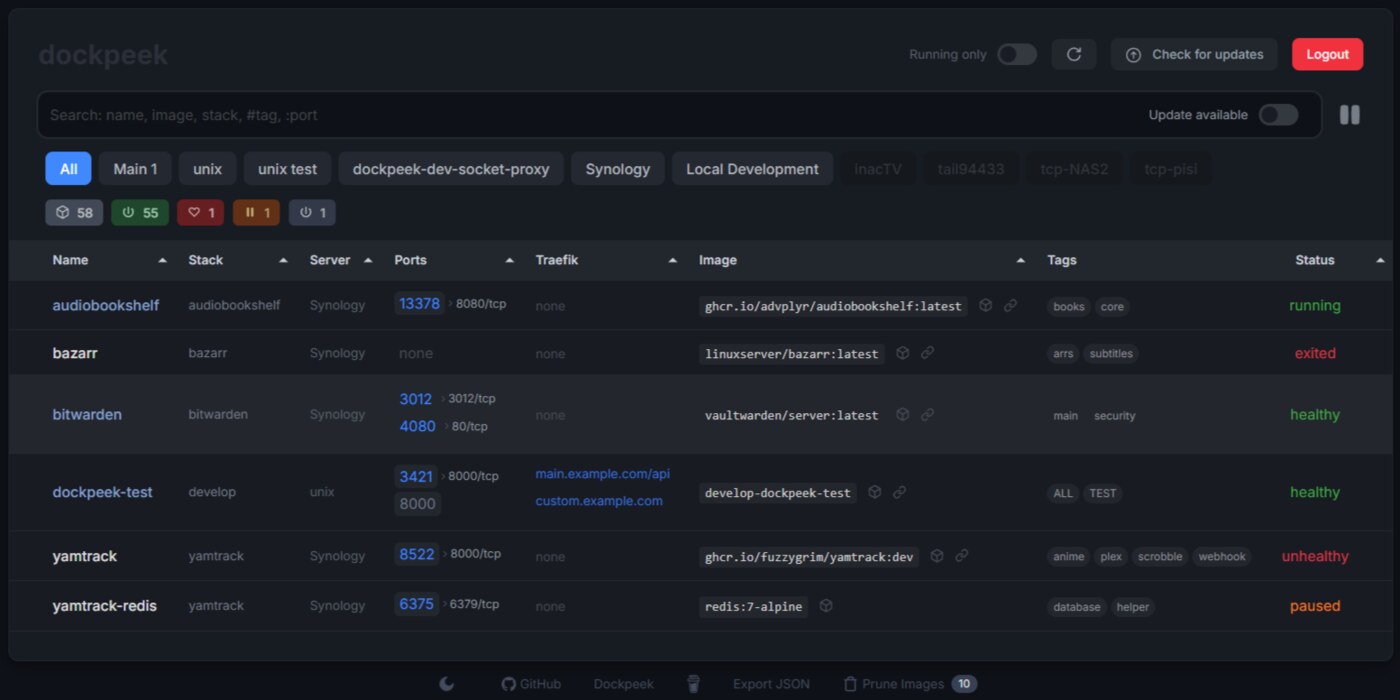
The Compose file is short, and one of its four environment variables is a security decision:
| |
Dockpeek reaches the socket read-only, which means it can enumerate containers and read logs but cannot start, stop, or remove anything. Given that it is the tool most likely to be exposed on a LAN for convenience, that read-only mount is the correct default — you get visibility without handing a web app the ability to delete your volumes.
For multiple hosts, run one Dockpeek per host and add each endpoint in the interface, or point it at Docker’s TCP/SSH endpoints. The multi-host view is the reason to prefer it over a startpage: container names and ports are discovered rather than hand-written, so a new Compose stack appears in the index the moment it starts instead of the moment somebody remembers to edit YAML.
The update badges are the second reason. Dockpeek compares local image digests against the registry and flags containers with a newer image available. It does not update anything — that is Watchtower’s job — but it answers “what is stale” without a docker pull loop.
The AGPL-licensed startpage ecosystem has been solving the link-grid problem for years. What Dockpeek adds is truth: the link exists because the container exists, and it carries live state instead of a hand-typed URL that broke three migrations ago.
Pitfalls and Operational Notes
Do not expose OliveTin without authentication. A web UI that executes shell commands is a remote code execution surface by design. OliveTin supports local users, LDAP, and OAuth; configure one of them before the port leaves localhost. The YAML defaultPermissions block also accepts exec: false per-action, which is how you build a read-only dashboard with a few privileged buttons.
Never use type: raw for OliveTin arguments. The whole point of typed arguments is validation. ascii_identifier restricts to letters, digits, and dashes; shell accepts shell metacharacters and should only be used when the action is fully trusted and not exposed.
Sablier plus Watchtower is a trap. Watchtower restarts containers when it updates the image, which Sablier then stops as idle. That is harmless, but the update check in Dockpeek will show a running container that Sablier suspended, and you will chase a phantom. Pin update windows to hours when nobody is requesting sessions.
A suspended container still holds its volumes. Sablier stops the process; it does not delete state. Memory is reclaimed, disk is not. If you are trying to reclaim disk, this is not the tool.
The Docker socket is root-equivalent. Mounting /var/run/docker.sock into any container is functionally the same as giving it root on the host. Sablier needs it read-write to start containers; that is an accepted risk for its use case, and the reason it should never be internet-facing. Dockpeek and OliveTin can live with :ro.
Bind mounts, not named volumes, for config. All three tools read configuration from a mounted directory. Named volumes hide the YAML from your editor and from your backup job, which is the opposite of what you want for the one file that defines your operations interface.
Why Self-Host Your Homelab Control Plane?
There is no SaaS product that will restart your Plex container. The choice is not between self-hosted and managed — it is between a tool and an SSH habit.
The case for a tool is that it is auditable and delegable. An OliveTin action has a name, an owner, and a log entry. An SSH session has none of those. When three people share a household server, “who restarted the database during the backup” stops being a mystery.
The case against adding more software is real too. Every control plane is another container to patch, another port to reason about, and another thing that can break in a way that requires the very access it was supposed to replace. The honest recommendation is to add one, not three: pick the gap that actually hurts. If idle RAM is the problem, that is Sablier. If access is the problem, that is OliveTin or Dockpeek.
If you are still choosing the foundation, our CasaOS vs Umbrel vs YunoHost comparison covers the appliance-style approach, and the Homer vs Heimdall vs Flame guide covers the pure-link startpage tier these tools sit above. For keeping containers healthy once they are running, the Watchtower vs Autoheal vs Kured breakdown is the natural next read.
FAQ
Can I run all three together? Yes, and they do not conflict. Sablier stops containers, Dockpeek indexes them, OliveTin restarts them. The only interaction to watch is update tooling: a container stopped by Sablier will look stale in Dockpeek until someone requests it again.
Does Sablier work without a reverse proxy? It can, by calling its API directly, but that defeats the purpose. The value comes from the proxy middleware: an inbound request for a sleeping service triggers the start. Without a proxy in front, users need to know the service is sleeping, which they never do.
Is OliveTin safe for non-technical users?
Yes, if you configure typed arguments and enable authentication. The dangerous configuration is type: raw arguments plus no auth, which is equivalent to publishing an unauthenticated shell. OliveTin’s own documentation is explicit about this.
Does Dockpeek replace Homer or Heimdall? For container-backed services, mostly yes. It cannot host arbitrary external links and it does not have the theming ecosystem. Many homelabs end up running Dockpeek for containers and keeping a minimal startpage for documentation links and external sites.
How much RAM does Sablier save? It depends entirely on what you suspend. A stopped container returns its RSS to the host, so a stack of ten idle services using 150 MB each returns roughly 1.5 GB. Stateful databases restart slowly and should generally be excluded.
Do these tools support Podman instead of Docker?
Sablier supports Podman through its provider configuration. OliveTin is agnostic — it runs whatever shell command you give it, so podman restart works unchanged. Dockpeek is Docker-socket-oriented and expects a Docker-compatible API endpoint, which Podman can expose but with caveats.
💰 想测试你的市场判断力?我用 Polymarket 做预测市场交易——这是全球最大的预测市场平台,从大选结果到技术监管时间线,什么都可以押注。和赌博不同,这是真正的信息市场:你懂的信息越多,胜率越高。我靠预测技术相关事件的走向已经赚了不少。用我的邀请链接注册:Polymarket.com