The average household produces a file-format problem every week. An iPhone dumps 300 HEIC photos that a web form refuses to accept. A signed contract arrives as a 40 MB scan that needs splitting and compressing. A podcast episode is 38 WAV files that have to become MP3s before the hosting bill triples. The reflex is to search “convert heic to jpg free” and upload your documents to whichever ad-funded site ranks first.
That reflex is the problem. There are three genuinely capable open-source tools that solve this locally, and they solve different slices of it: ConvertX for breadth, SnapOtter for batch media and document pipelines, BentoPDF for PDF work with a browser-first architecture.
TL;DR / Quick Verdict
For “convert literally anything to anything else”, install ConvertX. 19,646 stars, 1,000+ format pairs, one container, no account system to fight. It is the tool you keep bookmarked and use twice a month without thinking.
For batch jobs and repeatable pipelines, pick SnapOtter. 200+ tools across images, video, audio, PDF, and data files, with a REST API and chainable pipeline steps. It is the only one of the three that wants a PostgreSQL and Redis beside it, and the only one built for “process 4,000 files overnight”.
For PDF-only work, choose BentoPDF. 16,314 stars, a browser-side processing model, and a tool-per-page interface that is faster than anything that round-trips bytes through a server. If your problem is merging, splitting, signing, and redacting PDFs, you do not need the other two.
Side-by-Side Comparison
Repository figures verified on 2026-11-09.
| Dimension | ConvertX | SnapOtter | BentoPDF |
|---|---|---|---|
| Stars | 19,646 | 2,958 | 16,314 |
| Language | TypeScript | TypeScript | JavaScript |
| License | AGPL-3.0 | AGPL-3.0 | AGPL-3.0 |
| Last commit | 2026-11-08 | 2026-11-08 | 2026-11-08 |
| Format coverage | 1,000+ pairs | 200+ tools, 5 modalities | PDF in, PDF and images out |
| Processing model | Server-side | Server-side, queue-based | Mostly browser-side |
| Database required | No | PostgreSQL 17 + Redis 8 for production | No |
| API | Limited | REST with API keys | Not the primary interface |
| Pipelines | No | Yes, chainable steps | No |
| Auth | Local accounts | Local accounts, OIDC/SSO | None by default |
| Image | ghcr.io/c4illin/convertx | snapotter/snapotter:latest | ghcr.io/alam00000/bentopdf-simple:latest |
| Port | 3000 | 1349 | 8080 |
| Best fit | One-off conversions | Batch and automation | PDF operations |
Use Case Decision Matrix
| Your task | Use this | Why |
|---|---|---|
| 300 HEIC photos to JPG | ConvertX | Native format matrix, batch upload |
| 38 WAV files to MP3 with normalisation | SnapOtter | Audio toolset with pipeline chaining |
| Merge, split, or redact a PDF | BentoPDF | Tool-per-page, no upload round-trip |
| Convert CSV to JSON and merge spreadsheets | SnapOtter | Files modality covers tabular conversion |
| Video to GIF, trim, burn subtitles | SnapOtter | 57 video tools in one interface |
| DOCX to PDF as part of a script | ConvertX | Simple endpoint, predictable output |
| Process files on a machine with no spare RAM | BentoPDF | Browser does the work, server just serves files |
| Expose conversion to a team with logins | SnapOtter | API keys, OIDC, per-user history |
ConvertX — Breadth as a Strategy
ConvertX does one thing and refuses to be clever about it: you upload a file, pick an output format from a very long dropdown, and get the converted file back. Under the hood it dispatches to the right external binary — FFmpeg, ImageMagick, Pandoc, LibreOffice, Ghostscript, Calibre — depending on the pair.
Deployment is a single container with a data volume:
| |
Two of those variables deserve attention. ACCOUNT_REGISTRATION=false locks the instance to the first account created — the first registration always succeeds regardless, so create yours immediately after the first start and then leave registration disabled. AUTO_DELETE_EVERY_N_HOURS=1 is the cleanup job; without it, /app/data grows until the disk fills, because every upload and every output is retained.
The image is large — it bundles the entire conversion toolchain, and a few hundred megabytes is normal. That is the honest trade for 1,000 format pairs. If you only need four of them, you are paying for the rest in image size and CVE surface.
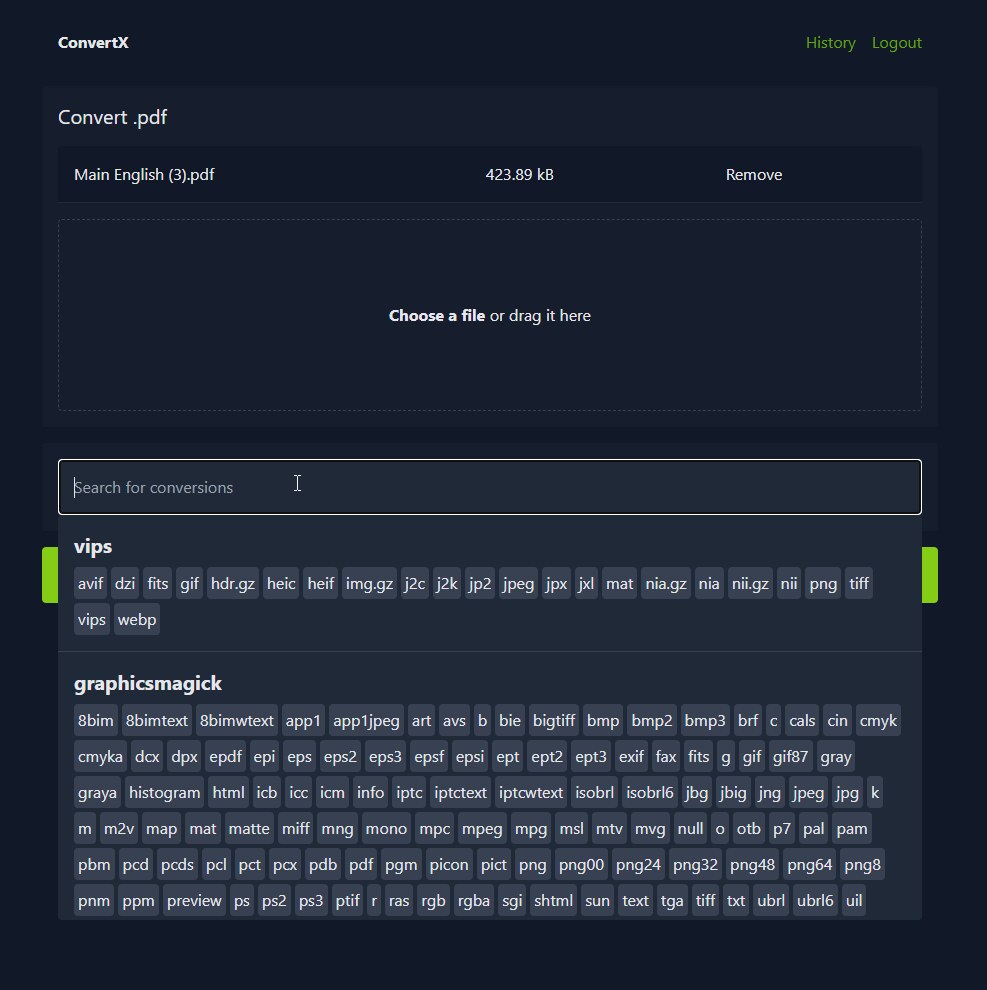
Where ConvertX wins is the long tail. Somebody needs .dng to .png. Somebody needs .epub to .mobi. Somebody needs .heic to .pdf for a visa application at 11 p.m. ConvertX has all three, and the answer is the same container you already run.
Where it loses is batch sophistication. There are no pipelines, no per-step parameters, and no job queue worth the name — conversions run and you wait. For a single file that is fine; for 4,000 files it is the wrong tool.
SnapOtter — The Batch Processing Workbench
SnapOtter is what happens when somebody decides a self-hosted file converter should behave like a proper media pipeline. It exposes 200+ tools across five modalities — 112 image operations, 57 video, 27 audio, 35 PDF, 23 data-file tools — and lets you chain them into reusable pipelines that can be triggered from the UI or from a REST API.
The quick start really is one command:
| |
That starts an embedded PostgreSQL 17 and Redis 8 inside a single container. For anything beyond testing, use the documented three-container stack:
| |
The migration URL exists for a reason worth understanding: the application connects with a role that can only read and write rows, while the owner connection is used only at boot to run migrations and grant privileges. That is a deliberate least-privilege split, and it is the sort of detail that separates a tool built for teams from a weekend project.
The pipeline feature is the differentiator. A pipeline is an ordered list of tool invocations with parameters, stored as JSON and re-runnable. “Take every uploaded PNG, resize to 1600px wide, strip metadata, convert to WebP at quality 82, write to the output folder” is one pipeline, and it runs identically from the UI and from the API:
| |
Check /api/docs on your own instance for the authoritative schema — the API surface moves faster than any article, including this one.
Team features are real: local accounts, OIDC single sign-on, 21 interface languages, and per-user history. If you are running this for an organisation rather than a household, that is the deciding factor.
The cost is operational weight. Three containers, a database backup to add to your rotation, and a first-login password of admin/admin that you must change before the port leaves localhost.
BentoPDF — PDF Work With the Server Left Out
BentoPDF is the outlier. Most of its tools run in the browser: the file you open never travels to the server at all, so the container is essentially a static file server plus a client-side application.
| |
That is the whole deployment. No database, no volume, no worker, no cleanup job. The -simple tag is the self-hosted build; the project also publishes a commercial build under a different tag, and the Compose file in the repository documents both.

The architecture has one very practical consequence: upload size limits disappear. There is no client_max_body_size to raise, because there is no upload. A 900 MB scanned document opens in the tab, gets split, and is saved back to disk without a byte crossing the network. On a VPS with 1 GB of RAM and a 20 GB disk, that is the difference between “possible” and “not possible”.
The second consequence is that it scales to nothing. Ten colleagues using it simultaneously cost you a static asset response each.
The trade-off is capability. BentoPDF does PDF operations — merge, split, compress, rotate, sign, redact, watermark, page numbers, OCR, and PDF-to-image conversion — and it does not convert WAV to MP3. If your problem is broader than documents, this is one tool of three, not the answer.
Browser-side processing also means the browser’s memory is the limit. A 2 GB PDF will still fail, just on the client instead of the server, and Safari is less forgiving than Chromium. For documents in the normal 5-200 MB range, it is the fastest path available.
Pitfalls and Operational Notes
Reverse proxy body limits will silently break large uploads. Nginx defaults to 1 MB. If ConvertX or SnapOtter is behind it, set client_max_body_size 512m; and restart — otherwise every upload over 1 MB fails with a 413 that looks like an application bug.
Disk fills quietly. ConvertX keeps every upload and output until AUTO_DELETE_EVERY_N_HOURS cleans them. SnapOtter keeps /data and a PostgreSQL volume. Put both behind a monitoring check on free space, not just on container health.
Default credentials are not placeholders. SnapOtter starts with admin/admin. ConvertX’s first registered account owns the instance forever. Change both before the service is reachable from anything but localhost.
FFmpeg work is CPU-bound and will starve your other containers. A video conversion saturates every core it can get. Set cpus: limits in Compose for SnapOtter and ConvertX if they share a host with latency-sensitive services, and expect a 4K transcode to take real time regardless of RAM.
BentoPDF’s client-side model is a privacy feature and a support burden. Files never reach the server, which is exactly what you want for contracts — and also why you cannot audit what a user did with an uploaded document after the fact. There are no server logs to consult.
Do not layer these behind a single “uploads” bucket without retention rules. The most common post-incident finding in self-hosted conversion setups is a year of forgotten files in a Docker volume nobody backs up and nobody deletes.
Why Self-Host Your File Conversion?
The privacy argument is the obvious one: documents you convert include contracts, medical scans, ID cards, and tax paperwork, and the free conversion sites monetise exactly that traffic. A container on your own network removes the third party from the loop entirely.
The reliability argument is stronger in practice. Public converters change limits without notice, add watermarks, cap file counts, and disappear. A pinned container image keeps working for years. For anyone who processes documents as part of a job, that predictability is worth more than the setup time.
The cost argument is real but modest — a conversion container is not a cloud-bill item. Where self-hosting pays off is in volume: batch-converting a media library on your own hardware costs electricity, while per-file API pricing turns a weekend project into a recurring line item.
If you are building the document side of this stack, our Stirling PDF vs Gotenberg vs OCRmyPDF comparison covers server-side PDF pipelines, and the document digitisation guide explains where scanning fits. For template-driven output rather than conversion, the Docassemble vs Docxtemplater vs Pandoc breakdown is the next step.
FAQ
Can these tools replace each other entirely? No. ConvertX covers the widest format matrix but has no pipelines. SnapOtter has the best automation but is heavier to operate. BentoPDF is excellent at PDFs and does nothing else. Most setups end up with BentoPDF for documents and one of the other two for everything else.
Which one handles HEIC photos from an iPhone? ConvertX handles HEIC directly, along with 23 camera RAW variants in its image toolset. BentoPDF can turn images into PDFs but is not a general image converter. SnapOtter supports HEIC to JPG as a dedicated tool.
Do I need a GPU? No, for all three. SnapOtter publishes a CUDA Compose variant for hardware-accelerated background removal and upscaling, and its documentation notes that Intel and AMD integrated graphics are not accelerated — those run on CPU. Conversion itself is CPU work.
How do I stop the containers from filling my disk?
Set AUTO_DELETE_EVERY_N_HOURS on ConvertX, prune SnapOtter’s /data volume on a schedule, and monitor free space. BentoPDF needs neither, because the browser holds the file.
Are these safe to expose to the internet? Only with authentication in front. ConvertX and SnapOtter both have account systems; BentoPDF has none by default, so put it behind a reverse proxy with basic auth or keep it on a VPN. None of the three should be reachable from the public internet without a login.
What about very large files? BentoPDF is the best choice for documents over a few hundred megabytes, because nothing is uploaded. For video, SnapOtter handles large files but needs disk headroom for both input and output, and the conversion is limited by CPU rather than file size.
💰 想测试你的市场判断力?我用 Polymarket 做预测市场交易——这是全球最大的预测市场平台,从大选结果到技术监管时间线,什么都可以押注。和赌博不同,这是真正的信息市场:你懂的信息越多,胜率越高。我靠预测技术相关事件的走向已经赚了不少。用我的邀请链接注册:Polymarket.com