A 42-second iPhone clip is 380 MB. Your Node API accepts the upload, shells out to ffmpeg, and blocks a worker for 90 seconds while the event loop is idle and the container’s CPU sits at 100%. Multiply by fifty concurrent uploads and you have a queue backlog, an angry support channel, and a cloud bill that grows faster than your user count.
Video is the most expensive thing most web apps handle, and Node.js gives you three genuinely different ways to deal with it: drive a native binary with fluent-ffmpeg, compile FFmpeg to WebAssembly and run it in the browser with ffmpeg.wasm, or describe video as React components and render it deterministically with Remotion. They solve different problems, and picking wrong costs you either money or months.
TL;DR — the 30-second verdict
- Server-side transcoding of user uploads? fluent-ffmpeg — a thin, honest wrapper over the
ffmpegbinary. Pair it with a real job queue; never run it on the request thread. - Zero server cost, privacy-first clip editing in the browser? ffmpeg.wasm — 17,950 stars, actively maintained, and it genuinely works, but the 31 MB core download and memory ceilings are a product decision, not an implementation detail.
- Programmatic, repeatable video generation (ads, personalized clips, data-driven video)? Remotion — 71,167 stars, deterministic frames, React for layouts.
- Everything else is a false economy. Shelling out to
ffmpeginside awhileloop is not a pipeline; it is a future incident.
Side-by-side comparison (GitHub data pulled 2026-11-06)
| fluent-ffmpeg | ffmpeg.wasm | Remotion | |
|---|---|---|---|
| GitHub stars | 8,224 | 17,950 | 71,167 |
| Last push | 2025-05-22 | 2026-09-29 | 2026-11-06 |
| License | MIT | MIT | Remotion License (company license above free tier) |
| Runtime | Node.js, spawns native ffmpeg | Browser and Node (WebAssembly) | Node renderer + headless Chrome |
| Where encoding happens | Your server / worker | User’s browser tab (or your Node process) | Rendering machine (Chrome + FFmpeg) |
| Input model | Any file, any codec | Files you write into the WASM filesystem | React components (<Video>, <Img>, CSS) |
| Best at | Arbitrary transcoding of arbitrary files | Client-side trim/convert, no upload | Templated, data-driven video at scale |
| Cold start | Binary already installed | ~31 MB core download | Chrome launch + bundle |
| Memory ceiling | Container/host RAM | WASM 32-bit heap (practical limit ~2 GB, browser-dependent) | Rendering machine RAM |
| Determinism | Depends on your flags | Depends on your flags | Frame-accurate by design |
| Learning curve | Low | Low–medium | High (React + video timing model) |
| Maintenance status | Feature-complete, low activity | Active | Very active |
Decision matrix: pick in ten seconds
| Your situation | Pick | Why |
|---|---|---|
| Users upload MP4/MOV, you must produce HLS + thumbnails | fluent-ffmpeg | Full codec access, hardware acceleration available, predictable cost |
| “Trim this clip before I upload it” in a web app | ffmpeg.wasm | The file never leaves the device; zero server CPU |
| Personalized marketing videos from a JSON payload | Remotion | Data in, deterministic MP4 out, versioned in Git |
| Batch re-encoding a media library | fluent-ffmpeg + queue | Long jobs belong on workers with retries and progress |
| Watermarking + captions burned in client-side | ffmpeg.wasm | Cuts upload size before it hits your bandwidth bill |
| Live streaming / real-time transcoding | None of these | Use a dedicated pipeline (and see the RTP notes below) |
fluent-ffmpeg: the boring correct answer for servers
fluent-ffmpeg is 8,224 stars with an MIT license and a last push in May 2025 — “feature-complete” rather than abandoned. It does not bundle FFmpeg; it builds an argument list, spawns the binary and parses progress from stderr. That design is why it stays small and why you must install FFmpeg yourself.
Screenshots and thumbnails, exactly as documented in the official README:
| |
A realistic HLS transcode job with progress reporting, which is what an upload pipeline actually looks like:
| |
Three operational rules that separate a working pipeline from a 3 a.m. page:
1. Never run this on the request thread. FFmpeg spawns a child process that saturates cores. Queue the job (BullMQ, pg-boss, SQS), return a job ID, and stream status from the worker. Your HTTP layer stays responsive and you get retries for free.
2. Prefer -crf over fixed bitrate for on-demand content, and reserve two-pass -b:v for cases with a hard bitrate ceiling. -preset veryfast typically costs 5–10% file size versus medium for a large CPU saving — the right default for upload pipelines.
3. Cap concurrency per host. A worker with 4 vCPUs running 4 simultaneous libx264 jobs is slower than 2 jobs run sequentially, because x264 already threads. Set concurrency to ceil(vCPU / 2) and measure.
Where fluent-ffmpeg stops being enough: it is a wrapper, so anything FFmpeg cannot do, it cannot do. Complex filter graphs are easier written as direct argument arrays than through the fluent chain, and hardware acceleration (h264_nvenc, h264_qsv, videotoolbox) requires the right FFmpeg build on the host — ffmpeg-static downloads a generic build without those encoders.
ffmpeg.wasm: encoding inside the browser tab
ffmpeg.wasm compiles FFmpeg to WebAssembly. It is at 17,950 stars with a push in September 2026, MIT licensed, and it runs both in the browser and in Node. The pitch is genuinely compelling: no upload, no server CPU, no storage of raw footage.
The API is a virtual filesystem around exec. Here is the official React example from the project’s own repository, unmodified in structure:
| |
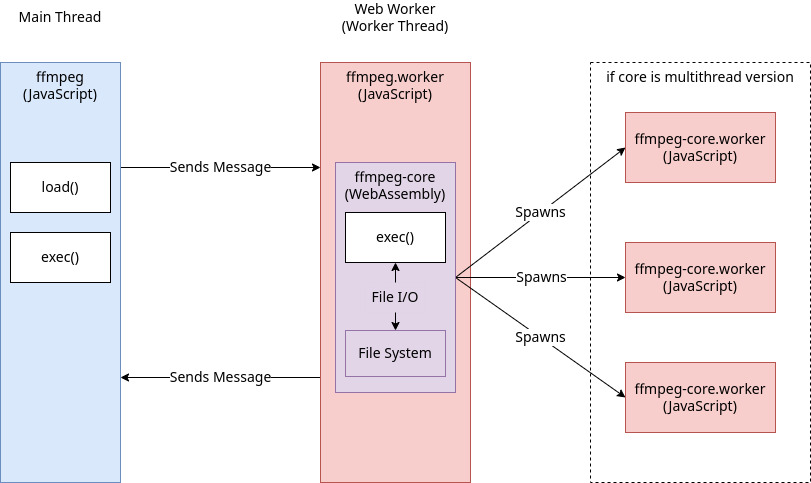
The constraints are hard numbers, not opinions:
- Payload size. The multithreaded core is roughly 31 MB. On mobile data that is a 10–20 second stall before the first frame is even parsed. Lazy-load it, show a real progress bar, and cache it with a service worker.
- SharedArrayBuffer requires cross-origin isolation. The
-mt(multithreaded) core needsCross-Origin-Opener-Policy: same-originandCross-Origin-Embedder-Policy: require-corpheaders. Adding COEP breaks third-party embeds, fonts and analytics scripts that do not send CORP headers. Decide this before you build the page. - Memory. WASM is 32-bit; practical heaps top out around 2 GB and browsers are stricter on mobile. A 4K 10-minute source will not survive in a phone tab. Downscale or segment first.
- Speed. Expect roughly 2–10× slower than native encoding depending on device and thread count. For a 30-second 1080p trim on a laptop, that is acceptable. For a full re-encode, it is not.
- No hardware encoders. Everything is software — battery drain on laptops and phones is real and users notice.
The winning pattern is pre-processing, not production encoding: let the browser trim, crop, downscale and strip metadata, then upload a 20 MB file instead of 380 MB. You cut bandwidth, storage and server CPU in one move, and the user gets instant feedback.
Remotion: video as a function of props
Remotion inverts the model entirely: video is a React component tree where every frame is a pure function of frame. With 71,167 stars and a push today, it is by far the most active of the three — and the only one with a non-MIT license (free for individuals and small teams, company license above the threshold defined in the repo).
A composition, from the official template:
| |
Rendering server-side through the official renderer API:
| |
What Remotion buys you is determinism and version control. The video is code: it lives in Git, it can be reviewed in a pull request, and the same input props always produce the same output. For 10,000 personalized onboarding clips, that property is worth more than raw encoding speed.
What it costs: a headless Chrome per rendering worker (roughly 300–600 MB RSS), a bundling step, and a mental model shift — you are not editing footage, you are animating components frame by frame. Source footage still comes in through <OffthreadVideo>, and heavy footage still needs pre-processing with real FFmpeg before Remotion touches it.
Throughput, cost and the numbers nobody puts in the README
| Scenario | fluent-ffmpeg | ffmpeg.wasm | Remotion |
|---|---|---|---|
| 60s 1080p H.264 re-encode, 4 vCPU | ~12–25 s | 40–120 s (laptop) | N/A (composition render, not re-encode) |
| Marginal cost per job | Server CPU seconds | Zero (user device) | Chrome + CPU seconds |
| Scales with | Your worker pool | Your users’ devices | Your render farm |
| Failure mode | Queue backlog | Tab closed mid-encode | Chrome crash / OOM |
| Retry cost | Re-run whole job | User retries | Re-render composition |
The strategic insight: ffmpeg.wasm converts server cost into user wait time. If your users are on laptops and the operation is small, that trade is excellent. If they are on mid-range phones with a 4K source, it is a support nightmare. fluent-ffmpeg keeps cost on your side of the table but gives you full control. Remotion is the only one that makes video generative rather than converted.
If you also run self-hosted media servers, the transcoding decisions are the same ones covered in our Tdarr vs Unmanic vs HandBrake guide, and real-time media paths (RTP, codec negotiation) are covered in the FreeSWITCH and RTPengine deep dive. For the still-image equivalent of this comparison, see the libvips, sharp and Pillow benchmark.
Pitfalls that will bite you in production
1. FFmpeg builds are not interchangeable. ffmpeg-static ships a generic build without libx264 in some redistributions, and without h264_nvenc/h264_qsv in almost all. Check ffmpeg -encoders | grep 264 on the exact image you deploy, not on your laptop.
2. Licensing follows the build, not the npm package. FFmpeg itself is LGPL/GPL depending on compile flags; an --enable-gpl --enable-libx264 build makes the resulting binary GPL. If you distribute a product that ships FFmpeg, verify the build flags and your obligations. fluent-ffmpeg’s MIT license covers the wrapper only.
3. Progress parsing is approximate. p.percent from fluent-ffmpeg can be undefined early and jump backwards with multi-pass or HLS output. Never drive a UI progress bar from it without smoothing, and never bill on it.
4. Timestamps and rotation metadata. Phone videos carry rotation in metadata rather than pixels. A “vertical” video can arrive as 1920×1080 with a 90° rotate flag; HLS players may or may not honor it. Normalize with -vf "scale=...,transpose=..." or strip rotation explicitly.
5. Audio sync drift on segmenting. Cutting HLS with -c copy at arbitrary keyframe boundaries produces mojibake in some players. Force keyframe alignment (-g, -keyint_min, -sc_threshold 0) at encode time.
6. WASM and cross-origin isolation. Adding COEP breaks Google Fonts, embedded YouTube iframes and analytics. Scope the isolated headers to the editor route only — a <iframe> with COOP/COEP plus postMessage is often cleaner than isolating the whole site.
7. Disk, not CPU, is usually the bottleneck. Segments, temp files and thumbnails can fill a worker’s ephemeral disk long before CPU saturates. Monitor disk and clean up on both success and failure paths; try/finally around your temp directory is not optional.
8. Chrome in a container needs the right flags. Remotion rendering in Docker requires shared memory (--shm-size) and font packages; missing CJK or emoji fonts render as tofu boxes, which you will only notice after the render completes.
FAQ
Should I use fluent-ffmpeg or ffmpeg.wasm for user uploads?
Use fluent-ffmpeg when you must produce multiple renditions (HLS, MP4, thumbnails) and store the results. Use ffmpeg.wasm when the operation is a pre-processing step — trim, crop, downscale, strip metadata — and the value is avoiding an upload of the original. A common hybrid: wasm trims in the browser, fluent-ffmpeg produces final renditions on the server.
Is ffmpeg.wasm fast enough for production?
For short clips and pre-processing, yes. Expect 2–10× slower than native FFmpeg depending on device, threads and codec. It is not suitable for full-length re-encodes on mobile, and it cannot use hardware encoders, so battery and CPU cost land on the user.
Does Remotion replace FFmpeg?
No. Remotion renders frames with headless Chrome and encodes with FFmpeg under the hood. It replaces your composition layer — layouts, animation, data binding — not the encoder. You still need real FFmpeg for input normalization and for anything that is not a Remotion composition.
Why does ffmpeg.wasm need special HTTP headers?
The multithreaded core uses SharedArrayBuffer, which browsers only expose to cross-origin-isolated pages. That requires Cross-Origin-Opener-Policy: same-origin and Cross-Origin-Embedder-Policy: require-corp. Without them, ffmpeg.load() fails or silently falls back to single-threaded mode.
How do I run many FFmpeg jobs without overloading a Node server?
Put jobs in a durable queue (BullMQ, pg-boss, SQS) and run workers as a separate deployment. Set worker concurrency to roughly half the vCPU count because x264/x265 already thread internally, add per-job timeouts, and clean temp files in a finally block. Never call FFmpeg from an HTTP handler.
Is Remotion free for commercial use?
Remotion uses its own license, not MIT. Individuals and small teams can use it free; companies above the revenue/employee threshold defined by the project need a company license. Check the current terms in the repository before shipping — this is the one place where the three tools genuinely differ in legal risk.
💰 想测试你的市场判断力?我用 Polymarket 做预测市场交易——这是全球最大的预测市场平台,从大选结果到技术监管时间线,什么都可以押注。和赌博不同,这是真正的信息市场:你懂的信息越多,胜率越高。我靠预测技术相关事件的走向已经赚了不少。用我的邀请链接注册:Polymarket.com