You add one line — every 1.day, at: '4:30 am' — and ship it. Three weeks later the nightly invoice job has run twice on Tuesdays, not at all on the day you deployed at 04:29, and nobody can tell you which of the four Rails hosts actually executed it. Recurring jobs are the smallest feature in your app with the largest blast radius, because the failure mode is silent and the damage is already written to the database by the time anyone notices.
Ruby has four mature answers, and they differ in something more fundamental than API taste: where the schedule lives. rufus-scheduler keeps it in process memory, Whenever exports it to the system crontab, GoodJob stores it in PostgreSQL, and sidekiq-cron keeps it in Redis alongside your Sidekiq queues. That choice determines what happens on restart, on deploy, and on the second web host.
TL;DR — Pick in Thirty Seconds
- Rails app already on PostgreSQL? → GoodJob. Cron entries in the database, advisory locks so only one host fires each job, and a dashboard that shows you the next run time. This is the correct default in 2026.
- Already running Sidekiq and Redis, and you like it? → sidekiq-cron. Same queues, same retries, same web UI, plus a cron tab.
- Tiny app, no Redis, no Postgres, one VPS? → Whenever. It writes real crontab entries and needs nothing but the cron daemon.
- A script, a rake task runner, or a single long-lived process? → rufus-scheduler. No infrastructure at all — and no durability either, which is the trade.
The Four Contenders at a Glance
Live data from GitHub and RubyGems as of 2026-10-31.
| rufus-scheduler | Whenever | GoodJob | sidekiq-cron | |
|---|---|---|---|---|
| Stars | 2,446 | 8,854 | 2,999 | 1,945 |
| Gem version | 3.9.2 | 1.1.4 | 4.24.0 | 2.4.0 |
| Last commit | 2026-06-22 | 2026-10-21 | 2026-10-30 | 2026-10-16 |
| License | MIT | MIT | MIT | MIT |
| Schedule stored in | Process memory | System crontab | PostgreSQL | Redis |
| Survives restart | No | Yes | Yes | Yes |
| Safe with N app hosts | No (unless you add a lock) | Per-host crontab — needs care | Yes (advisory locks) | Yes |
| Extra infrastructure | None | cron daemon | PostgreSQL | Redis + Sidekiq |
| Web dashboard | No | No | Yes | Sidekiq Web + cron tab |
| Missed-run recovery | No | No (cron just fires next time) | Yes (cron_graceful_restart_period) | No |
| Best fit | Single process / scripts | Minimal VPS apps | Rails on Postgres | Sidekiq shops |
The star counts invert the recommendation, and that is worth understanding before you pick. Whenever’s 8,854 stars reflect a decade of being the first answer anyone found, not superiority for multi-host Rails in 2026. rufus-scheduler’s 2,446 stars sit on an in-process design that silently duplicates work the moment you scale past one worker process.
Decision Matrix
| Situation | Pick | Why |
|---|---|---|
| 3 Puma hosts behind a load balancer | GoodJob | Postgres advisory locks make exactly-once firing the default |
| Existing Sidekiq deployment, 200k jobs/day | sidekiq-cron | Reuses your queues, retries, dead set, and dashboards |
| Single 1 GB VPS, SQLite, no Redis | Whenever | Zero new infrastructure; cron is already running |
A rake task that must poll every 60 seconds in one container | rufus-scheduler | In-process, no round trip to any store |
| Job must run even if the app is down at that minute | GoodJob | Enqueued and persisted; catches up after restart |
| You need to see a job’s next run time in a UI | GoodJob | Dashboard lists cron entries with next-run timestamps |
| Strict no-Postgres policy but you have Redis | sidekiq-cron | Cron state lives in Redis, not SQL |
Docker container without cron installed | GoodJob or rufus-scheduler | Whenever needs the daemon present in the image |
rufus-scheduler: The Zero-Infrastructure Option
rufus-scheduler is a thread-based scheduler you start inside your own process. There is no database, no daemon, no configuration file — just a scheduler object and blocks.
| |
The API is genuinely pleasant: in for one-shot delays, every for intervals (it accepts '3h10m'-style strings), and cron for real cron expressions. Because it runs in-process, it can call your application code directly — no serialization boundary, no worker boot, no queue.
That convenience is also the entire problem. The schedule lives in memory, so it dies with the process. Deploy at 04:29 and the 04:30 job never fires — and nothing tells you. Restart the container and any job that was supposed to run during the gap is simply skipped.
Worse, in a multi-process deployment each process builds its own scheduler. Three Puma workers means three schedulers means three executions of every cron entry. The gem’s documentation has always been clear that it is not a distributed scheduler; the trap is that nothing in the code makes this obvious.
| |
Use it when: you have a single dedicated process whose whole job is scheduling, or you need periodic work inside a CLI tool. Do not use it as your Rails app’s scheduler unless you have solved the leader-election problem yourself.
Whenever: Cron as the Source of Truth
Whenever takes a completely different approach: it does not schedule anything at runtime. It is a DSL that generates crontab lines, which you install once at deploy time.
| |
Install it into the current user’s crontab:
| |
The --set environment=production part is not optional in practice. Whenever renders RAILS_ENV into each generated line from the environment at generation time, so running this on a machine where RAILS_ENV is unset produces crontab entries that boot your app in development mode — or crash — every night at 04:30, quietly.
The generated output is ordinary cron, which is the whole appeal:
| |
Recurring tasks now survive restarts, deploys, and even your app being down — cron fires the command and the command boots Rails. Requirements are minimal: a cron daemon and a Ruby environment on the same host.
The two limitations are structural. First, cron knows nothing about your cluster: install the crontab on four hosts and the job runs four times, because each host’s cron is independent. The fix is operational (run it on one host, or wrap the command in a distributed lock), not something Whenever can do for you. Second, slim containers usually have no cron daemon. If you deploy to ruby:slim or distroless images, whenever --update-crontab writes a file nobody reads.
A note on Whenever 1.x: the DSL gained sequential: true for ordered task groups and halt_sequence_on_failure: true on individual jobs. If you are still on 0.10, that behavior does not exist — multiple jobs in one every block run in parallel, which surprises people who expect top-to-bottom execution.
Use it when: you have a small number of hosts, cron present, and you want the simplest possible mental model. Avoid it when: you autoscale, run multiple hosts, or deploy to images without cron.
GoodJob: Database-Backed Cron for Rails on Postgres
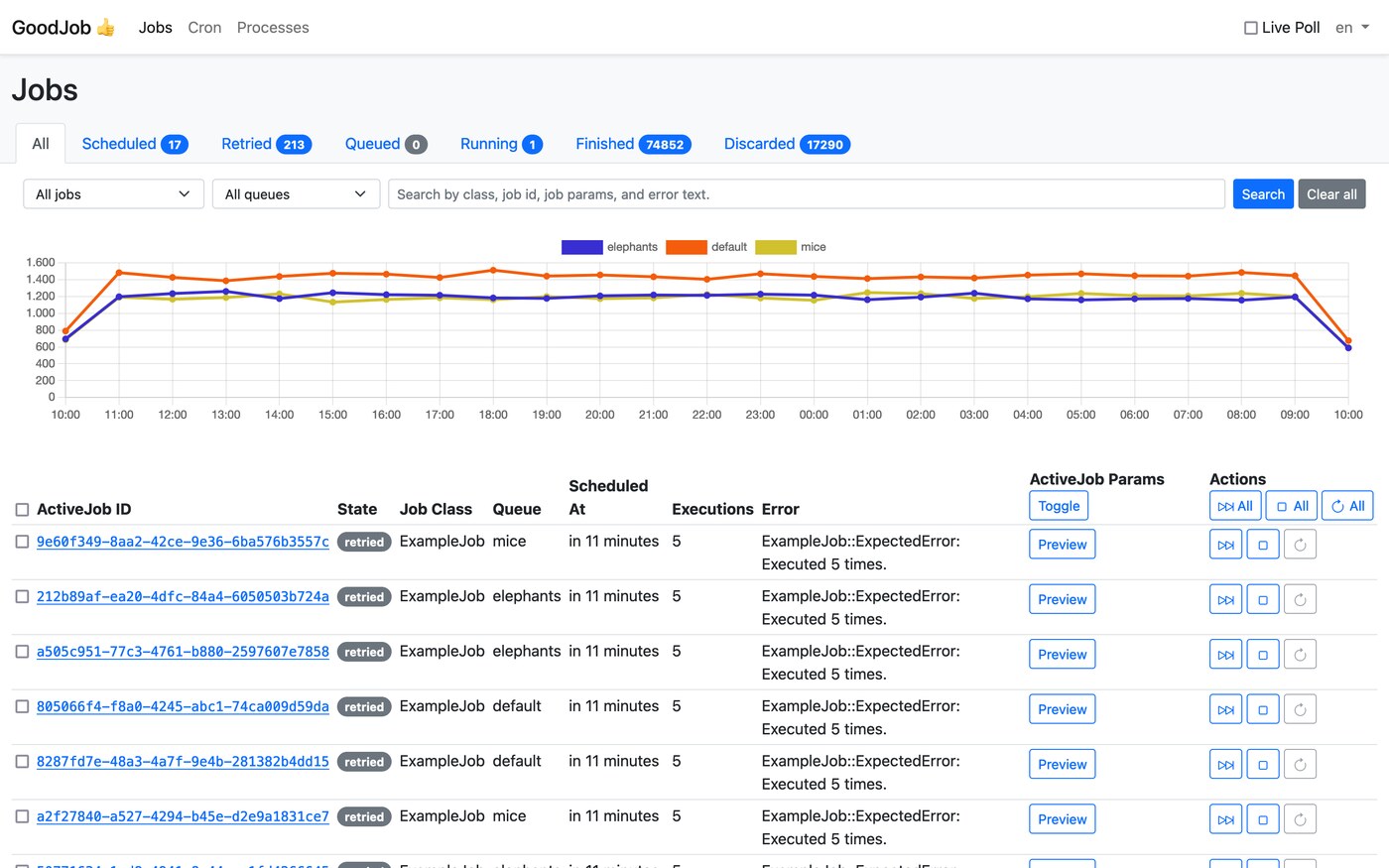
GoodJob is an Active Job backend that stores jobs in PostgreSQL and uses LISTEN/NOTIFY instead of polling. Its cron support is the most operationally boring option here, which is the highest compliment you can pay a scheduler.
Setup is Active Job plus a cron hash:
| |
| |
Run it as a separate process when you want scheduling isolated from web traffic:
| |
The dashboard mounts like any Rails engine:
| |
What makes GoodJob the right default for multi-host Rails: cron entries are rows in Postgres, and each run is claimed with an advisory lock. Four Puma hosts with execution_mode = :async all look at the cron table, and exactly one wins the lock for each tick. No leader election to configure, no per-host crontab to keep in sync, no duplicate invoices.
It also solves the missed-run problem that rufus-scheduler cannot: if the app is down at 04:30, the job is enqueued on the next available tick rather than skipped, and cron_graceful_restart_period governs how far back GoodJob will look after a restart.
The constraint is hard: PostgreSQL. Not MySQL, not SQLite. If your Rails app is on MySQL, GoodJob is simply unavailable and you should look at sidekiq-cron or a cron-based approach instead.
sidekiq-cron: Cron for People Who Already Run Sidekiq
If Sidekiq is already in your stack, sidekiq-cron adds recurring enqueueing with essentially no new concepts. You define a job and it lands in the same queues, retries, and dead set as everything else.
Programmatically:
| |
Or declaratively, which is what you want in version control — config/sidekiq.yml:
| |
Cron entries appear in Sidekiq Web under a Cron tab, with enable/disable toggles and a “Enqueue now” button — genuinely useful when you need to re-run last night’s digest without waiting 24 hours.
The scheduler state lives in Redis, so it survives restarts as long as Redis is persistent. Two caveats matter in production. Redis must be configured with append-only file or RDB persistence; a Redis restart with an in-memory-only config silently loses your cron definitions. And the enqueue is at-most-once per tick: sidekiq-cron’s poller enqueues the job, and if that enqueue is lost, the run is lost — there is no catch-up mechanism for a window when the process was down.
Use it when: you already run Sidekiq and Redis and want recurring jobs to share the same reliability model as your other background work. Avoid it when: adding Redis just for scheduling is the only reason Redis exists in your infrastructure.
Timezones: The Bug That Hits Every Team Once
Whichever tool you pick, this pitfall is independent of it and far more common than any API mistake.
- Whenever and rufus-scheduler interpret cron expressions in the system timezone (
/etc/localtime) unless you say otherwise. - Rails stores and compares times in
Time.zone, which you set inconfig/application.rb.
During daylight-saving transitions these diverge. A job configured at: '2:30 am' in a zone that springs forward at 2:00 am either runs twice or not at all. A container built from a base image defaults to UTC while your team reasons in local time, which shifts every job by five or eight hours — and it will look correct in staging (where someone exported TZ) and wrong in production.
| |
| |
Large time shifts are also why daily reports dated by Date.today produce duplicate or missing rows: the scheduler fires in one zone and the query filters in another. Prefer explicit Time.zone.now boundaries over implicit local-time assumptions in job code.
How to Choose Without Regretting It in Six Months
Ask three questions in order.
1. Do you run more than one application host? If yes, eliminate rufus-scheduler immediately — it will fire your job once per process, and no amount of documentation saves you from a teammate adding a worker later. Whenever survives only if you deliberately install the crontab on a single host and remember that forever.
2. Which datastore do you already pay for? Postgres → GoodJob. Redis → sidekiq-cron. Neither → Whenever if cron exists on the host, rufus-scheduler if you control a single process.
3. Do you need to know when a job will run next? GoodJob and sidekiq-cron both answer this in a UI. Whenever answers it in crontab -l and your head. rufus-scheduler answers it in a process you have to attach to.
FAQ
Which Ruby scheduler should I use in Rails in 2026?
For a Rails application on PostgreSQL, use GoodJob. It stores cron definitions in the database, uses advisory locks so only one host executes each tick, recovers missed runs after a restart, and ships a dashboard showing next-run times. On MySQL without Sidekiq, use Whenever with a single designated host. With existing Sidekiq and Redis, sidekiq-cron is the lower-friction choice.
Does rufus-scheduler survive a restart?
No. The schedule lives in process memory, so a deploy, crash, or container restart destroys pending timers. One-shot in jobs are lost entirely, and interval or cron jobs restart their schedule from the moment the process boots — which is why a nightly job scheduled for 04:30 can be skipped permanently if you deploy at 04:29 every night.
Will Whenever run my job twice with multiple app servers?
Yes, if you install the crontab on every host. Each host’s cron daemon is independent and knows nothing about the others. The standard fixes are to install the schedule on exactly one designated host, or to wrap the generated command in a distributed lock (a Postgres advisory lock, a Redis SET NX with TTL, or a lock gem) so only one instance proceeds.
Does GoodJob work with MySQL or SQLite?
No. GoodJob requires PostgreSQL because it relies on Postgres-specific features: advisory locks for job claiming, LISTEN/NOTIFY for low-latency dispatch, and SKIP LOCKED for concurrent dequeueing. Rails apps on MySQL should use sidekiq-cron or Whenever instead.
How do I run recurring jobs in a Docker container without a cron daemon?
Do not use Whenever in that case — it writes crontab entries that nothing will execute. Use GoodJob with execution_mode = :external and a dedicated worker container, sidekiq-cron in your Sidekiq container, or rufus-scheduler in a single-purpose process container. If you must keep the cron-file model in a slim image, install a supercronic-style runner that reads a crontab file without a system daemon.
What happens to a scheduled job if the app is down when it should run?
It depends entirely on where the schedule lives. rufus-scheduler skips it — the timer never existed. Whenever skips it, because cron does not record missed invocations. sidekiq-cron skips it unless its poller was running. GoodJob catches up: its cron entries are database rows, so the run is enqueued on the next tick after the process returns, bounded by cron_graceful_restart_period.
Related Reading
If you are choosing the worker layer rather than the scheduler, our Ruby background job processor comparison covers Sidekiq, Shoryuken, Faktory, and Sucker Punch in depth — including why a scheduler and a queue are two different problems. For the same comparison in other ecosystems, see the job scheduling library roundup covering APScheduler, robfig/cron, gocron, and Quartz, and the C# job scheduling comparison covering Hangfire, Quartz.NET, and Coravel.
💰 想测试你的市场判断力?我用 Polymarket 做预测市场交易——这是全球最大的预测市场平台,从大选结果到技术监管时间线,什么都可以押注。和赌博不同,这是真正的信息市场:你懂的信息越多,胜率越高。我靠预测技术相关事件的走向已经赚了不少。用我的邀请链接注册:Polymarket.com