Your analytics dashboard says 12,400 sessions. Your payment provider says 340 checkouts. Somewhere between those two numbers, the story of your business disappears — and consent banners are part of why. Cookie-based analytics now lose a double-digit share of sessions to rejection or blocking, which means the reports you make decisions with are systematically biased toward people who do not mind being tracked.
The 2026 answer is not “no analytics.” It is cookie-free, self-hosted measurement with a data model you control. Three projects lead that category: Umami (39,785 stars, MIT), Rybbit (13,187 stars, AGPL-3.0), and Swetrix (1,210 stars, AGPL-3.0). They look similar on a landing page and behave very differently under load, in a backup restore, and on the day you need funnel data for a board deck.
TL;DR
- Umami is the safe default: MIT licensed, 39.8K stars, dead-simple Postgres deployment, and the largest third-party integration ecosystem. Pick it unless you have a specific reason not to.
- Rybbit is the best product of the three: sessions, funnels, journeys, and a UI that does not require a manual. It is also the heaviest — Caddy + ClickHouse + Postgres + Redis + two app containers. Pick it when you will actually read the dashboard.
- Swetrix is the only one that bundles error tracking and performance monitoring with traffic analytics, so it can replace two tools. Pick it if you want one pane of glass and can tolerate a smaller community.
- Migration warning: none of them can import your GA4 history. Start collecting now; historical comparisons will be impossible for 90 days either way.
Side-by-Side
| Umami | Rybbit | Swetrix | |
|---|---|---|---|
| Stars | 39,785 | 13,187 | 1,210 |
| License | MIT | AGPL-3.0 | AGPL-3.0 |
| Last commit | 2026-10-29 | 2026-10-26 | 2026-10-29 |
| Primary datastore | PostgreSQL | ClickHouse (+ Postgres, Redis) | ClickHouse (+ MySQL, Redis) |
| Containers | 2 (app + database) | 5–6 (app, client, ClickHouse, Postgres, Redis, optional Caddy) | 4+ (API, frontend, ClickHouse, MySQL, Redis) |
| Minimum sane RAM | ~1 GB | ~4 GB | ~2 GB |
| Cookie-free tracking | Yes | Yes | Yes |
| Funnels / goals | Goals, basic funnels | Funnels, goals, journeys, retention | Funnels, goals, sessions |
| Error tracking | No | No | Yes, built in |
| Performance monitoring | No | Basic web vitals | Yes, built in |
| Self-host difficulty | Easy | Advanced | Medium–advanced |
| Best for | Most teams | Product teams who live in the dashboard | Teams consolidating analytics + errors |
Decision Matrix
| Your situation | Use | Why |
|---|---|---|
| Marketing site, 10k–500k pageviews/month, one engineer | Umami | Two containers, Postgres backup, done |
| SaaS with signup funnels and a product manager | Rybbit | Journeys and funnels are first-class, not bolted on |
| You also pay for error tracking | Swetrix | Traffic + errors + performance in one install |
| 8 GB VPS already running five services | Umami | Rybbit’s ClickHouse stack will fight your other tenants for RAM |
| Compliance review with legal | Umami (MIT) or Swetrix | MIT licensing removes a procurement conversation |
| You want raw SQL over events | Rybbit / Swetrix | ClickHouse rewards ad-hoc aggregation queries |
Umami: The Boring Correct Choice
Umami’s pitch is that analytics should be a small Postgres application. The official compose file is 30 lines and tells you everything about the architecture: one app container, one database, a heartbeat healthcheck, and an APP_SECRET you must change.
| |
Two operational notes that the README does not emphasise enough. First, APP_SECRET and TWO_FACTOR_ENCRYPTION_KEY must be generated once and preserved — rotating them invalidates sessions and two-factor enrolments. Second, change the default database password before the container ever binds to a non-loopback interface; umami/umami is the documented default, which means it is also the first thing a scanner tries.
Tracking is a single <script> tag with a data-website-id, which is why Umami has become the default in static-site generators and Hugo themes: no build step, no wrapper library, no cookie banner gymnastics. The trade-off is analytical depth. Umami answers “how many, from where, on what page” extremely well and “why did this cohort convert” only partially. Funnels exist, but multi-step journey analysis is not its strength.
Where Umami genuinely wins: aggregation speed at moderate volume on commodity hardware. Postgres with proper indexes handles millions of events comfortably. You are not forced into a distributed column store for a marketing site.
Rybbit: ClickHouse-Backed Product Analytics
Rybbit’s compose file reads like a small production platform, because that is what it is:
| |
The division of labour is the point: ClickHouse stores and aggregates events, Postgres holds relational configuration (sites, users, goals), Redis handles sessions and queues, and the backend/client split means the UI can be served from a CDN edge while the API stays private. If you have ever watched a Postgres-backed analytics table hit 50 million rows and start timing out on GROUP BY, this architecture is the fix.
The cost is real. ClickHouse wants RAM and disk; on a 4 GB VPS shared with other services it will be the loudest tenant. CLICKHOUSE_PASSWORD defaults to frog in the compose file — change it, and also change CLICKHOUSE_QUERY_PASSWORD if you enable read-only query users. BETTER_AUTH_SECRET must be a strong random value; it signs sessions.
What you get in return is the best analysis surface of the three. Funnels, goals, journeys, retention, and filter combinations that stay responsive at event volumes where Umami’s Postgres queries become a background job. For a product team that actually opens the dashboard weekly, Rybbit is the one that survives the second quarter.
Swetrix: Traffic, Errors, and Web Vitals in One Install
Swetrix differentiates by scope rather than by query engine. It ships cookie-free traffic analytics plus error tracking and performance monitoring, which means the stack is ClickHouse for events, MySQL for relational data, and Redis for caching and queues — three datastores, which is both the feature and the tax.
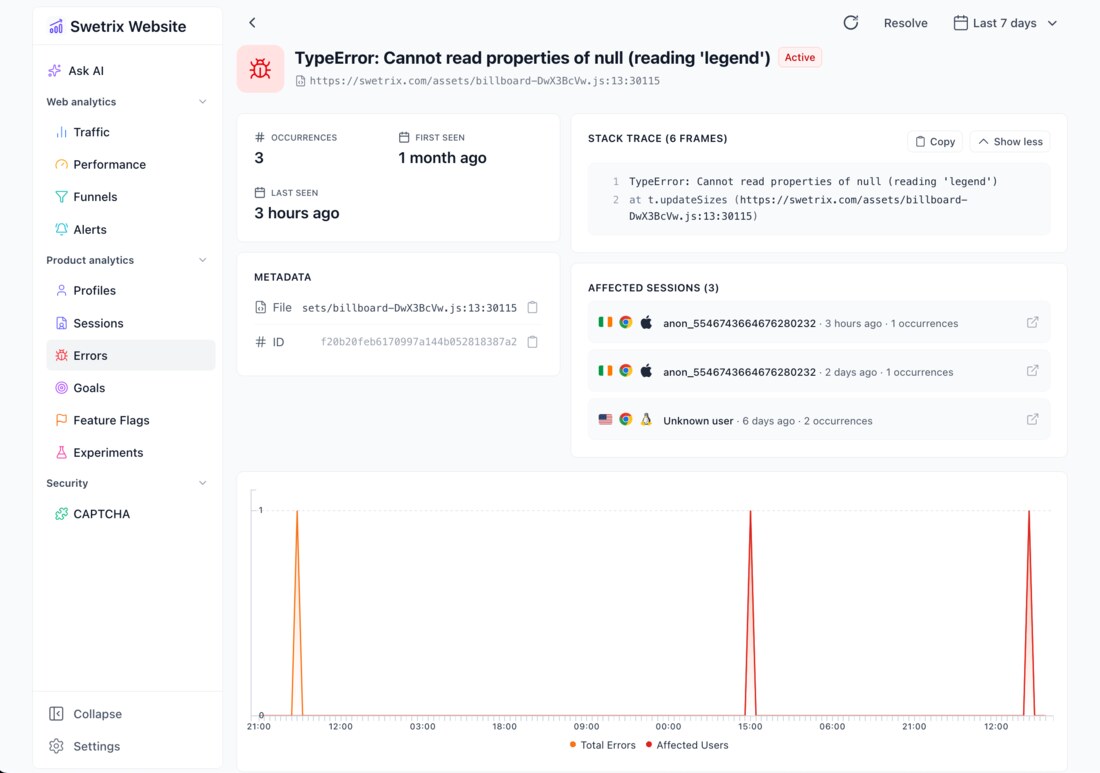
The practical argument is tool consolidation. If you are currently running analytics, an error tracker, and a separate web-vitals monitor, Swetrix replaces three subscriptions with one self-hosted install and one backup job. The error view groups exceptions, tracks occurrence counts over time, and links each group to the release and page where it appeared — the same job our GlitchTip vs Sentry comparison covers in depth, except here it is included rather than integrated.
The counter-argument is community size. At 1,210 stars, Swetrix has roughly 3% of Umami’s mindshare: fewer blog posts, fewer Stack Overflow answers, fewer people who have already hit your exact migration bug. The codebase is actively maintained (last commit 2026-10-29) and the docs are thorough, but you are earlier on the support curve. Budget an afternoon for the initial install rather than an hour.
Also worth knowing: Swetrix’s commercial product and its open-source edition share a codebase but not an identical feature surface. Read the self-hosting documentation for your target version before promising a stakeholder a specific report — cloud screenshots are not a specification.
Deployment Reality: What Breaks First
- Do not migrate mid-quarter. None of these tools imports GA4 history. You will run two systems in parallel for a month, and your first month-over-month report will be wrong. Start collection at the beginning of a period you can explain.
- Bot filtering is not optional. All three filter known bots, but self-hosted installs see far more junk traffic than a hosted product because there is no shared reputation layer. Check your referrer report weekly for the first month; a single spoofed referrer can be 40% of “traffic.”
- Backups differ per stack. Umami:
pg_dumpand you are done. Rybbit: Postgres config + ClickHouse data (useBACKUP/FREEZE, not a raw file copy of a running server). Swetrix: MySQL + ClickHouse + Redis state. Write the restore procedure before you need it — the profiling guide principle applies: measure, do not assume. - Retention policies save disks. ClickHouse will happily keep every event forever. Set a TTL (90–365 days) on the events table or your 200 GB VPS becomes a 200 GB problem.
- Privacy defaults are not legal advice. Cookie-free tracking with IP anonymisation reduces consent requirements in many jurisdictions, but “we self-host it” is not a compliance strategy. Have counsel review your actual data flow, especially if you sell into the EU.
- Segment your ad blockers. Even cookie-free scripts get blocked. Server-side event collection (proxying the script through your own domain) recovers a meaningful share of lost sessions — and it is the single highest-leverage change you can make after install.
Which One Replaces Your Current Stack?
If your current tool is Google Analytics and you mainly want honest pageview and referrer numbers, Umami is the lowest-risk replacement: MIT licence, Postgres, two containers, and a tracking snippet that fits in a Hugo template.
If your current tool is a product analytics suite and you care about funnels and journeys, Rybbit is the only one of the three built for that reading pattern. Accept the ClickHouse footprint; it is the reason the dashboards stay fast.
If your current tool is three tools, Swetrix is the consolidation play. And if you are still deciding whether self-hosting analytics is worth it at all, our Matomo vs Plausible vs Umami breakdown and the Countly vs PostHog vs Matomo comparison cover the heavier end of the market, where per-event pricing stops being theoretical.
FAQ
Are these tools really cookie-free, and does that remove the need for a consent banner? They do not set analytics cookies by default, which removes one common trigger for consent banners. It does not automatically make you compliant: local storage identifiers, IP handling, and whether you combine analytics data with other personal data all matter. Treat cookie-free as a strong starting position, not a legal conclusion.
Can I import my Google Analytics history? No. None of the three ships a GA4 import path, and the underlying data models (sessions vs events vs pageviews) do not map cleanly. The practical approach is to keep GA read-only for historical reference and start fresh collection in the new tool, accepting a break in long-range comparisons.
Which one handles the most traffic per gigabyte of RAM? Rybbit and Swetrix, because ClickHouse is designed for exactly this access pattern — large scans with tight aggregation. Umami’s Postgres backend is fine into the low millions of events, then index maintenance and vacuum start to compete with query latency. If you expect sustained high volume, choose a column store on day one rather than migrating later.
Do I need a reverse proxy in front of them? Yes for anything internet-facing. Rybbit’s compose includes an optional Caddy profile; Umami and Swetrix expect you to terminate TLS yourself. Put all three behind Caddy or Nginx, enable compression, and proxy the tracking script through your own domain to reduce the impact of blocklists.
How do I back up ClickHouse without corrupting it?
Use ClickHouse’s own BACKUP command to a disk or S3 target, or pause writes and use ALTER TABLE ... FREEZE before copying parts. Copying a live ClickHouse data directory with rsync produces subtly broken parts that fail on restore — the failure usually appears weeks later, in one shard, during a board meeting.
Is the AGPL licence a problem for a commercial site? Running AGPL software as a service for your own business is fine; the obligation is about distributing modified versions or offering the modified software as a network service to others. If you plan to embed analytics inside a product you sell, read the licence with counsel — or pick Umami’s MIT licence and skip the question.
💰 想测试你的市场判断力?我用 Polymarket 做预测市场交易——这是全球最大的预测市场平台,从大选结果到技术监管时间线,什么都可以押注。和赌博不同,这是真正的信息市场:你懂的信息越多,胜率越高。我靠预测技术相关事件的走向已经赚了不少。用我的邀请链接注册:Polymarket.com