OmnySSH vs Voltius vs RustConn in 2026: Three Termius Alternatives That Don’t Need a Subscription
Termius sat at 649 MB of RAM across nine processes on an idle machine. That is not a typo, and it is not a benchmark run under load — it is what one of these projects measured while comparing itself to the incumbent. For a tool whose entire job is holding an SSH socket open, that is an absurd amount of memory, and it is exactly why the paid-SSH-client category has been quietly rebuilt in Rust over the last two years.
Three of those rebuilds are now mature enough to use daily: OmnySSH (1,244 stars, Apache-2.0), Voltius (790 stars, AGPL-3.0) and RustConn (640 stars, GPL-3.0). All three are open source, all three ship signed builds, and all three are actively developed — every one of them had commits in the last three weeks. They are also aimed at genuinely different operators, which is why “which is best” is the wrong question.
TL;DR — The 30-Second Verdict
- You live in a terminal, manage 20+ Linux hosts, and want one-click key hardening: pick OmnySSH. 130 MB RAM, a real TUI that stays maintained, and an SSH key setup flow that backs up
sshd_configbefore it touches it. - You work in a team and need shared, synced host inventories: pick Voltius. Team vaults, end-to-end encrypted sync, and importers for Termius, MobaXterm, PuTTY and SecureCRT — the only one of the three that takes migration seriously.
- You connect to Windows boxes and network gear as often as Linux: pick RustConn. SSH is one protocol among eight: RDP, VNC, SPICE, MOSH, Telnet, Serial, Kubernetes and Zero Trust all live in the same host list.
- You only have three servers: honestly,
~/.ssh/configplussshis still undefeated. Install nothing.
Comparison Table (stats pulled 2026-10-28)
| Dimension | OmnySSH | Voltius | RustConn |
|---|---|---|---|
| GitHub stars | 1,244 | 790 | 640 |
| Licence | Apache-2.0 | AGPL-3.0 | GPL-3.0 |
| Stack | Rust (GUI + TUI) | Rust core + TypeScript/Tauri | Rust + GTK4/libadwaita |
| Last commit | 2026-10-09 | 2026-10-25 | 2026-10-26 |
| Interfaces | Desktop GUI, TUI, Termux | Desktop GUI, Android | Desktop GUI (GTK) |
| Protocols | SSH, SFTP, port forwarding | SSH, SFTP, Serial | SSH, RDP, VNC, SPICE, MOSH, Telnet, Serial, Kubernetes |
| Team sync | No | Yes (E2EE vaults) | No |
| Importer from other clients | ~/.ssh/config at startup | Termius, MobaXterm, PuTTY, KiTTY, SecureCRT, ZOC, CSV | Manual / config |
| Container integration | Docker container count badge | Docker + Proxmox LXC manager | — |
| Install channels | install.sh, cargo, Homebrew, Releases | APT/DNF repo, AUR, Flatpak | Flatpak, Snap, brew, OBS, AUR, FreeBSD, Nix |
| Memory profile | ~130 MB with several sessions | Tauri webview baseline | GTK4 baseline |
| Best fit | Solo operators, large fleets | Teams sharing access | Mixed-OS estates |
Decision Matrix
| Your situation | Pick | Reason |
|---|---|---|
| 50 VPS instances, all Linux | OmnySSH | Host grid with CPU/RAM/disk bars; sick server visible from across the room |
| Three engineers sharing 30 hosts | Voltius | Team vaults with role permissions beat a shared password in a wiki |
| You still RDP into Windows VMs | RustConn | Embedded RDP with FreeRDP fallback, not a bolt-on |
| Air-gapped lab | OmnySSH (TUI) or RustConn (Flatpak) | No cloud dependency in either path |
| Ubuntu 22.04 fleet | RustConn | Voltius needs glibc 2.39+; Ubuntu 22.04 has 2.35 |
| You share your screen on calls | OmnySSH | Streamer mode replaces real IPs on screen |
| You forward ports constantly | OmnySSH | Port forwarding is a first-class tab, not a dialog |
OmnySSH — Small, Fast, and Ruthless About Scope
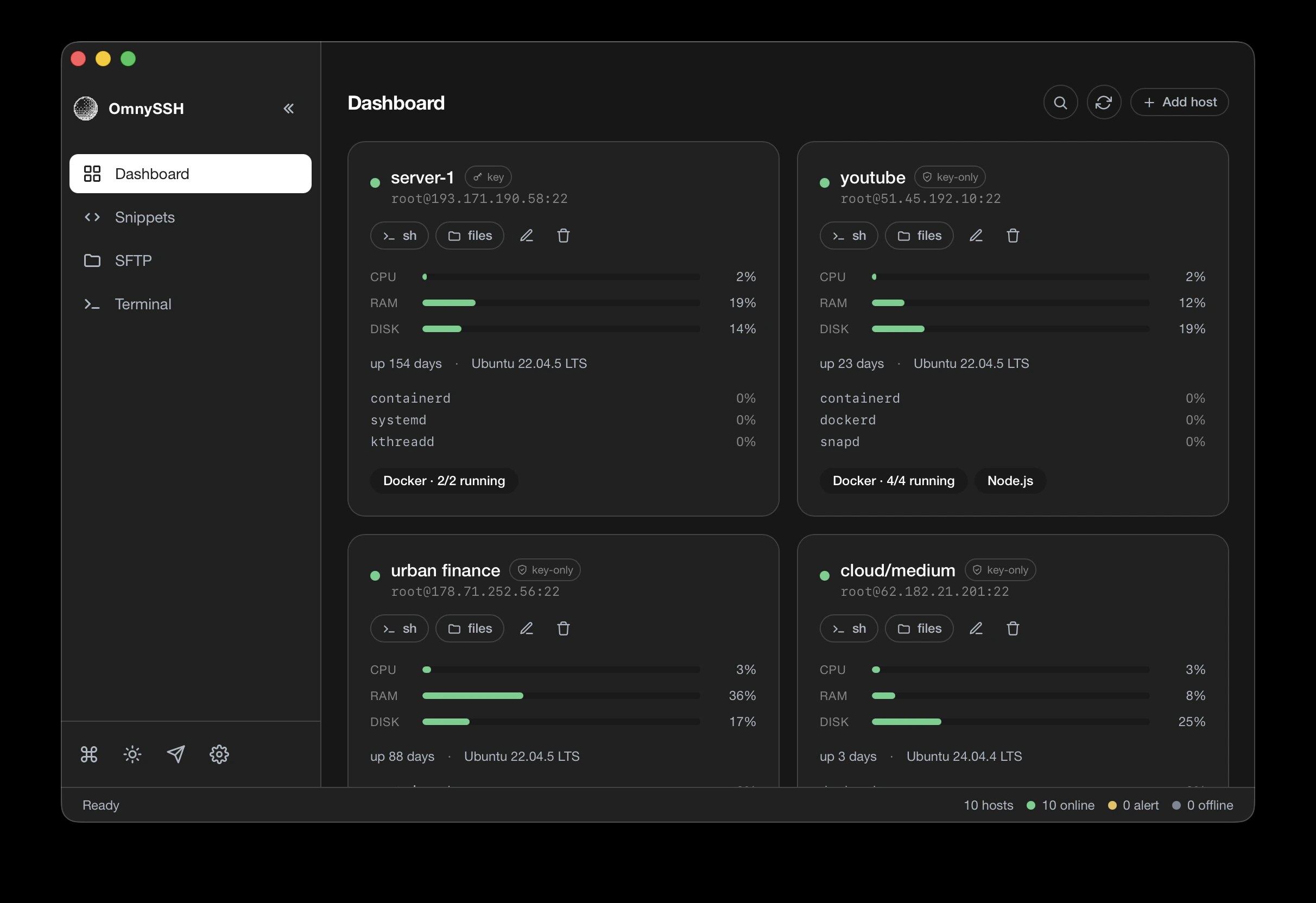
OmnySSH started as a terminal UI and the TUI is still shipped and still gets releases — that is rarer than it should be. The desktop build wraps the same core in a host grid where every card shows CPU, RAM and disk bars, uptime, OS version, top processes, and a Docker badge counting running containers. Bars go yellow, then red. You stop reading dashboards and start noticing colour.
The feature that justifies the install is one-click SSH key setup. Pick a host with no key configured, hit “Set up SSH key”, and it generates an Ed25519 key, appends the public half to authorized_keys, reconnects to prove the key works, then disables password login. Before editing sshd_config it saves a backup on the server and restores it if any step fails. Password auth on a fresh VPS is the chore everyone postpones; this closes it in one flow.
Two design decisions worth respecting: it reads ~/.ssh/config at startup and never writes to it (your canonical config stays canonical), and passphrases for encrypted keys are held in memory only, never on disk.
| |
Prebuilt TUI binaries also exist for Linux, macOS, Windows and Termux under the omny-* release assets — relevant if you administer hosts from a phone.
Where it breaks: no team sync at all. The host list is local. Two engineers means two independently drifting inventories. And the key-setup flow has no confirmation step after you start it — by design, but do not click it on a host whose sshd_config you hand-tuned.
Voltius — The Team Vault Play
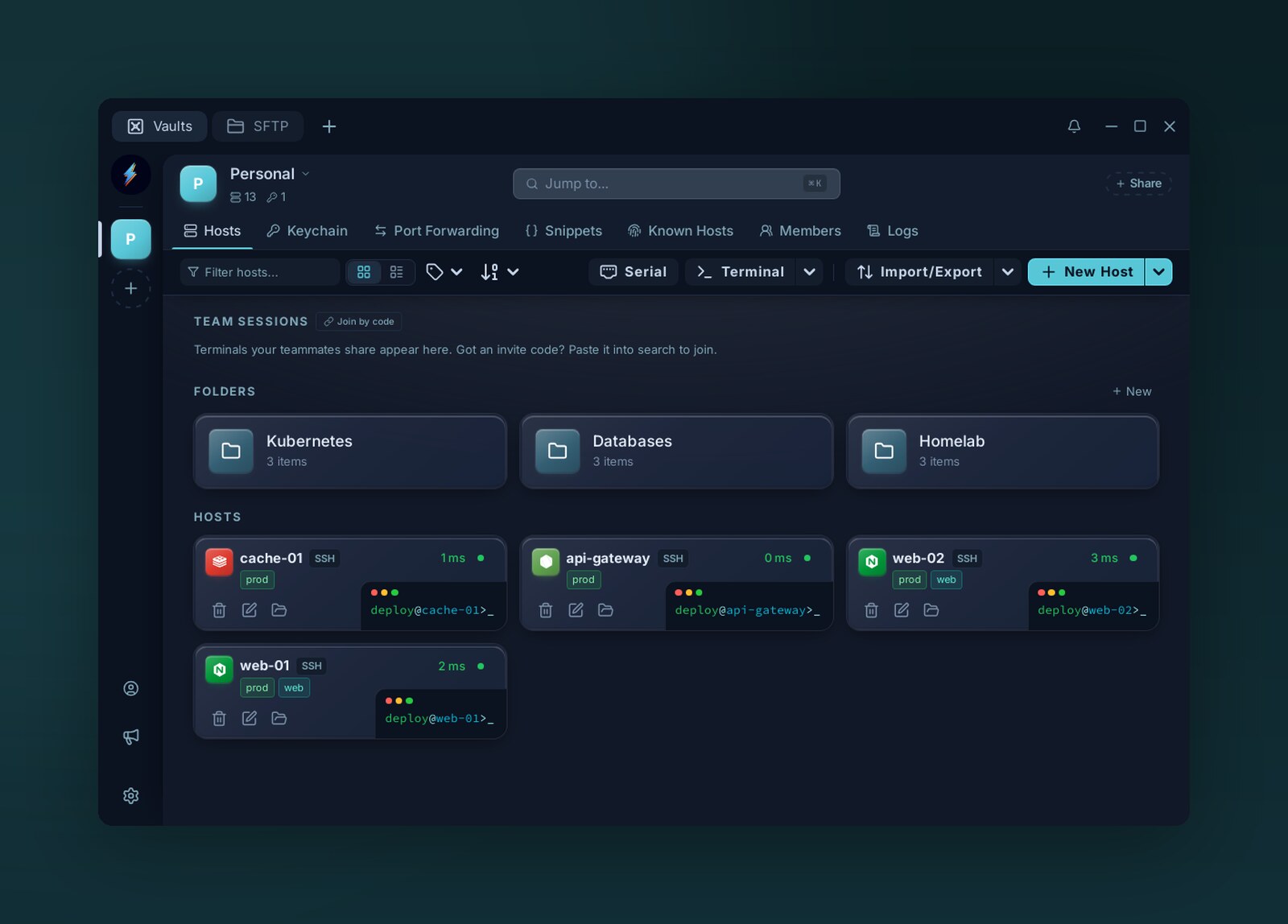
Voltius is the only one of the three that treats access as a shared resource. Team vaults with role permissions, real-time end-to-end encrypted sync, and live session sharing mean a new hire gets the right hosts on day one instead of a text file of IPs.
The migration story is unusually honest: one-click importers for Termius, MobaXterm, PuTTY/KiTTY, SecureCRT, ZOC Terminal and CSV, plus export to open JSON (optionally encrypted). No vendor lock-in is a marketing phrase until you test it; here it is a menu item.
It also reaches beyond SSH: a container manager for Docker and Proxmox LXC, a plugin registry, a command palette, split panes with broadcast input, and a dual-pane SFTP manager. On a single screen that is more surface than either competitor — the trade-off is Tauri’s webview baseline memory, which will never match a native GTK or pure-Rust UI.
| |
Where it breaks: prebuilt Linux packages require glibc 2.39 or newer — Ubuntu 24.04+, Debian 13+, Fedora 40+, RHEL 10+. On Ubuntu 22.04 you are on Flatpak or building from source. If your jump host runs an LTS released before 2024, check this before you standardise.
RustConn — Eight Protocols, One Host List
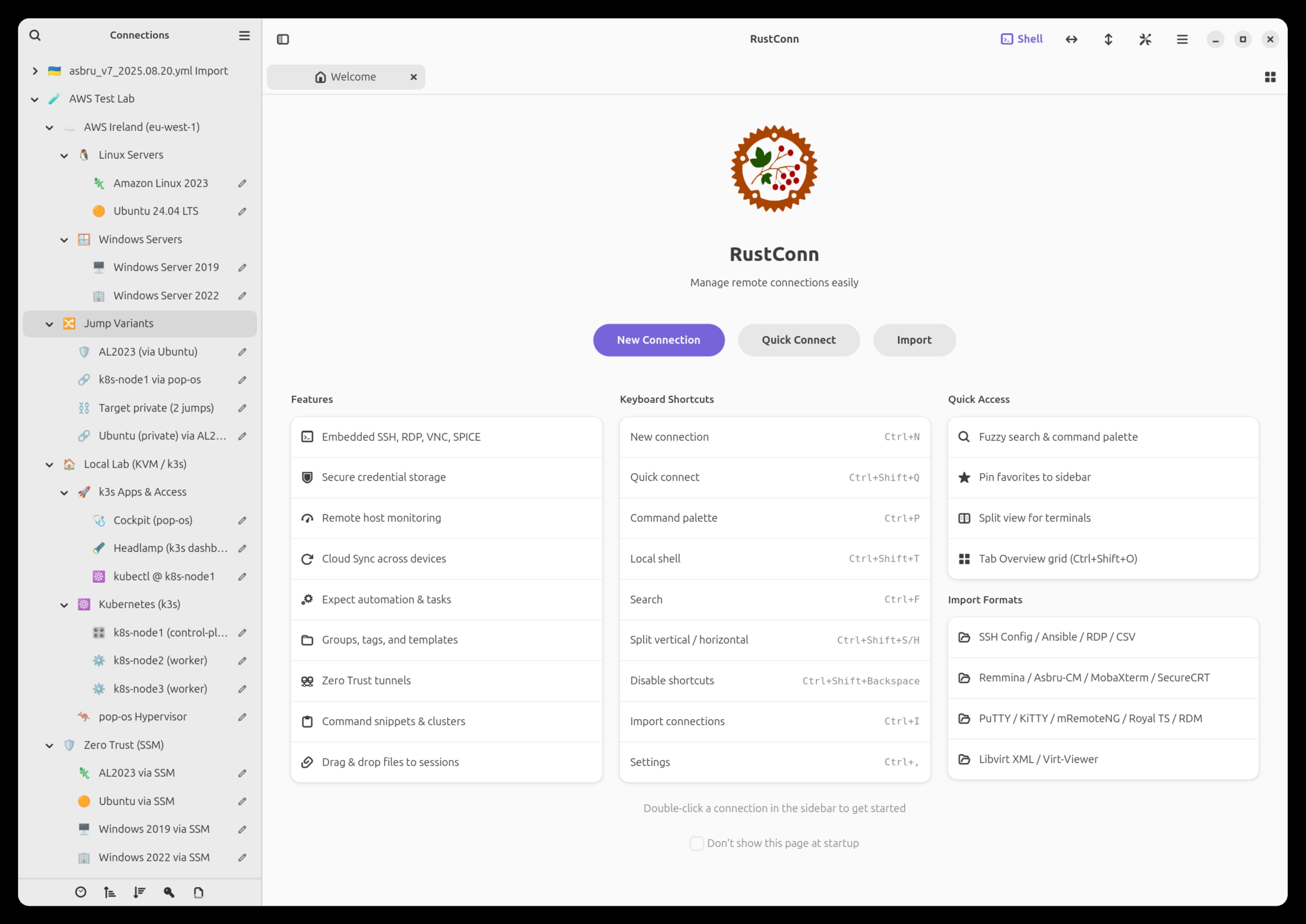
RustConn is what you install when “SSH client” is too narrow a description of your job. A single GTK4/libadwaita host list covers SSH, RDP (IronRDP with FreeRDP fallback), VNC, SPICE, MOSH, Telnet, Serial via picocom, Kubernetes and Zero Trust. Embedded Rust clients mean RDP sessions render inside the app rather than shelling out to xfreerdp in a separate window.
The distribution coverage is the widest of the three by a distance: Flathub, Snap, Homebrew, OBS repositories for Debian/Ubuntu/openSUSE/Fedora, AUR, FreeBSD ports, a Nix flake, AppImage, and WSLg on Windows. Release files carry signed build-provenance attestations you can check with gh attestation verify.
| |
Where it breaks: Flatpak and Snap sandboxes need explicit permission grants before they can read ~/.ssh or talk to ssh-agent. If keys “work in the terminal but not in the app”, that is almost always the sandbox, not the app. The Snap permissions guide exists for exactly this reason — read it before filing a bug.
Pitfalls Nobody Warns You About
- Your client is now part of your security perimeter. All three store credentials locally. Enable the OS keychain, set an app lock, and decide deliberately whether you allow plaintext key export. A synced vault with a weak master password is a fleet-wide compromise in one phishing click.
~/.ssh/configis the only portable inventory you own. OmnySSH reads it without writing; the others import it once. Whichever you choose, keep the file authoritative and commit a redacted copy to your infra repo.- Agent forwarding is a footgun, not a convenience. Prefer
ProxyJumpwith separate keys overForwardAgent yes. Our SSH agent management guide covers the keychain side properly. - Browser-based access is a different product. If the requirement is “reach a shell from a Chromebook or a locked-down laptop”, a desktop client is the wrong answer — see our web SSH access comparison instead.
- Jump hosts need more than a saved profile. Multi-hop access, bastion rotation and tunnel lifecycle are their own problem; our SSH tunnel management guide covers it.
Why Own the Last Mile of Your Infrastructure?
Every self-hosted service you run terminates in a shell somewhere. The client you use to reach it is the one piece of your stack that sees every host, every key and every credential — which makes it the highest-leverage 20 MB on your laptop, and the worst possible place to accept closed-source telemetry.
Owning this layer buys three specific things. Auditability: all three projects are open source, so the claim “your keys never leave your machine” is a code path you can read, not a privacy policy. Portability: Voltius exports open JSON, OmnySSH refuses to write to your ~/.ssh/config, RustConn uses standard system key storage. None of them hold your inventory hostage. Cost: a per-seat SSH client subscription scales with headcount forever; these are free and stay free, with the AGPL/GPL guaranteeing that a future commercial fork cannot close the source.
The counter-argument is maintenance. Three clients, three release cadences, three sets of sandbox quirks. That is real, and it is why the correct answer is usually “pick one, standardise on it, and keep ~/.ssh/config as the fallback that always works.” A team running two of these in parallel is a team that has already lost track of which host list is current.
FAQ
Is OmnySSH really usable without the desktop app?
Yes. The TUI is not a legacy artifact — it started the project, still receives releases, and runs over SSH itself, which makes it practical from Termux on Android or from inside a jump host. The --tui install flag gets you only the terminal build.
Does Voltius work on Ubuntu 22.04?
Not with the prebuilt packages. They require glibc 2.39 or newer, so Ubuntu 24.04+, Debian 13+, Fedora 40+ and RHEL 10+ are supported natively. On older systems use the Flatpak build or compile from source.
Can RustConn replace PuTTY on Windows?
Practically, yes, with one caveat: RustConn targets Windows through WSLg, not as a native Windows binary. If you need a native Windows executable, keep PuTTY alongside it — but you can import existing sessions into RustConn’s host list and drive SSH, RDP and Serial from one place under WSLg.
Do any of these store my private keys on a server?
None of the three uploads private keys to a vendor service. OmnySSH keeps passphrases in memory only, Voltius syncs vaults with end-to-end encryption so the sync server holds ciphertext, and RustConn stores configuration locally through the GTK stack. Read the respective source before trusting any of those claims with production credentials.
Which one handles the most servers before it gets slow?
OmnySSH, because its host grid is built for fleet overview and its footprint stays around 130 MB with several sessions open. Voltius and RustConn are session-oriented rather than fleet-oriented — both handle dozens of hosts fine, but neither gives you an at-a-glance health wall.
💰 想测试你的市场判断力?我用 Polymarket 做预测市场交易——这是全球最大的预测市场平台,从大选结果到技术监管时间线,什么都可以押注。和赌博不同,这是真正的信息市场:你懂的信息越多,胜率越高。我靠预测技术相关事件的走向已经赚了不少。用我的邀请链接注册:Polymarket.com