ProxCenter vs PegaProx vs Proxmox Datacenter Manager: Which Multi-Cluster Console Wins in 2026?
You can run one Proxmox VE node from its built-in web UI forever. The moment you own three clusters in two racks — plus a Proxmox Backup Server — that same UI becomes a tab-hopping exercise in copy-pasting VMIDs. The stock interface has no concept of “all my infrastructure.” It shows one cluster at a time, and it shows it well, but it never shows you the whole estate.
That gap used to be filled by VMware vCenter. In 2026 it is filled by three very different projects: ProxCenter (1,741 stars, TypeScript), PegaProx (1,694 stars, Python), and Proxmox’s own Datacenter Manager (PDM, now at 1.1.9). They overlap on maybe 60% of the feature list and diverge sharply on the other 40% — which is exactly where your decision lives.
TL;DR — The 30-Second Verdict
- You run Enterprise-grade Proxmox VE 9 with a support contract and want the vendor’s own tool: pick Proxmox Datacenter Manager. It is the only option that will never break on an upgrade path, and it is free.
- You manage 3–500 nodes and want a polished, fast, opinionated console with a real live demo: pick ProxCenter. It has the best dashboard ergonomics of the three and a proper PostgreSQL backend.
- You run a mixed Proxmox + XCP-ng estate, or you want the most features per euro with zero licence friction: pick PegaProx. AGPL-3.0, one Docker image, and cross-hypervisor features you will not find elsewhere.
- You have exactly one cluster and fewer than 20 guests: install nothing. The built-in UI is fine, and every hour you spend on a management layer is an hour not spent on backups.
The Comparison Table (verified 2026-10-28)
| Dimension | ProxCenter | PegaProx | Proxmox Datacenter Manager |
|---|---|---|---|
| GitHub stars | 1,741 | 1,694 | 146 (mirror of git.proxmox.com) |
| Primary language | TypeScript (Next.js) | Python (Flask) | Perl (Proxmox stack) |
| Licence | Community + Enterprise (source-available) | AGPL-3.0 | AGPL-3.0 |
| Latest activity | 2026-10-27 | 2026-10-27 | Active, 1.1.9 release |
| Install method | curl | bash installer → Docker Compose | Docker image, .deb APT repo, source | ISO installer, or apt on Debian |
| Web port | 3000 | 5000 / 5001 / 5002 | 8443 (HTTPS) |
| Multi-cluster | Yes, VE + PBS | Yes, VE + XCP-ng | Yes, VE + PBS |
| Database | PostgreSQL (SQLite removed in v1.4) | SQLite / file-based config | Proxmox config files |
| High availability | Yes (3-node Compose, wizard) | Not in community edition | Not applicable (single pane) |
| Cross-cluster VM migration | Yes | Yes | Yes (remote migration) |
| Cost | Free Community; paid Enterprise | Free, sponsorship-funded | Free (subscription repo optional) |
| Best fit | 50–500 nodes | Mixed hypervisor fleets | Vendor-aligned enterprises |
Decision Matrix: Match Your Situation to a Tool
| Your situation | Recommended | Why |
|---|---|---|
| Single PVE cluster, <20 guests | None (built-in UI) | Adding a management layer adds a failure domain with no payoff |
| 3+ clusters, one team, need HA console | ProxCenter | 3-node Compose HA and PostgreSQL are first-class, not bolted on |
| Proxmox + XCP-ng in the same rack | PegaProx | Only one of the three that speaks XCP-ng natively |
| You must stay inside the Proxmox support boundary | Proxmox Datacenter Manager | Vendor tool; no third-party upgrade surprises |
| Air-gapped datacenter, no internet egress | PegaProx | Single Docker image + .deb repo you can mirror internally |
| You want a live demo before committing | ProxCenter | Public demo instance at demo.proxcenter.io |
| You need per-tenant branding | ProxCenter Enterprise | Community edition is single-tenant by design |
ProxCenter — The Dashboard People Actually Enjoy Using
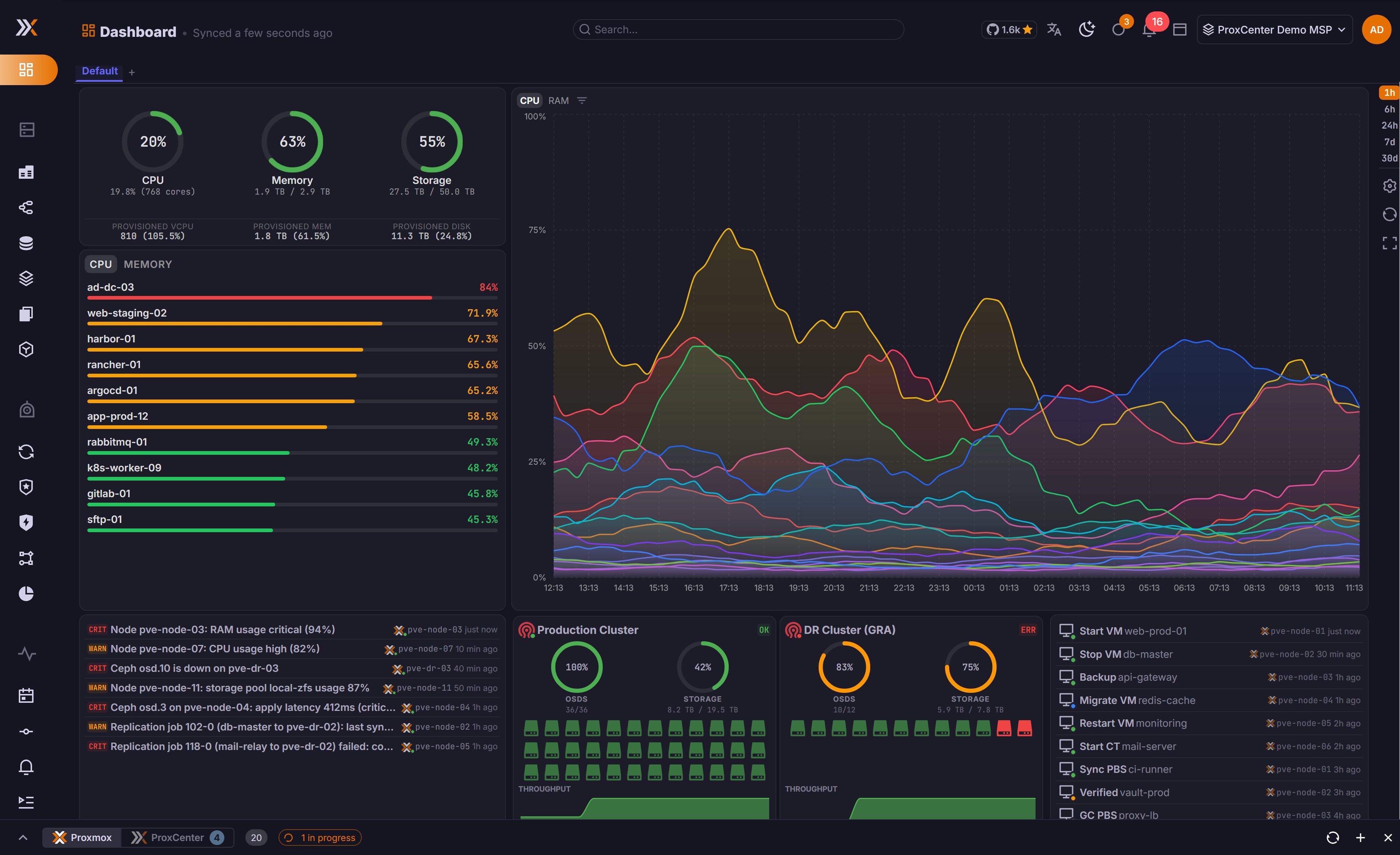
ProxCenter is a Next.js frontend with a separate orchestrator, PostgreSQL for state, and a metrics pipeline that stores roughly 90 MB per node at 14-day retention. That number matters more than the star count: it tells you the design assumption is “long-running console, not a stateless proxy.”
It is the only one of the three with a documented high-availability topology — three nodes running an identical Compose file, upgraded one at a time, versions pinned identically across the cluster. If your console being down means nobody can evacuate a node at 3 a.m., that is the feature you are buying.
Install ProxCenter (Community)
| |
The installer lands everything under /opt/proxcenter and serves the UI on port 3000. Verify the stack:
| |
Two operational traps worth knowing before you commit:
- Behind a reverse proxy, enable the “Behind reverse proxy” toggle in connection settings. Otherwise failover logic rewrites redirects to internal node IPs and your browser ends up chasing a 10.x address it cannot route.
- Upgrading from 1.3.x or earlier is not in-place. SQLite support was removed in 1.4.0; you must follow the PostgreSQL cutover guide. There is no
docker compose pullthat saves you.
Sizing guidance from the project: 2 vCPU / 4 GB / 40 GB covers up to 50 nodes and 1,500 guests; 8 vCPU / 16 GB / 250 GB covers 500 nodes and 15,000 guests. Give the console host dedicated CPU — a starved host misses its own first-start health checks and the installer reports failure on a working system.
PegaProx — The Mixed-Hypervisor Workhorse

PegaProx is Python/Flask, AGPL-3.0, and unapologetically dense. Where ProxCenter polishes, PegaProx piles on capability: multi-cluster control, automated PVE installations via answer files, V2P/ESXi migration with VirtIO driver pre-staging, a Docker Swarm manager, and PWA offline boot.
The XCP-ng support is the headline. Nobody else in this comparison manages both hypervisors from one pane, which makes PegaProx the default choice for anyone mid-migration off VMware who kept a XCP-ng cluster around “just in case.”
Install PegaProx (Docker, no Compose file needed)
| |
The identical image is published to Docker Hub as pegaprox/pegaprox — the maintainers explicitly warn that other PegaProx images on Docker Hub are not theirs. From 1.4.1 onward, images ship with a signed build provenance attestation, so you can verify what you are running:
| |
Prefer packages to containers for production? There is an APT repository maintained by the packager:
| |
One caveat: the deploy.sh one-liner tracks the head of main, meaning you get unreleased commits. The maintainers say so themselves. For anything you care about, use the tagged image or the .deb.
Proxmox Datacenter Manager — The Vendor’s Answer
PDM is what you get when Proxmox decides the console problem is theirs to solve. It is at 1.1.9, it manages Proxmox VE and Proxmox Backup Server remotes, and it performs remote migration of guests between separate clusters — the one operation every third-party console has to reverse-engineer.
It is also the least glamorous option. No plugin ecosystem, no live demo, no dashboard you would screenshot for a conference slide. What it has is an upgrade path that the vendor tests, and a support boundary that your auditor will accept.
Install PDM
Two supported routes. The recommended one is the ISO installer from proxmox.com. On top of an existing Debian install:
| |
The web interface listens on HTTPS port 8443 — for example https://pdm.example.com:8443. Not 8006, which is the per-cluster PVE UI. Bookmarking the wrong port is the single most common first-five-minutes complaint.
PDM’s honest limitation: it assumes a fairly vanilla Debian base. Installing it on a host with hand-rolled LVM or ZFS layouts is documented as “not trivial,” and network configuration is entirely your problem. The ISO route exists precisely because the apt route is a trap for the unprepared.
Where Each Console Breaks (Read This Before You Migrate)
- Every one of these tools becomes a single point of failure the day you stop treating it as one. If the console holds your only inventory of which VM lives where, back up its database on the same schedule as your PVE configs.
- API tokens, not root passwords. All three can store PVE credentials. Create a dedicated
PVEAuditor-plus-PVEVMAdmintoken per console and revoke it the day you decommission the tool. - Cross-cluster migration is not live migration. PDM and PegaProx both move guests between clusters, but storage must be reachable on the destination. Plan the storage layer first — see our Ceph deployment comparison for the shared-storage half of that problem.
- Metrics retention silently eats disk. ProxCenter’s 90 MB per node at 14 days is fine for 50 nodes and 4.5 GB. At 500 nodes with 90-day retention you are provisioning a database server, not a console.
- PDM will not manage your email gateway. It is a datacenter console, not a monitoring suite. If you are consolidating a Proxmox rollout, our Proxmox mail gateway rollout guide covers the layer PDM ignores.
Why Self-Host the Management Layer At All?
Because the alternative is a spreadsheet. The realistic failure mode of a growing Proxmox estate is not hardware — it is that three people each keep their own mental map of which cluster holds the staging database, and one of them leaves.
A self-hosted console fixes three concrete things. First, it makes the estate addressable: one search box for every guest across every cluster, instead of ssh plus qm list on nine hosts. Second, it makes permissions reviewable: you grant a colleague read-only access to the console rather than shell on nine hypervisors. Third, it makes capacity a number rather than an opinion — and that number is what you take to whoever approves the next node purchase.
The cost side is equally concrete. All three tools here are free to self-host. Compared with a per-host vCenter-style licence, a 50-node estate saves the entire licence line, and you spend a fraction of it on one small VM plus backups. If you are still deciding whether Proxmox is the right hypervisor at all, our Proxmox VE vs XCP-ng vs oVirt breakdown is the prerequisite reading.
What you do not get for free is operational discipline. A console that nobody backs up, whose API token is a root password, and which is reachable from the public internet is worse than the spreadsheet it replaced. Treat it as production infrastructure from day one: TLS, authentication proxy, database backups, and a documented owner.
FAQ
Is Proxmox Datacenter Manager free?
Yes. PDM is free software under AGPL-3.0, and it works with either the no-subscription repository or an enterprise subscription repository. The subscription buys you the stable enterprise repo and support — not the console itself.
Can PegaProx and ProxCenter manage Proxmox Backup Server?
ProxCenter explicitly manages both Proxmox VE clusters and Proxmox Backup Server instances from one pane. PegaProx focuses on Proxmox VE and XCP-ng clusters. PDM manages both VE and PBS remotes, which is one of its strongest arguments if your backup tier is already Proxmox-native.
Do I need a separate database for these consoles?
Only ProxCenter does, and its installer handles it: PostgreSQL runs as part of the Compose stack. PegaProx keeps configuration on disk in mounted volumes. PDM uses the standard Proxmox configuration file layout, which means your existing config-backup tooling already covers it.
What happens to my console when I upgrade Proxmox VE to a new major version?
This is the real differentiator. PDM ships from the same vendor as PVE, so version compatibility is tested as one product. ProxCenter and PegaProx both track the PVE API and generally work across 8.x and 9.x, but a major PVE release is precisely when third-party consoles need a patch. Pin your console version before upgrading PVE, and read the release notes for both.
Which one should a two-person homelab team pick?
PegaProx. One docker run, no external database, no licence tier to think about, and the feature surface you will never outgrow. If you later need HA, migrate to ProxCenter — both speak the same PVE API, so the migration is a re-registration, not a rebuild.
💰 想测试你的市场判断力?我用 Polymarket 做预测市场交易——这是全球最大的预测市场平台,从大选结果到技术监管时间线,什么都可以押注。和赌博不同,这是真正的信息市场:你懂的信息越多,胜率越高。我靠预测技术相关事件的走向已经赚了不少。用我的邀请链接注册:Polymarket.com