Somebody on your team is still SSH-ing into production from a laptop with a key that has never been rotated, through port 22 exposed to the internet, with no record of what they ran. You know it because you saw it in the audit. The fix is not a VPN — it is a gateway that authenticates the human, records the session, and forwards the connection to the target without ever giving the client network-level access.
Three open-source projects take three genuinely different approaches to that job in 2026. Termix (15,691 stars, Apache-2.0) is a self-hosted, plugin-based server management platform with a web UI. Warpgate (8,155 stars, Apache-2.0, Rust) is a transparent bastion that proxies SSH, HTTPS, Kubernetes, MySQL, PostgreSQL, RDP and VNC, recording every session. Sshwifty (3,128 stars, AGPL-3.0) is a focused web SSH and Telnet client — the smallest possible thing that solves “I need a shell from a browser.”
TL;DR: The 60-Second Verdict
- You need an auditable bastion with session recording and per-user target assignment → Warpgate. Nothing else in this price bracket does transparent proxying plus replay.
- You want a team-facing control panel — hosts, snippets, collaboration, plugin ecosystem → Termix. Highest star velocity of the three and the most active development.
- You only need browser-based SSH/Telnet access and nothing else → Sshwifty. One container, one port, zero database.
- Do not put Sshwifty directly on the internet as your only control. It is a client, not an access-control system — auth happens at the target.
Head-to-Head Comparison
| Dimension | Termix | Warpgate | Sshwifty |
|---|---|---|---|
| GitHub stars | 15,691 | 8,155 | 3,128 |
| Last push | 2026-10-25 | 2026-10-27 | 2026-10-12 |
| Language | TypeScript | Rust (100% safe Rust) | JavaScript |
| License | Apache-2.0 | Apache-2.0 | AGPL-3.0 |
| Container image | ghcr.io/termix-ssh/termix | ghcr.io/warp-tech/warpgate | niruix/sshwifty:latest |
| Default port | 8080 | 2222 (SSH), 8888 (HTTPS), 33306 (MySQL) | 8182 |
| Protocols proxied | SSH-centric management | SSH, HTTPS, K8s, MySQL, PostgreSQL, RDP, VNC | SSH, Telnet |
| Session recording / replay | No | Yes (live view + replay) | No |
| Built-in 2FA / SSO | Proxy-trust auth, secrets hardening | TOTP + OpenID Connect | None |
| Database required | SQLite in volume | None (config file) | None |
| Multi-user RBAC | Yes | Yes, per-service assignment | No |
| Best fit | Team ops console | DMZ bastion / PAM | Quick web shell |
Freshness matters here: all three pushed within the last three weeks of October 2026, so none of these is abandoned. The differentiator is scope, not maintenance.
Decision Matrix: Pick by Blast Radius
| Scenario | Recommended | Reason |
|---|---|---|
| Contractor needs temporary access to one host | Warpgate | Per-user, per-service assignment plus session recording |
| Ops team wants one console for 40 servers | Termix | Host inventory, collaborative terminal, plugin model |
| Break-glass shell from a locked-down laptop | Sshwifty | Browser only, no client install, no VPN |
| Compliance requires session replay | Warpgate | Built-in recording viewable in the admin UI |
| You already run Teleport and want a lighter second bastion | Warpgate | Same transparent-proxy model, far smaller footprint |
| Proxying database clients without exposing ports | Warpgate | Native MySQL/PostgreSQL proxying on dedicated ports |
| You redistribute a product to customers | Termix or Warpgate | Apache-2.0 is friendlier than AGPL-3.0 |
Termix — The Ops Console That Grew Into a Platform
Termix is the most-starred project of the three, and the reason is scope: it is not just a terminal in a browser, it is a server management platform. Host inventory, snippet library, collaborative sessions, and a plugin system live in one TypeScript application backed by SQLite.
The upstream compose file is compact — one service, one volume:
| |
Two things in that file tell you a lot about its intended deployment. First, REDIS_URL is commented out and only matters for multi-instance setups — meaning the collaboration feature has a single-instance in-memory fallback, and if you scale to two replicas without Redis the rooms silently stop syncing. Second, the commented *_FILE variables (JWT_SECRET_FILE, DATABASE_KEY_FILE, ENCRYPTION_KEY_FILE, INTERNAL_AUTH_TOKEN_FILE) plus TERMIX_REQUIRE_EXTERNAL_SECRETS: "true" exist because the defaults are not meant for production. If you deploy Termix with default secrets, your session tokens are derived from values an attacker can read from the image.
The trusted-proxy authentication is off by default and should stay that way unless you terminate auth in front of it. Upstream is explicit about the risk: do not expose the container directly to untrusted clients when TRUSTED_PROXY_AUTH_ENABLED is on, and keep TRUSTED_PROXY_AUTH_TRUSTED_PROXIES narrow — a published Docker port can be reached from the Docker gateway, so trusting an entire private range defeats the control.
Honest weakness: Termix manages servers, but it does not record sessions. If your requirement is audit replay, it is the wrong tool no matter how good the UI is.
Warpgate — The Bastion That Records Everything
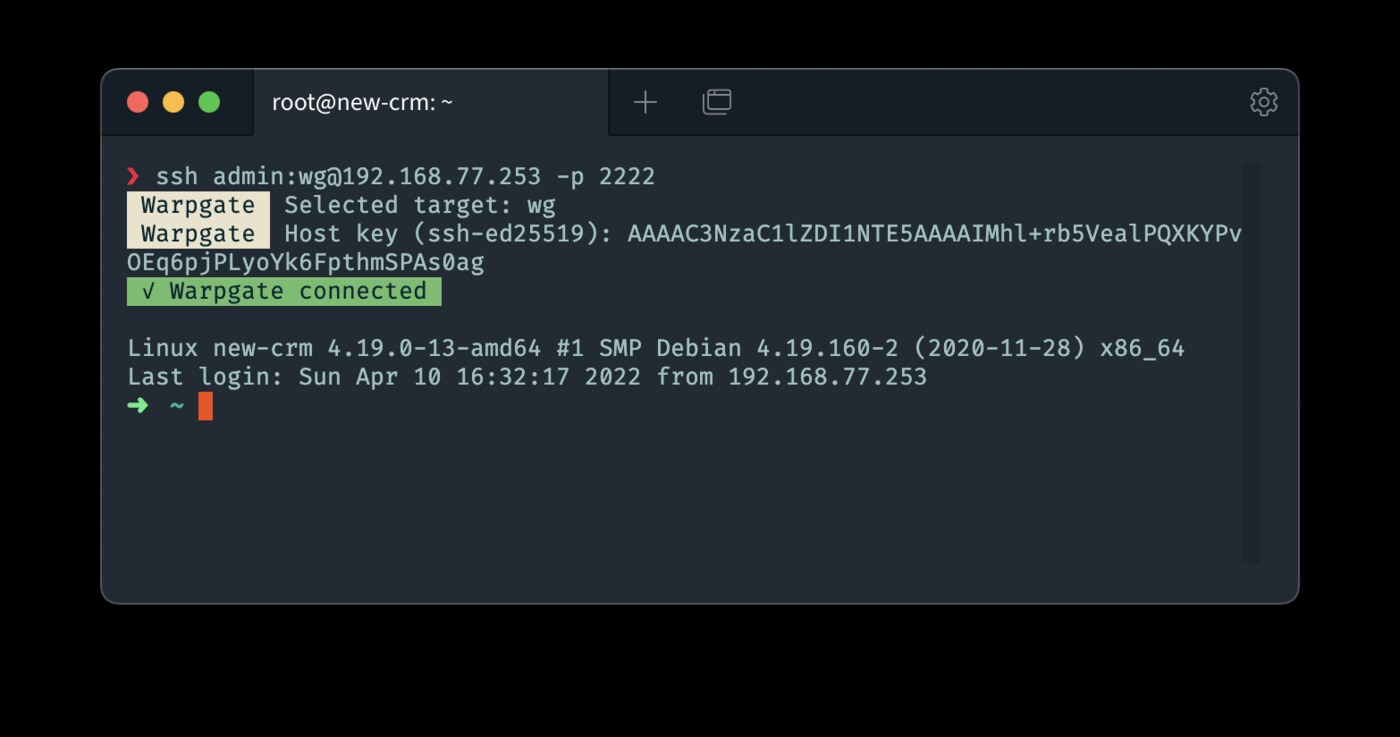
Warpgate’s design is deliberately transparent: it terminates the connection, authenticates the user locally, then opens its own connection to the target. The client never routes packets through your network, and importantly, it does not need a special client or a ProxyJump config — native SSH clients keep working.
Setup is a one-time interactive generator that writes the config and port bindings:
| |
The shipped Docker compose is minimal because almost all configuration lives in warpgate.yaml:
| |
Port 8888 serves the admin web UI and the browser-based SSH/RDP/VNC clients; 2222 accepts SSH connections from native clients; 33306 is a MySQL proxy port. Add PostgreSQL or more database ports as your config requires. stdin_open and tty are not cosmetic — the container expects an attached terminal for the interactive setup command, and dropping them turns first-run into a confusing hang.
What you actually get beyond proxying: session recording with live view and replay, TOTP and OpenID Connect authentication, brute-force protection with IP blocking and user lockout, and a single dependency-free Rust binary you can drop on a DMZ host without Docker at all.
Honest weakness: it is a security component, so the config surface is real. You must understand target roles, user assignment, and TLS for the admin endpoint before exposing it. Budget a day, not an hour. Also note the image path in the docs — it is ghcr.io/warp-tech/warpgate, not the personal-namespace path you might guess from the repo owner.
Sshwifty — The Smallest Correct Thing
Sshwifty does one job: it gives a browser an SSH or Telnet session. There is no user database, no RBAC, no recording. It is the tool you install when you need a shell from a device where you cannot install a client.
| |
Note the published address: 127.0.0.1:8182:8182, not 8182:8182. Upstream recommends this binding specifically so that remote clients must come through your reverse proxy, which is where TLS and authentication belong. Opening 8182:8182 publishes the client to every interface on the host — a common and avoidable mistake.
If you would rather terminate TLS in the container, the image accepts certificates through environment variables without mounting volumes:
| |
Honest weakness: AGPL-3.0. If you embed Sshwifty in a product you distribute or expose as a service, the licence obligations are materially different from Apache-2.0. For internal use it changes nothing; for anything commercial, read it before you build on it. And because it is a client rather than a gateway, every user needs credentials on every target — the opposite of the centralized model the other two offer.
Pitfalls Nobody Warns You About
1. A gateway is not a firewall. Warpgate and Termix authenticate the human, but if the target still accepts key auth from the whole internet, you have added a door without closing the window. Bind sshd to the gateway’s address or a private network after rollout.
2. Session recording has a privacy cost and a storage cost. Warpgate’s replays accumulate quickly. Decide retention before you enable it on everything, and store recordings somewhere the operator cannot delete them.
3. Do not trust proxy headers by default. Termix’s trusted-proxy auth and any equivalent feature in your reverse proxy will happily believe an X-Forwarded-User header from anyone who can reach the container. Pin the trusted proxy IP and never publish the container port directly.
4. Backups of /app/data and ./data are the whole system. Termix stores its SQLite database in the volume; Warpgate keeps config and recorded sessions in ./data. Treat both as stateful services, not stateless containers, and back them up like a database.
5. Rotate the default secrets before first start, not after. With Termix, set the *_FILE variants from Docker secrets and enable TERMIX_REQUIRE_EXTERNAL_SECRETS. Changing them later invalidates existing sessions and, depending on the key, the encrypted database fields.
6. Port collisions with existing services. 8080 and 8888 are heavily used. Warpgate’s bindings are in its config file (change them there, not in compose), while Termix takes PORT from the environment.
Sizing and Operations
For a team of ten with fifty hosts, a 2 vCPU / 2 GB instance runs any of the three comfortably. Warpgate with recording enabled is the only one where disk grows continuously: assume 1-5 MB per interactive session hour depending on terminal output, and set a retention policy.
Availability expectations differ too. Warpgate and Sshwifty are single processes with no database — restart is instant and loss-free. Termix keeps state in SQLite, so back up before upgrades and never run two replicas against one volume. If you need high availability at the gateway layer, run two Warpgate instances behind a TCP load balancer with shared config; that model is far easier than replicating an application database.
For the wider picture — certificate-based SSH auth, jump host patterns, and how these compare to heavier PAM platforms — see our SSH bastion and jump server comparison, the web SSH client roundup, and the guide to SSH certificate management with Step CA, Vault and Teleport.
FAQ
Is Warpgate a replacement for Teleport?
For SSH, HTTPS, database and RDP proxying with session recording, yes for most small and mid-sized teams. Warpgate is a single Rust binary with a config file, while Teleport requires a cluster with its own auth service. Teleport still wins on Kubernetes-native access, large-scale certificate authority workflows, and ecosystem integrations. If you need a bastion this afternoon, Warpgate is the shorter path.
Can I run Termix without Docker?
Yes in principle, since it is a Node/TypeScript application, but there is no reason to. The project publishes a maintained container image at ghcr.io/termix-ssh/termix and the compose file is a single service with one volume. Running it outside a container means you also own the Node runtime, the SQLite file permissions, and the upgrade path.
Does Sshwifty store credentials?
No. It does not have a user database — the browser session connects to the target using the credentials you type, and authentication happens on the target host. That is also why it cannot enforce per-user access policy: it has no concept of users. Put it behind your reverse proxy with SSO if you need an outer gate.
Which one should I expose to the public internet?
None of them directly. Termix and Sshwifty belong behind a reverse proxy that terminates TLS and performs authentication; bind Sshwifty to 127.0.0.1 and let the proxy reach it. Warpgate is designed for a DMZ, but its admin UI on port 8888 still needs TLS and network restriction. The only port that should face the outside world is your hardened front door.
How do I migrate from a plain SSH jump host?
Deploy Warpgate alongside the existing jump host, replicate the host inventory as targets, and point a small pilot group at the new endpoint. Because Warpgate forwards transparently, clients just need the new hostname in their SSH config — no ProxyJump chain. Once session recording is verified for the pilot group, retire the jump host.
What happens to recorded sessions if the gateway dies?
For Warpgate, recordings live in the mounted ./data volume, so they survive container replacement and are replayable after restart. If you lose the volume, you lose the recordings — there is no external export pipeline in the base install. Back up ./data on the same schedule as your configuration.
💰 想测试你的市场判断力?我用 Polymarket 做预测市场交易——这是全球最大的预测市场平台,从大选结果到技术监管时间线,什么都可以押注。和赌博不同,这是真正的信息市场:你懂的信息越多,胜率越高。我靠预测技术相关事件的走向已经赚了不少。用我的邀请链接注册:Polymarket.com