Every network diagram is a lie within about three weeks. You draw the VLANs, label the switch ports, screenshot it into the wiki — and then someone adds a Proxmox node, a test SSID appears on the AP, and the drawing becomes archaeology. Three self-hosted projects are attacking that decay from different directions: Scanopy (5,909 stars), Homelable (4,549) and Neko-Master (4,211) — one scans your subnets and redraws itself, one gives you a curated map with live status, and one turns raw traffic into a geographic picture of what your network is actually doing.
TL;DR — the 30-second verdict
- Pick Scanopy if the diagram should be discovered, not drawn. It runs a scanning daemon, walks ARP/SNMP, and regenerates topology so the map matches reality after every change.
- Pick Homelable if you want to curate the map — hand-placed nodes, live up/down status, your own labels and layout — and keep it in SQLite on your own box.
- Pick Neko-Master if your question is not “what is connected to what” but “where is my traffic going”. GeoIP-enriched traffic analytics, not topology.
They are complementary rather than competitive, and the honest answer for a serious home lab is two of the three.
Side-by-side comparison
| Dimension | Scanopy | Homelable | Neko-Master |
|---|---|---|---|
| Written in | Rust (daemon) + web UI | TypeScript (backend + frontend) | TypeScript / Node |
| GitHub stars (Oct 2026) | 5,909 | 4,549 | 4,211 |
| Last commit | 2026-10-26 | 2026-10-19 | 2026-10-10 |
| Core idea | Auto-discovered topology diagrams | Curated homelab map with live status | Traffic visualization and analysis |
| Discovery method | Active subnet scan, ARP/SNMP walk | Manual node placement + ping checks | Collectors push data over WebSocket |
| Storage | PostgreSQL 17 | SQLite (homelab.db) | SQLite (stats.db) or ClickHouse |
| Host privileges | Host network + privileged | NET_RAW capability | None (collector port only) |
| Default UI port | 60072 (server) / 60073 (daemon API) | 3000 | 3000 (UI), 3001 (API), 3002 (WS) |
| GeoIP enrichment | No | No | Yes, built in |
| Cost | Free self-hosted edition; commercial compose variant in repo | Free, self-hosted | Free, self-hosted |
Notice the privilege column — it is the single most important difference. Scanopy needs to see layer 2, which means host networking and a privileged container. Homelable needs raw sockets for ICMP status checks. Neko-Master needs nothing beyond a port.
Decision matrix: pick in 10 seconds
| Your situation | Use this | Why |
|---|---|---|
| Diagram is always stale, you want it generated | Scanopy | Daemon rescans and redraws; no manual upkeep |
| You have SNMP-capable switches and want L2 port maps | Scanopy | SNMP walk maps ports to devices |
| Small lab, you like placing nodes by hand | Homelable | Curated canvas with live status dots |
| You want a wall display of “everything up?” | Homelable | Status-first presentation, single port |
| Traffic analysis: top talkers, countries, ASNs | Neko-Master | Purpose-built traffic analytics + GeoIP |
| You want both topology and traffic | Scanopy + Neko-Master | Different data, different ports, no conflict |
Scanopy — topology that regenerates itself
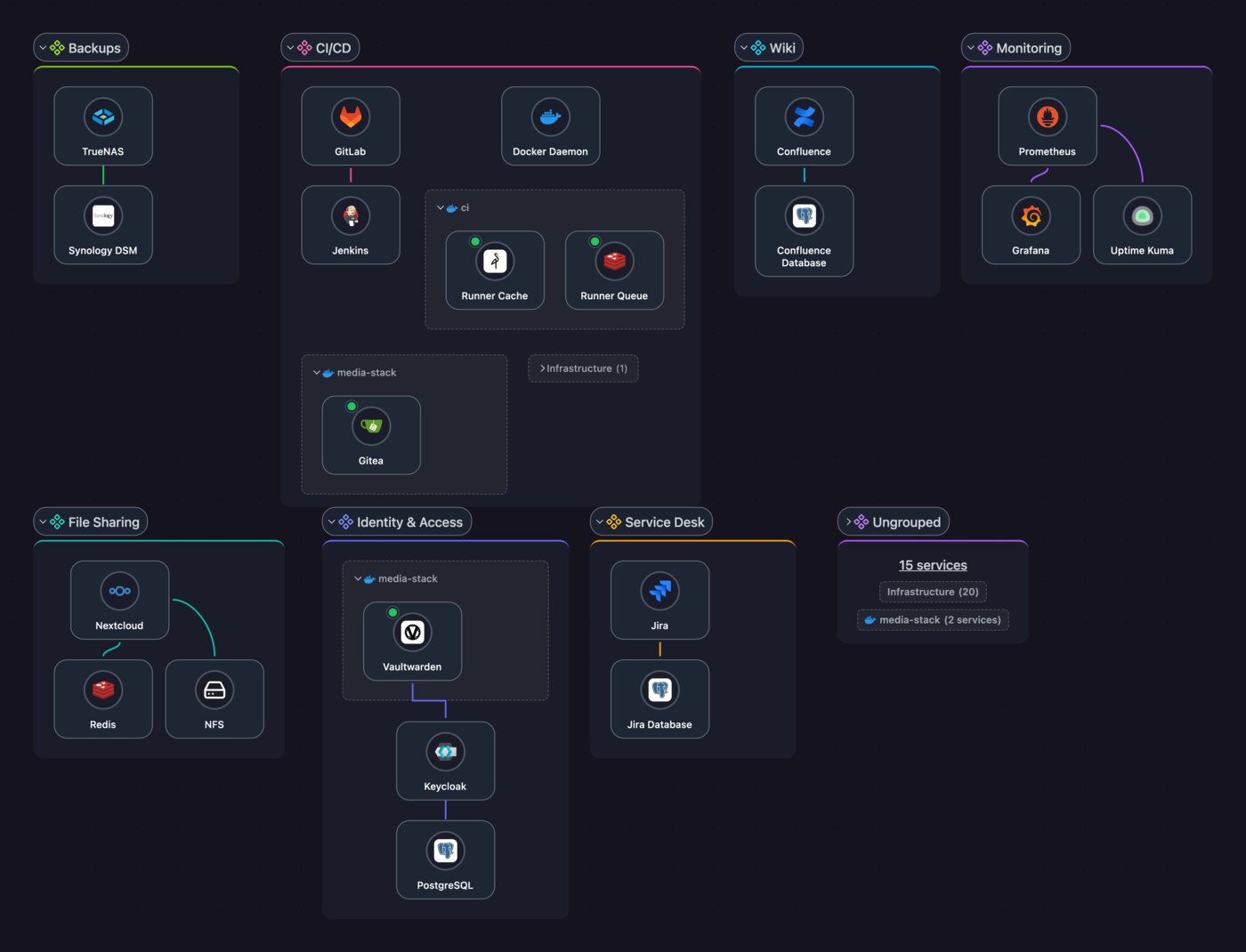
Scanopy’s pitch is one sentence: network diagrams that update themselves. The architecture is a scanning daemon plus a web server and a PostgreSQL 17 database. The repository ships two compose variants — an open self-hosted one using ghcr.io/scanopy/scanopy/daemon and a commercial one pointing at docker.scanopy.net. The self-hosted variant looks like this:
| |
Two things are non-negotiable here. network_mode: host lets the daemon see the real interfaces instead of a bridged NAT view; privileged: true is what allows raw socket inspection for ARP discovery. Run it on a segmented management VLAN, not on your DMZ edge, and give it SNMP read-only credentials for switches if you want port-level detail rather than just “these IPs responded”.
The payoff is that the topology re-derives itself. Add a device, wait for the next scan cycle, and the diagram contains it. The cost is trust: an active scanner on your network is indistinguishable from a reconnaissance tool to your IDS, so you will be writing a suppression rule the first week. Also budget the PostgreSQL backup — that database is your documentation now.
Homelable — the map you draw yourself, with live dots
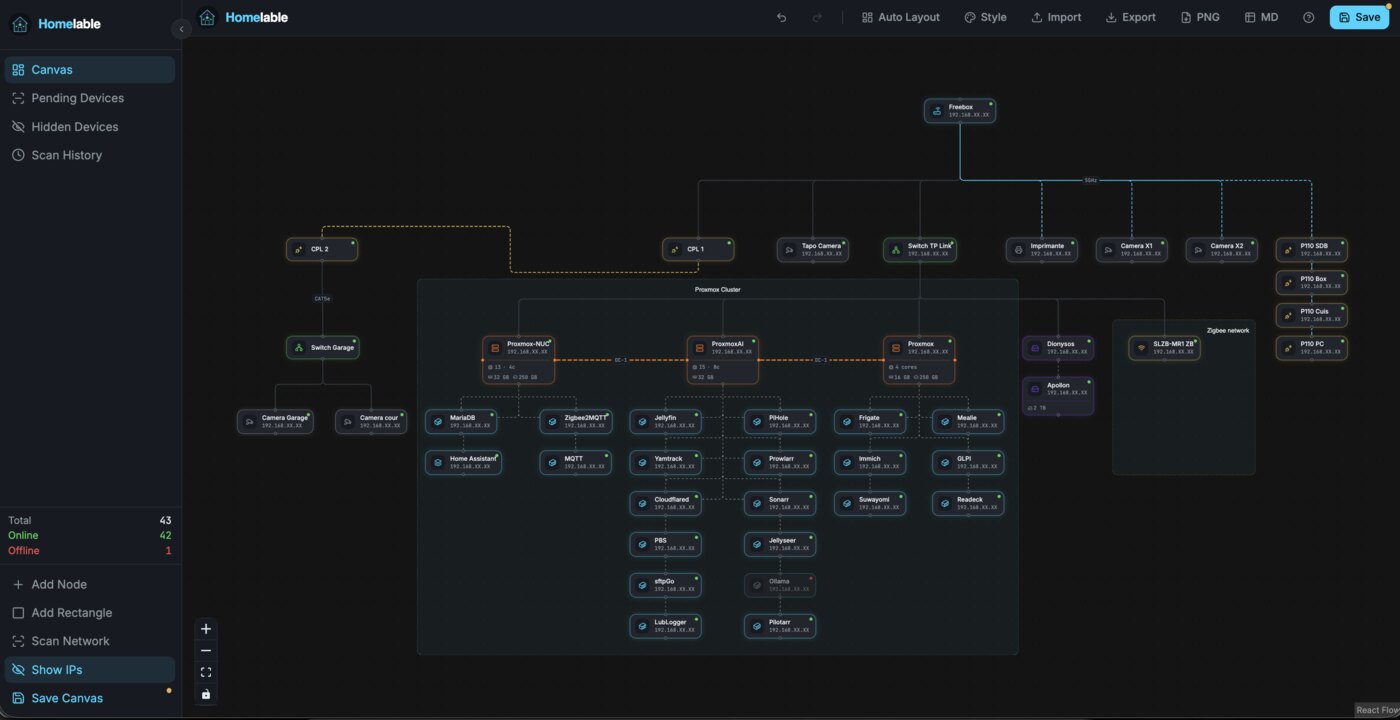
Homelable inverts the model: you place nodes, arrange the canvas, and the backend keeps them alive-status-aware. It runs as three containers — backend, frontend, and an optional connector service — with SQLite for storage and NET_RAW for ICMP probes:
| |
Authentication is enforced by the backend with AUTH_USERNAME and AUTH_PASSWORD_HASH in .env — a bcrypt hash, not a plaintext password, so generate one with htpasswd -bnBC 12 "" 'yourpassword' and paste the result. Leave those unset on a public interface and you have published an inventory of every host you own.
Homelable’s real value is editorial control. Scanopy tells you what exists; Homelable lets you say what things mean — “this is the backup NAS, it must stay up”, “this AP covers the garage”. Status checks then attach to your mental model instead of overriding it. The trade-off is upkeep: nothing appears on the canvas unless you put it there, so it drifts exactly as fast as your discipline does.
Neko-Master — where the traffic actually goes
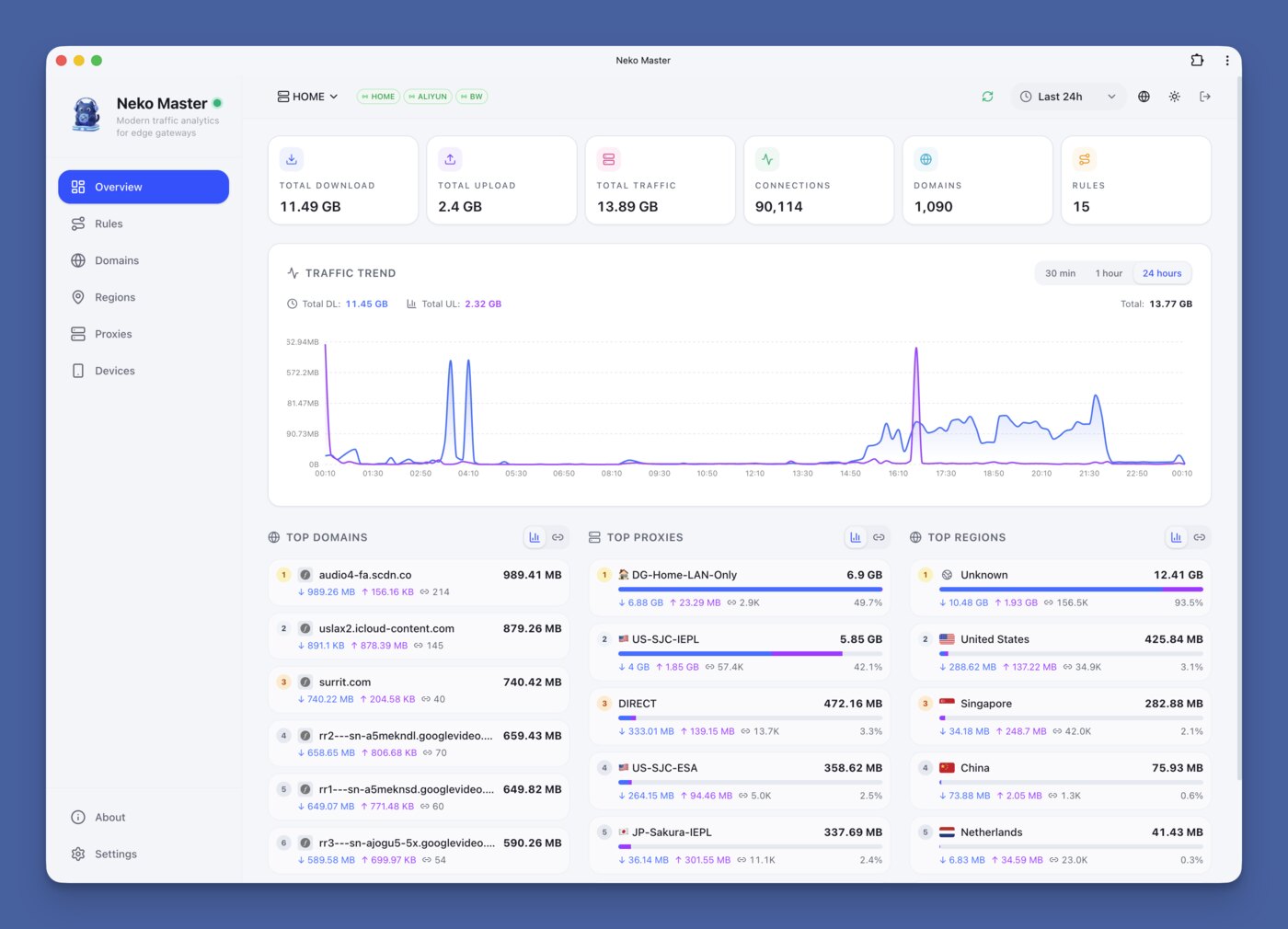
Neko-Master answers a third question entirely: not what is connected, but what is flowing. Collectors push data into a WebSocket endpoint, the app enriches it with GeoIP, and the dashboard renders volume, regions and top talkers:
| |
Two production notes from the compose file itself. Set COOKIE_SECRET explicitly — the container starts without it, but session cookies become unpredictable across restarts. And if you are storing weeks of per-connection rows, flip CH_ENABLED=1 and point it at ClickHouse; SQLite handles a home lab comfortably and a busy proxy badly, because per-connection inserts are exactly the workload SQLite is worst at.
Its niche is precise: if you route traffic through a proxy or gateway that can export per-connection logs, Neko-Master gives you the geography and volume view without standing up a full flow-analysis stack.
Why self-host your network documentation?
Because a diagram of your internal network is a map of your attack surface, and uploading it to a SaaS dashboard is a decision most security reviews would reject. Scanopy’s discovered topology names every host, Homelable’s map marks which one is the backup target, Neko-Master’s traffic view reveals which internal services talk to the internet and how much. That is a targeting package. Keeping it on hardware you control is not paranoia; it is the same reasoning that keeps your IPAM internal.
There is a practical argument too. Cloud diagramming tools charge per editor and per diagram, and they break exactly when your link is down — the moment you most need to know what is still reachable. A local tool keeps rendering from the last scan.
And there is an accuracy argument that matters more than either: generated documentation is the only documentation that survives. A hand-drawn diagram is correct on the day it is drawn. A scan-derived one is correct on the day you look at it. If you have ever debugged a “why is this VLAN not routing” incident against a two-year-old wiki image, you already know which property you want.
For the layer above this, our network topology mapping guide covers NetBox plus LibreNMS auto-discovery, the IPAM comparison handles address management, and the topology discovery tool comparison covers CDP/LLDP crawlers that complement Scanopy’s scan approach.
Pitfalls that bite on day one
1. Privileged containers on the wrong VLAN. Scanopy with privileged: true on your edge network is a scanner pointed at the internet-facing segment. Put it on management, restrict its egress with firewall rules, and accept that your IDS will alert on it.
2. Scanning subnets you do not own. A /16 scan will happily walk into a neighbouring tenant’s address space. Scope the scan range explicitly to the CIDRs you are responsible for — this is also the fastest way to get your port blocked by an upstream provider.
3. Rediscovering the same devices forever. Devices with randomized MACs (phones, IoT) create new nodes every scan. Group them by hostname or exclude their OUI, or your topology becomes a wall of duplicates.
4. Forgetting SNMP is read-only until it isn’t. Use SNMPv3 with an auth-only user for discovery. A v2c community string shared across the fleet is a plaintext password in every config file you own.
5. Reverse-proxying the collector port. Neko-Master’s WebSocket port (3002) is for collectors, not browsers. Exposing it publicly invites junk data; bind it to your internal interface and let only the gateway reach it.
6. Pinning :latest on a moving project. All three ship frequently (Scanopy committed within the last day as of this writing). Pin a digest in production and read the release notes before bumping — schema migrations in a topology database are not something you want happening unattended at 3 a.m.
7. Assuming the diagram is complete. Discovery only sees what answers. Firewalled hosts, devices with ICMP disabled, and anything on an isolated VLAN will be missing. Treat generated topology as “observed”, not “authoritative”, and keep your IPAM as the source of truth.
FAQ
Does Scanopy replace NetBox?
No. Scanopy observes the network and draws it; NetBox is the system of record you declare intent in. In practice they pair well: use Scanopy to find drift between what exists and what NetBox says should exist. If you need one tool only, NetBox plus a discovery crawler is the more conventional choice, but you will be maintaining the diagram by hand.
Is Homelable usable without Docker?
It is designed container-first, with prebuilt images for backend and frontend. A source deployment is possible since both are TypeScript services with a SQLite file, but you would be maintaining the build yourself. For a home lab, the compose file above is the supported path.
Can Neko-Master see traffic without a proxy?
It needs a collector that can report per-connection data. That usually means a proxy or gateway capable of exporting logs. It is a visualization layer, not a packet capture engine — if you want flows from a switch, use sFlow or NetFlow tooling instead.
How much RAM do these need?
Scanopy is the heaviest because of PostgreSQL: budget 1 GB for the stack on a small network, more if you scan large ranges. Homelable and Neko-Master run comfortably in 256-512 MB with SQLite on a few hundred devices. Neko-Master with ClickHouse enabled jumps to roughly 2 GB.
Do they support SNMPv3?
Scanopy’s discovery is built around SNMP walks plus ARP inspection, and SNMPv3 auth is the configuration you want for anything beyond a lab. Homelable does not need SNMP at all — it checks reachability. Neko-Master does not speak SNMP; it consumes exported traffic data.
What if my switches are unmanaged?
Then you get IP-level topology only: which hosts exist and which gateway they sit behind. Port-level maps require a device that can answer SNMP or LLDP. Scanopy will still produce a useful diagram from ARP alone — just a flatter one.
💰 想测试你的市场判断力?我用 Polymarket 做预测市场交易——这是全球最大的预测市场平台,从大选结果到技术监管时间线,什么都可以押注。和赌博不同,这是真正的信息市场:你懂的信息越多,胜率越高。我靠预测技术相关事件的走向已经赚了不少。用我的邀请链接注册:Polymarket.com