An untested backup is a rumour. The uncomfortable part of PostgreSQL operations is not taking the backup — pg_dump has worked for twenty years — it is proving that the backup restores, that the WAL stream has no gaps, and that the recovery point you promise your business is the recovery point you actually get. Three tools take three different routes to that proof: Databasus (9,196 stars), pgBackRest (4,458) and pg_probackup (799). One wraps backup in a web console with scheduled restore verification, one is the battle-tested CLI workhorse of the Postgres world, and one is Postgres Pro’s block-level incremental engine.
TL;DR — the 30-second verdict
- Pick Databasus if you want backups you can see and verify without writing cron jobs: web UI, scheduled backups, multiple storage destinations, and restore verification as a first-class feature.
- Pick pgBackRest if you want the industry default: parallel backup/restore, robust S3/Azure/GCS repositories, aggressive retention, and documentation that covers every failure mode you will hit at scale.
- Pick pg_probackup if WAL volume is your bottleneck and block-level incremental or delta backups would cut your storage footprint dramatically.
For a single small database, Databasus gets you to “I have a verified restore” fastest. For a fleet of clusters and a compliance auditor, pgBackRest is still the answer. For a 2 TB database on a slow link, look hard at pg_probackup before you default to full backups.
Side-by-side comparison
| Dimension | Databasus | pgBackRest | pg_probackup |
|---|---|---|---|
| Written in | TypeScript + Go | C | C |
| GitHub stars (Oct 2026) | 9,196 | 4,458 | 799 |
| Last commit | 2026-10-25 | 2026-10-26 | 2026-07-12 |
| Interface | Web UI + scheduler | CLI + config file | CLI + config file |
| Incremental strategy | Full + WAL for point-in-time recovery | Full / differential / incremental + WAL | Full / DELTA / PAGE + WAL |
| Object storage | Yes (S3-compatible, R2, and others) | Yes (S3, Azure, GCS, SFTP) | Local/remote via SSH; archive through WAL shipping |
| Parallelism | Per-database jobs | Multi-process backup and restore | Multi-threaded (--threads) |
| Restore verification | Built-in scheduled verification | Manual (verify command) | Manual (validate command) |
| Encryption | Destination-level | Repository cipher (repo1-cipher-type) | --compress + external |
| Default port / entry point | 4005 (web UI) | pgbackrest binary | pg_probackup binary |
| Best fit | Small teams, many databases | Production clusters, S3 repos | Large databases, tight storage |
The last-commit row is worth reading carefully: pg_probackup’s last push is 2026-07-12, roughly three months behind the other two. It is stable, mature code rather than an abandoned project, but you are adopting a slower release cadence.
Decision matrix: pick in 10 seconds
| Your situation | Use this | Why |
|---|---|---|
| 5 databases on one VPS, no DBA | Databasus | UI schedules backups and verifies restores for you |
| You need proof for an auditor | Databasus or pgBackRest + verify | Verification records, not promises |
| 20 clusters across three regions | pgBackRest | Per-stanza config, parallel WAL push, mature retention |
| Backups must land in S3 with encryption | pgBackRest | Native repo types and cipher support |
| 2 TB database, 200 GB of daily change | pg_probackup | DELTA/PAGE backups avoid re-reading everything |
| You want both UI and CLI rigour | Databasus to schedule, pgBackRest for drill-down | Run them against different clusters |
Databasus — backups with a console and a verification habit
Databasus is the newest of the three and the only one that assumes you would rather click than write a cron entry. Its install is a single container listening on 4005, with all state in one mounted directory:
| |
The same image is published as ghcr.io/databasus/databasus:latest if Docker Hub rate-limits you, and the repo also ships a compose file plus a Helm chart for Kubernetes. First boot gives you an admin account; from there you add a database connection, choose a destination (local volume, S3-compatible bucket, Cloudflare R2), set a schedule and retention, and pick notification channels.
What makes it interesting is restore verification: rather than trusting that the dump is intact, Databasus can restore a backup on a schedule and report whether it succeeded, then surface that result in the dashboard alongside the backup history. That single feature moves you from “we back up” to “we have restored successfully N times this month” — which is the sentence that actually matters in an incident review.
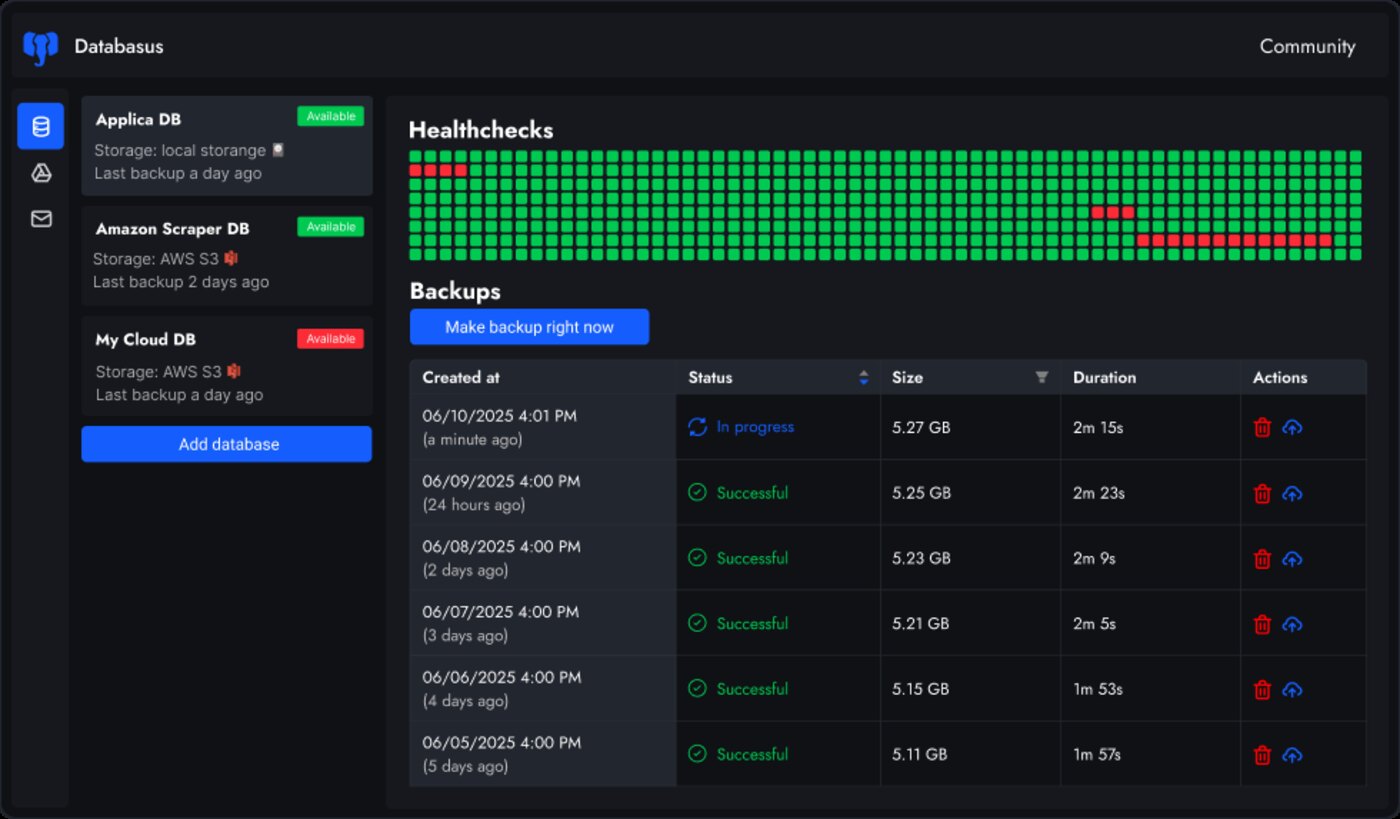
Two honest caveats. First, the backup engine is PostgreSQL-first; the repository also carries driver directories for MySQL, MariaDB and MongoDB, but treat non-Postgres support as younger. Second, a web UI is a convenience layer over a privileged operation: secure 4005 behind a reverse proxy and a strong password, because anyone who reaches that console can read every database credential you have stored.
pgBackRest — the reference implementation
pgBackRest is the tool that most production Postgres fleets converge on, and its design rewards you for reading the manual once. Everything lives in one config file:
| |
Point PostgreSQL at it with archive_command, then initialise the stanza:
| |
stanza-create and check are the two commands people skip and later regret. check verifies that the archive command actually works end to end — that WAL is landing in the repository and that the stanza metadata matches the running cluster. If check passes, your point-in-time recovery window is real; if you never ran it, you have a backup schedule and a hope.
Restoring to a point in time is one command and one target:
| |
Note the timezone in --target. A timestamp without an offset is interpreted in the server’s local timezone, and the resulting “we recovered to the wrong minute” incident is a classic. For object storage, swap repo1-path for repo1-s3-bucket, repo1-s3-endpoint, repo1-s3-region and credentials in an environment file — the rest of the workflow is identical, which is exactly why teams standardise on it.
pg_probackup — when re-reading 2 TB every night is not an option
pg_probackup, maintained by Postgres Pro, solves a different problem: full backups of a large database cost hours of I/O and a lot of space. Its answer is block-level incrementals — DELTA backups read only changed blocks, and PAGE backups can be even finer:
| |
Restore and merge follow the same pattern: pg_probackup restore --instance=main -i <backup-id>, with merge to collapse an incremental chain into a single full backup so your restore time does not grow forever.
The trade-offs are real. pg_probackup requires wal_level=replica, checksums enabled on the cluster (or it falls back to slower detection), and — most importantly — it is not an object-storage-first tool. Backups live on a filesystem or a remote host reached over SSH. If your architecture assumes “backups go to a bucket”, pgBackRest is the better fit and pg_probackup is the wrong shape.
Why self-host the backup layer?
Because the recovery time objective is yours, not your provider’s. A managed backup service gives you a retention window and a support ticket queue; when the primary is gone, the difference between a 20-minute restore and a four-hour escalation is whether the WAL archive is in a bucket you control with credentials you can use right now.
Cost matters at scale too. Object storage for a 500 GB cluster with 30 days of WAL is a rounding error against per-GB managed backup pricing, and pgBackRest’s repository can be a $5/month bucket. Encryption at the repository level means the bucket operator cannot read your data — with pgBackRest that is repo1-cipher-type, and it is one line.
Finally, verification is a habit, not a product feature. Whether you use Databasus’s scheduled restores or a monthly manual drill with pgbackrest restore into a scratch instance, the discipline is what converts a backup into a recovery plan. Write it down, put it on the calendar, and record the result.
If you are still choosing an engine, our pgBackRest vs Barman vs WAL-G comparison covers the wider landscape, the logical replication guide explains the streaming alternative that is not a backup strategy, and the PostgreSQL performance dashboards guide helps you watch the primary you are protecting.
Pitfalls that break backups quietly
1. A failing archive_command nobody notices. PostgreSQL retries the failed WAL segment forever and pg_wal grows until the disk fills. Alert on pg_stat_archiver.failed_count and on pg_wal size — both, because the second one is your last warning before an outage.
2. stanza-create without check. The stanza exists, the schedule runs, and the archive path was never writable. Run pgbackrest --stanza=main check after every config change, not once during installation.
3. Retention that keeps WAL longer than backups. If the repository deletes full backups after seven days but keeps WAL for thirty, you have unusable WAL and an inflated bill. Set repo1-retention-full and the archive retention together, and verify with pgbackrest info.
4. Restoring into the live data directory. restore overwrites pg1-path by default. Always test into a scratch path or a throwaway container; using --delta on production without a snapshot is how people turn a drill into a second incident.
5. Point-in-time targets in the wrong timezone. Pass an explicit offset (+00) or you will recover to a plausible but wrong moment. For “before the bad migration”, recover to just before the timestamp in the migration log, not to the minute you noticed.
6. Verifying that the dump exists instead of that it restores. A verification job that checks file size proves nothing. The only meaningful check is a restore into a real PostgreSQL instance, followed by a query against your application’s tables. Databasus automates this; with pgBackRest you automate it yourself.
7. Encrypting the repository and losing the passphrase. repo1-cipher-pass is the entire security model. Store it in a secrets manager and in a sealed offline copy — a lost passphrase makes every backup worthless, and there is no recovery path.
8. Backing up to the same host. A repository on the same disk survives DROP TABLE and dies with the VM. Keep one destination off-host, whether that is S3, a NAS, or a second machine.
FAQ
Is Databasus a replacement for pgBackRest?
For small and mid-size deployments, largely yes: it schedules backups, writes to object storage, handles retention and verification. What it does not replace is pgBackRest’s maturity at scale — per-stanza parallelism, delta restore, and a decade of documented edge cases. Many teams run Databasus for visibility and pgBackRest underneath it.
Which tool gives the smallest backup footprint?
pg_probackup, in most cases: DELTA backups read only changed blocks, and --compress-algorithm=zstd shrinks what is stored. pgBackRest’s incremental backups are file-level by default, so a single changed 1 GB table segment is copied whole. For very large databases with small daily change rates, the difference can be an order of magnitude.
Can these back up a managed Postgres instance?
Only with filesystem-level access. All three operate on the data directory or the WAL stream, so a managed service that does not expose pg_basebackup or filesystem access is out of scope. For those, use logical dumps (pg_dump) or the provider’s native snapshot mechanism.
How often should I verify a restore?
Monthly for anything with a recovery-time objective under an hour, quarterly at minimum otherwise, and always after a major version upgrade. Verification means restoring into a real instance and running a query, not listing the files in the repository.
Do they support PostgreSQL 17?
Yes — all three track current major versions, and this comparison was written against clusters running 16 and 17. pg_probackup and pgBackRest both require wal_level=replica for point-in-time recovery; PostgreSQL 17’s defaults are compatible out of the box.
What about MySQL or MongoDB?
Databasus ships driver directories for MySQL, MariaDB and MongoDB alongside its PostgreSQL engine, though PostgreSQL is clearly the primary target. pgBackRest and pg_probackup are PostgreSQL-only by design — for other engines look at their native tools.
💰 想测试你的市场判断力?我用 Polymarket 做预测市场交易——这是全球最大的预测市场平台,从大选结果到技术监管时间线,什么都可以押注。和赌博不同,这是真正的信息市场:你懂的信息越多,胜率越高。我靠预测技术相关事件的走向已经赚了不少。用我的邀请链接注册:Polymarket.com