You need to hand a folder of files to eight people across three networks. Nextcloud wants a database, a PHP-FPM pool, a Redis instance, a cron daemon, and roughly 700 MB of RAM before it will serve a single byte — and that is before the “it says my upload failed at 94%” support tickets start. Sometimes the right answer is not a collaboration suite. It is a file server that is one process, one config, and one open port.
That is exactly the niche Copyparty, Dufs, and KodExplorer occupy, and all three have crossed into serious adoption in 2026: Copyparty at 47,137 GitHub stars, Dufs at 10,982, KodExplorer at 6,398. They solve the same problem from three completely different design philosophies — Python stdlib maximalism, Rust minimalism, and PHP plugin ecosystem.
TL;DR: Quick Verdict
- Choose Copyparty if you want one Python file that speaks WebDAV, SFTP, FTP, TFTP, and HTTP at once, with resumable uploads and de-duplication. It is the most capable per megabyte of install, and it needs no database.
- Choose Dufs if you want a ~5 MB Rust binary that serves a directory in one command and stays out of your way. Best for CI artifacts, internal drops, and quick sharing.
- Choose KodExplorer if non-technical users need a familiar Windows-Explorer-style interface with office previews, archive extraction, and mounted cloud storage — and you are comfortable running PHP.
If you only remember one line: Copyparty for capability, Dufs for simplicity, KodExplorer for end users.
At-a-Glance Comparison
| Dimension | Copyparty | Dufs | KodExplorer |
|---|---|---|---|
| GitHub stars | 47,137 | 10,982 | 6,398 |
| Language | Python (stdlib only) | Rust | PHP |
| License | MIT | Apache-2.0 | GPLv3 |
| Last push | 2026-10-21 | 2026-10-22 | 2026-10-09 |
| Database required | No | No | No (flat-file config) |
| WebDAV | Yes | Yes | Yes |
| SFTP / FTP / TFTP | Yes / Yes / Yes | No | FTP client only |
| Resumable uploads | Yes (accelerated) | No | Partial (chunked) |
| Content de-duplication | Yes | No | No |
| Media indexing + thumbnails | Yes | Thumbnails only | Yes (plugins) |
| Per-user permissions | Yes (volumes + accounts) | Single global auth | Yes (multi-user) |
| Office/document preview | No | No | Yes (plugins) |
| Memory footprint | ~40–80 MB | ~5–15 MB | ~120–250 MB |
| Container image | copyparty/ac | sigoden/dufs | kalcaddle/kodexplorer |
Decision Matrix: Pick in 10 Seconds
| Your use case | Recommended | Why |
|---|---|---|
| Share a 2 TB media library with thumbnails and search | Copyparty | Built-in media indexer, dedup, range requests, per-folder accounts |
| Drop box for CI artifacts or logs | Dufs | One binary, -A flag, no state to lose |
| Replace an FTP server without changing client workflows | Copyparty | Native FTP/SFTP/TFTP alongside HTTP |
| Non-technical staff need a file manager UI | KodExplorer | Explorer-like tree, drag-and-drop, office previews |
| Air-gapped machine, no package manager | Dufs or Copyparty | Static binary / single .py file |
| Mount storage from S3, SMB, or WebDAV into one UI | KodExplorer | Plugin-based storage backends |
| You must expose WebDAV to desktops and phones | Copyparty | WebDAV plus SFTP covers every client |
| You have 128 MB of RAM to spare, total | Dufs | Smallest realistic footprint |
Copyparty — The 47K-Star Python Juggernaut
Copyparty’s pitch sounds like a joke until you read the feature list: resumable uploads, de-duplication, WebDAV, SFTP, FTP, TFTP, zeroconf discovery, a media indexer with thumbnails, and per-volume permission rules, all in a single Python file with zero third-party dependencies. The upstream project describes it as a “portable file server” and the description is literal — you can scp the script to a machine with Python 3 and run it.
The official Docker image is copyparty/ac, and the project ships a real Compose example in docs/examples/docker/basic-docker-compose/docker-compose.yml. This is the upstream file, not an approximation:
| |
Read that LD_PRELOAD line carefully before you copy it. The image ships two allocators, and NOPE is a deliberate placeholder: replacing it with 2 enables mimalloc and roughly doubles memory use for a measurable throughput gain. Leave it alone on a small VPS.
The /cfg mount is where Copyparty looks for its YAML config, which is how you get per-user permissions without a database:
| |
Three things make Copyparty hard to replace. First, uploads are resumable at the protocol level, so a phone that loses Wi-Fi at 90% continues instead of restarting. Second, de-duplication is built in, which matters when five people upload the same 400 MB installer. Third, the same volume can be reached over HTTP, WebDAV, SFTP, and FTP simultaneously — meaning a legacy scanner that only speaks FTP and a modern desktop that wants WebDAV can share one directory tree.
The cost is configuration surface. Copyparty’s flag space is enormous, and the documentation is thorough but dense. Budget an afternoon for the first deployment.
Dufs — The 11K-Star Rust Minimalist
Dufs is the opposite bet: a single Rust binary that serves a directory over HTTP and WebDAV, with optional upload, delete, search, and authentication. The project describes itself as “a file server that supports static serving, uploading, searching, access control, WebDAV” — and that sentence is the entire product.
The documented one-liner from the upstream README:
| |
-A is the “allow everything” convenience flag (upload, delete, search, WebDAV writes). For anything reachable from the internet you want explicit flags plus auth instead:
| |
What you get is one credential for the whole server. There is no per-user model, no quota, and no audit trail. That is not a defect — it is the design. Dufs is the correct tool when the trust boundary is the network, not the user account.
Where Dufs genuinely wins:
- Cold start is instant. No interpreter, no JIT warm-up, no plugin autoload.
- It survives neglect. A binary that does six things does not break when you upgrade PHP.
- It is trivially auditable. You can read the flag list in one screen.
- WebDAV works out of the box, so macOS Finder and Windows Explorer can mount it without extra services.
Dufs is a poor choice the moment you need two people with different permissions, an upload quota, or a UI that a non-technical colleague will not call “a directory listing.”
KodExplorer — The PHP File Manager That Mounts Everything
KodExplorer (the open-source core of KodBox) is a PHP application that recreates the Windows Explorer experience in a browser: tree navigation, drag-and-drop, archive create/extract, text and code editing, and — the feature that keeps it relevant — pluggable storage backends, so local disk, SMB, FTP, and object storage can appear as folders in one interface.
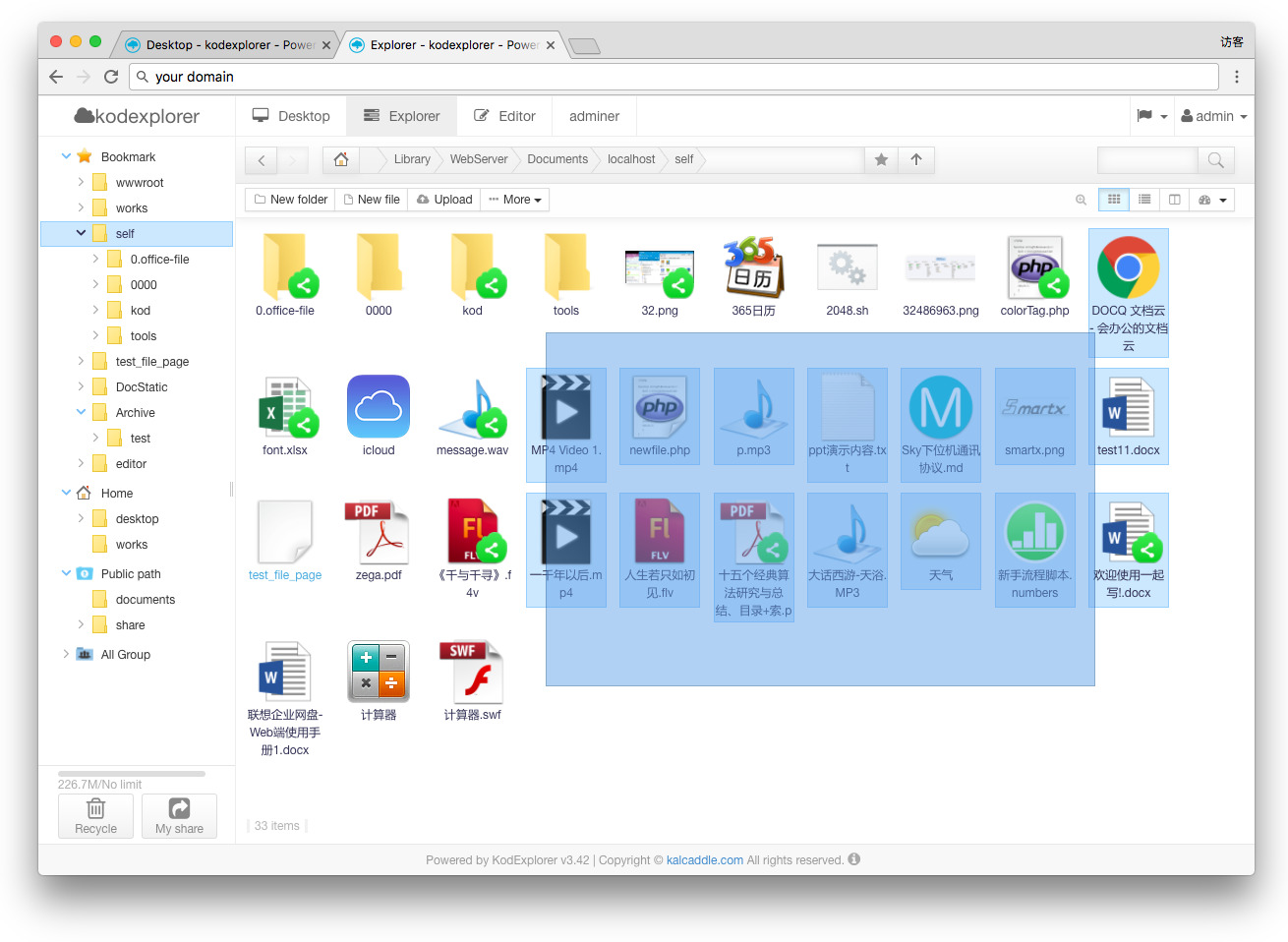
Deployment is a standard PHP stack. The official image expects a writable data volume:
| |
Behind a reverse proxy, set the body size limit explicitly — KodExplorer will happily accept multi-gigabyte uploads and fail confusingly when nginx cuts them off at the default 1 MB:
| |
KodExplorer’s differentiator is not performance. It is the plugin layer: office document preview, PSD and CAD viewers, archive tooling, and storage mounts all arrive as plugins rather than core features. For a small office that wants one place to click, that is worth more than any benchmark.
The trade-offs are real. PHP means an opcache and a web server you must keep patched. The interface is heavier than Dufs by an order of magnitude. Multi-user support exists, but permission granularity is coarser than Copyparty’s volume-and-account model.
Head-to-Head: The Three Things That Actually Decide It
Uploads over bad networks. Only Copyparty implements resumable uploads properly. Dufs streams a request body; if the connection drops, the transfer restarts. KodExplorer chunks uploads in the browser, which helps but is not the same as server-side resumption. If your users are on hotel Wi-Fi uploading multi-gigabyte files, this single difference usually settles the decision.
Permissions. Copyparty gives you accounts, per-volume read/write grants, and per-flag restrictions. KodExplorer gives you users and groups with folder rights. Dufs gives you one credential. Map your requirement honestly: most internal artifact drops need exactly one credential and no more.
Storage backends. KodExplorer is the only one that mounts external storage as first-class folders. Copyparty serves directories that must exist locally (bind mounts and FUSE cover the rest). Dufs serves exactly one directory tree.
Deployment Pitfalls That Will Bite You
- UID/GID mismatches. The upstream Copyparty Compose file pins
user: "1000:1000". If your host user is not 1000, uploads land with the wrong ownership or fail outright. Set it to$(id -u):$(id -g)of the account that owns the data directory. - Reverse proxies break WebDAV verbs. Default nginx configurations mangle
PROPFIND,MKCOL, andLOCK. If Finder mounts the share read-only, the proxy is the suspect, not the server. -Aon a public port. Dufs’s convenience flag means anonymous upload and delete. It is fine on a private VLAN and catastrophic on a public IP.- Client body limits. nginx’s 1 MB default silently truncates large uploads. Set
client_max_body_sizeand raiseproxy_read_timeoutfor slow links. - FTP exposure. Copyparty’s FTP and TFTP listeners are plaintext. Publish them only on an internal interface, or skip them and standardise on SFTP.
- Backups of the config, not just the data. Copyparty’s YAML and KodExplorer’s flat-file user database are single points of failure. A restored data volume with a lost account list is a support incident.
For a broader look at how these fit alongside SMB and NFS shares, see our Samba vs NFS vs WebDAV comparison. If your requirement is really a WebDAV endpoint for calendar and contact sync, the WebDAV server comparison covers that narrower problem. And when you outgrow “file server” and need sync clients, versioning, and sharing links, the Cloudreve vs Pydio Cells vs Seafile guide is the next step.
FAQ
Is Copyparty really a single file with no dependencies? Yes. The distributable is one Python file that runs on the standard library. Optional accelerators exist as separate wheels, but the core server needs nothing beyond Python 3.
Can Dufs handle multiple users with different permissions? No. Dufs authenticates with a single credential pair for the whole server. Per-user permissions require Copyparty’s accounts/volumes model or KodExplorer’s multi-user layer.
Does KodExplorer require a database? No. KodExplorer stores users and configuration in flat files under its data directory, which is why it deploys without MySQL or PostgreSQL. The trade-off is that concurrent administrative writes are not transactional.
Which one should I put behind Cloudflare Tunnel or a VPN? Any of them, but only Dufs and Copyparty are comfortable with very small memory budgets. If you expose a file server to the internet, terminate TLS at the proxy, disable anonymous writes, and prefer SFTP or WebDAV over plain FTP.
Can these serve media with thumbnails and range requests? Copyparty has a built-in media indexer with thumbnail generation and byte-range serving, which makes it usable as a lightweight media share. Dufs serves ranges but does not index. KodExplorer generates thumbnails through plugins.
How do I migrate a directory tree between them? They all read from a normal filesystem path, so migration is a bind-mount change plus a permission pass. The only friction is metadata: Copyparty’s index and KodExplorer’s thumbnails live in their own state directories and rebuild on first access.
💰 想测试你的市场判断力?我用 Polymarket 做预测市场交易——这是全球最大的预测市场平台,从大选结果到技术监管时间线,什么都可以押注。和赌博不同,这是真正的信息市场:你懂的信息越多,胜率越高。我靠预测技术相关事件的走向已经赚了不少。用我的邀请链接注册:Polymarket.com