You pointed OBS at a server, hit “Start Streaming”, and the preview in the browser arrived 8 seconds late. That is not a bug in OBS, your browser, or your network — it is HLS doing exactly what HLS does. If your users expect to watch a referee decision, a lecture, or a security camera without narrating the past, you need a streaming server built around an ingest protocol and a low-latency delivery path, not a segment-based one.
Three open-source media servers dominate that niche in 2026: SRS (29,371 GitHub stars), ZLMediaKit (17,653 stars), and Ant Media Server (4,745 stars, with a commercial edition on top). They overlap on paper — all speak RTMP, all do WebRTC, all ship container images — and behave very differently once real traffic arrives.
This is a production-oriented comparison: protocol coverage, actual configuration files from the upstream repositories, the UDP ports that will silently break your first deployment, and which one to pick for cameras versus live events versus one-to-many broadcasts.
TL;DR: Quick Verdict
- SRS is the best default for general live streaming. The config is readable, the HTTP API is honest, WebRTC and SRT are first-class, and the project documents its own trade-offs. Pick it for events, RTMP ingest, and RTMP-to-WebRTC bridging.
- ZLMediaKit is the protocol Swiss-army knife. If you must ingest RTSP from IP cameras, GB28181 from Chinese-market devices, and RTMP from OBS into one server, nothing else covers that spread in one process.
- Ant Media Server is the one with an actual product around it: a web management console, adaptive bitrate transcoding, and clustering — with a Community/Enterprise split you must read before deploying commercially.
One-line rule: SRS for live events, ZLMediaKit for camera and protocol soup, Ant Media when you need a console and a support contract.
At-a-Glance Comparison
| Dimension | SRS | ZLMediaKit | Ant Media Server |
|---|---|---|---|
| GitHub stars | 29,371 | 17,653 | 4,745 |
| Language | C++ | C++11 | Java |
| License | MIT | Permissive, custom (see LICENSE) | Community edition + commercial Enterprise |
| Last push | 2026-10-26 | 2026-10-25 | 2026-10-26 |
| RTMP in/out | Yes | Yes | Yes |
| RTSP | Limited (out) | Yes (in and out) | Yes (in) |
| WebRTC | Yes (play/publish) | Yes (play/publish) | Yes, ~0.5 s glass-to-glass |
| SRT | Yes | Yes | Yes |
| HLS / LL-HLS | Yes | Yes | Yes |
| HTTP-FLV | Yes | Yes | No (WebRTC/HLS instead) |
| GB28181 | Yes | Yes (native) | No |
| Transcoding | External (FFmpeg hook) | External (FFmpeg hook) | Built-in, adaptive bitrate |
| Clustering | Edge/origin (forward) | Cluster mode with origins | Enterprise edition |
| Built-in web console | No (REST API + demo pages) | Optional _py image with UI | Yes |
| Typical RAM (idle) | ~30–60 MB | ~50–100 MB | ~1–2 GB (JVM) |
Decision Matrix: Pick in 10 Seconds
| Your situation | Recommended | Why |
|---|---|---|
| Live event, OBS in, browser out, sub-second | SRS | RTMP-to-WebRTC bridging with a clean config |
| 40 IP cameras, mixed RTSP and GB28181 | ZLMediaKit | Native RTSP and GB28181 ingest in one process |
| You need a UI for non-technical operators | Ant Media | Management console, stream controls, analytics |
| Multi-bitrate adaptive streaming | Ant Media | Built-in transcoding and ABR profiles |
| Edge/origin distribution across regions | SRS or ZLMediaKit | Both support cluster forwarding without a license fee |
| Publishing from a browser (WHIP) | SRS | Documented WebRTC publish path |
| You have 512 MB RAM and 200 viewers | SRS or ZLMediaKit | Both idle in tens of megabytes |
| You need a vendor to call at 3 a.m. | Ant Media Enterprise | Commercial support is the product |
SRS — The Readable Default
SRS (Simple Realtime Server) has been the reference open-source RTMP server for a decade and has steadily absorbed WebRTC, SRT, and GB28181. What makes it pleasant is that the configuration is a small, legible file — and the project ships complete examples for each mode. This is the upstream conf/rtc.conf, quoted as-is:
| |
Three details matter more than the rest. rtc_server listens on UDP 8000, so a firewall rule that only opens TCP gives you a WebRTC player that connects and then never receives media. candidate $CANDIDATE is the public IP that SRS advertises in ICE candidates — leave it unset on a NATed host and browsers will try to reach a private address. And rtmp_to_rtc is off in the example; for the OBS-in/browser-out pattern you are almost certainly here for, flip it on:
| |
Run it with the official image and pass the config in:
| |
Then verify the stream is actually registered before blaming the player:
| |
SRS’s strength is that every behaviour is inspectable: the HTTP API reports streams, clients, and bandwidth, and the documentation explains why each default exists. Its weakness is that transcoding is delegated to FFmpeg hooks — if you need ABR ladders out of the box, you are writing that pipeline yourself.
ZLMediaKit — The Protocol Swiss-Army Knife
ZLMediaKit’s scope is unusual: RTSP, RTMP, HLS, HTTP-FLV, HTTP-TS, WebSocket-FLV, WebSocket-TS, fMP4, GB28181, SRT, STUN/TURN — in one C++ process. For anyone integrating IP cameras, that RTSP and GB28181 support is the deciding feature. Camera vendors speak RTSP; Chinese-market NVRs speak GB28181; browsers speak WebRTC. ZLMediaKit bridges all three without an intermediate FFmpeg relay.
The official container command from the upstream README publishes the full port surface, which doubles as the best documentation of what the server does:
| |
Read the mapping carefully: HTTP is served on container port 80 (published as 8080), RTSP on 554 (published as 8554), RTCP/RTP proxy on 10000 with both TCP and UDP, WebRTC on UDP 8000, SRT on UDP 9000. Missing the UDP mappings is the single most common reason a ZLMediaKit deployment “works in VLC but not in the browser”.
Configuration lives in conf/config.ini, which is section-based and readable. The upstream defaults for the parts you will actually touch:
| |
That secret is a published default that grants API access, including stream control. Rotate it before the port ever faces a network. Mount your own config to avoid shipping the default:
| |
If you want a browser UI for stream management, the project publishes a _py image variant that adds a web management panel. That is convenient for operations and one more surface to patch — treat it as a separate decision from the streaming server itself.
ZLMediaKit’s trade-offs are documentation depth and configuration sprawl. The config.ini is long, many options interact (especially RTP proxy and multicast), and English-language guidance is thinner than SRS’s. In exchange you get the widest protocol coverage of any open-source server here.
Ant Media Server — The One With a Product
Ant Media Server is the only option in this comparison that ships a management console a non-engineer can operate. The console lists live streams, shows viewer counts, exposes publish/play URLs per protocol, and toggles recording per stream.
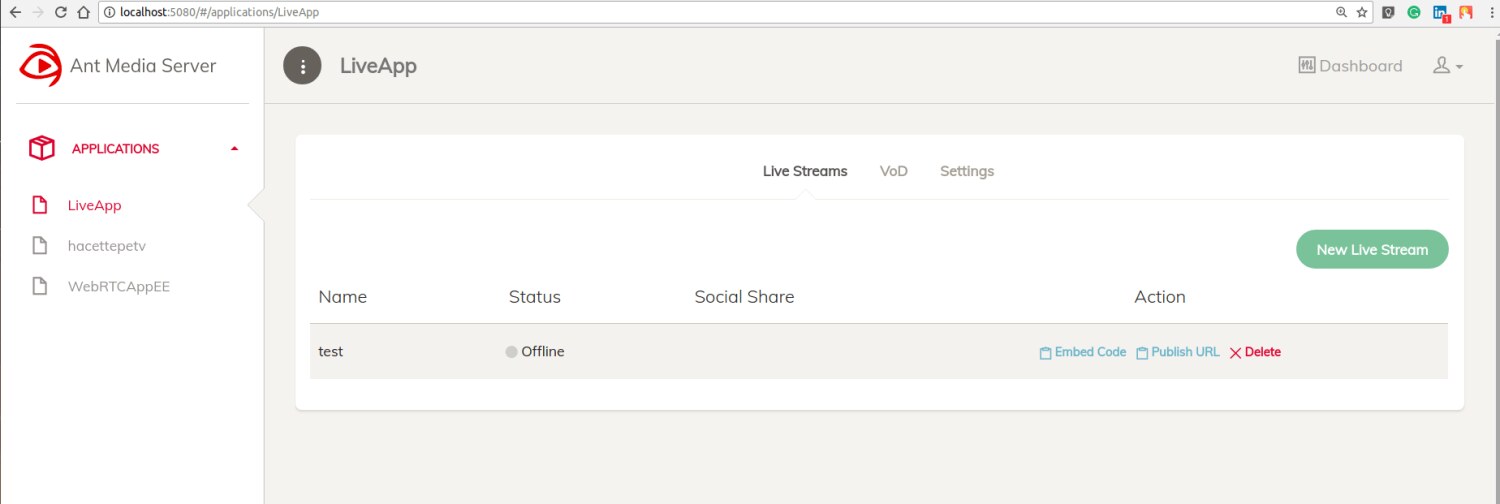
The container is published as antmedia/ant-media-server, and the documented pattern publishes the web console on 5080 and RTMP ingest on 1935:
| |
What you get beyond the console: built-in transcoding with adaptive bitrate, so a single ingest produces a ladder of renditions without an external FFmpeg pipeline; WebRTC at roughly half a second glass-to-glass; recording to disk; and a REST API for stream lifecycle management. For a one-to-many broadcast where some viewers are on hotel Wi-Fi, ABR is not a nice-to-have — it is the difference between a working stream and a support queue.
The catch is the licence split. The Community edition is free and source-available but deliberately limited; clustering, adaptive bitrate at scale, and support sit behind the Enterprise edition. Read the LICENSE and the edition feature matrix before you plan a commercial deployment on the free build. The JVM also costs you: expect 1–2 GB of RAM before any transcoding, and transcoding itself is CPU-bound, so a modest VPS will produce one rendition and nothing more.
If you are choosing Ant Media, you are usually choosing it because someone else will operate it. That is a legitimate reason — console quality is a feature.
Head-to-Head: What Actually Breaks
Protocol coverage. ZLMediaKit wins outright. RTSP ingest, GB28181, and SRT in one process is a combination neither competitor matches. SRS covers the live-event set (RTMP, WebRTC, SRT, HLS, HTTP-FLV) completely and adds GB28181 without ZLMediaKit’s RTSP ingest depth. Ant Media covers publishing and playback well but not camera protocols.
Latency. All three deliver sub-second WebRTC in a LAN. Across the public internet, the deciding factor is your TURN/STUN path, not the server: without a reachable candidate or relay, WebRTC degrades to nothing rather than to a slow stream. SRS exposes candidate explicitly; ZLMediaKit exposes it in the [rtc] section; Ant Media configures it in the console.
Transcoding. Ant Media is the only one with it built in. SRS and ZLMediaKit hand you hooks and expect you to run FFmpeg. For a single 1080p ingest with three renditions, that difference is a day of work versus an afternoon.
Clustering. SRS and ZLMediaKit both support origin/edge forwarding without a licence fee. Ant Media requires Enterprise. If you plan multi-region distribution, price that in early.
Operability. Ant Media wins on console, SRS wins on API clarity, ZLMediaKit wins on breadth at the cost of a large config surface.
Deployment Pitfalls That Will Bite You
- UDP ports that never got opened. WebRTC (8000/udp), SRT (9000 or 10080/udp), and ZLMediaKit’s RTP proxy (10000/udp) are UDP. A TCP-only firewall produces a player that connects and shows a black frame forever.
- Missing ICE candidate on NAT. Set SRS
CANDIDATE(or the equivalent) to your public IP. Without it, browsers receive private-address candidates and fail silently. - HTTPS is mandatory for browser capture.
getUserMediaonly works on secure origins. Publishing from a browser over plain HTTP will fail even though the server is fine. - ZLMediaKit’s default API secret. The shipped
secretis public knowledge. Rotate it and never publish the API port. - Container port confusion. ZLMediaKit serves HTTP on container port 80, not 8080. Mapping
8080:8080produces a dead web root and a confusing 404. - Transcoding on a small VPS. One 1080p transcode can consume two cores. Ant Media’s ABR ladder on a 2 vCPU box will drop frames; size for the ladder, not for the idle process.
- HLS latency expectations. HLS is a segmented protocol with inherent delay. If someone asks for “one second”, the answer is WebRTC or LL-HLS, not tuned HLS.
- Recording storage growth. All three can record; none cleans up after you. A 24/7 camera recording 4 Mbps fills 43 GB per day.
For the segmented-delivery side of streaming — Owncast, MediaMTX, and nginx-rtmp — see our self-hosted live streaming comparison. If your real requirement is a conferencing SFU rather than broadcast distribution, the Janus vs Mediasoup vs LiveKit guide is the right starting point, and the Tdarr vs Unmanic vs HandBrake comparison covers the transcoding farm you will need behind any of them.
FAQ
Which server should I use for RTSP IP cameras? ZLMediaKit. It ingests RTSP natively and can republish as WebRTC, HLS, or HTTP-FLV, which is exactly the camera-to-browser path. SRS and Ant Media accept RTMP pushes and can pull some sources, but RTSP ingest is not their strength.
Do I need a TURN server as well? Often, yes. A media server’s built-in STUN is enough when both peers can reach the server directly. For restrictive corporate networks you need a TURN relay (coturn is the usual choice) or viewers will fail to connect with no useful error.
Is SRS or ZLMediaKit better for a live event with 5,000 viewers? Both handle it, and both need an edge tier rather than a bigger single box. SRS’s origin/edge forwarding is more thoroughly documented; ZLMediaKit’s cluster mode works but assumes you understand its origin configuration.
Can Ant Media Server’s free edition be used commercially? Read the LICENSE for the exact Community edition terms — the free build is deliberately limited and clustering plus certain scaling features belong to Enterprise. Do not assume the free image covers a commercial broadcast.
What latency should I expect per protocol? WebRTC: 0.3–1 s. SRT: sub-second to a few seconds depending on buffering. HTTP-FLV: 1–3 s. HLS: 6–30 s standard, 2–5 s with LL-HLS. The protocol choice sets the floor; tuning cannot beat it.
How much bandwidth does one 1080p stream need? Roughly 4–6 Mbps per rendition. Ten concurrent viewers of a single 5 Mbps rendition is ~50 Mbps of egress — which is usually the real cost of self-hosted streaming, not CPU.
💰 想测试你的市场判断力?我用 Polymarket 做预测市场交易——这是全球最大的预测市场平台,从大选结果到技术监管时间线,什么都可以押注。和赌博不同,这是真正的信息市场:你懂的信息越多,胜率越高。我靠预测技术相关事件的走向已经赚了不少。用我的邀请链接注册:Polymarket.com