If you administer Windows infrastructure, you already have PowerShell everywhere: scheduled tasks, runbooks, DSC pulls, CI agents. The moment you need to give other humans access to those scripts, you hit a wall. Nobody on the help desk is going to Enter-PSSession to run a query. They want a button in a browser.
That is the gap the PowerShell web stack fills, and in 2026 there are exactly three options worth considering: Pode (the open-source web framework), Pode.Web (a UI template layer on top of it), and PowerShell Universal (a commercial platform). Everything else is abandoned — Polaris last saw a commit in August 2020, and Universal Dashboard, the open-source precursor to PowerShell Universal, was archived in March 2023.
This is a practical comparison: what each one actually is, what the deployment looks like, where it breaks, and whether the whole idea makes sense for your workload.
TL;DR: Use Pode for APIs, Pode.Web for Internal Dashboards, Universal Only If You Are Buying Support
- REST APIs and webhooks driven by existing PowerShell logic → Pode. MIT licensed, 1,069 stars, actively developed (last push 2026-10-22), official Docker images on Ubuntu, Alpine and ARM32.
- Internal admin dashboards, forms, and “give the ops team a button” tooling → Pode.Web on top of Pode. You write PowerShell only — no HTML, CSS or JavaScript. It is Bootstrap and jQuery under the hood, with charts from Chart.js.
- Hundreds of users, role-based access, job scheduling, git-backed config, and someone to call when it breaks → PowerShell Universal. It is commercial, it is the most polished product here, and its Docker image has 1.28 million pulls. It is also closed source, so you are buying a product, not adopting a project.
- Anything latency-sensitive or CPU-heavy → none of them. Use ASP.NET Core, FastAPI or Go, and call PowerShell as a subprocess when you genuinely need it.
Comparison Table (Live Data, 2026-10-23)
| Pode | Pode.Web | PowerShell Universal | |
|---|---|---|---|
| License | MIT | MIT | Commercial (free tier, paid tiers) |
| GitHub stars | 1,069 | 248 | 73 (issue tracker only; product is closed source) |
| Last push | 2026-10-22 | 2026-10-20 | 2026-05-19 |
| Docker image | badgerati/pode (30,840 pulls) | badgerati/pode.web (3,502 pulls) | ironmansoftware/universal (1,279,229 pulls) |
| Install | Install-Module Pode | Install-Module Pode.Web | Installer, MSI, or container |
| Runs on | PowerShell 7.6 (bundled in image) + Windows PowerShell 5.1 | Pode 2.6.0+ | Own runtime |
| UI included | No — you write HTML or serve static files | Yes — pages, tables, charts, forms, login | Yes — full admin portal |
| Auth | Pluggable (basic, form, bearer, OIDC via add-ons) | Login page support built in | Built-in roles and identity providers |
| Best at | APIs, webhooks, TCP/SMTP listeners | Internal dashboards with zero front-end code | Multi-user platform with scheduling |
One number deserves a warning: Pode.Web is still pre-1.0. Its README explicitly says “until v1.0.0 expect possible breaking changes in some releases.” Treat it as a fast-moving internal tool, not a platform you build a five-year product on.
Decision Matrix
| Scenario | Pick | Why |
|---|---|---|
| Expose existing admin scripts over HTTP for a handful of operators | Pode | Smallest possible stack: one module, one .ps1 file, one container |
| Give the help desk a form that resets a user’s MFA and logs who did it | Pode.Web | Forms, tables and toast notifications without writing HTML |
| Receive webhooks from monitoring and trigger runbooks | Pode | Route handling plus JSON responses in a few lines |
| Run a portal for 300 technicians with per-page permissions and audit | PowerShell Universal | Role management and audit are product features, not weekend projects |
| Build something internet-facing with auth and rate limiting | None | Put a real reverse proxy in front, or use a framework with a security team |
| Anything where p99 latency below 100 ms matters | None | PowerShell startup and runspace overhead are the wrong tool for this |
Pode — A Web Framework That Happens to Be PowerShell
Pode is a cross-platform PowerShell web framework: HTTP endpoints, routing, static files, and even TCP/SMTP listeners. The whole programming model is a script block. Here is the repository’s own Hello World, unmodified in structure:
| |
A more realistic internal API — accept a JSON payload, validate it, and return JSON — looks like this:
| |
Two things make Pode pleasant in a Windows shop: routes are just script blocks that call cmdlets you already know, and -Threads lets you scale runspaces. Two things make it painful: every request executes PowerShell (startup cost per runspace, not per request, but still measurable), and anything CPU-heavy inside a route blocks that runspace — push long work to Start-ThreadJob and return a job ID instead of making the caller wait 90 seconds.
Docker deployment
Pode publishes official images. The documented pattern copies your scripts into the image and runs the server script directly:
| |
| |
The upstream Dockerfile builds on .NET SDK 10.0 with PowerShell 7.6 bundled, with Ubuntu Resolute as the default base and Alpine 3.23 and ARM32 variants published alongside it — which means this runs on a Raspberry Pi, not just on Windows Server. For a compose-based deployment you can drop the image straight into an existing stack:
| |
Where Pode wins: MIT license, tiny footprint, real cross-platform support, and a route model that any PowerShell admin can read. Where it hurts: no UI, no built-in user management, and the documentation, while good, assumes you are comfortable reading source when the docs run out.
Pode.Web — Dashboards Without Touching HTML
Pode.Web sits on top of Pode and generates a full Bootstrap UI from PowerShell cmdlets. The README’s own example builds an auto-refreshing process chart in about 15 lines:
| |
That is the entire pitch: the chart, the layout, the auto-refresh timer and the dark theme are all handled by the framework. It ships light, dark and terminal themes, plus forms with validation, tables with pagination and filtering, tabs, steppers, toasts and a login page.
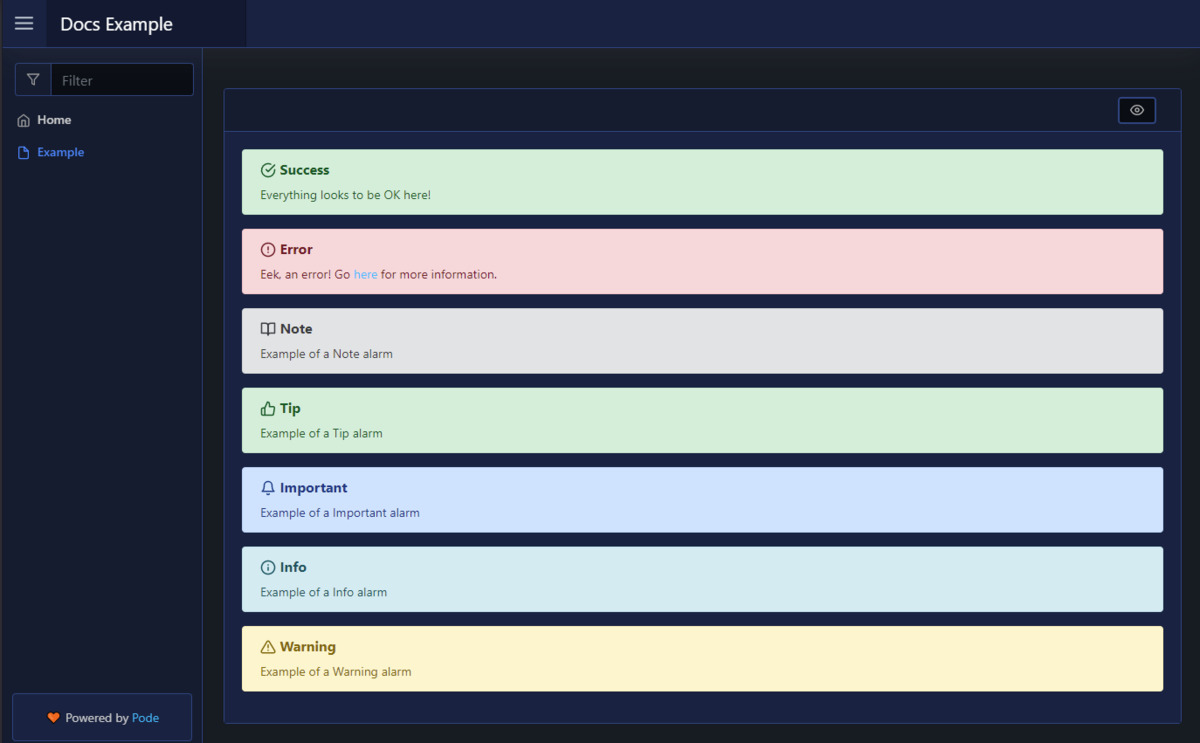
Two caveats that matter at scale. First, Pode.Web is built on Bootstrap, jQuery, Chart.js and Highlight.js — a 2026 dashboard stack with 2016 front-end conventions. It works, it is stable, but do not expect reactivity or a component model. Second, pre-1.0 breaking changes are explicitly possible; pin the module version in your deployment (Install-Module Pode.Web -RequiredVersion x.y.z) and upgrade deliberately.
For monitoring-style dashboards, this is still the fastest path from “I have a script” to “the team has a page.” Compare it with what it takes to build the same thing in a general-purpose stack: a FastAPI service, a Jinja template, an auth layer, and a chart library — several hundred lines versus fifteen.
PowerShell Universal — The Commercial Answer
PowerShell Universal is the paid successor to Universal Dashboard, and it is the only option here that is a finished product rather than a framework. It bundles a web portal, role-based access control, job scheduling, API endpoints, git-backed configuration and a terminal in the browser.
The signals are unambiguous: the Docker image has 1.28 million pulls, and the public GitHub repository is an issue tracker only — 73 stars, no license file, because the product itself is closed source. The open-source predecessor, ironmansoftware/universal-dashboard (450 stars, LGPL-3.0), has not been touched since March 2023.
| |
Where it wins: everything an internal platform needs to pass an audit — roles, per-page authorization, job history, scheduled runbooks, and a support contract. Where it hurts: licensing cost per admin user, no ability to fork or patch, and lock-in: your dashboards are defined in its own model, not portable PowerShell.
If your requirement is “one dashboard for four admins,” paying for Universal is hard to justify against 30 lines of Pode.Web. If your requirement is “a portal for 300 technicians with per-department permissions and a change log,” building that yourself on Pode is a multi-month project that will never be as good.
Pitfalls: What Bites People After Week Two
1. PowerShell is single-threaded per runspace, and your routes are not magic. A route that waits 30 seconds on a database query holds a runspace for 30 seconds. Under any real concurrency you must either raise -Threads and accept memory growth (each runspace carries its own session state) or move work to background jobs with a polling endpoint. The most common production incident with Pode is a dashboard that freezes because one page’s script block is slow.
2. Never expose these frameworks directly to the internet. Pode’s auth is pluggable, which also means it is your responsibility: session timeouts, CSRF, TLS termination, rate limiting and header hardening are all DIY. Put Caddy, nginx or a reverse proxy with a WAF in front, terminate TLS there, and bind Pode to an internal interface. A webhook receiver is not a public API.
3. Credentials inside script blocks leak into logs. Pode logs route information; if you interpolate an API key into a message or throw an exception containing the request body, the secret lands in your log aggregator. Read secrets from the environment or a secret store at call time, and scrub the body before logging.
4. Install-Module without -Scope AllUsers fails silently in service contexts. Scheduled tasks and containers run as a service account with a different module path. Modules installed interactively under your profile will not be found at runtime. Install with -Scope AllUsers, or bake modules into the image at build time.
5. PowerShell 5.1 and PowerShell 7 are not interchangeable here. Pode works on both, but ForEach-Object -Parallel, ??, ternary operators and most modern cmdlet parameters do not exist in 5.1. If your server is Windows PowerShell 5.1 (still extremely common on older Server builds), test on 5.1 — the Docker image gives you 7.6 and hides every compatibility problem.
6. Session state is per runspace, and that surprises people. Variables set in one runspace are not visible in another when -Threads is greater than one. Shared state belongs in a database, a file, or Pode’s own state facilities — not in a $script: variable that happens to work when you run with a single thread locally.
If you like niche-language web stacks, our Tcl web stacks comparison with NaviServer, Apache Rivet and OpenACS and the Clojure web framework comparison with Ring, Compojure and Reitit make good companion reads. And if you are writing Pode modules, our Pester, PSScriptAnalyzer and platyPS testing guide covers the quality tooling.
FAQ
Is Pode production-ready in 2026? Pode is production-ready for internal APIs and admin endpoints. It is MIT licensed, actively maintained (last push 2026-10-22), and publishes official Docker images for Ubuntu, Alpine and ARM32. The caveat is operational rather than technical: you are responsible for authentication hardening, TLS termination, rate limiting and logging, so it belongs behind a reverse proxy rather than directly on the internet.
What is the difference between Pode and Pode.Web? Pode is the web server and routing framework — endpoints, routes, static files, TCP and SMTP listeners. Pode.Web is a template layer that runs on top of Pode (version 2.6.0 or newer) and generates a Bootstrap-based UI with pages, tables, charts, forms and a login page, so you can build a dashboard without writing HTML, CSS or JavaScript.
Is PowerShell Universal open source? No. The product is closed source and commercially licensed, with a free tier for small environments and paid tiers for larger ones. Its GitHub repository is an issue tracker only, containing no license file. Its open-source predecessor, Universal Dashboard, was LGPL-3.0 licensed and has not been updated since March 2023.
Should I use Pode instead of ASP.NET Core or FastAPI? Only when the logic you are exposing is already PowerShell. Pode’s value is that an administrator can read, modify and deploy the routing code without learning another language. For latency-sensitive services, high concurrency, or anything customer-facing, use a general-purpose framework and invoke PowerShell as a subprocess when you need it.
Why does my Pode dashboard freeze when two people use it at once?
Because each HTTP request executes inside a PowerShell runspace, and a slow script block occupies that runspace for its full duration. Increase the -Threads value passed to Start-PodeServer, and move long-running work into background jobs with a status endpoint that the page polls.
Can Pode run on Linux and in containers?
Yes. Pode is cross-platform and its official image bundles PowerShell 7.6 on .NET SDK 10.0, with Ubuntu Resolute as the default base plus Alpine and ARM32 variants. The Docker Hub repository badgerati/pode has more than 30,000 pulls, and Pode also runs on a Raspberry Pi.
💰 想测试你的市场判断力?我用 Polymarket 做预测市场交易——这是全球最大的预测市场平台,从大选结果到技术监管时间线,什么都可以押注。和赌博不同,这是真正的信息市场:你懂的信息越多,胜率越高。我靠预测技术相关事件的走向已经赚了不少。用我的邀请链接注册:Polymarket.com