You buy a $6 ESP32, plug it in, and discover that “just use Python” hides three completely different products: a firmware that speaks Python over a serial REPL, a firmware that mounts as a USB drive so you can edit code.py in any text editor, and a compiled language with a virtual machine that pushes new code over WiFi in under two seconds.
Choosing wrong costs you a weekend. Choosing right means your first sensor reads data the same afternoon. Here is how the three actually differ, with the install commands and code taken from each project’s own repository.
TL;DR: Quick Verdict
- Use MicroPython when you want the widest board support and the most control: raw
machine.Pin, real threading on ports that support it, a serial REPL, and firmware that runs on everything from an ESP32 to an STM32 to a Unix host for testing. - Use CircuitPython when the board is for learning, teaching, or a quick build: it exposes a
CIRCUITPYUSB drive, reloads on save, ships 300+ official libraries, and has error messages translated into more than ten languages. - Use Toit when you are shipping a maintained fleet of ESP32 devices: live reload over WiFi, hardware-enforced process isolation between programs, and a compiled runtime that catches mistakes at build time instead of at 2 a.m. on a device in a ceiling.
If you have not chosen a board yet, start with our embedded RTOS comparison — the RTOS decision constrains everything downstream, including whether a Python runtime is even an option.
Comparison Table
| MicroPython | CircuitPython | Toit | |
|---|---|---|---|
| GitHub stars | 22,134 | 4,567 | 1,406 |
| License | MIT | MIT | LGPL-2.1 |
| Latest stable | v1.29.0 (2026-08-24) | Continuous + stable releases | Rolling releases |
| Language | Python 3 subset | Python 3 subset | Toit (Python-like, compiled) |
| Deploy method | esptool.py over USB serial | Drag-and-drop .uf2 file | jag over WiFi |
| Edit workflow | REPL / mpremote / rshell | Native USB drive, edit code.py | Editor + jag watch |
| Threads / interrupts | Supported on many ports | Disabled by design | Programs isolated in VM |
| Floats | Build-dependent | Always enabled | Native types |
| Board coverage | Very wide (stm32, esp32, rp2, unix, more) | 300+ boards, Adafruit-centric | ESP32 only |
| Library story | Built-in modules + mip | 300+ Adafruit libraries, Blinka-compatible | Toit standard library + containers |
| Last push | 2026-10-17 | 2026-10-18 | 2026-10-15 |
Star counts flatter MicroPython because it is a decade old and embedded in commercial products. They also undersell Toit, which is a much newer, narrower tool aimed at production ESP32 fleets rather than hobby breadth.
Decision Matrix: Pick by What You Are Building
| Your situation | Use | Why |
|---|---|---|
| First microcontroller project, any board | CircuitPython | No toolchain, no drivers; save the file and it runs |
| Classroom or workshop with mixed hardware | CircuitPython | Consistent USB workflow and translated error messages |
| ESP32 with WiFi, MQTT and deep sleep | MicroPython | Mature networking modules and the widest example corpus |
| STM32, RP2040 and ESP32 in the same codebase | MicroPython | One runtime, many ports, same API surface |
| Device fleet you update remotely | Toit | Live reload over WiFi, no serial cable, isolated programs |
| Hard real-time guarantees | None of these | Use an RTOS; see the Zephyr/NuttX/RIOT comparison |
| You want to unit-test logic on a laptop | MicroPython | The unix port runs your code as a normal process |
MicroPython: The Reference Implementation
MicroPython is the project the other two define themselves against. It targets microcontrollers “and constrained systems,” runs on STM32, ESP32, RP2040 and a Unix port, and exposes hardware through machine, network and time modules that map closely to the metal.
Flashing an ESP32 uses esptool, and the commands below are the ones from the official download page:
| |
Then open the REPL over serial and you have a live Python prompt on the device:
| |
A blink is the canonical smoke test, and it reads exactly as you would expect:
| |
What MicroPython gives you that the others do not: a unix port so you can run logic tests without hardware, micropython.mem_info() for inspecting the heap, and threading on ports that implement it. What it withholds: floats are build-dependent, so an integer-only build silently turns 1/3 into 0 unless you check. Bytecode (.mpy) files are also tied to the firmware version, which is why a .mpy compiled for v1.28 can refuse to load on v1.29.
CircuitPython: The USB Drive That Runs Code
CircuitPython is a fork of MicroPython maintained by Adafruit, and it changes the workflow rather than the language. Its README is explicit about the design goal: install it “usually via drag and drop and then edit a code.py file on the CIRCUITPY drive. The code will automatically reload. No software installs are needed besides a text editor.”
The install is genuinely that simple:
- Download the
.uf2for your exact board fromcircuitpython.org/downloads. - Double-tap the reset button so the board mounts as
RPI-RP2(or the vendor’s bootloader drive). - Drag the
.uf2onto that drive. - A new
CIRCUITPYdrive appears. Editcode.pyon it.
The code is deliberately more abstract than machine.Pin — board names the pin, digitalio handles direction:
| |
That abstraction is why the same file works on a dozen different boards. It is also why CircuitPython can disable what it considers footguns: the project’s own “Differences from MicroPython” section states that concurrency within Python is not well supported — interrupts and threading are disabled, with async/await available on some boards for cooperative multitasking. Floats are always enabled, and error messages are translated into ten-plus languages.
Where it hurts: no threads means no interrupt-driven sampling, so high-rate sensors need native modules or asyncio. code.py runs once and exits when it reaches the end of the file — beginners who forget the while True conclude the board is dead. And writing to CIRCUITPY while code is running can corrupt the filesystem; use safe mode before bulk edits.
Toit: Compiled, Isolated, Live-Reloaded
Toit is the odd one out and the most interesting if you are past the blinking-LED stage. It is not Python: it is a statically compiled language with a virtual machine that runs on the ESP32. The compiler, VM and standard library live in one repository, and a program is compiled on your machine, sent to the device, and started under the VM.
The development loop is the selling point. Jaguar runs a small HTTP server on the ESP32, and updates are pushed over WiFi:
| |
Real code from the project’s examples/ directory — this is the entire GPIO example:
| |
Deep sleep is a first-class concept rather than an afterthought, which matters for anything battery powered:
| |
Jaguar allocates each installed program its own isolated heap inside the VM, stops the previous version and frees its resources before starting the new one. On a device in a ceiling, that is worth more than a nicer syntax: a bad push does not leave the old process half-alive holding a socket.
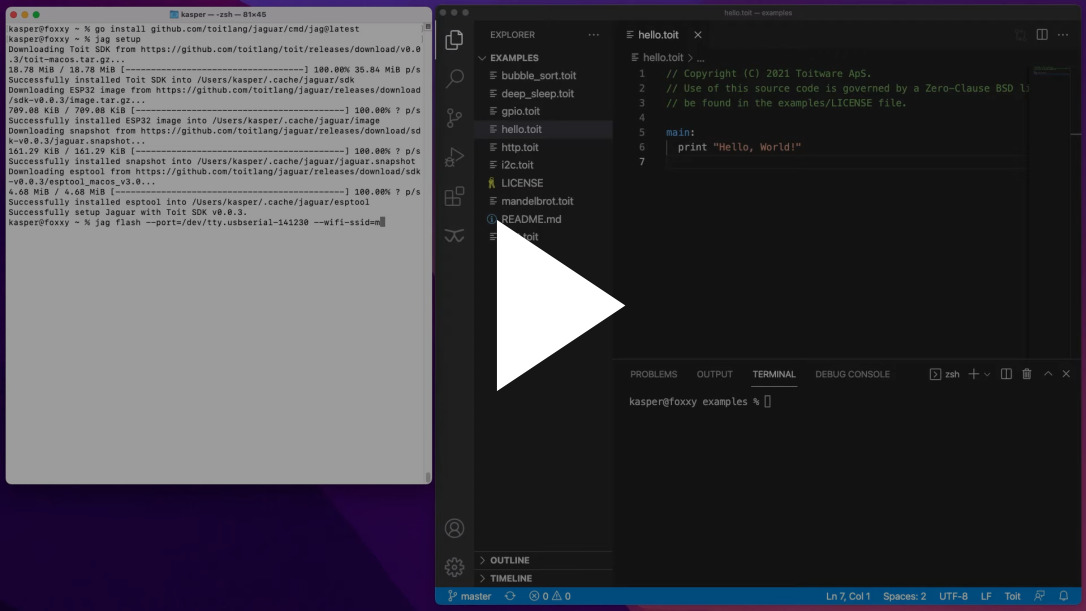
Where it hurts: ESP32 only. The ecosystem is small (1,406 stars, 91 forks), the license is LGPL-2.1 rather than MIT, and the first Jaguar install still needs a serial flash. If your fleet includes RP2040 or STM32 boards, Toit is simply not an option.
Memory and Performance: The Trade Nobody Mentions
All three fit in a few hundred kilobytes of RAM, but they spend it differently, and the difference decides what you can build.
MicroPython keeps a compact bytecode interpreter and lets you freeze modules into firmware to save RAM. CircuitPython spends memory on the USB mass-storage stack and always-on floats — a deliberate trade for the drag-and-drop workflow. Toit compiles ahead of time and runs under a VM, paying for the VM but gaining isolation and faster execution of hot loops.
Practical rules that hold across all three:
- WiFi costs more than your logic. A connected ESP32 idles around 80–120mA with the radio on; deep sleep drops it to tens of microamps. If your project is battery powered, sleep strategy matters more than runtime choice.
- Freeze your libraries into the firmware on MicroPython (
make BOARD=... FROZEN_MANIFEST=...) when RAM is tight; importing from flash costs heap. - Avoid large string formatting in loops. All three allocate on format; on a 200KB heap that is how you get a
MemoryErrortwo hours into a run. - Measure before optimizing.
gc.mem_free()in MicroPython andgccollection logs tell you more than any benchmark table.
If your project is outgrowing these runtimes, the next step is usually a build-toolchain change, not a language change — our PlatformIO vs ESP-IDF vs Arduino CLI comparison covers that transition.
Pitfalls and Migration Notes
Serial permissions bite first. On Linux, add yourself to the dialout group before flashing, and expect the port to be /dev/ttyUSB0 on ESP32 dev boards but /dev/ttyACM0 on native-USB boards like the RP2040.
Erase before you flash. Reflashing MicroPython over an existing filesystem without erase_flash produces boot loops and stale boot.py behaviour that looks like a firmware bug.
.mpy and firmware versions must match. MicroPython bytecode is versioned. Keep mpy-cross pinned to the firmware release you deploy, or ship plain .py files during development.
CircuitPython needs safe mode for bulk edits. Drop into safe mode before copying a new lib/ tree; writing while code.py is executing is the usual cause of a corrupted filesystem.
Do not port machine.Pin code to CircuitPython line by line. The names differ (board, digitalio, busio), and the idiomatic port is shorter than the mechanical one.
Toit requires WiFi for its best workflow. jag watch is a network operation. Plan for a serial recovery path before you deploy to a device you cannot physically reach.
Deep sleep changes your program structure. On every runtime, wake-from-sleep usually restarts main. State that must survive belongs in RTC memory or flash, not in a global variable.
FAQ
Is CircuitPython just MicroPython with a different name?
No. CircuitPython is a fork, but the differences are deliberate: native USB mass storage on most boards, floats always enabled, translated error messages, and threading/interrupts disabled. It also maintains its own 300+ library collection and a compatibility layer (Blinka) that lets the same libraries run on Raspberry Pi-class Linux boards.
Which one is fastest?
For pure compute loops, Toit has the advantage because programs are compiled ahead of time and run under its VM. MicroPython and CircuitPython are bytecode interpreters and are broadly comparable, with MicroPython usually ahead on tight numeric loops and CircuitPython paying a small cost for its always-on float support and USB stack. For most sensor projects the radio and sleep strategy dominate runtime choice.
Can I use these on a Raspberry Pi Pico?
Yes for MicroPython and CircuitPython — the RP2040 is one of the best-supported targets for both. Toit does not target the RP2040; it is ESP32-only.
Do I need a toolchain installed to use CircuitPython?
No. That is the point: you need a text editor and a USB cable. MicroPython needs esptool to flash and something like mpremote for a REPL; Toit needs the jag CLI and a WiFi network for live reload.
How do I update code on a device I cannot reach?
Toit is built for this — jag watch and container installs push over WiFi. With MicroPython, the usual patterns are an HTTP or MQTT-triggered updater that writes files and reboots, or OTA support in your own firmware. CircuitPython’s drag-and-drop model assumes physical access, so remote updates require a companion service.
Are these suitable for production products?
MicroPython is used in commercial devices and has a mature, MIT-licensed codebase. CircuitPython targets education and prototyping and says so. Toit is explicitly positioned for production ESP32 fleets, with process isolation and remote updates — at the cost of a smaller ecosystem and an LGPL-2.1 runtime.
💰 想测试你的市场判断力?我用 Polymarket 做预测市场交易——这是全球最大的预测市场平台,从大选结果到技术监管时间线,什么都可以押注。和赌博不同,这是真正的信息市场:你懂的信息越多,胜率越高。我靠预测技术相关事件的走向已经赚了不少。用我的邀请链接注册:Polymarket.com