Every time you copy a password reset link, a customer’s address, or a half-written API key, that string leaves your machine. On macOS it lands in iCloud. On Windows it lands in Microsoft’s cloud clipboard history. On ChromeOS it is synced by default. Nobody asked you, and almost nobody turns it off — which is why clipboard sync is quietly the most invasive convenience feature in modern computing.
Self-hosting your clipboard fixes the trust problem, but the three obvious candidates solve it in completely different ways. ClipCascade is an always-on sync daemon with per-user isolation and peer-to-peer fallback. SyncClipboard is a history-first client/server pair that can also run on plain WebDAV or S3 storage. LocalSend is not really a clipboard sync service at all — it is an encrypted pipe between devices on the same network, and that distinction matters more than any feature table.
This guide compares all three with live repository data, the actual Docker invocations from their official docs, and the deployment traps that bite people in week two.
TL;DR: Pick Based on the Shape of Your Problem
- You want copies to appear automatically on every device, forever → ClipCascade. Docker container, per-user accounts, optional P2P, 1,944 stars, last commit October 2026.
- You want clipboard history plus file transfer, and you already have object storage → SyncClipboard. ASP.NET Core server on port 5033 or point it at S3/WebDAV, 5,138 stars, MIT licensed.
- You want to move text and files between two machines on the same Wi-Fi, right now, with no server → LocalSend. 94,713 stars, Apache-2.0, zero infrastructure. It will not silently mirror your clipboard, and that is a feature, not a gap.
My verdict after running all three: ClipCascade for a personal fleet, SyncClipboard for teams that already own storage, LocalSend for everything else. Do not deploy ClipCascade expecting LocalSend’s zero-config transfer, and do not deploy LocalSend expecting push-style sync. Half the complaints in issue trackers come from exactly that mismatch.
The 30-Second Comparison
| Dimension | ClipCascade | SyncClipboard | LocalSend |
|---|---|---|---|
| Architecture | Sync server + tray clients | Client/server, or WebDAV / S3 backend | Peer-to-peer, no server |
| Live automatic sync | Yes (no key press) | Yes (client polls/pushes) | No — manual send/receive |
| Clipboard history | Per-user, server side | Yes, first-class feature | No |
| File transfer | Limited by message size cap | Yes (file type in protocol) | Yes, primary purpose |
| Encryption | HTTPS + optional E2E | HTTPS / TLS termination required | HTTPS with per-device certificates |
| Server port | 8080 | 5033 | None (LAN discovery) |
| Clients | Windows, Linux, macOS, Android | Windows, macOS, Linux, Android | Windows, macOS, Linux, Android, iOS |
| Multi-user isolation | Yes, accounts per user | Single account per server | N/A |
| License | GPL-3.0 | MIT | Apache-2.0 |
| GitHub stars | 1,944 | 5,138 | 94,713 |
| Last push | 2026-10-17 | 2026-10-17 | 2026-10-17 |
Data pulled from the GitHub API at publish time. All three projects are actively maintained — that is rare for this corner of self-hosting and it means you are not betting on abandoned code.
Which One Fits Your Setup?
| Use case | Recommended | Reason |
|---|---|---|
| Two laptops and a phone, one person | ClipCascade | Accounts isolate data; P2P mode keeps traffic off the server when both peers are online |
| You paste passwords between machines | SyncClipboard + private server | History is inspectable and clearable; you control retention |
| Air-gapped or locked-down LAN | LocalSend | No server, no DNS, no certificate authority |
| Team of five sharing snippets | SyncClipboard | One account, shared storage backend, file support |
| Homelab with a reverse proxy already | ClipCascade | Single container, port 8080, CORS configurable |
| Sending a 2 GB file to a colleague | LocalSend | Purpose-built transfer, no message size cap |
ClipCascade: Automatic, Encrypted, Multi-User
ClipCascade’s selling point is that it removes the key press. You copy on one device; the text is available on the others within a second. The server is a Java application, but you should not run the JAR — the official Docker path is better because it pins the runtime and persists the user database as a volume.
The compose file below is taken from the project’s own self-hosting section, not reconstructed from memory:
| |
Three environment variables deserve attention before you expose this to the internet:
CC_MAX_MESSAGE_SIZE_IN_MiBcaps payload size (default 1 MiB). Raise it if you routinely copy large blobs, but remember every message is stored in the user database.CC_P2P_ENABLEDswitches to direct device-to-device transfer when both peers are reachable. It reduces server load and keeps content off your VPS, but it breaks when one endpoint is behind symmetric NAT.CC_SIGNUP_ENABLED=falsecloses public registration. Do this before your firstdocker compose upon a public host, not after. An open instance with self-registration is an open clipboard for anyone who finds the port.
Start it, open http://localhost:8080, create the admin account, and change the default credentials immediately — the README says this in bold and it is the single most ignored instruction in the project.
Clients are available for Windows, Linux, macOS, and Android. On Linux the tray app needs a working StatusNotifier host; on headless servers there is nothing to install, which is why ClipCascade pairs well with a cheap VPS as the hub and laptops as the endpoints.
SyncClipboard: History, Files, and Bring-Your-Own-Storage
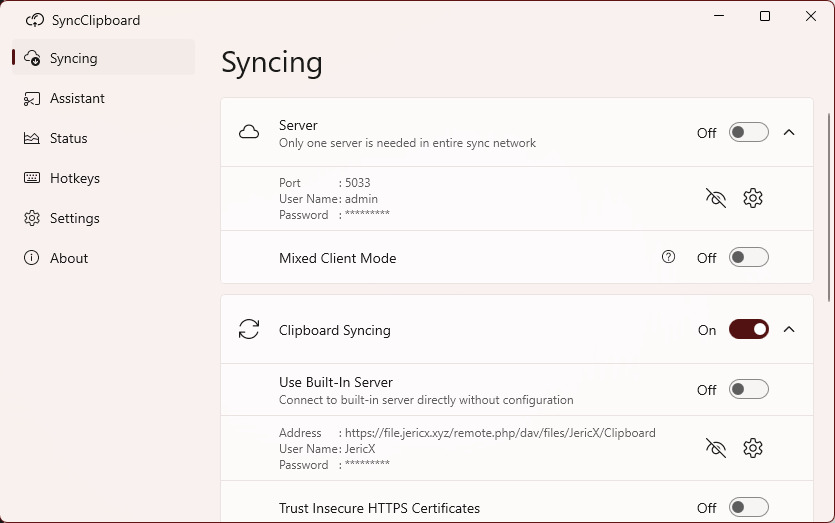
SyncClipboard is the heavyweight of the three, and I mean that as a compliment. It keeps a searchable history, transfers images and files as first-class types, and — the underrated part — it does not require its own server. Behind a WebDAV endpoint or any S3-compatible bucket, the desktop client syncs through storage you already pay for.
If you do want the dedicated server, the official image is a single container:
| |
Or, as the project documents it, pull the compose file straight from the repository and bring it up:
| |
After the first boot, appsettings.json is generated under /app/data inside the container (your /data/syncclipboard-server on the host). That file is where you set retention and storage paths, and it is the file people forget to back up before rebuilding the container — which is how you lose history you assumed was permanent.
The WebDAV and S3 modes deserve their own paragraph because they change the threat model. With a dedicated server you authenticate to a service you control. With WebDAV or S3 you are handing a credential to the client, and every device that syncs has write access to the folder. Scope it to a dedicated bucket or directory, never a bucket shared with backups. The README explicitly warns not to store other data in the WebDAV working directory, for exactly this reason.
SyncClipboard requires HTTPS in any deployment that crosses a public network. The project recommends a reverse proxy with a real certificate, or mkcert for lab-only setups. Running it over plain HTTP means your clipboard — including anything sensitive you copied — travels in cleartext.
LocalSend: When You Need a Pipe, Not a Sync Service
LocalSend is the outlier: 94,713 stars, Apache-2.0, Flutter on every platform, and no server at all. Devices discover each other over the local network and transfer over HTTPS with certificates generated on first run. Nothing leaves the subnet.
That architecture is why LocalSend is the safest of the three by default — and why it is the wrong tool if you wanted automatic clipboard mirroring. LocalSend sends what you explicitly hand it. It will not push a copied URL to your phone while you walk to the kitchen.
Installation is the easiest of the bunch:
| |
The operational caveats are network ones, not software ones. Enterprise Wi-Fi with client isolation blocks peer discovery. Docker bridge networks block it too, which is why people run LocalSend with --network host in containers and then wonder why it still fails across VLANs. Multicast and broadcast do not cross subnets by design; if your laptop is on the guest SSID and your desktop is on the wired LAN, LocalSend will simply not see it.
Hard-Won Deployment Notes
Never expose these on a public IP without TLS and authentication. ClipCascade ships with an admin account you must change; SyncClipboard ships with credentials you set at container start but will happily run over HTTP if you let it. A clipboard endpoint is a credential-stealer’s dream: it is a live feed of everything a human copies.
Clipboard managers and password managers collide. When KeePassXC or Bitwarden clears the clipboard after 10 or 30 seconds, the sync daemon may have already pushed the secret to three devices and written it to history. Set the manager’s clear interval shorter than the sync interval, or exclude the app. This is the number one reason people abandon clipboard sync after a month.
Multi-user isolation is not sandboxing. ClipCascade’s per-user accounts keep your partner’s recipes out of your engineering notes. They do not protect you from a compromised device that is already authenticated. Treat a synced clipboard as a shared secret store and rotate anything you would not want archived.
Watch the message size cap. ClipCascade’s default 1 MiB will silently truncate or reject large images. If you copy screenshots all day, either raise the cap or use SyncClipboard, which handles files as a distinct type instead of pretending they are text.
Back up the data volume, not just the compose file. ./cc_users for ClipCascade and /app/data for SyncClipboard contain the accounts and history. Rebuilding a container is trivial; regenerating history is impossible.
Mobile clients and battery. Android background restrictions will pause sync. On several ROMs you must disable battery optimization for the client or accept that copies arrive late. This is an operating system decision, not a project bug — but it is the reason “it works on my laptop” is not a valid test.
Why Self-Host Your Clipboard at All?
Cloud clipboard sync is a trade you never explicitly agreed to: convenience in exchange for a permanent, searchable record of everything you copy, held by a company whose incentives are not aligned with yours. Clipboard content is unusual data — it routinely contains passwords from password managers, one-time codes, private keys, customer records, and half-finished legal text. It is the least curated stream of sensitive data your devices produce.
Running it yourself removes the third party, not the convenience. A €4 VPS running ClipCascade gives you the same multi-device experience with an access log you can read, a retention policy you choose, and no sync across an account you cannot audit. If you want the transport layer locked down first, our zero-trust network access comparison covers how to keep the sync port off the public internet entirely.
There is a pattern here that repeats across self-hosting: the convenience features are the ones most worth owning. For the same reasoning applied to file handoff, see our document sharing comparison and the one-time secret sharing guide. Both solve the “I need to move this string to another machine” problem with an explicit action instead of a permanent feed — which is sometimes exactly what you want.
The honest summary: self-hosting a clipboard is a two-hour project with a permanent security obligation. If you are not going to terminate TLS properly and rotate credentials, LocalSend’s explicit-send model is the safer default, because it has no server to misconfigure.
FAQ
Is clipboard sync over the internet safe?
It is as safe as the transport and the server. ClipCascade and SyncClipboard both support HTTPS, but neither forces it. Terminate TLS at a reverse proxy with a real certificate, disable public signup on ClipCascade, and restrict access to your own network or a private overlay network. Over plain HTTP on a public host, assume every copied string is readable by anyone on the path.
Can SyncClipboard work without its own server?
Yes. It supports WebDAV and S3-compatible storage as backends, which means you can sync through a Nextcloud WebDAV folder or an object bucket you already run. The trade-off is that every client holds credentials with write access to that location, so scope it to a dedicated directory and never share it with backups or documents.
Does LocalSend sync the clipboard automatically?
No. LocalSend transfers text and files that you explicitly send, peer to peer, over the local network. It has no background clipboard monitor and no server-side history. If you need copies to appear on other devices without any action, use ClipCascade or SyncClipboard instead; if you need a fast, private pipe between two machines on the same network, LocalSend is the better fit.
Why does my Android device stop receiving clipboard updates after a while?
Aggressive battery optimization suspends background clients. Disable battery optimization for the sync app, allow background data, and check that the app is not being killed by the vendor’s task manager. Desktop-to-desktop sync is usually unaffected, which makes the problem look like a server bug when it is a client-side restriction.
How much server resources does ClipCascade need?
Very little. It is a Java service with an embedded database; a 1 vCPU / 1 GB VPS handles a handful of personal devices comfortably. The 1 MiB default message cap keeps memory bounded, so the container’s memory footprint is dominated by the JVM itself rather than by clipboard payloads.
Is it a problem that my password manager clears the clipboard?
It is a conflict, not a bug. Clearing protects the secret locally, but a sync daemon may have already transmitted it. Set the clear interval shorter than the sync latency (or exclude the manager from monitoring), and treat any synced clipboard as having retained that value in history.
💰 想测试你的市场判断力?我用 Polymarket 做预测市场交易——这是全球最大的预测市场平台,从大选结果到技术监管时间线,什么都可以押注。和赌博不同,这是真正的信息市场:你懂的信息越多,胜率越高。我靠预测技术相关事件的走向已经赚了不少。用我的邀请链接注册:Polymarket.com