Your printer’s mainboard is not the bottleneck. Its firmware is. A stock Ender 3 with Marlin and a stock Ender 3 running Klipper on a $15 Raspberry Pi are the same hardware with wildly different acceleration ceilings — and the difference shows up as ringing, corner bulge, and print time, not as a spec-sheet number.
This guide compares the three firmware families that actually matter in 2026: Klipper (11,970 stars, still committing this week), Marlin (17,623 stars, commits daily), and RepRapFirmware (1,051 stars, the Duet ecosystem’s G-code-driven firmware). Real configuration files, real trade-offs, no vendor cheerleading.
Quick Verdict
Flash Klipper if you already have a spare Pi or mini-PC and you want the highest acceleration your frame can survive, with resonance compensation done by measurement instead of guesswork. Stay on Marlin if you want a single self-contained board, no host, and a firmware you can compile once and forget. Choose RepRapFirmware if you are buying into Duet hardware and want Klipper-style no-recompile configuration with a first-party web interface.
If you are on an 8-bit board from 2018, none of this matters until you replace the board. Firmware cannot outrun a microcontroller that spends its cycles calculating arcs.
Side-by-Side Comparison
| Dimension | Klipper | Marlin | RepRapFirmware |
|---|---|---|---|
| Architecture | Host (Pi/mini-PC) does kinematics, MCU emits step pulses | Everything on the MCU | Everything on the board (Duet / STM32 port) |
| Configuration | printer.cfg (INI-style), reload via FIRMWARE_RESTART | Configuration.h, requires compile + flash | /sys/config.g (G-code), executed at boot |
| Host required | Yes, always | No | No |
| Input shaping | Yes, with accelerometer auto-calibration (SHAPER_CALIBRATE) | Yes, manual INPUT_SHAPING_X/Y values in 2.1.x | Yes, M593 with F/Z parameters |
| Pressure advance | Yes, tunable live (SET_PRESSURE_ADVANCE) | Yes (LIN_ADVANCE) | Yes (M572) |
| First-party web UI | No — Mainsail/Fluidd via Moonraker | No — OctoPrint or host | Yes — Duet Web Control |
| License | GPLv3 | GPLv3 | GPLv3 |
| GitHub stars | 11,970 | 17,623 | 1,051 |
| Last commit | 2026-10-13 | 2026-10-17 | 2026-10-16 |
| Best fit | Tinkerers, high-speed bedslingers, farms | Single-board printers, offline shops, beginners | Duet/CAN-FD multi-tool machines |
Decision Matrix: Pick by Situation, Not by Hype
| Your situation | Recommended | Why |
|---|---|---|
| Ender 3 / Voron / Switchwire, Pi already on the shelf | Klipper | Input shaping plus high acceleration gives the biggest quality jump per dollar |
| Printer in a workshop with no network, must work offline | Marlin | No host dependency, no SD-card latency, boots in seconds |
| Duet 3 with CAN-FD toolboards, multi-material | RepRapFirmware | Native CAN expansion and a config model designed for tool changers |
| You hate recompiling after every PID tweak | Klipper or RRF | Both reload configuration without a toolchain |
| 8-bit AVR board, no budget to upgrade | Marlin | Klipper needs a 32-bit MCU anyway; Marlin still supports AVR |
| You want one vendor for board, firmware, and UI | RepRapFirmware | Duet Web Control is maintained by the same project |
Klipper: The Host Does the Math
Klipper splits the work. The Raspberry Pi (or any Linux box) runs the kinematics, look-ahead, pressure advance and input shaping; the mainboard becomes a dumb, precise step-pulse generator. That split is why a $35 Pi can make an SKR board behave like hardware twice its price.
The configuration is a plain INI file, and the stock Ender 3 V2 sample shipped in the repository is a good example of how literal it is:
| |
Two sections carry most of the print-quality gain:
| |
Those shaper_freq values should come from measurement, not from this article. With an ADXL345 wired over SPI, SHAPER_CALIBRATE sweeps each axis and prints a resonance graph. The plot below is the real output from the Klipper documentation — peaks in the 40-60 Hz band are what a ringing Ender frame looks like:
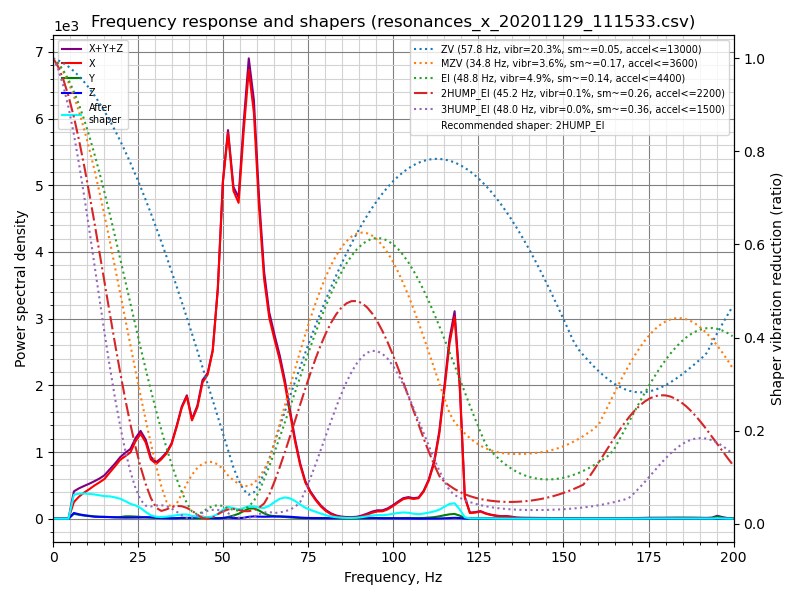
The trade-off is operational: the host must be on, on the same stable USB link, for every print. A Pi Zero W on Wi-Fi with a marginal buck converter will produce “Lost communication with MCU” errors mid-print, and no amount of max_accel tuning fixes that.
Marlin: One Board, Zero Dependencies
Marlin is the firmware most people have already used. It compiles into a single binary, lives entirely on the mainboard, and prints from SD card with the network unplugged. That reliability is why print shops and schools still run it.
Configuration is C preprocessor defines. A typical SKR-style setup looks like this:
| |
Quality features are opt-in and manual. Linear advance must be enabled and tuned per filament:
| |
The cost is the edit-compile-flash loop. Change a PID value, rebuild, re-flash, re-run M500-style EEPROM saves — on a slow laptop that is a five-minute round trip. Marlin’s 2.1.x branch also supports input shaping, but you supply the frequencies by hand; there is no accelerometer-driven auto-calibration.
Where Marlin still wins outright: it does not care whether anything else is running. No host process, no Moonraker service, no Python environment to break after an OS update. For a machine that must work when the network is down, that is the entire argument.
RepRapFirmware: G-code All the Way Down
RRF takes the third path. Configuration lives in /sys/config.g on the SD card and is interpreted at boot, so changing motor currents or pressure advance means editing a text file and sending M999, not recompiling. Because everything is G-code, it also has real control flow — if, while, echo, and variables — which is how macro-heavy machines like tool changers get configured.
A minimal config.g for a CoreXY-style machine reads like this:
| |
Two things stand out to anyone coming from Marlin. First, M566 is jerk in mm/min, not mm/s — a classic migration mistake that produces violent cornering. Second, driver mapping (M584) lets you assign motors to axes arbitrarily, which is what makes CAN-FD toolboards practical on a Duet 3.
The catch is ecosystem gravity. RRF is excellent on Duet hardware and on the community STM32 ports for BTT boards, but the documentation assumes you are inside the Duet world. Its web interface, Duet Web Control, is first-party and genuinely good — status, object model browser, macro buttons, height map — but you are not going to run RRF on an arbitrary old Anet board.
Migration and Coexistence Notes
Moving a printer between these firmwares is less about flashing and more about relearning units, pin names, and homing order.
- Steps per mm vs rotation distance. Marlin stores steps/mm (
DEFAULT_AXIS_STEPS_PER_UNIT). Klipper storesrotation_distance. Convert withrotation_distance = full_steps_per_rotation * microsteps / steps_per_mm. A 1.8-degree motor with 16 microsteps at 80 steps/mm is 40 mm rotation distance. - Jerk units differ. Marlin’s
DEFAULT_XJERKis mm/s; RRF’sM566is mm/min; Klipper replaces classic jerk withsquare_corner_velocity. - Homing order matters more on RRF.
homeall.gis a script you write, not a checkbox. Get the Z probe order wrong and you will drive the nozzle into the bed. - Klipper needs a matching MCU config. The
[mcu]serial path is not stable across reboots unless you pin it by/dev/serial/by-id/.... Using/dev/ttyUSB0is how you end up flashing the wrong board. - PID and E-steps do not transfer. Every firmware change requires re-running PID tuning and re-checking extrusion calibration. Copying old values is how “the new firmware prints worse” stories start.
FAQ
Is Klipper faster than Marlin in real prints?
It is faster in achievable acceleration, not in raw feedrate. Klipper’s host-side look-ahead and measured input shaping let you run 3000-5000 mm/s² on a well-braced bedslinger where Marlin would ring badly above roughly 1500-2000 mm/s². On small detailed parts with many direction changes, that shows up as 20-40% shorter print times.
Do I need a Raspberry Pi for Klipper?
You need a Linux host with a reliable USB or UART connection to the mainboard. A Raspberry Pi 3/4/Zero 2 W is the common choice, but any old x86 mini-PC, an Orange Pi, or even a spare laptop works. A first-generation Pi Zero over Wi-Fi is the one combination to avoid.
Can I run Klipper without OctoPrint?
Yes. Klipper exposes an API through Moonraker, and Mainsail or Fluidd talk to that API directly. OctoPrint is optional and, on Klipper setups, increasingly unnecessary — but it remains useful if you depend on its plugin ecosystem.
Does Marlin support input shaping in 2026?
Yes, via INPUT_SHAPING_X and INPUT_SHAPING_Y in Configuration_adv.h on the 2.1.x branch. The limitation is that you must supply frequencies yourself; there is no built-in accelerometer sweep like Klipper’s SHAPER_CALIBRATE.
Is RepRapFirmware limited to Duet boards?
Officially it targets Duet hardware. Community STM32 ports exist for several BTT and Fly boards, and they work, but you are relying on community-maintained pin maps and build instructions rather than vendor support. If you want the RRF experience with zero surprises, buy the board it was written for.
Which firmware should a beginner choose?
Marlin, on a 32-bit board, with a vendor-provided configuration. It is the shortest path from unboxing to printing, and every problem you hit has a decade of forum answers. Move to Klipper once you can articulate what ringing and pressure advance actually do.
The Bottom Line
Firmware is the cheapest performance upgrade in 3D printing, and in 2026 the choice is clearer than it has ever been: Klipper for quality per dollar on hardware you already own, Marlin for independence, RepRapFirmware for Duet’s integrated ecosystem. Pick the constraint you cannot change — host availability, board vendor, or offline operation — and the firmware follows.
If you are still choosing the software layer above the firmware, our OctoPrint vs Mainsail vs Fluidd comparison covers the host side, and the 3D printer farm management guide covers running more than one machine. For slicing profiles that match these firmwares, see the OrcaSlicer vs PrusaSlicer vs Cura breakdown.
💰 想测试你的市场判断力?我用 Polymarket 做预测市场交易——这是全球最大的预测市场平台,从大选结果到技术监管时间线,什么都可以押注。和赌博不同,这是真正的信息市场:你懂的信息越多,胜率越高。我靠预测技术相关事件的走向已经赚了不少。用我的邀请链接注册:Polymarket.com