A product without a field update path has a maintenance model built on truck rolls. The moment a fleet of deployed devices needs a bug fix, the bootloader you chose two years earlier becomes the most expensive code in the project — and the one you can never change afterwards, because a failed bootloader update bricks hardware in the field.
Three open-source options cover almost every 2026 use case, and they solve genuinely different problems. MCUboot is an A/B slot secure-boot loader designed to be embedded by an RTOS. OpenBLT is a portable, vendor-supportable bootloader with polished host tools and industrial transports like CAN and Modbus RTU. TinyUF2 turns your microcontroller into a drag-and-drop USB drive. Picking between them is mostly about how your device gets updated in production, not which one is “best.”
TL;DR: The 2026 Verdict
Choose MCUboot if you are on Zephyr, NuttX, Mynewt or Espressif and want signed images with rollback — it is the default secure-boot path in the Zephyr ecosystem. Choose OpenBLT if your device is updated over CAN, RS232, TCP/IP or Modbus RTU in an industrial setting, or if you want a GUI and command-line host tool you can hand to a field technician. Choose TinyUF2 if you want the simplest possible update story: a USB mass-storage device where dropping a .uf2 file flashes the firmware.
Short version: MCUboot for regulated A/B updates, OpenBLT for industrial transports and hand-held flashing, TinyUF2 for developer-friendly USB updates.
Comparison Table: MCUboot vs OpenBLT vs TinyUF2
| Dimension | MCUboot | OpenBLT | TinyUF2 |
|---|---|---|---|
| GitHub stars | 2,157 | 980 | 477 |
| Last upstream activity | 2026-10-14 | 2026-10-15 (read-only SVN mirror) | 2026-10-15 |
| License | Apache-2.0 | GPL-2.0 or commercial | MIT |
| Update model | A/B slots, swap or overwrite-only | Single application slot (in-place) | Single slot + UF2 drag-and-drop |
| Signed images | Yes — RSA, ECDSA, Ed25519, ECIES | Optional (licensed add-on / custom) | Yes — UF2 can carry signed payloads |
| Rollback / anti-downgrade | Yes — image version + security counter | Not built in | Not built in |
| Transports | Application-driven (BLE, UART, TCP, USB) | CAN, CAN FD, RS232, USB, TCP/IP, Modbus RTU, SD card | USB mass storage (MSC) class |
| Host tooling | imgtool (Python) | MicroBoot GUI, BootCommander CLI, LibOpenBLT | None required (file copy) |
| RTOS integration | Zephyr, NuttX, Mynewt, Espressif, RIOT boot target | Bare-metal port per target | Ports per board under ports/ |
| Best-fit silicon | Any 32-bit with two flash regions | STM32, Infineon XMC, NXP S12, TI TM4C/LM3S | ESP32-S2, STM32F4, i.MX RT10xx, nRF52840 |
Star counts and timestamps were read live from the GitHub API when this article was published. Note the OpenBLT caveat: the GitHub repository is an official read-only mirror of the project’s SVN repository, so commit timestamps reflect the mirror’s daily sync, not a GitHub-first workflow.
Decision Matrix: Which Bootloader for Which Product
| How your device gets updated | Choose | Why |
|---|---|---|
| Cloud OTA with mandatory rollback on failure | MCUboot | Two slots, signed images, automatically reverts if the new image fails to confirm |
| Technician with a laptop, CAN or serial cable | OpenBLT | MicroBoot GUI plus BootCommander CLI, works over CAN/RS232/TCP out of the box |
| Developer board, “just let me drop a file” | TinyUF2 | Appears as a USB drive; flashing is a file copy |
| Industrial product with Modbus RTU in the field | OpenBLT | Native Modbus RTU transport is unusual and hard to retrofit elsewhere |
| Regulated product needing anti-downgrade protection | MCUboot | Security counter blocks installation of older, vulnerable firmware |
| Fastest possible bring-up on a supported dev board | TinyUF2 | Prebuilt board images in the repo; no signing pipeline required |
MCUboot — A/B Slots and Signed Images
MCUboot describes itself as secure boot for 32-bit microcontrollers. The design is a two-slot scheme: a primary slot holds the running image and a secondary slot receives the update. Images are signed, versioned and — critically — can be marked for test mode so the bootloader automatically reverts to the previous image if the new one fails to confirm itself. That single capability is what separates MCUboot from “write the new firmware and hope.”
The core of the bootloader lives in boot/bootutil, with ports under boot/zephyr, boot/mynewt, boot/nuttx, and an Espressif port; RIOT support is documented as a boot target rather than a full port. The host-side signing tool is a Python program, scripts/imgtool.py:
| |
-k/--key, -v/--version, -H/--header-size and -S/--slot-size are required; --align must match how your swap mode moves data in flash, and --pad fills the image out to the slot size with the trailer magic the bootloader expects. The image layout that results — two slots plus a boot status area — looks like this:
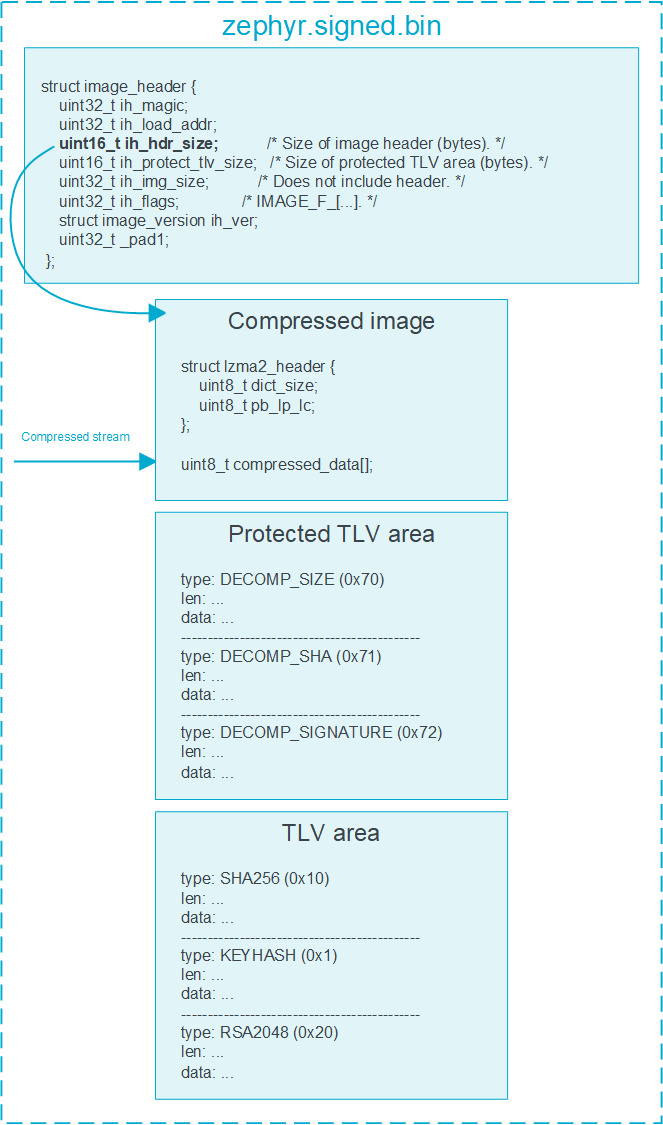
Two details save real projects: --security-counter (or the auto keyword, which derives it from the image version) is your anti-downgrade mechanism, and --vector-to-sign exists for external signing workflows where the private key never touches the build machine. If your product needs the signing key held by a separate team, plan for that field before you write the build pipeline.
Because MCUboot is default-integrated in Zephyr and friends, the RTOS choice comes first — our Zephyr, NuttX and RIOT comparison covers how each one exposes the slot configuration.
OpenBLT — Industrial Transports and Host Tools That Field Techs Can Use
OpenBLT is the option you choose when the update path is a cable, not a cloud. It runs on ST STM32, Infineon XMC, NXP S12, and TI TM4C/LM3S microcontrollers, and supports RS232, CAN, CAN FD, USB, TCP/IP, Modbus RTU and SD-card updates. The project is dual-licensed: GPL by default, with a commercial license available for closed-source integration — a real budget line item, not a footnote.
What makes OpenBLT stand out is the host side, and this is the real MicroBoot tool talking to a bootloader over CAN:
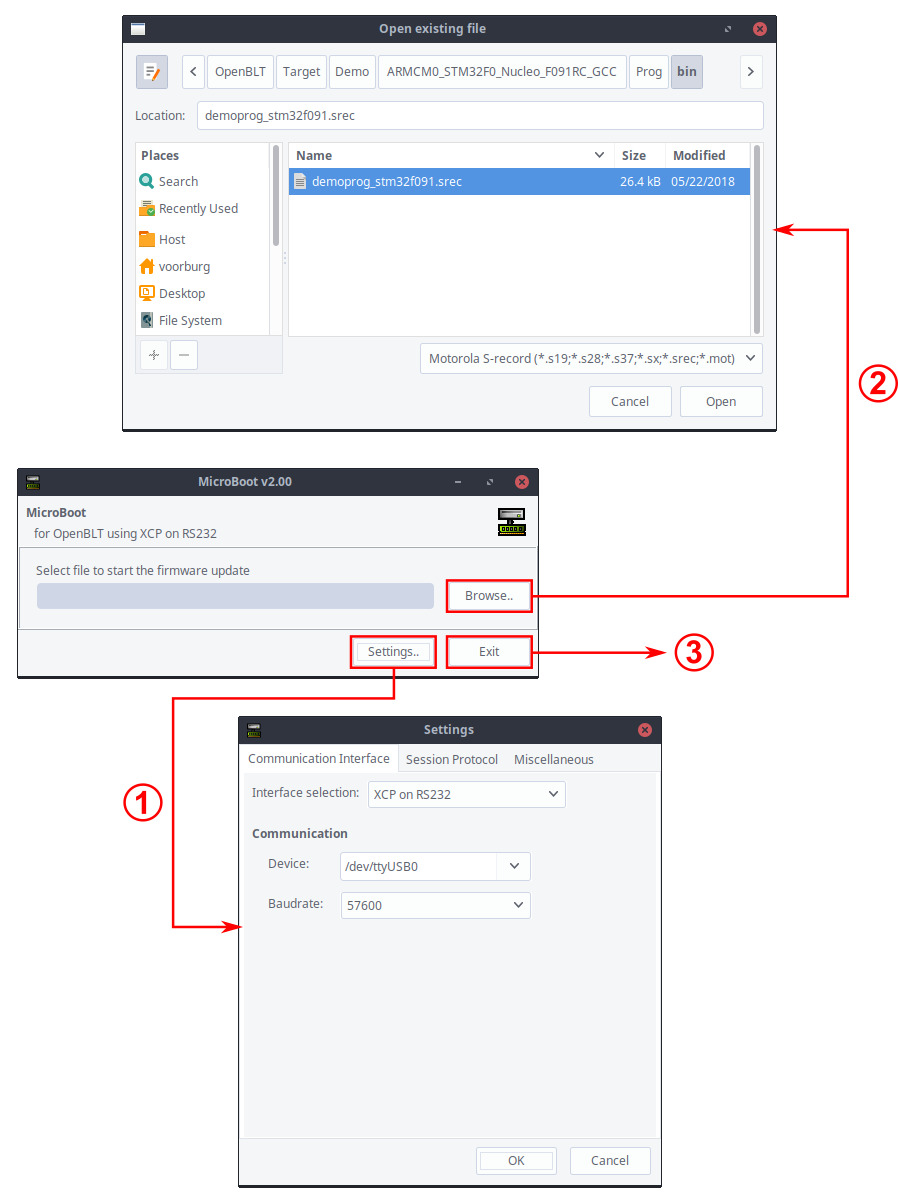
Three host options ship with the project: the MicroBoot GUI for technicians, BootCommander for scripting and CI, and LibOpenBLT, a cross-platform shared library you can call from your own tooling in whatever language you prefer. Because the source lives in an SVN repository with a GitHub mirror, plan your fork-and-vendor workflow around that mirror rather than assuming a GitHub-native contribution flow.
OpenBLT’s porting model is deliberately hand-rolled: you adapt a demo target under the downloaded package for your board, which is more work than adding a Kconfig option but gives you a bootloader small enough to reason about line by line. For industrial products where the flash layout is fixed and the update channel is a bus, that trade is usually worth it.
TinyUF2 — Drag-and-Drop Firmware for Development and Beyond
TinyUF2 is a UF2 bootloader built on TinyUSB, targeting boards such as ESP32-S2, STM32F4, i.MX RT10xx and nRF52840. The user experience is the pitch: the device enumerates as a USB mass-storage volume, and copying a .uf2 file onto it flashes the firmware. No host tool, no driver, no vendor utility.
Builds are board-scoped and the commands come straight from the project’s README:
| |
Artefacts land in ports/<port>/_bin/<board>, with each application built as its own CMake project under build/apps/<app>. The bootloader supports self-update from a UF2 file, which solves the classic chicken-and-egg problem of patching the updater itself.
The honest limitation: UF2 gives you a clean update mechanism, not an update policy. There is no A/B slot, no automatic rollback, and no built-in version counter, so anti-downgrade protection is your application’s job. For developer boards and products updated over USB by a human, that is a fine trade. For unattended fleets, you want the MCUboot-style confirmation model.
Pitfalls That Brick Devices in the Field
Designing for rollback after you need it. Retrofitting A/B slots onto a product shipped with a single-slot layout requires changing the flash map, which means an update path that does not work. If rollback matters, it must be in the first hardware revision — the same reasoning that applies to the flash filesystem layout you choose at the same time.
Power loss during the swap. Any copy-based update has a window where neither slot holds a complete image. MCUboot’s boot status area exists precisely so an interrupted swap is detected and re-run rather than booted into.
Downgrade attacks through version reuse. Signing without a monotonically increasing version or security counter lets an attacker reinstall an older image with a known flaw. Use --security-counter and bump versions per release, never per build.
The bootloader you cannot patch. If the bootloader lives in a region that the application update cannot touch, any bootloader bug is an RMA. Reserve a documented route to update the loader itself — TinyUF2’s self-update, or a fallback transport on MCUboot and OpenBLT.
Watchdog and boot-time assumptions. A bootloader that waits forever for an update on a transport that is not connected will hold your device in reset loops. Bound the wait and always fall back to the last confirmed application image.
Bootloader/application build mismatch. Slot size, header size and flash alignment are three numbers that must agree across the bootloader build, the signing command and the linker script. When an image “signs fine but will not boot”, this is the first place to look — alongside general Linux-side bootloader management practices that make the same point at the OS level.
Alignment versus flash geometry. MCUboot’s --align value must match how your device’s flash can be erased and written. On parts with large erase units, a mismatch produces verification failures that look like corruption but are actually geometry.
FAQ
Is MCUboot or OpenBLT better for over-the-air updates?
MCUboot, if the update arrives over a network and you need signed images with automatic rollback — it is built around two flash slots and image confirmation. OpenBLT is a better fit when updates are delivered over an industrial bus such as CAN or Modbus RTU by a technician or a connected gateway, since it ships host tools and transports that MCUboot leaves to your application.
Can TinyUF2 roll back a failed firmware update?
No. TinyUF2 provides a USB drag-and-drop flashing mechanism via the UF2 format, but it has no second slot and no boot-confirmation logic. Rollback must be implemented in your application, or you should choose a bootloader designed around A/B slots.
What license does OpenBLT use?
OpenBLT is dual-licensed under the GNU GPL by default, with a commercial license available for integrating it into closed-source products. If you ship proprietary firmware, budget for that commercial license before committing to the bootloader.
How do I sign an MCUboot image?
Use imgtool sign with a private key, the required slot size and header size, the image version, and the flash alignment: imgtool sign --key root-rsa-2048.pem --align 8 --version 1.2.3+4 --header-size 0x200 --pad-header --slot-size 0x60000 --pad app.bin app-signed.bin. Generate keys with imgtool keygen and verify PEM contents with imgtool keyinfo.
Why does a signed image fail to boot?
The three most common causes are a slot size that does not match the flash map, a flash alignment that does not match the device’s erase geometry, and a bootloader built with a different header size than the one used when signing. Check those three numbers first; they must be identical across the signing command, the linker script and the bootloader build.
Do I need to change the flash layout to add a bootloader?
Yes, always. Every option here reserves flash at the start of the address space and defines where the application lives, so the linker script, the update tooling and the signing parameters all depend on the map. Decide the map in the first hardware revision — it is the one interface you cannot redesign after deployment.
💰 想测试你的市场判断力?我用 Polymarket 做预测市场交易——这是全球最大的预测市场平台,从大选结果到技术监管时间线,什么都可以押注。和赌博不同,这是真正的信息市场:你懂的信息越多,胜率越高。我靠预测技术相关事件的走向已经赚了不少。用我的邀请链接注册:Polymarket.com