The most underrated deployment channel in 2026 is still SSH into a box and run something. Admin consoles, interactive installers, log browsers, Kafka lag dashboards rendered as text — all of it is Java-friendly, and all of it is a minefield the moment you need to read a keystroke, repaint a screen, or emit escape codes that survive Windows.
Java has three mature libraries for this, and they solve different problems: JLine handles input and line editing, Lanterna draws full-screen text GUIs, and Jansi makes ANSI escape sequences portable. Teams regularly pick the wrong one and then fight it. Here is what each actually does, with real coordinates and code.
TL;DR: which Java terminal library do you need?
- Interactive prompt, tab completion, history, line editing? → JLine (1,804 stars, v4.4.8). It is the one that powers modern JDBC shells, Kafka tooling and Spring Shell.
- Full-screen windowed TUI — panes, menus, list boxes, dialogs? → Lanterna (2,627 stars, v3.1.3). Text-mode GUI toolkit with screens, windows and widgets.
- Just color and cursor control that works on Windows too? → Jansi (1,201 stars, v2.4.2). One-line install, portable escape sequences, no screen model.
- Building an SSH-accessible admin console? → JLine or Lanterna on top of Apache MINA SSHD, not Jansi alone.
One-sentence answer: JLine for reading, Lanterna for painting, Jansi for portability. They are layers, not competitors — production tools often stack two of them.
The three libraries at a glance
| Library | Stars | Latest release | Last commit | Layer | Full-screen GUI | Line editing | Windows ANSI | License |
|---|---|---|---|---|---|---|---|---|
| JLine | 1,804 | 4.4.8 | 2026-10-14 | Input / console | Yes (ConsoleUI) | Yes | Yes | BSD-3 |
| Lanterna | 2,627 | 3.1.3 | 2026-07-07 | Screen / GUI | Yes (GUI2) | Limited | Yes | LGPL-3 |
| Jansi | 1,201 | 2.4.2 | 2026-03-27 | Escape codes | No | No | Yes | Apache-2.0 |
Note the maintenance signals: JLine’s repository saw a commit the same day this article was written, Lanterna’s last commit is mid-2026 with a stable 3.1.x release line, and Jansi sits in low-maintenance mode — which is fine for a small, complete library and a risk for anything you would have to extend.
Decision matrix
| What you are building | Pick | Why |
|---|---|---|
| Database shell or REPL-style tool | JLine | Completion, history, multi-line editing, key bindings out of the box |
| Interactive server dashboard with panes | Lanterna | Screen buffer + absolute positioning; no manual cursor math |
| CLI that must show colored output on Windows cmd.exe | Jansi | Virtual-terminal handling encapsulated in one systemInstall() call |
| Installer wizard with prompts and validation | JLine ConsoleUI | Checkbox, confirmation and choice prompts already implemented |
| Log tailer with search and scrolling | Lanterna | Full-screen control, redraws only dirty regions |
| Embedded console inside an SSH server | JLine + MINA SSHD | JLine abstracts terminals from any InputStream/OutputStream |
| A one-off script that prints green text | Jansi, or nothing | Do not add a screen library to escape a single sequence |
JLine — the input layer that everything else builds on
JLine’s job is the hard part of interactive input: key decoding across terminals, line editing, history, completion, and now a set of ready-made console UI prompts.
| |
A read-eval loop with history and tab completion, which is what a shell actually is:
| |
That is already more than most hand-rolled CLIs get right: arrow-key history, Ctrl-R reverse search, Ctrl-A/Ctrl-E line movement, and configurable key bindings, all without writing a terminal emulator.
JLine 4 also ships ConsoleUI, a widget layer for prompts that would otherwise be a few hundred lines of raw-mode terminal handling:
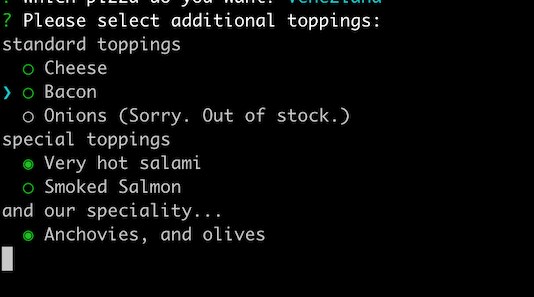
| |
Because JLine takes a Terminal built from any streams, the same code serves a local console and a remote SSH session — you build the terminal from the channel’s input and output. That is why it is the default choice for in-process admin consoles.
Lanterna — a text-mode GUI toolkit, not a prompt library
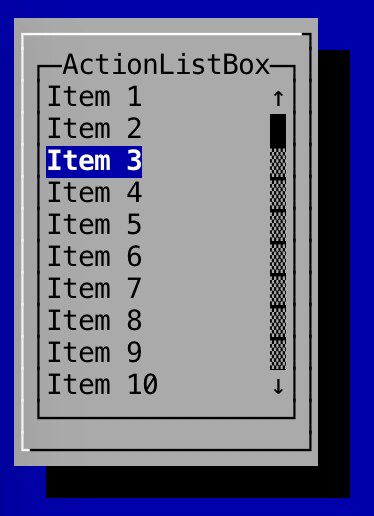
Lanterna goes a layer further: it owns the whole screen. You create a Screen, optionally attach a TextGUI with windows and panels, and let the library diff and repaint cells. For dashboards and multi-pane tools, this is dramatically less code than tracking cursor positions yourself.
| |
A windowed UI with a list box and a status panel:
| |
The important architectural benefit is testability: Lanterna separates the terminal from the screen buffer, so you can run the identical UI against a DefaultVirtualScreen in a unit test and assert on cell contents. For interactive admin tooling, that is the difference between “works on my machine” and a regression suite.
Lanterna needs one thing from you that JLine does not: resize handling. When a terminal is resized, the screen buffer must be reallocated. Wire a ResizeListener early — retrofitting it after you have absolute-positioned widgets is painful.
Jansi — portable escape codes without a screen model
Jansi is small and does exactly one thing: it lets you emit ANSI escape sequences and cursor movements safely, including on Windows consoles that historically lacked native ANSI support.
| |
| |
Two rules matter in production. First, always pair systemInstall() with systemUninstall() in a finally block or shutdown hook; otherwise a long-lived JVM can leave the console in a patched state, and in embedded containers it leaks the wrapper streams. Second, never enable ANSI unconditionally — honor NO_COLOR, and check System.console() == null before decorating output that is being piped into a log collector.
Jansi is the right call when the answer to “do I need a library?” is “only for colors and cursor control.” If you find yourself implementing layout, scrollback, or input parsing on top of it, you have outgrown it and should be on Lanterna or JLine.
Pitfalls that bite in production
Never run two of these libraries on the same terminal. JLine, Lanterna and Jansi each manipulate raw mode and terminal state. Interleaving them produces corrupted output, lost keystrokes, or a terminal left in raw mode after your process exits. Use JLine for input and hand formatted strings to it, or let Lanterna own the screen end to end.
Guard every TUI behind a capability check. Admin tools get invoked from cron, systemd units and CI runners where TERM is dumb and stdout is a pipe. Detect that early, degrade to plain line output, and exit cleanly rather than printing escape garbage into log files.
Restore the terminal in a shutdown hook. If a JVM dies while the terminal is in raw mode, the user’s shell stops echoing keystrokes. Register a hook that calls screen.stopScreen() or AnsiConsole.systemUninstall() so a crash never costs someone their session.
Do not block the main thread on raw key reads in a server process. For SSH consoles, run the UI loop on a dedicated thread per session and shut it down when the channel closes, or sessions accumulate threads that hold terminal resources.
Test with a virtual screen, not a pty. Both JLine and Lanterna expose stream-backed or buffer-backed abstractions; use them. Tests that spawn a pseudo-terminal are flaky in CI and slow in every environment.
Check the license before embedding in a closed product. Lanterna is LGPL-3, while JLine is BSD-3 and Jansi is Apache-2.0. For an internal admin tool this rarely matters; for a distributed CLI it changes what you can link.
For related JVM reading, our Java JSON library comparison and JVM build tools guide cover adjacent stack decisions, while the embedded Java HTTP server comparison applies the same evaluation method to networking. If you are picking a terminal interface on another runtime, see the Git terminal UI comparison and the Rust TUI framework comparison.
FAQ
What is the difference between JLine, Lanterna and Jansi? They operate at different layers. JLine handles console input — line editing, history, completion and prompts. Lanterna renders full-screen text GUIs with windows, panels and widgets. Jansi only emits portable ANSI escape sequences for color and cursor control, with no screen or input model.
Can I build an SSH-accessible admin console in Java?
Yes, and it is a well-trodden path: run Apache MINA SSHD and construct a JLine Terminal from the SSH channel’s input and output streams, or a Lanterna screen from the same streams. The library then behaves identically to a local console, so the UI code is shared.
How do I get colored console output working on Windows?
Use Jansi and call AnsiConsole.systemInstall() at startup. It handles the Windows virtual-terminal plumbing so ANSI sequences render correctly instead of appearing as literal ESC[ characters, and it is a no-op on Unix-like systems.
Does Lanterna work in a headless CI environment? The screen abstraction can be backed by a virtual buffer rather than a real terminal, which is how Lanterna UIs are unit-tested. For headless runs, detect the missing terminal, fall back to plain output, and keep the virtual-screen path for tests.
Is JLine only for shells? No. JLine is a general console-input library and also powers Spring Shell, JDBC shells and interactive installers. Its ConsoleUI module provides ready-made checkbox, choice and confirmation prompts for tools that are not shells at all.
Which Java terminal UI library is most actively maintained? JLine, which publishes frequent releases on a 4.x line with commits landing in October 2026. Lanterna is stable and still receives updates on its 3.1.x line, while Jansi is intentionally low-maintenance because its scope is small and effectively complete.
💰 想测试你的市场判断力?我用 Polymarket 做预测市场交易——这是全球最大的预测市场平台,从大选结果到技术监管时间线,什么都可以押注。和赌博不同,这是真正的信息市场:你懂的信息越多,胜率越高。我靠预测技术相关事件的走向已经赚了不少。用我的邀请链接注册:Polymarket.com