You have 500 nodes, one patch, and an ssh command that only reaches one host at a time. A naive for loop over a hosts file is your first instinct — and it works right up until node 213 hangs, nobody notices for forty minutes, and the patch window closes. Parallel SSH tooling exists precisely to fix three problems that a shell loop cannot: bounded concurrency, per-host timeouts, and merged output you can actually read.
This guide compares the three tools that sysadmins and HPC operators actually deploy in 2026 — pdsh (569★, last push 2026-01-12), ClusterShell (478★, 2026-10-04), and PSSH (350★, 2026-01-24) — with install commands and configuration taken from their official repositories, plus notes on where GNU Parallel and Ansible fit instead.
TL;DR: The 30-Second Verdict
- Job control with per-host modules, fan-out limits, and a tiny footprint → pdsh. It is the classic HPC answer:
pdsh -w node[1-500]and afanoutsetting. Shipspdcpfor parallel file copy anddshbakfor output folding. - Node groups, Python extensibility, and the best output merging → ClusterShell.
clushwith-bmerges identical output into one labelled block, and thenodeset/clusetalgebra handlesnode[001-500]style ranges properly. Also a full Python library. - A quick parallel version of your existing SSH workflow → PSSH.
pssh,pscp,prsync,pnuke,pslurp. Small, scriptable, and easy to reason about; fewer advanced grouping features. - Not covered here: for idempotent configuration management across hundreds of hosts, use Ansible; for ad-hoc shell fan-out without SSH, GNU Parallel and
xargs -Pare adequate.
The honest summary: pdsh for HPC fleets, ClusterShell for heterogeneous node groups, PSSH for scripted one-off operations.
The Contenders at a Glance
| Tool | Stars / Last push | Language | License | Host list syntax | Node groups | Output merging |
|---|---|---|---|---|---|---|
| pdsh | 569★ / 2026-01-12 | C | GPL-2.0 | -w node[1-500], -x to exclude | Genders-style modules | dshbak (external) |
| ClusterShell | 478★ / 2026-10-04 | Python | LGPL-2.1 | -w linux[4-6,32-39] | Yes — config-file groups, @group | -b built into clush |
| PSSH | 350★ / 2026-01-24 | Python | BSD | -h hosts.txt or -H h1 h2 | No (plain lists) | Per-host output files (-o) |
| GNU Parallel (reference) | GNU Savannah, packaged everywhere | Perl | GPL-3.0 | Inline list or ::: arguments | No | Interleaved or grouped |
Two observations from the numbers. First, ClusterShell was pushed in the week this article was written — it is under active development. Second, all three tools have existed for over a decade, which is the point: you are choosing between mature, stable designs, not between a fast-moving newcomer and an abandoned script.
Use-Case Decision Matrix
| Your situation | Pick | Why |
|---|---|---|
| 1,000-node Linux cluster, same command on all nodes | pdsh | Host ranges, module-based remote shell, predictable fan-out |
| Mixed node groups (“web”, “db”, “gpu”) by role | ClusterShell | Group config files plus @group expansion |
Need to merge 500 identical uname -r outputs | ClusterShell | clush -b collapses identical results into one labelled block |
| Copy one file to every node, then verify | pdsh + pdcp | pdcp is a parallel scp designed for the same host ranges |
| Scripted, in a Docker container, minimal dependencies | PSSH | pip install, five small commands, plain host file |
| Collect one file from every node | PSSH pslurp | Built for the “gather logs from all hosts” pattern |
| Idempotent configuration (packages, services, templates) | Ansible | Parallel SSH is imperative; configuration management is declarative |
pdsh — The HPC Standard
pdsh was written for clusters and it shows in the interface: host ranges expand with square brackets, -x excludes nodes, -f sets the fan-out (how many simultaneous connections), and -R selects the remote shell module. The optional Genders module is the piece that makes it genuinely useful at scale, because it lets you address machines by role instead of by name.
Build from source (the project ships no prebuilt binaries for every platform):
| |
Everyday usage:
| |
The dshbak step is not optional in practice. Without it you get 500 interleaved lines; with dshbak -c you get a single line per unique output plus a list of the hosts that produced it — exactly the format you want in a change ticket.
ClusterShell — Node Groups and Readable Output
ClusterShell takes a different route: a Python library with command-line front ends (clush, clubak, cluset/nodeset). Its two standout features are group definitions in configuration files and output batching (-b), and they combine well — you name a group once and every subsequent command becomes short and readable.
Node groups live under /etc/clustershell/groups.d/ as simple sections, so a realistic multi-role file looks like this:
| |
Install and use it (the group reference @web expands server-side, before any connection is made):
| |
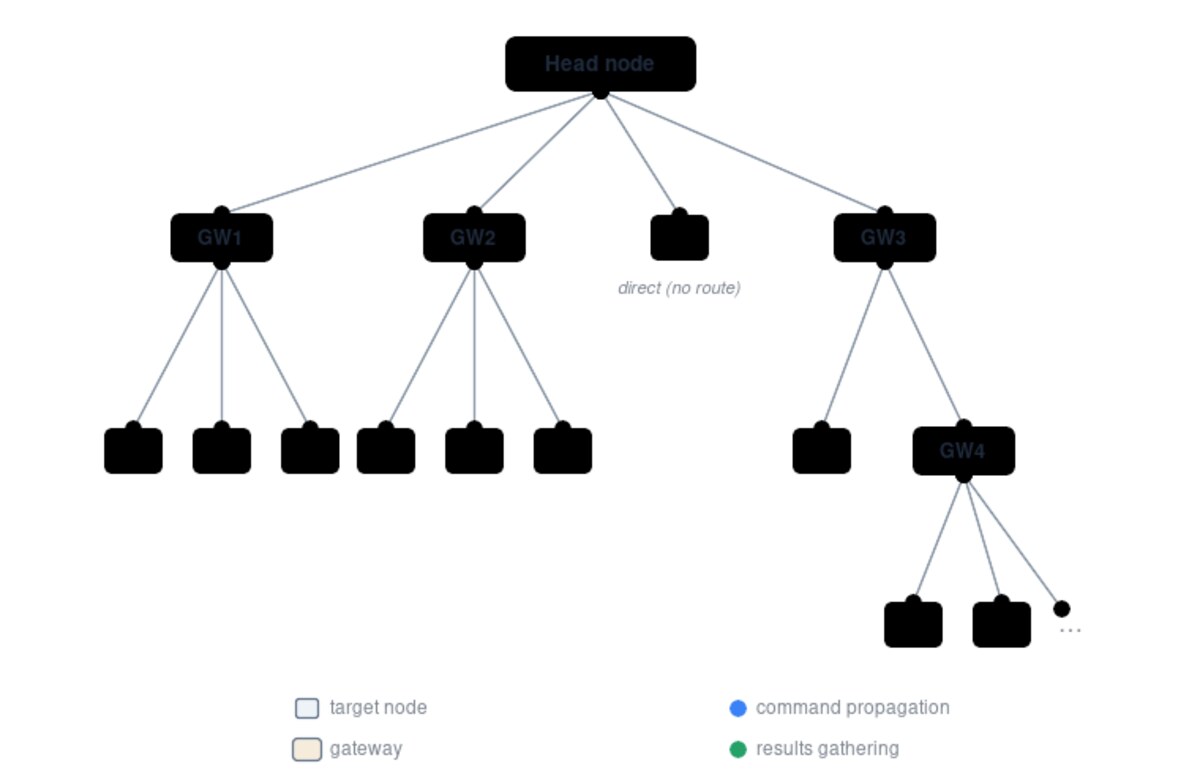
The Python API is the other half of the story. If your fleet automation is already Python, ClusterShell.Task gives you the same parallel execution engine without shelling out — useful when you need to parse the results and act on them within the same process.
PSSH — Small, Scriptable, Predictable
PSSH intentionally does one thing: it provides parallel versions of the OpenSSH tools. You get pssh (run a command), pscp (copy files out/in, confusingly named relative to scp semantics), prsync (rsync in parallel), pnuke (kill remote processes), and pslurp (copy files from remote hosts to a local directory tree).
| |
The -i flag matters more than it looks: without it, pssh buffers output per host and prints it when that host finishes, which is what you want for logs. With -i, output streams as it arrives — better for watching progress, worse for reading results later.
Pitfalls That Bite People at Scale
- Unbounded fan-out. The default in most of these tools is “try everything at once”. On 500 nodes that means 500 simultaneous SSH handshakes and a load spike on your jump host. Always set
-f(pdsh),-f(clush) or-p(pssh) to something sane — 32 to 64 is a common choice. - No timeout, no throttle. A single unreachable node will hold the whole run open indefinitely. Set per-host timeouts (
-t 10in pdsh,--connect-timeout/-tequivalents elsewhere) so one bad NIC does not cost you the maintenance window. - Host-key prompts silently stalling. Parallel tools are non-interactive; if a host key is unknown and
StrictHostKeyCheckingis on, that connection hangs. Provision keys deliberately (ssh-keyscanintoknown_hosts, or a managedssh_config) as part of fleet build-out. sudowithout a TTY. Many parallel SSH implementations do not allocate a pseudo-terminal by default, sosudofails with “no tty present” on some configurations. Either configure NOPASSWD for the specific commands you fan out, or use the tool’s TTY option where available.- Imperative tools doing declarative jobs. Running the same
apt installcommand on 500 nodes twice is fine; running a bespoke idempotency-sensitive shell snippet twice is not. Once the operation has state, switch to Ansible. - Assuming output is ordered. It never is. If the ordering of results matters, sort or fold them explicitly — this is exactly what
dshbakandclush -bare for. - Forgetting
-xon the control node. Running a service restart on the node that is orchestrating the restart is a classic self-inflicted outage.
Why Fleet Tooling Belongs in Your Own Infrastructure
Everything above runs on hosts you control, over SSH keys you own, with no agent installed on the managed nodes — which is precisely why parallel SSH survives alongside fully featured orchestration platforms. There is no control plane vendor, no per-node licence, and no data path leaving your network.
- If your fan-out commands feed a scheduler, see the self-hosted HPC workload managers comparison — replacing a shell loop with scheduler jobs is often the better long-term answer.
- For the shared storage layer these tools operate on, our parallel filesystem guide covers Lustre, BeeGFS and MooseFS.
- When the fleet job is a data pipeline rather than a shell command, the workflow pipeline comparison explains where Nextflow and Snakemake take over.
FAQ
What is the difference between pdsh, ClusterShell and PSSH?
All three run commands on many hosts in parallel over SSH. pdsh is a C tool from the HPC world with host ranges, remote-shell modules and a configurable fan-out. ClusterShell is a Python library plus the clush command, and its advantages are node-group configuration files and output batching with -b. PSSH is a small Python toolset that mirrors the OpenSSH command set: pssh, pscp, prsync, pnuke and pslurp.
How do I stop a parallel SSH run from overwhelming my network?
Set an explicit fan-out limit. pdsh uses -f, clush uses -f, pssh uses -p. Values between 32 and 64 concurrent connections are a common compromise between speed and load on the control host. Also set a per-host timeout so unreachable nodes are reported instead of stalling the run.
Which tool is best for merging output from hundreds of hosts?
ClusterShell. clush -b collapses identical results into a single labelled block showing the host count, and for the older workflow dshbak -c does the same job for pdsh pipelines. PSSH instead writes per-host files with -o, which is better when you need raw logs but worse when you want a one-screen summary.
Do these tools replace Ansible? No. They are imperative execution tools — you tell them a command, they run it everywhere once. Ansible is declarative and idempotent: you describe the desired state and it converges every host to it, repeatedly and safely. Use parallel SSH for one-off operational actions (checks, restarts, log collection) and configuration management for anything that must stay true over time.
Is it safe to run a restart across a whole fleet in one command?
Only with two safeguards: exclude the control node from the host list (-x) and stage the operation so a partial failure is recoverable. On production fleets, use node groups to move in batches rather than opening 500 connections and restarting everything at the same instant — you want a rollback path, not a synchronised outage.
Can I use these tools without installing an agent on each node? Yes, and that is their main operational advantage. All three require only SSH access and a shell on the target — no daemon, no controller agent, no licence. Ansible works the same way by default, which is why the three approaches compose well: choose the layer that matches the problem.
💰 想测试你的市场判断力?我用 Polymarket 做预测市场交易——这是全球最大的预测市场平台,从大选结果到技术监管时间线,什么都可以押注。和赌博不同,这是真正的信息市场:你懂的信息越多,胜率越高。我靠预测技术相关事件的走向已经赚了不少。用我的邀请链接注册:Polymarket.com