Your bookkeeping should outlive the application you record it in. That single idea is why plain-text accounting has quietly become the default choice for engineers, freelancers and small finance teams who have been burned by a subscription hike, a shut-down SaaS product, or an export that silently dropped three years of payment metadata. A plain-text ledger is just a file: diffable, greppable, encryptable, versionable with Git, and still readable in 2056 without anyone’s permission.
Three projects define the genre in 2026, and they are far from interchangeable. hledger (4,754 stars) ships a CLI, a terminal UI and a browser interface in one package. Beancount (6,056 stars) treats accounting correctness as a compiler problem and pairs with a separate web front end. Ledger (6,053 stars) is the original C++ engine that spawned everything else. Pick the wrong one and you will fight it for years; pick the right one and you will wonder why you ever used a spreadsheet.
TL;DR: Quick Verdict
- Choose hledger if you want the most complete single install: fast Haskell CLI, interactive terminal UI, a built-in web interface, CSV import rules and useful reports with zero extra plumbing. It is the easiest on-ramp and the best default for a first plain-text ledger.
- Choose Beancount if you care about strict double-entry validation and long-term maintainability, and you want Fava (2,585 stars) as a polished browser front end. This is the strongest pick for large, multi-year, multi-account books.
- Choose Ledger if you live in a terminal, want the widest ecosystem of third-party reports and scripts, and do not need a bundled UI. It has the most mature query language and the most history.
- The honest summary: start with hledger, graduate to Beancount when your journal passes roughly 10,000 transactions or when you need automated import pipelines, and reach for Ledger when you want the original period-expression syntax and the fastest raw reporting on very large files.
The Comparison Table (GitHub data, 9 October 2026)
| Dimension | hledger | Beancount | Ledger |
|---|---|---|---|
| Repository | simonmichael/hledger | beancount/beancount | ledger/ledger |
| Stars | 4,754 | 6,056 | 6,053 |
| Last push | 2026-10-08 | 2026-08-23 | 2026-09-22 |
| Language | Haskell | Python | C++ |
| Licence | GPL-3.0 | GPL-2.0 | BSD 3-Clause |
| Interfaces | CLI, TUI (hledger-ui), web (hledger-web) | CLI + Fava web UI (separate repo) | CLI only (third-party UIs exist) |
| Input formats | journal, CSV, timeclock, timedot | Beancount syntax, CSV via importers | ledger format, CSV via converters |
| On-demand web UI | Built in | Fava | No official |
| Automated import rules | CSV rules files | Python importers (beangulp) | --import with Python support |
| Strict double-entry validation | Yes, with balanced-transaction checks | Yes, by design (parser rejects errors) | Yes, with warnings |
| Best for | First ledger, all-in-one tooling | Large books, scriptable pipelines | Terminal power users, script ecosystems |
Decision Matrix: Pick in Ten Seconds
| Your situation | Use | Why |
|---|---|---|
| You want to be recording transactions tonight with the least setup | hledger | One install gives CLI, TUI and web UI |
| You have used a GUI finance app and want a browser view of a text ledger | hledger + hledger-web or Beancount + Fava | Both render interactive reports from a plain file |
| You are importing bank CSV exports monthly and want repeatable rules | Beancount | Importers are real Python code you can test |
| You want to grep, diff and version your finances with Git | All three | The format is text; see our Git commit signing guide |
| You need multi-currency, multi-commodity reporting with price history | Beancount | Explicit price and cost directives, strict valuation |
| You want the largest library of community report scripts | Ledger | Two decades of query recipes and add-ons |
| You would rather click than type | See self-hosted personal finance apps | Web-based budgeting instead of a text file |
hledger — One Binary, Three Interfaces, Zero Excuses
hledger is written in Haskell, which explains both its speed on large journals and its relentless consistency: the same query language drives hledger balance, hledger register, the interactive hledger-ui and the browser-based hledger-web. Nothing else in this comparison gives you a working web interface in the same breath as the CLI.
Installation is unremarkable in the best way. On Debian and Ubuntu:
| |
On macOS via Homebrew, on Windows via the installer, and from source with Cabal:
| |
A journal file is deliberately plain. This is a complete, valid ledger:
| |
Then the reports you actually reuse:
| |
For the web interface, the project ships a Docker workflow with a single run script. The underlying container invocation documented in docker/run.sh looks like this:
| |
The container’s startup script reads standard environment variables — HLEDGER_HOST (default 0.0.0.0), HLEDGER_PORT (default 5000), HLEDGER_BASE_URL and HLEDGER_JOURNAL_FILE — so you can pin it behind a reverse proxy without editing anything inside the image.
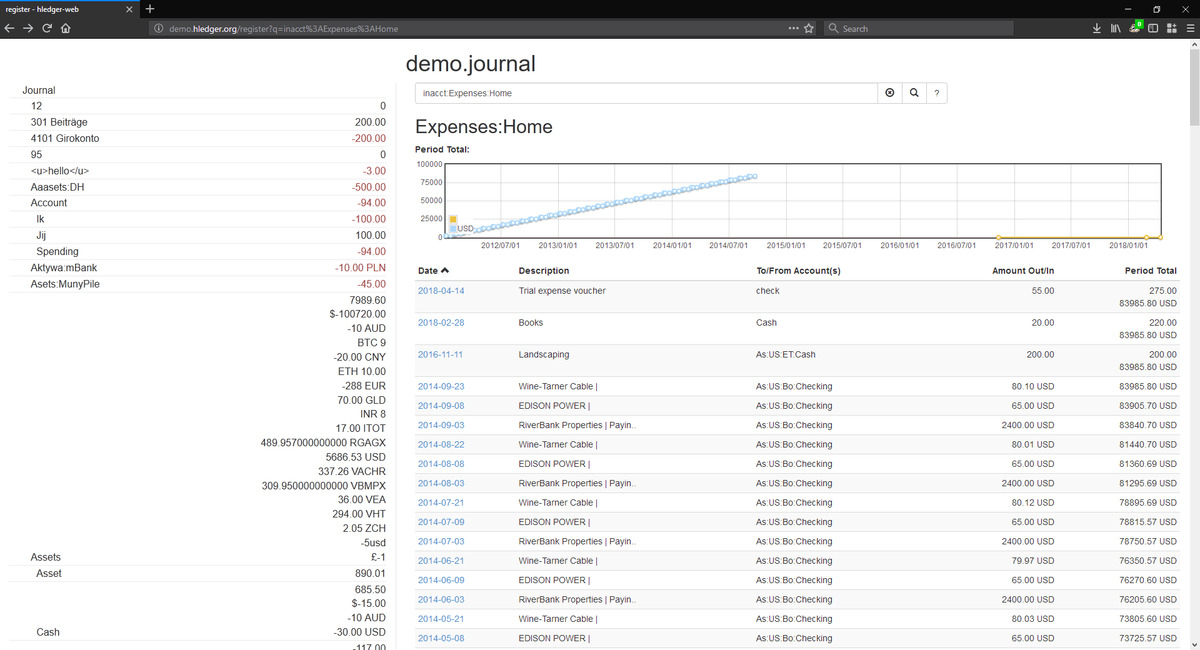
The catch: hledger’s CSV import is driven by rules files rather than general-purpose code, which is fast to write for a single bank format but awkward when your broker exports six subtly different CSV dialects. If your importing needs are complex, Beancount is the better fit.
Beancount — Correctness as a Compiler Problem
Beancount was written by Martin Blais as an experiment in doing personal accounting the way you would design a compiler: a strict grammar, an abstract syntax tree, and a validation pass that refuses to produce a report from a broken file. Every transaction must balance. Every account must be declared. Currencies, costs and prices are first-class concepts rather than strings you hope are consistent.
Install the engine and the web UI together:
| |
Then check and explore a file:
| |
A Beancount entry looks like this:
| |
Reporting is done through bean-query, which speaks a SQL-like language over your ledger:
| |
What you gain over hledger is the import pipeline. Importers are ordinary Python modules that map a bank export to entries and, critically, extract a stable ID for every row so that re-running the same import never duplicates a transaction:
| |
Wire the importers into beangulp and a monthly import becomes one command that you can put in a cron job and forget about. If you want the reasoning behind this design, the project’s documentation at furius.ca/beancount/doc/install and the Fava README are the authoritative references.
The catch: Fava is a separate project with its own release cadence, and Beancount 3.x changed the import API relative to 2.x. Pin your versions in a virtual environment and keep the importer code in the same repository as the ledger file.
Ledger — The Original, Still the Fastest Query Language
Ledger predates the entire category. John Wiegley’s C++ implementation established the journal format that hledger and dozens of other tools now read, and its period expressions remain the most expressive way to slice time in a command line. If you have ever typed ledger reg expenses --monthly -b "last year", you have used a syntax that nothing else replicates exactly.
Install it from your package manager:
| |
Or use the community container, which needs no toolchain at all — the README documents exactly this invocation:
| |
Building from source is a single documented command once dependencies are present:
| |
Everyday reporting is terse and composable:
| |
Because the binary is a single C++ executable with no runtime, it starts instantly and handles journals with hundreds of thousands of postings without visible delay. The trade-off is that Ledger itself has no official web interface — you either stay in the terminal or run one of the third-party browsers maintained by the community.
The catch: the ecosystem is a strength and a hazard. Many popular add-ons and blog recipes were written for Ledger 2.x and assume Python support compiled in (--import). Verify your distribution’s build flags if you rely on import scripts.
Real-World Workflow: Versioning, Automation and Reconciliation
The reason to choose any of these tools is the workflow around the file, not the binary.
1. Keep the ledger in Git. A journal is text, so git diff shows you exactly what changed between two reconciliations. Commit after every statement import and you get a free audit trail:
| |
If the file contains account numbers, encrypt it at rest or keep the repository private — signing your commits is a separate, well-covered problem.
2. Automate the monthly import. With Beancount, a cron entry that runs the importer and then bean-check will refuse to silently ingest a malformed export. With hledger, a rules file plus a wrapper script gives you the same effect with less code.
3. Reconcile against statements, not against vibes. All three tools support an assertion or balance-check directive so that a stale entry fails loudly instead of drifting for a year:
| |
4. Back up the plain file, not the app. Because there is no database, your backup is a copy of a directory. Any of the approaches in our self-hosted backup comparison applies unchanged.
Pitfalls and Migration Notes
- Do not start with a full history import. Convert the current year first, confirm the opening balances match your bank, then decide whether the old years are worth migrating.
- Beware duplicate transactions. Only Beancount’s importer framework gives you row-level IDs out of the box. With hledger and Ledger, deduplicate on
(date, amount, payee)yourself before importing. - Currency handling differs enormously. hledger and Ledger treat commodities loosely; Beancount forces you to be explicit about cost and price. Loose handling is faster to start and harder to audit later.
- Report semantics are not portable. A “balance” in
hledger balancecollapses sub-accounts differently fromledger bal. Do not assume the numbers match until you have compared them on the same data. - Web interfaces expose your finances.
hledger-webbinds to0.0.0.0by default inside the container. ChangeHLEDGER_HOST, put it behind authentication, and never expose it to the open internet. - Licence matters if you redistribute. Ledger’s BSD 3-Clause is the most permissive of the three; hledger is GPL-3.0 and Beancount GPL-2.0.
FAQ
Is plain-text accounting harder than a normal finance app?
The first hour is harder; every hour after that is easier. You type transactions by hand or import CSV files, but you get unlimited flexibility in reporting and complete control over your data. Most people are comfortable after a week of daily use.
Which of hledger, Beancount and Ledger should a beginner start with?
hledger. It ships the CLI, a terminal UI and a web interface from one installation, and its journal format is the most forgiving of the three. Move on when you hit a limitation rather than choosing the most powerful tool first.
Can I use these tools together or switch later?
Yes, and people do. hledger can read Ledger journals, and conversions between the formats are mechanical because they share the double-entry model. Keep the original file in Git so a migration is always reversible.
Do I need a server to run a web interface?
No. Fava and hledger-web both run on the same machine as your ledger and bind to localhost by default. A small VPS or home server is only needed if you want to view reports from another device.
What about multi-currency accounts?
Beancount is the strongest choice — it requires explicit prices and costs and will compute valuations for you. hledger handles multi-commodity journals well, and Ledger can do it, but both let you record inconsistent conversions that later produce confusing reports.
Is my financial data safe in a text file?
It is exactly as safe as you make it. Use file permissions, encrypt the directory at rest, keep it in a private repository and avoid exposing any web interface without authentication. The advantage over a SaaS product is that you can verify this yourself.
💰 想测试你的市场判断力?我用 Polymarket 做预测市场交易——这是全球最大的预测市场平台,从大选结果到技术监管时间线,什么都可以押注。和赌博不同,这是真正的信息市场:你懂的信息越多,胜率越高。我靠预测技术相关事件的走向已经赚了不少。用我的邀请链接注册:Polymarket.com