Portainer taught a generation of sysadmins that a browser tab is sometimes all the tooling you need. But the 2026 generation of Docker control panels has quietly moved past “browse containers and click restart” — the new contenders do GitOps, multi-server rollouts, database backups, and deployment orchestration. Three projects dominate the conversation right now, and all three shipped releases in the last few weeks: Dokploy (37,702 stars, v0.30.8), Komodo (12,643 stars, v2.3.3), and Arcane (7,764 stars, v2.15.1).
Picking the wrong one costs you weekends. This guide compares them on architecture, real deployment configs, and the specific workloads each one handles best.
TL;DR — Quick Verdict
- Want a Vercel-like PaaS for your own VPS? Choose Dokploy. It is the fastest path from
git pushto a running app, with databases, backups and Traefik routing wired in. - Want to manage many servers from one pane, written in Rust, with a proper GitOps core? Choose Komodo. Its Core/Periphery split scales from 1 box to 50.
- Want something lightweight, Docker-native and unopinionated, with no extra database? Choose Arcane. A single Go binary plus the Docker socket, port 3552, done.
Everything below explains why, with the actual install commands and compose files lifted from the official repos.
Feature-by-Feature Comparison
All figures were pulled live from the GitHub API at publish time.
| Dokploy | Komodo | Arcane | |
|---|---|---|---|
| Stars | 37,702 | 12,643 | 7,764 |
| Language | TypeScript | Rust | Go |
| License | Custom (GitHub reports “Other”) | GPL-3.0 | BSD-3-Clause |
| Latest release | v0.30.8 | v2.3.3 | v2.15.1 |
| Last push | 2026-10-07 | 2026-09-21 | 2026-10-07 |
| Architecture | Single control plane + Swarm workers | Core + Periphery agents | Single binary + remote agents |
| Multi-server | Yes (Docker Swarm) | Yes (native agent model) | Yes (GHCR agent image) |
| GitOps / build from Git | Yes, first-class | Yes, build + deploy pipelines | Compose-centric, Git-backed projects |
| Managed databases | MySQL, MariaDB, PostgreSQL, MongoDB, Redis, libsql | No provisioner, deploy-as-container | No provisioner, deploy-as-container |
| Config format | UI + API + CLI | TOML config files + UI | .env + compose projects |
| Reverse proxy | Traefik auto-config | You bring it | You bring it |
Decision Matrix: What Should You Run?
| Your situation | Pick | Why |
|---|---|---|
| One VPS, 5–20 small apps | Dokploy | Templates, one-click databases, automatic TLS |
| Homelab with a managed DB requirement | Dokploy | Built-in database lifecycle + scheduled backups |
| 3–50 servers, need central state | Komodo | Core/Periphery agents, GPL, Rust reliability |
| Air-gapped or restricted network | Komodo | Explicit onboarding keys, no external SaaS dependency |
| “I just want Portainer but modern” | Arcane | Single container, single port, zero database |
Team that lives in docker compose files | Arcane | Treats your compose files as source of truth |
| You want to avoid GPL in a commercial product | Arcane (BSD-3) | Permissive license with no copyleft |
Dokploy — The PaaS Experience
Dokploy’s pitch is simple: the Vercel/Netlify/Heroku workflow, minus the bill and the lock-in. Install is a single script on a fresh VPS:
| |
From there, the panel handles application deployments from Git (GitHub, GitLab, Gitea, Bitbucket, raw Docker), Let’s Encrypt certificates, and a template gallery that deploys Plausible, PocketBase, Cal.com and friends in one click. It also ships a CLI and an HTTP API, so anything you can click you can script.
The feature that separates Dokploy from the rest is database management. You can provision MySQL, MariaDB, PostgreSQL, MongoDB, Redis and libsql instances from the UI, attach them to apps, and schedule dumps to external storage. That is a meaningful chunk of what people normally self-host other tools for.
Where it is weakest: Dokploy is opinionated. Traefik is the routing layer, and multi-node scale-out means Docker Swarm, not Kubernetes. If your fleet is heterogeneous or you already own the ingress layer, you will be fighting the defaults. It is also the youngest codebase of the three, and the license is a custom one — read it before shipping it inside a commercial product.
Verdict: the best choice for solo operators and small teams who want a managed-feeling platform on a €5 VPS.
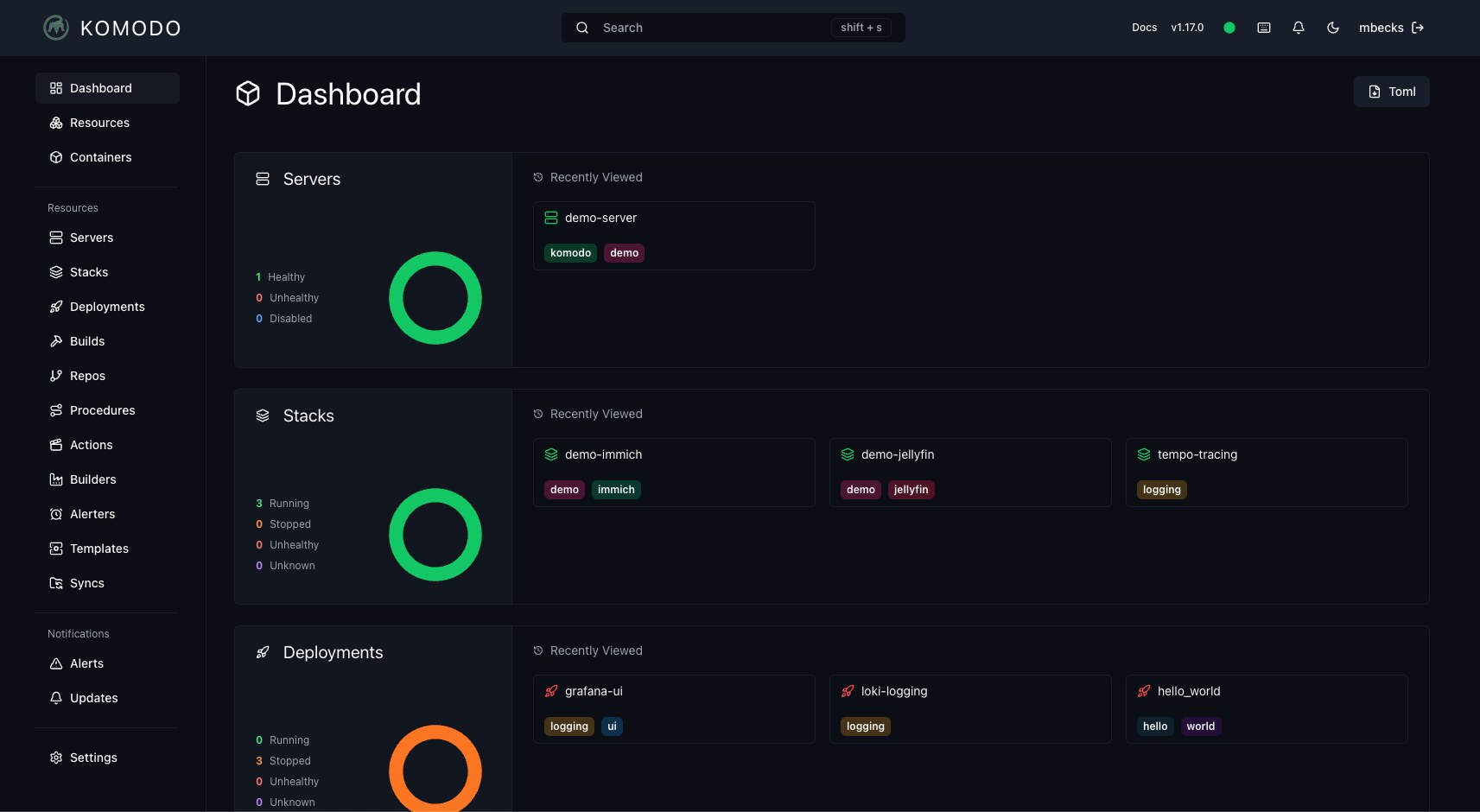
Komodo — Infrastructure, Not Apps
Komodo splits into two binaries: Core (the UI, API, database and scheduler) and Periphery (an agent that runs on every managed server). Core talks to Periphery over an authenticated connection, which is why the model scales cleanly — one Core, N Periphery agents, one source of truth per resource.
The project ships its own compose files, including a single stack that deploys MongoDB, Core and Periphery together. The Periphery side of the stack looks like this, taken from the repository’s compose/periphery.compose.yaml:
| |
That onboarding-key flow is the security detail worth noting: a fresh agent cannot register itself into the UI without a key you generated, and Core only accepts Periphery connections signed with an accepted public key. Compare that with the “mount the Docker socket and hope” pattern most panels use.
Operationally, Komodo is a build-and-deploy system: it clones repos, builds images, pushes them to a registry (or transfers them), and rolls out stacks with resource sync. Server stats, alerts and updates are built in, and the resource diff view tells you exactly what will change before apply.
Where it is weakest: the learning curve. You are configuring a system, not clicking through a wizard, and the GPL-3.0 license rules out some commercial embedding. There is also no built-in database provisioner — you deploy databases the normal containerized way.
Verdict: the professional’s pick for fleets, and the only one of the three where I would happily run 30 nodes.
Arcane — The Docker-Native Minimalist
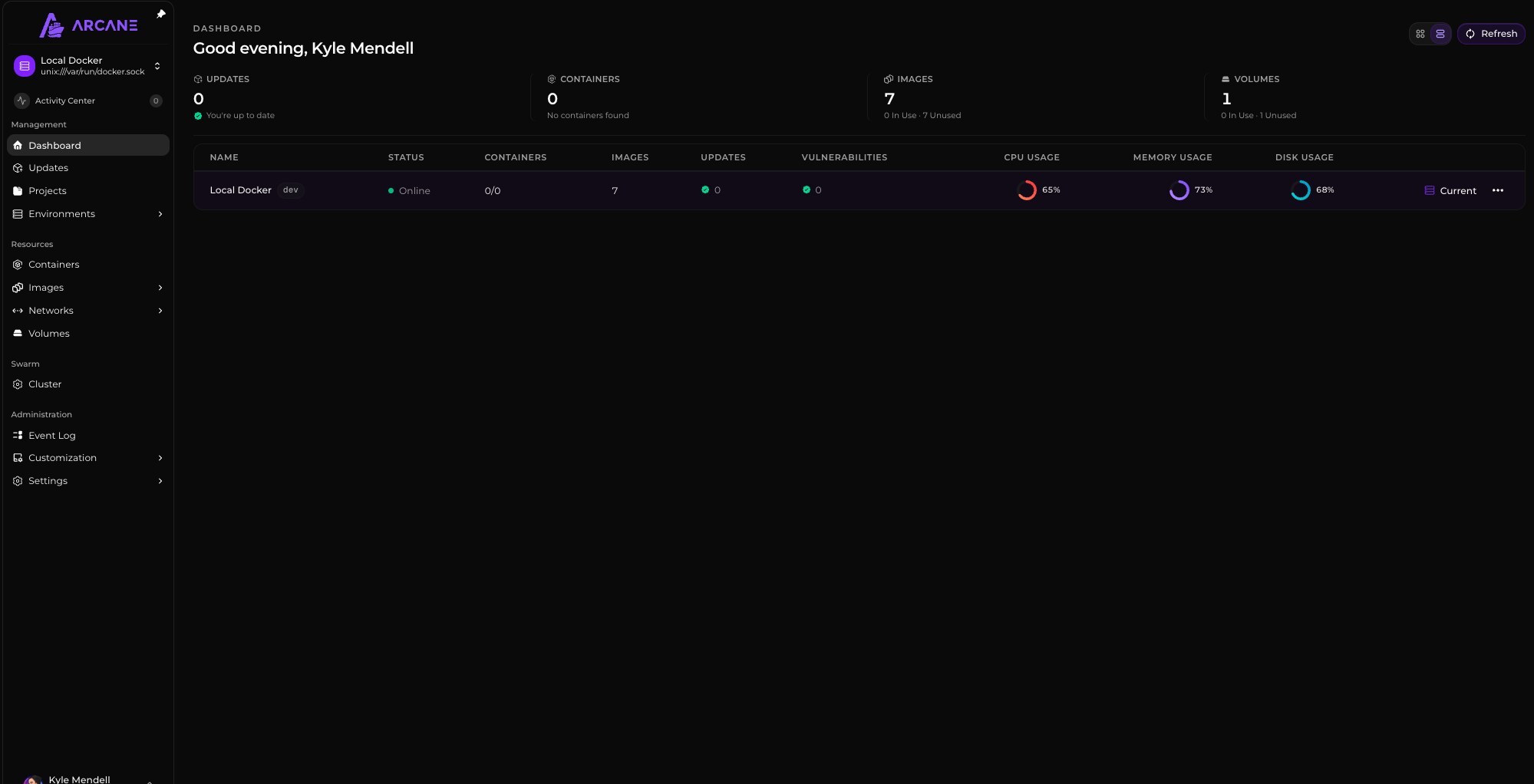
Arcane positions itself as “modern Docker management, designed for everyone”, and the design constraint is obvious: one Go binary, one port (3552), no separate database to babysit. It publishes two container images from its release pipeline — ghcr.io/getarcaneapp/manager for the control plane and ghcr.io/getarcaneapp/agent for remote nodes — and reads configuration from a plain environment file.
The project’s own .env.example shows how little there is to configure:
| |
Deployment is correspondingly boring, which is a compliment: mount /var/run/docker.sock, publish 3552, mount a data volume, set APP_URL, and you are done. Because Arcane treats compose projects as the unit of work, it slots into teams that already keep their stacks in Git instead of clicking them into existence. It also handles container images, volumes, networks, environment management, and a first-party agent for managing more than one host.
Where it is weakest: fewer batteries included than Dokploy (no database provisioner, no Traefik automation) and a smaller community than either rival. You will be writing more YAML yourself — which, for a lot of operators, is precisely the point.
Verdict: the right default if you want a modern UI without adopting a platform or a vendor-shaped workflow.
Migration Notes and Common Traps
Adopting a new panel is less risky than it looks, because all three are docker compose first: if your stacks live in YAML, they move with a copy-paste. What bites people is everything around the YAML.
- Socket exposure is root on the host. Every one of these tools mounts
/var/run/docker.sock. A compromise of the panel is a compromise of the machine. Run the panel on a management VLAN, behind TLS, with strong auth — or use a socket proxy that filters the API surface. - Do not run two panels on one host. Compose project names, networks and labels collide in confusing ways. Import stacks, then decommission the old panel.
- Label-based routers need rewriting. Portainer and Dokploy generate Traefik/nginx labels automatically. Moving to a panel that does not own ingress means recreating those routes by hand.
- Back up the panel’s own state. Dokploy keeps app definitions in its Postgres, Komodo in MongoDB, Arcane in its data volume. Your compose files are not a backup of your deployment definitions.
- Pin image tags. All three projects move fast — 2026 saw multiple releases a month. Floating tags will eventually restart your production stack on a Tuesday.
- Check the license before commercial embedding. BSD-3-Clause (Arcane) and GPL-3.0 (Komodo) and a custom license (Dokploy) have very different obligations.
If you are cleaning up an existing install, our guide to self-hosted container garbage collection and image pruning covers the storage side, and the older Portainer Compose vs Dockge vs Coolify comparison is still useful background on how compose-driven UIs diverged. If you would rather have a PaaS minus the panel, see our Dokku vs Tsuru vs CapRover write-up.
Frequently Asked Questions
Which of Dokploy, Komodo and Arcane is easiest to install?
Dokploy — one shell command on a fresh VPS, then everything happens in the browser. Arcane is a close second: a single container with the Docker socket mounted and one exposed port (3552). Komodo requires the most upfront thought because you deploy Core and Periphery separately and register agents with an onboarding key.
Can Komodo or Arcane provision PostgreSQL and MySQL like Dokploy does?
No. Only Dokploy ships a database provisioner with lifecycle management and scheduled backups. With Komodo and Arcane you deploy databases as ordinary containers or compose services, which many operators prefer because the database definition then lives in version control with everything else.
Do these panels work with Docker Swarm or Kubernetes?
Dokploy uses Docker Swarm for multi-node scale-out. Komodo manages Docker hosts (and Kubernetes clusters) through its agent model, with Swarm and Nomad support in its stack deployment options. Arcane is deliberately Docker-and-compose-centric, adding remote hosts through its own agent.
What are the system requirements?
All three are modest: a 1 vCPU / 1 GB VPS runs the panel itself comfortably. Dokploy also runs PostgreSQL for its own state; Komodo runs MongoDB for Core; Arcane stores its data as files in its volume, which is why it has the smallest footprint of the three.
Should I migrate away from Portainer in 2026?
Only if you feel a specific pain: no Git deployments, no multi-node orchestration, or no database lifecycle. Portainer remains a solid container browser. If you want deployment pipelines and don’t mind a platform-shaped tool, Dokploy; if you want fleet-wide orchestration, Komodo; if you want minimalism, Arcane.
💰 想测试你的市场判断力?我用 Polymarket 做预测市场交易——这是全球最大的预测市场平台,从大选结果到技术监管时间线,什么都可以押注。和赌博不同,这是真正的信息市场:你懂的信息越多,胜率越高。我靠预测技术相关事件的走向已经赚了不少。用我的邀请链接注册:Polymarket.com