A single variable font can carry 40,000 glyphs and weigh over 3 MB. Your landing page needs about 96 characters. Shipping the full file means 97% of your font payload is dead weight — downloaded, parsed, and cached by users who never render a single Bengali conjunct or Cyrillic ligature. Font files are the last uncompressed asset class most teams still copy wholesale from a CDN.
The fix is font manipulation: subsetting, converting, rewriting name tables, merging, and inspecting binary font data. Four open-source toolkits dominate that work in 2026, and they are not interchangeable. This guide compares them with real GitHub data pulled on 2026-10-06, working code from each project’s official repository, and the gotchas that cost teams entire afternoons.
TL;DR — Quick Verdict
- Pick
fontTools(Python) if you need production-grade subsetting, WOFF2 compression, variable-font instancing, or any automated pipeline. It is the reference implementation for almost every other tool. - Pick
fontkit(JavaScript) if you are inside a Node or browser build and want subsetting without shelling out to Python. - Pick
opentype.js(JavaScript) when you need to render text to SVG paths or read/write name tables in the browser, not when you need deep binary surgery. - Pick
FontForgewhen a human needs to see the glyphs. It is the only GUI in this comparison, and its scripting layer makes it automatable too.
If you have no idea which to choose: fontTools for pipelines, FontForge for design, fontkit for Node builds, opentype.js for rendering.
Head-to-Head Comparison
All star counts and last-push dates below were fetched live from GitHub on 2026-10-06.
| Tool | Language | GitHub Stars | License | Last Update | Subsetting | GUI | Best For |
|---|---|---|---|---|---|---|---|
| fontTools | Python (+ Rust-accelerated) | 5,279 | MIT | 2026-10-05 | Yes (pyftsubset) | No | Automated pipelines, WOFF2, variable fonts |
| fontkit | JavaScript (Node + browser) | 1,674 | MIT | 2026-10-06 | Yes (createSubset) | No | Node/browser builds, glyph layout |
| opentype.js | JavaScript (Node + browser) | 5,029 | MIT | 2026-08-08 | Partial | No | SVG text rendering, font inspection |
| FontForge | C/C++ with Python scripting | 8,006 | GPL-3.0 | 2026-10-05 | Yes (scripting) | Yes | Visual editing, complex outline work |
The star counts tell an interesting story: FontForge’s 8,006 stars reflect a quarter-century as the default libre font editor, while fontTools’ 5,279 reflect its status as the library everyone else builds on. opentype.js has more stars than fontkit (5,029 vs 1,674), but that popularity is driven by its rendering API — a different job entirely.
Scenario Decision Matrix
| Your Use Case | Recommended Tool | Why |
|---|---|---|
| Subset a font in a CI/CD pipeline | fontTools | pyftsubset is scriptable, battle-tested, and produces the smallest WOFF2 output |
| Subset inside a Node build (no Python) | fontkit | Native createSubset() and encodeStream() — no subprocess |
| Draw text as SVG paths in a browser | opentype.js | font.getPath() returns vector paths directly |
| Manually fix a broken glyph outline | FontForge | Only tool with an interactive editor and Bézier handle control |
| Convert a variable font to a static instance | fontTools | fonttools varLib.instancer is the canonical implementation |
Inspect what’s inside a mystery .otf | fontTools or opentype.js | Both expose the table directory; fontTools is deeper |
fontTools — The Python Workhorse
fontTools is the library other font projects quietly depend on. It reached 5,279 stars and was last updated 2026-10-05 under the MIT license, and it ships both a Python API and a command-line tool called pyftsubset.
Install it with the optional extras that enable WOFF2 and Unicode handling:
| |
The fastest win is subsetting from the shell — this is the command you will paste into a build script:
| |
That turns a 300 KB webfont into something closer to 15 KB. Note --layout-features='*': keeping all OpenType features preserves ligatures and kerning, which is usually what you want for display text and rarely what you want for icon fonts.
The Python API gives you access to every table in the file:
| |
Where fontTools pulls ahead is variable fonts. Instancing — freezing a variable font at a specific weight so you ship one static file — is a first-class feature:
| |
Verdict: if your pipeline runs Python anywhere (GitHub Actions, Docker, a Makefile), fontTools should be your default. It is the reference implementation, and its output is what the rest of the ecosystem validates against.
fontkit — Subsetting Without Leaving Node
fontkit sits at 1,674 stars, last updated 2026-10-06 — the freshest commit in this comparison — and is built for the JavaScript ecosystem. It handles TrueType, OpenType, WOFF, WOFF2, and TTC collections, and unlike opentype.js it treats subsetting as a core feature rather than an afterthought.
| |
Opening a font and reading its metadata takes three lines:
| |
The subsetting API is what you came for. You collect the glyphs you actually use and stream a new font file:
| |
fontkit also exposes the low-level layout engine — font.layout() returns positioned glyphs, advance widths, and kerning — which makes it a reasonable choice for server-side text measurement where you need to know exactly how wide a string will render.
Verdict: the correct answer when adding Python to your build is unacceptable. It gives you 90% of fontTools’ subsetting power with none of the cross-runtime plumbing.
opentype.js — Rendering First, Manipulation Second
opentype.js carries 5,029 stars and was last updated 2026-08-08. Its README describes it precisely: “Read and write OpenType fonts using JavaScript.” Read and write is accurate, but the library’s center of gravity is the rendering side — turning text into SVG or canvas paths.
| |
Parsing a font and extracting path data is the canonical use case:
| |
To load a font directly from a filesystem path in Node, opentype.loadSync() skips the manual buffer step. In the browser, the CDN build exposes the same API:
| |
You can write fonts with opentype.js — it exposes glyph and table objects — but subsetting is not a documented first-class operation the way it is in fontkit. If you need to shrink a file, use the other tools and reserve opentype.js for what it is best at: converting outlines into paths you can style with CSS.
Verdict: indispensable for text-to-SVG work, wrong tool for binary font surgery.
FontForge — The GUI That Also Scripts
FontForge is the outlier: at 8,006 stars (the most of any tool here), last updated 2026-10-05, and licensed under GPL-3.0. It is the only project in this comparison with an actual visual editor, which is why designers have kept it alive since the late 1990s.
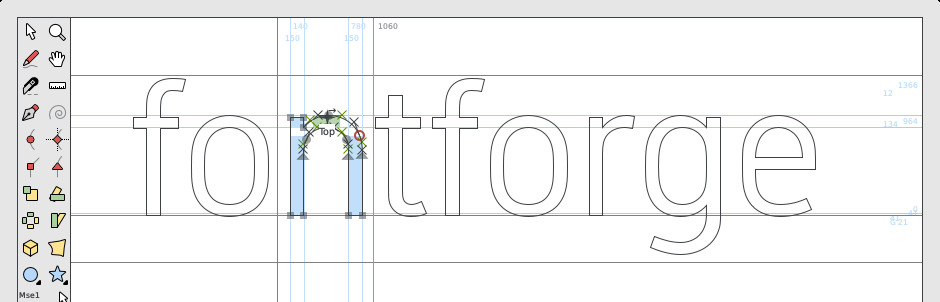
The screenshot above is the real FontForge outline editing canvas — a selected on-curve point with its Bézier control handles, the tool palette down the left, and coordinate rulers across the top. When a glyph’s contour is corrupted and no script can guess your intent, this is where you fix it by hand.
What surprises most engineers is that FontForge is fully scriptable with Python, which makes it usable in automation without ever opening the window:
| |
You can also drive it entirely from the command line, which is handy for batch format conversion inside a Docker image:
| |
Verdict: pick FontForge when the problem is visual, and keep it in your toolchain for conversions when you want a GUI fallback. The GPL-3.0 license matters if you plan to link it into proprietary software — the scripting interface is fine, but verify your distribution model before shipping modified binaries.
Pitfalls and Gotchas
Subsetting does not grant you a license. Most commercial font licenses explicitly forbid modification, and subsetting is modification. Check the EULA before you run pyftsubset on anything you bought.
Hinting is fragile across formats. Converting TrueType hinting instructions to the CFF outlines used by some OpenType fonts will silently drop them. Text that looked crisp at 12px on Windows can turn muddy. Test at small sizes after any format conversion.
Don’t subset icon fonts feature-by-feature. If you use --layout-features='*' on an icon font built around ligatures, you may strip the ligature table and break every icon at once. Keep features for text fonts, allowlist glyphs for icons.
fontkit’s createSubset() needs real glyph objects. Passing codepoints instead of glyphs from font.layout() will produce an empty or broken file. Always walk the layout run.
WOFF2 needs the compression extra. A plain pip install fonttools will refuse to write WOFF2 until you add the [woff] extra. This is the single most common install-time error.
Variable fonts break naive subsetting assumptions. A static subset of a variable font is just one instance — if you later switch an axis, expect to re-subset.
Verify subsets in a real renderer, never by file size alone. A file that shrank by 80% may have dropped the glyphs your bootstrapped CSS still references, producing the classic invisible-text flash followed by fallback boxes.
Where This Fits in a Self-Hosted Stack
Font tooling is the last mile of asset optimization. Once you have a subset, host it yourself so third-party font CDNs never see your visitors — the reasoning is the same as our self-hosted Google Fonts alternatives guide, which covers the privacy and uptime arguments in detail.
If your interest is rendering rather than file manipulation, our comparison of FreeType, HarfBuzz, stb_truetype and fontconfig explains how rasterizers and shapers consume the files these toolkits produce. And if you are optimizing an asset pipeline more broadly, the self-hosted font and icon library comparison shows how Fontsource and Iconify solve the delivery half of the problem.
A practical stack: subset with fontTools in CI, self-host the WOFF2, and keep FontForge installed locally for the one glyph that breaks every six months.
FAQ
Is font subsetting legal for commercial fonts?
It depends entirely on the license, and “I own the font” is not the same as “I may modify the font.” Many commercial licenses permit embedding and web use but forbid modification — and subsetting is a modification of the binary. Free licenses like the SIL Open Font License explicitly allow subsetting and redistribution, which is why the majority of self-hosted setups standardize on OFL families such as Inter, Source Sans, and Roboto.
Can I convert OTF to WOFF2 without losing quality?
Yes — WOFF2 is a lossless compression container, so the outlines are preserved bit-for-bit. What you can lose is hinting when converting between outline formats (TrueType quadratic curves versus CFF cubic curves). The container conversion itself is safe; the curve-format conversion is where quality regresses.
Does fontTools support variable fonts?
Yes, and this is one of its strongest advantages. The fonttools varLib.instancer subcommand freezes a variable font at specific axis positions, producing a static instance, and it can also subset a variable font while preserving the variation data. fontkit can read variable fonts, but instancing is squarely a fontTools feature.
Which tool is fastest for a Node.js build pipeline?
fontkit, because it avoids the subprocess boundary. Shelling out to Python from a Node build adds process startup cost on every invocation and introduces a Python dependency into your CI image. If your build is already Node-based, staying in createSubset() keeps your Docker image smaller and your build graph simpler.
Do I need a GUI at all?
Only when the problem is visual. Ninety percent of font work — subsetting, converting, inspecting, instancing — is automatable and should never touch a GUI. Keep FontForge around for the remaining ten percent: a broken contour, a misaligned accent, or a designer handoff that arrived as an .sfd file.
How do I confirm a subset didn’t break complex scripts?
Render sample text in the target script in a real browser after subsetting, and check that shaping still applies. Subsetting a Devanagari or Arabic font without its layout tables will produce disconnected or reversed glyphs. If the script needs shaping, include the OpenType features and verify visually rather than trusting the file size.
💰 想测试你的市场判断力?我用 Polymarket 做预测市场交易——这是全球最大的预测市场平台,从大选结果到技术监管时间线,什么都可以押注。和赌博不同,这是真正的信息市场:你懂的信息越多,胜率越高。我靠预测技术相关事件的走向已经赚了不少。用我的邀请链接注册:Polymarket.com