Git has won. It won so completely that most developers have never used anything else, and the idea of a competing version control system sounds like a history lesson about Subversion. But Git won on distribution, not on workflow — and a growing number of developers are quietly running something else on top of Git repositories.
Three of those alternatives are worth your attention in 2026: Jujutsu (jj), the Git-compatible VCS whose operation log lets you undo anything; Sapling (sl), Meta’s Mercurial descendant rebuilt for enormous repositories; and Mercurial (hg), the mature alternative that many people still consider the better-designed system. Two of the three store data in ordinary Git repositories, so “trying” them costs you nothing.
All repository data below was fetched live on 2026-10-04. Mercurial’s release number comes from its PyPI package.
The 60-Second Verdict (TL;DR)
- Choose Jujutsu if you want a dramatically better day-to-day workflow on top of your existing Git remotes. It has 31,878 stars, a commit pushed the same day this article was written, and an undo model that makes Git’s “I destroyed my rebase” panic obsolete.
- Choose Sapling if you work in an enormous monorepo and want a Git-compatible client designed for millions of files, with a real web UI (ISL) for history browsing. 7,031 stars, last commit 2026-10-03.
- Choose Mercurial if you want a stable, mature, extension-driven VCS with predictable semantics and no Git compatibility layer in the middle. Current release 7.2.4.
- Stay on Git if your team’s tooling is deeply coupled to Git internals — hooks, per-branch CI logic, exotic server-side filters, or vendors that only speak Git.
If you read one line: Jujutsu for the workflow, Sapling for the scale, Mercurial for the stability.
2026 Comparison Table
Jujutsu (jj) | Sapling (sl) | Mercurial (hg) | |
|---|---|---|---|
| Repo | jj-vcs/jj | facebook/sapling | mercurial-scm.org (PyPI) |
| Stars | 31,878 | 7,031 | — (not GitHub-hosted) |
| Last commit | 2026-10-04 | 2026-10-03 | 7.2.4 release |
| Storage backend | Git (production-ready) | Git-compatible | Native (hg format) |
| Client binary | jj | sl | hg |
| Language | Rust | Rust / Python | Python |
| Undo model | Operation log — undo anything | Command-level recovery | hg rollback (limited) |
| Conflict handling | First-class, can commit conflicts | Standard | Standard |
| Web UI | No | Interactive Smartlog (ISL) | hg serve (built in) |
| Git interop | Full — same repo, same remote | Good (clone/push/pull) | Via hg-git extension |
| Server component | Any Git host | Mononoke (not publicly supported) | hg serve / any host |
| Extensions | Plugin-free by design | Config-driven | Rich extension ecosystem |
| Maturity | Experimental (stable Git interop) | Production at Meta, OSS newer | Mature, 20+ years |
| Best for | Developers who want a better Git | Huge monorepos on Git | Native-hg shops, purists |
The most important row is “storage backend”. Jujutsu and Sapling both sit on top of Git today, so you can keep your GitHub or Gitea remotes and your CI unchanged. Mercurial requires its own format and hosting, or a compatibility bridge.
Decision Matrix
| Your situation | Pick | Why |
|---|---|---|
| Solo developer, GitHub remotes, wants better UX | Jujutsu | Colocated Git repo, push normal branches |
| Team with strict Git-based CI and hooks | Jujutsu (pilot first) | Git backend means CI sees ordinary Git commits |
| Monorepo with millions of files | Sapling | Built for exactly that; EdenFS virtual FS |
| Need to browse history in a web UI | Sapling (ISL) or hg serve | Both ship real UI; jj has none |
| Native Mercurial shop already running hg | Mercurial | Staying put is correct; 7.2.4 is solid |
| Compliance environment needing audit trails | Jujutsu | Every operation is logged with args and timestamps |
| Exotic server-side hooks / Git LFS edge cases | Git | Compatibility layers still leak at the edges |
Jujutsu: The Operation Log Changes Everything
Jujutsu’s defining feature is not its Git compatibility — plenty of tools have that. It is the operation log: every command that modifies the repository is recorded, with its arguments and a timestamp, and every one of them can be undone. This is what the project’s own demo screenshot shows.
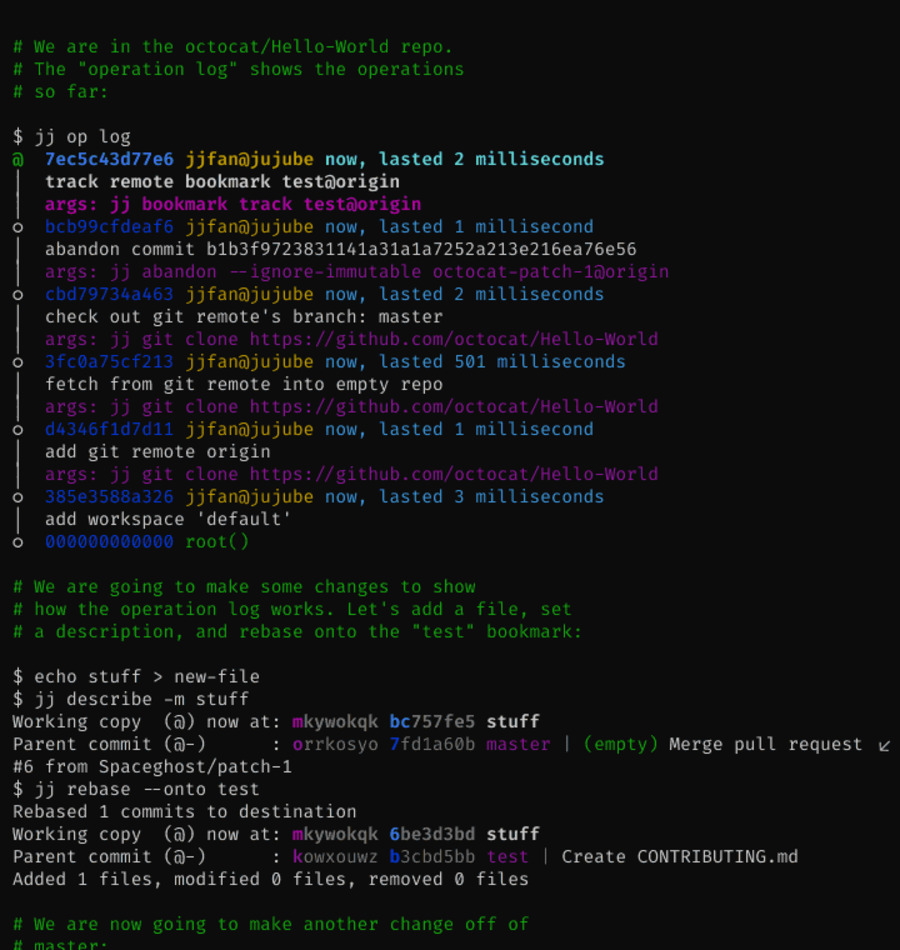
Notice what that screenshot demonstrates: jj op log lists the repository’s entire operation history — clone, remote setup, bookmark tracking, an abandoned commit — each with the exact command that produced it and the user who ran it. When something goes wrong, you are not hunting through git reflog hoping the commit object still exists. You run jj undo.
The second thing jj changes is the working copy model. There is no staging area and no “uncommitted changes” state: the working copy is a commit, and it is always amendable.
| |
The daily loop is genuinely different from Git:
| |
Two more things about jj worth knowing:
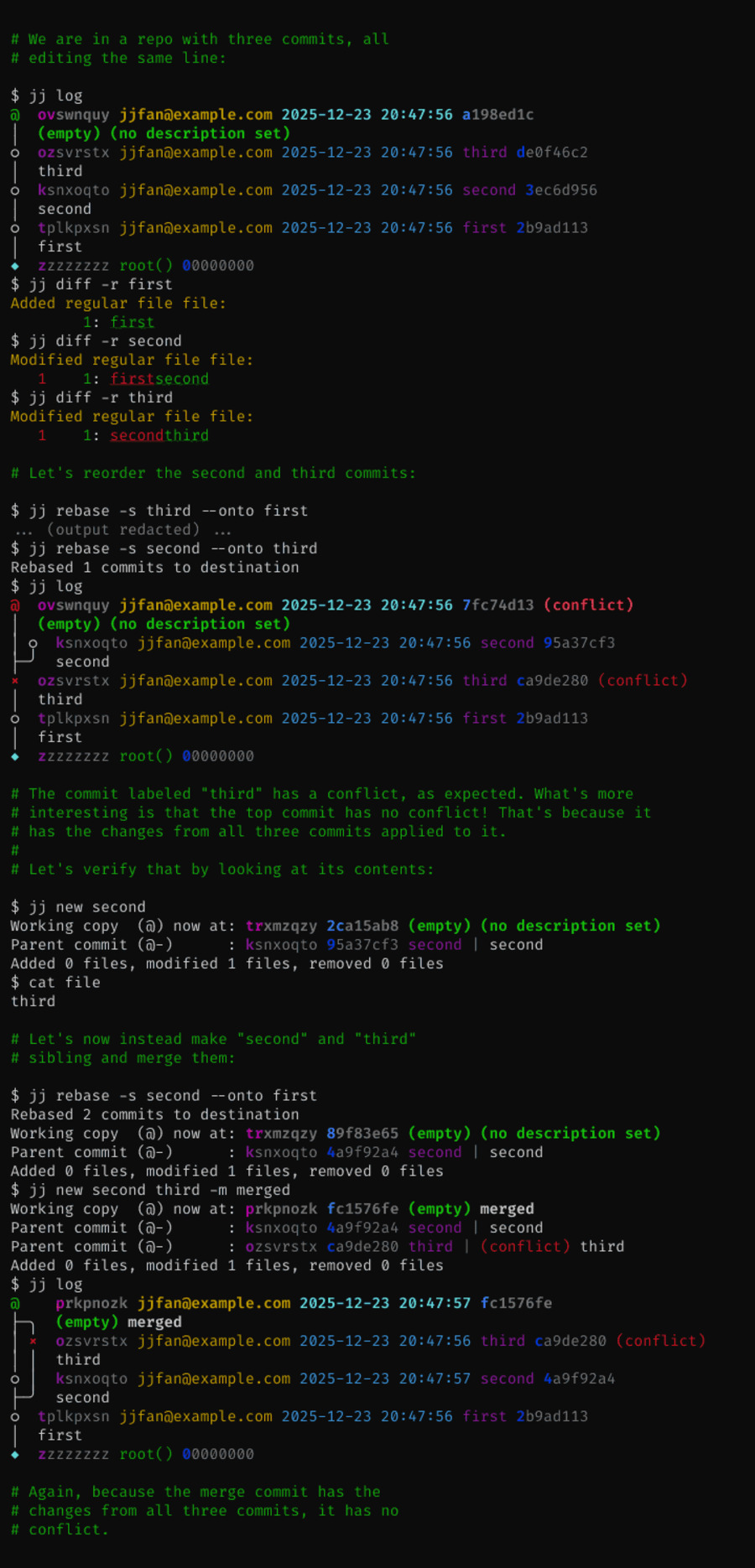
- Conflicts are first-class. jj can record a commit that contains conflicts and let you keep working, resolving them later. Git forces you to resolve a rebase conflict before you can do anything else. jj’s demo of conflict juggling:
- The Git backend uses gitoxide — the Rust Git implementation — and is the only backend the project calls production-ready. The project describes itself as an experimental VCS while stating that Git compatibility is stable and most users rely on it daily. That is an honest warning, not a disclaimer to ignore: read it as “some rough edges remain, your data is safe”.
Sapling: Meta’s Scaled-Up Mercurial, Rebranded for Git
Sapling’s lineage is the most interesting thing about it. Meta ran Mercurial at a scale nobody else attempted, then rebuilt the client — and the result, sl, still carries Mercurial’s DNA. The project’s own README says the CLI “was originally based on Mercurial, and shares various aspects of the UI and features of Mercurial.” Now it also speaks Git, which is how it survives in a Git world.
Sapling’s goal is stated in files-and-commits terms: operations should scale with the number of files you are actually using, not with the size of the repository. That is a fundamentally different design target from Git, which scales with the whole history unless you reach for partial clones and sparse checkouts.
| |
Sapling’s standout feature for most people is Interactive Smartlog (ISL) — a real web UI for your repository, available from the command line and integrated into VS Code:
| |
Two components of the Sapling ecosystem deserve explicit caution: Mononoke (the distributed server) and EdenFS (the virtual filesystem that makes checkout near-instant in huge repos) are both described in the README as used in production inside Meta but not yet supported for external usage — the open-source builds exist “for unsupported experimentation.” So the parts of Sapling that solve the truly enormous-repo problem are the parts you cannot get support for. Use Sapling for the client experience; do not plan on self-hosting Mononoke.
Mercurial: The Mature Alternative That Never Won
Mercurial is the least exciting option here and that is precisely its appeal. It has twenty years of production use, a stable command set, a well-documented extension system, and configuration in a single hgrc file that behaves predictably. It is also the system Meta’s engineers came from and the system Git’s early critics preferred — the difference was never really technical merit, it was that GitHub standardized on Git.
Installation and a normal workflow:
| |
| |
For history rewriting — Mercurial’s weakest area when compared to jj — you enable bundled extensions rather than installing plugins from the internet:
| |
With evolve enabled, hg evolve rewrites descendant changesets after you amend or rebase, which is the closest thing Mercurial has to Jujutsu’s fluid history model. It works, but it is an extension layered onto a system designed around immutable history, and it feels like one.
Where Mercurial still wins in 2026:
hg servegives you a browsable repository over HTTP with no extra software, which is the simplest self-hosted VCS setup in existence. Our Fossil SCM guide covers the other all-in-one option if you like that shape of tool.- Immutability and predictable semantics. Nobody loses work by accident in Mercurial, because the default operations cannot rewrite published history.
- A settled, slowly-changing command set. Your muscle memory from 2015 still works.
Where it loses: Git compatibility has to go through the hg-git bridge, the hosting ecosystem is small, and the merge/rebase experience is less pleasant than jj’s. If you are choosing fresh in 2026, Mercurial is a deliberate preference, not a default.
Migration Pitfalls: What Actually Bites
- Jujutsu splits your branch into bookmarks — understand the mapping. A jj change is not a Git branch. You create bookmarks to push, and forgetting to move a bookmark means your
git pushsends a stale commit. Runjj bookmark listbefore you push, every time, for the first month. - Do not run
gitcommands inside a jj repo carelessly. In colocated mode jj and Git share the working copy. Runninggit commitorgit checkout -bbehind jj’s back creates state that jj will notice and re-interpret, and that surprises people. Pick one driver per repo while you learn. - Sapling’s
slaliases will rewire your fingers.sl goto,sl smartlog, andsl commitare Mercurial-style verbs. Teams moving from Git need a cheat sheet taped to the monitor — the project publishes one. - Mercurial’s
hg-gitis a bridge, not a translation layer. Push and pull work, but Git-specific concepts such as submodules and some LFS configurations do not survive the round trip intact. - Server-side hooks are the real migration wall. Any VCS migration that touches a Git server with custom
pre-receivehooks needs those hooks reimplemented. Budget for it: it is usually the longest part of the project. - Commit signing needs re-verification. Moving to a different client can silently stop signing commits, which breaks signed-commit policies. See our Git commit signing guide covering GPG, SSH signing, and Sigstore before you switch.
- If you self-host, plan the server side too. A client change is easy; mirroring, backup, and access control on the server are separate work — covered in our Git mirror and replication comparison of Gitea, GitLab, and Gitolite.
FAQ
Can I use Jujutsu with an existing GitHub repository?
Yes, and that is the most common way to adopt it. Run jj git init --colocate inside an existing clone; jj and Git then share the same repository and working copy, and commits you create with jj are ordinary Git commits that GitHub, GitLab, or Gitea accept without modification. You push with jj git push --bookmark <name>, and the rest of your team sees a normal branch.
Is Jujutsu safe for real work, or is it still experimental?
The project calls itself an experimental version control system, but it explicitly qualifies that Git compatibility is stable and that most developers use it daily for all their needs. In practice the risk is workflow disruption from interface changes, not data loss — the operation log means almost any mistake is one jj undo away. For team repositories, pilot it on one person’s clone before mandating it.
What is the actual difference between Sapling and Mercurial?
Sapling is Meta’s fork-and-rebuild of Mercurial’s client, and its CLI still shares much of Mercurial’s UI and features. The differences are the target: Sapling adds Git compatibility, a web UI called Interactive Smartlog, and components (EdenFS, Mononoke) aimed at repositories with millions of files. Mercurial is the upstream, community-maintained system with a native format and a mature extension ecosystem.
Does Mercurial support Git hosting like GitHub?
Not natively. Git hosting platforms do not serve Mercurial repositories, so you either use the hg-git bridge to push into a Git remote, or self-host with hg serve or a Mercurial-capable forge. If your goal is “GitHub remotes with a non-Git client”, Jujutsu or Sapling are dramatically simpler answers than Mercurial plus a bridge.
Which one should a solo developer pick in 2026?
Jujutsu, unless you specifically need a web UI. It works directly on your existing repositories, it needs no server changes, and the operation log plus first-class conflicts remove the two most common sources of lost work in Git. The learning curve is real — a weekend — but it is learning a better model rather than a new ecosystem.
💰 想测试你的市场判断力?我用 Polymarket 做预测市场交易——这是全球最大的预测市场平台,从大选结果到技术监管时间线,什么都可以押注。和赌博不同,这是真正的信息市场:你懂的信息越多,胜率越高。我靠预测技术相关事件的走向已经赚了不少。用我的邀请链接注册:Polymarket.com