Your homelab is behind CGNAT. Your ISP blocks port 443. And you are tired of paying a usage-metered tunnel service that charges per GB and per “reserved domain”. The obvious escape hatch — a Cloudflare Tunnel — is convenient right up to the moment you need TCP streams, arbitrary ports, or a self-hosted control plane you actually own.
This guide compares the three most interesting self-hosted tunneling platforms of 2026: Pangolin, zrok and sish. All three are open source, all three ship real Docker deployment paths, and each one solves the problem at a completely different layer — WireGuard mesh, overlay network, and plain SSH.
TL;DR — Quick Verdict
- Pick Pangolin if you want a polished self-hosted replacement for Cloudflare Tunnel with a web dashboard, SSO/OIDC login, and browser access to SSH, RDP and VNC resources. It is the most “product” of the three (22,959 stars, active daily).
- Pick zrok if you need to share individual services or files with strangers, embed sharing into your own code via SDKs, and you are comfortable running a heavier stack (Ziti controller, Postgres, RabbitMQ, InfluxDB).
- Pick sish if you want the smallest possible footprint and you already live in a terminal. It is a single Go binary that turns
ssh -Rinto a public HTTPS endpoint — no dashboard, no database, no overlay.
Do not pick any of them if you only need a one-off tunnel for a debugging session; ssh -R port:localhost:port user@server and a reverse proxy config will do.
Comparison Table (September 2026)
| Feature | Pangolin | zrok | sish |
|---|---|---|---|
| Architecture | WireGuard-tunnelled reverse proxy (Traefik + Gerbil agent) | Ziti overlay network + share frontend | SSH remote port forwarding server |
| Language | TypeScript / Go | Go | Go |
| GitHub stars | 22,959 | 4,725 | 4,740 |
| Last commit | 2026-09-29 | 2026-09-29 | 2026-06-25 |
| License | Custom (check repo LICENSE) | Apache-2.0 | MIT |
| Client | Newt agent (909 stars) | zrok2 CLI + SDKs | any ssh client |
| Built-in SSO / OIDC | Yes (Google, Azure, generic OIDC) | Via Ziti identity model | No (public-key auth per tunnel) |
| Dashboard | Full web UI | CLI + metrics stack | Minimal service console |
| TCP support | Yes (raw TCP resources) | Yes (share tcp) | Yes (ssh -R on any port) |
| Wildcard DNS needed | Yes (for subdomain routing) | Yes (*.share.example.com) | Yes (--domain=) |
| Automatic TLS | Let’s Encrypt via Traefik | Caddy overlay or external | Let’s Encrypt or mounted certs |
| RAM footprint | ~2 GB limit in compose | 4–6 GB across 8 containers | Tens of MB |
| Best for | Homelab + team SSO | Ad-hoc sharing, SDK integration | Minimalists and CI debugging |
Decision Matrix: 10 Seconds to a Verdict
| Your use case | Recommended tool | Why |
|---|---|---|
| “I want Cloudflare Tunnel but self-hosted” | Pangolin | Dashboard, SSO, per-resource access rules, browser-based RDP/VNC |
| Give a client temporary access to a web app | Pangolin | Per-user resource grants instead of shared passwords |
| Share a build artifact or local port with a colleague | zrok | share public creates a revocable share token in seconds |
| Embed a tunnel into your CI pipeline from Python/Go/Node | zrok | First-class SDKs with share lifecycle control in code |
| Debug a webhook on a laptop behind a firewall | sish | ssh -R 80:localhost:3000 tuns.example.com — nothing to install |
| Expose an SSH server of a machine that has no public IP | sish | ssh -R 2222:localhost:22 keeps the tunnel inside SSH |
| Run on a 512 MB VPS | sish | Single container, no Postgres, no message broker |
| Zero-trust network segmentation across sites | Pangolin (with Newt) | WireGuard-based site connectors, per-site keys |
Pangolin: WireGuard Ingress With a Real Dashboard
Pangolin is the closest thing to a self-hosted Cloudflare Tunnel with a control panel. Its stack is three services: the pangolin API/UI container, gerbil (the WireGuard endpoint that terminates remote peers) and traefik as the request router.
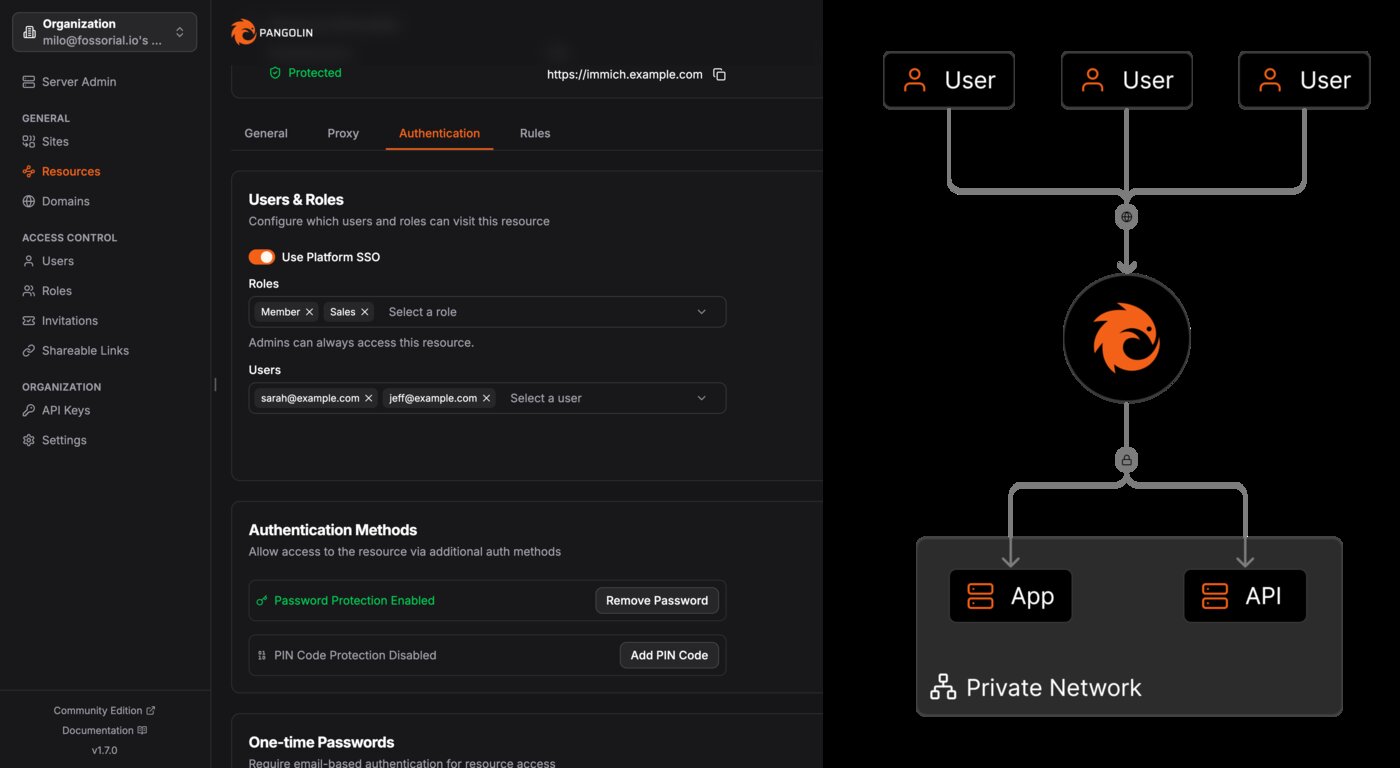
The upstream install/config/docker-compose.yml is a Go-templated installer file; after running the quick-install script it renders into something equivalent to this trimmed version:
| |
Two details matter operationally. First, gerbil needs NET_ADMIN and SYS_MODULE capabilities because it creates a WireGuard interface inside the container — this is why Pangolin cannot run on a fully locked-down container host. Second, Traefik runs with network_mode: service:gerbil, so ports 80/443 belong to the gerbil service, not to Traefik. If you copy the file and wonder why Traefik exposes nothing, that is why.
On the client side you install Newt (fosrl/newt, 909 stars), the tunneled connector, on the machine or network you want to expose. Newt dials out to Gerbil over WireGuard, so no inbound port on your home network is ever required. Each site gets its own key, and access to individual resources is granted per user or per role in the dashboard.
Verdict: the strongest choice for a homelab you want to share with a small team. It is also the heaviest — budget 2 GB of RAM and expect the installer (rather than a hand-written compose file) to manage config generation.
zrok: Sharing as a First-Class Primitive
zrok (by the OpenZiti project) inverts the model: instead of “publish a resource”, it thinks in shares. A share can be public, private, or reserved, and it can carry HTTP, TCP, or plain file content. Everything rides on a Ziti overlay, so the public frontend never sees your internal addresses.
The self-hosting stack is honest about its complexity — eight services in one compose project:
| |
The required environment (from .env.example) is small, which keeps the mental model manageable:
| |
Day-to-day usage is where zrok shines. Once the CLI is enabled, a share is one command:
| |
Because the share lifecycle is exposed through SDKs, you can create and revoke shares from application code — useful for embedding a tunnel into a CI job or a test harness rather than shelling out. The trade-off: RabbitMQ, InfluxDB and PostgreSQL all run in the stack, and metrics land in InfluxDB rather than Prometheus by default, so plan for 4–6 GB of RAM on a comfortable host.
Verdict: the most flexible sharing model of the three and the only one with proper SDKs. It is overkill for “expose my NAS”, and ideal for teams that programmatically manage short-lived access.
sish: SSH Is the Only Dependency
sish ignores the whole orchestration playbook. It is an SSH server that interprets remote port forwards as requests to publish services. The entire deployment is one container:
| |
Clients need nothing installed. To publish a local dev server on port 8080:
| |
Key points most guides miss:
--bind-random-subdomains=falseis what allows stable, memorable subdomains. Leaving it at the default gives you a new hostname on every reconnect.- Authentication is public-key based. Drop authorized keys into the
--authentication-keys-directoryand only those keys may create tunnels. There is no user database. network_mode: hostis effectively mandatory for the HTTPS/SSH ports to bind correctly; if you refuse host networking, map the ports explicitly and accept the reduced feature set.- sish committed most recently in June 2026 — it is stable rather than rapidly evolving. That is a feature for infrastructure, not a bug.
Verdict: unbeatable on resource usage and zero client footprint. It has no SSO and no per-user audit trail, so treat it as a developer tool rather than a team access platform.
Pitfalls and Migration Notes
- Wildcard DNS is non-negotiable for Pangolin and zrok (
*.share.example.com). Create the A/AAAA record before first boot, or TLS issuance fails and you will chase certificate errors for an hour. - Let’s Encrypt rate limits are per registered domain. When migrating from Cloudflare Tunnel to Pangolin, keep the old tunnel in place until the new certificates are issued, otherwise you risk hitting the 5-per-week duplicate-certificate limit while debugging.
- UDP is not an afterthought. Pangolin opens
51820/udpand21820/udpfor WireGuard. Most home routers and some VPS firewalls silently drop UDP — test withnc -ubefore assuming Pangolin is broken. - Do not expose the Ziti controller. In zrok’s compose the controller port binds to
127.0.0.1viaZROK2_INSECURE_INTERFACE. Publishing it publicly trades a convenient admin URL for a management-plane exposure you do not want. network_mode: service:gerbilvs host networking. Pangolin and sish take opposite approaches to port binding; copying compose snippets between the two projects is the fastest way to end up with an unreachable Traefik router.- Plan the reverse-proxy jump. If you already run Traefik or Caddy for other services, give Pangolin its own dedicated ports and route by hostname at the edge, rather than nesting two routers inside one container.
Why Self-Host Tunneled Ingress?
Renting a tunnel service means a third party terminates your TLS, sees your traffic metadata, and meters your usage. Self-hosting moves the trust boundary back inside infrastructure you control, and it turns an unpredictable monthly bill into a fixed VPS cost. For anyone running more than two or three services, the economics are usually lopsided in favour of self-hosting within the first month.
For lighter-weight approaches, see our comparison of frp vs chisel vs rathole and the bore vs expose vs localtunnel guide. If your real goal is network-level segmentation rather than publishing endpoints, our headscale vs netbird vs openziti breakdown is a better starting point, and for occasional webhook debugging the webhook relay tunnel guide covers the minimal setup.
FAQ
Which of these is the closest drop-in replacement for Cloudflare Tunnel? Pangolin. It provides a web dashboard, automatic certificates, hostname-based routing and identity-aware access to resources — the same mental model as a Cloudflare Tunnel plus Access policies, except you run the control plane.
Do I still need a reverse proxy in front of Pangolin or zrok? No. Both embed a router (Traefik for Pangolin, a Ziti-hosted frontend for zrok) and handle TLS themselves. Adding a second reverse proxy in front is only useful if you need to multiplex non-tunnel hostnames on the same IP.
Can I expose raw TCP, not just HTTP?
Yes for all three. Pangolin supports raw TCP resources, zrok offers share tcp, and sish forwards arbitrary ports with ssh -R 2222:localhost:22. WebSocket traffic works transparently in every case.
How much RAM do I actually need? sish runs comfortably in under 100 MB. Pangolin’s own compose caps the application container at 2 GB. A zrok stack with Ziti, PostgreSQL, RabbitMQ and InfluxDB realistically wants 4–6 GB if you intend to keep metrics enabled.
Is sish safe to expose on port 22 of a public host?
Sish itself is the SSH server, so yes, but lock it down: keep --authentication-keys-directory populated with only your keys, run it as a non-root user where possible, and consider moving the SSH listener to a non-default port to cut down on automated scanning noise.
Which project has the healthiest long-term outlook? Pangolin and zrok both saw commits on 2026-09-29 and have steady release cadence with commercial backing around them. sish is stable and less actively developed, but as a single-purpose Go binary with an MIT license, that is low risk — you can always fork it.
💰 想测试你的市场判断力?我用 Polymarket 做预测市场交易——这是全球最大的预测市场平台,从大选结果到技术监管时间线,什么都可以押注。和赌博不同,这是真正的信息市场:你懂的信息越多,胜率越高。我靠预测技术相关事件的走向已经赚了不少。用我的邀请链接注册:Polymarket.com