Keycloak is a masterpiece of scope creep. A default deployment wants a database, a JVM tuned for hundreds of megabytes of heap, a realm model you have to learn before you can add a single user, and an upgrade path that historically broke custom themes twice a year. For a homelab with six services and four users, it is a two-tonne truck used to buy groceries.
Meanwhile the hosted alternatives that solved this problem — Auth0, Clerk, WorkOS — charge per monthly active user, which is a strange pricing model for a service whose usage is essentially “login happens 30 times a day”.
The 2026 answer is a new class of lightweight identity servers: passkey-first, single-container, OIDC-certified, and small enough to read the logs. This article compares the three that matter most right now: Pocket ID, Tinyauth and Hanko.
TL;DR — Quick Verdict
- Pick Pocket ID if you want one identity provider for your entire stack, with passkeys as the primary factor. It is OIDC-certified, single-container, and the setup takes under five minutes (9,333 stars, BSD-2-Clause).
- Pick Tinyauth if you are not replacing your identity provider but protecting existing apps behind Traefik, Caddy or Nginx. Its forward-auth login screen sits in front of any container that has no authentication of its own (8,302 stars, AGPL-3.0).
- Pick Hanko if you are building an application and want drop-in authentication UI: a custom web component plus a backend API, with passkeys, passwords and email flows already implemented (9,035 stars).
The mistake to avoid: deploying Pocket ID and Tinyauth and keeping Keycloak. Choose one identity source of truth. Mixing three token issuers is how you end up debugging aud claim mismatches at midnight.
Comparison Table (September 2026)
| Feature | Pocket ID | Tinyauth | Hanko |
|---|---|---|---|
| Primary role | OIDC / OAuth 2.0 provider | Forward-auth gateway | Auth backend + UI components |
| Language | Go | Go | Go (+ TypeScript UI) |
| GitHub stars | 9,333 | 8,302 | 9,035 |
| Last commit | 2026-09-29 | 2026-09-29 | 2026-09-29 |
| License | BSD-2-Clause | AGPL-3.0 | Custom (see repo LICENSE) |
| Certification | OpenID Connect Certified | OpenID Certified authorization server | Not certified (own API + OIDC support) |
| Login factors | Passkeys (+ optional admin-triggered one-time links) | Username/password (bcrypt), optional OIDC upstream | Passkeys, passwords, email magic links, OTP |
| Native SSO protocol | OIDC discovery + JWKS | Forward-auth headers + OIDC | Own REST API + web components |
| Container image | pocketid/pocket-id:v2 | ghcr.io/tinyauthapp/tinyauth:v5 | build from source / compose quickstart |
| Database | SQLite (embedded) | None (users in env or config file) | PostgreSQL |
| External dependencies | None | None (needs Traefik/Caddy/Nginx) | Postgres, optional email provider |
| RAM footprint | ~100 MB | ~50 MB | ~300 MB + Postgres |
| Best for | Homelab-wide SSO | Protecting unauthenticated apps | Application developers |
Decision Matrix: 10 Seconds to a Verdict
| Your situation | Recommended tool | Why |
|---|---|---|
| “I want one login for Jellyfin, Grafana, Gitea and Nextcloud” | Pocket ID | Real OIDC provider with per-application clients and groups |
| “My apps have no login page at all” | Tinyauth | Forward-auth middleware adds a login screen without touching the app |
| “I am shipping a product and need sign-in screens today” | Hanko | Pre-built web component + API, no auth code to write |
| “I run a 1 GB VPS and cannot afford a database server” | Pocket ID or Tinyauth | SQLite embedded, or no database at all |
| “I need SMTP email verification and password reset flows” | Hanko | Email flows are native rather than bolt-on |
| “I only have four users and three services” | Tinyauth | One YAML block with bcrypt hashes, no IdP to administer |
| “I need an enterprise directory with LDAP federation” | None of these | Use Keycloak or Authentik; see the links at the end |
Pocket ID: Passkeys as the Default, Not a Feature Flag
Pocket ID takes the most confident position of the three: passwords are simply not supported. Users enrol a passkey, and every OIDC client in your stack authenticates against it. No password reset emails, no credential stuffing, no admin/admin on a public endpoint. It is OIDC-certified, which matters more than the marketing suggests — certified providers behave predictably with strict relying parties.
Deployment is one container and one environment file, both taken verbatim from the project’s own .env.example and docker-compose.yml:
| |
| |
Three operational notes worth more than the install guide:
APP_URLmust be the final public URL. Pocket ID builds redirect URIs and the OIDC issuer from it. Changing the URL later invalidates every enrolled passkey’s relying-party binding — passkeys are scoped to the domain.- Store the encryption key outside the volume. If you enable
ENCRYPTION_KEY_FILEon a separate mount, restoring the data volume alone is not enough to recover — that is deliberate, and it is the difference between a backup and a stolen database. - Bind passkeys per user, not per device. Practically: enrol a hardware key and a platform passkey for each account, otherwise a lost phone is a locked-out household.
Once running, add every app as an OIDC client, point it at https://id.example.com/.well-known/openid-configuration, and you are done. Groups in Pocket ID map cleanly onto role claims in Jellyfin, Grafana and Gitea.
Verdict: the best homelab-wide identity provider in this group, and the one I would install first on a fresh host.
Tinyauth: The Login Screen for Apps That Have None
Tinyauth solves a completely different problem. Many excellent self-hosted apps — dashboards, internal wikis, file browsers, metrics endpoints — ship with no authentication at all, on the assumption that they live behind something else. Tinyauth is that something else.
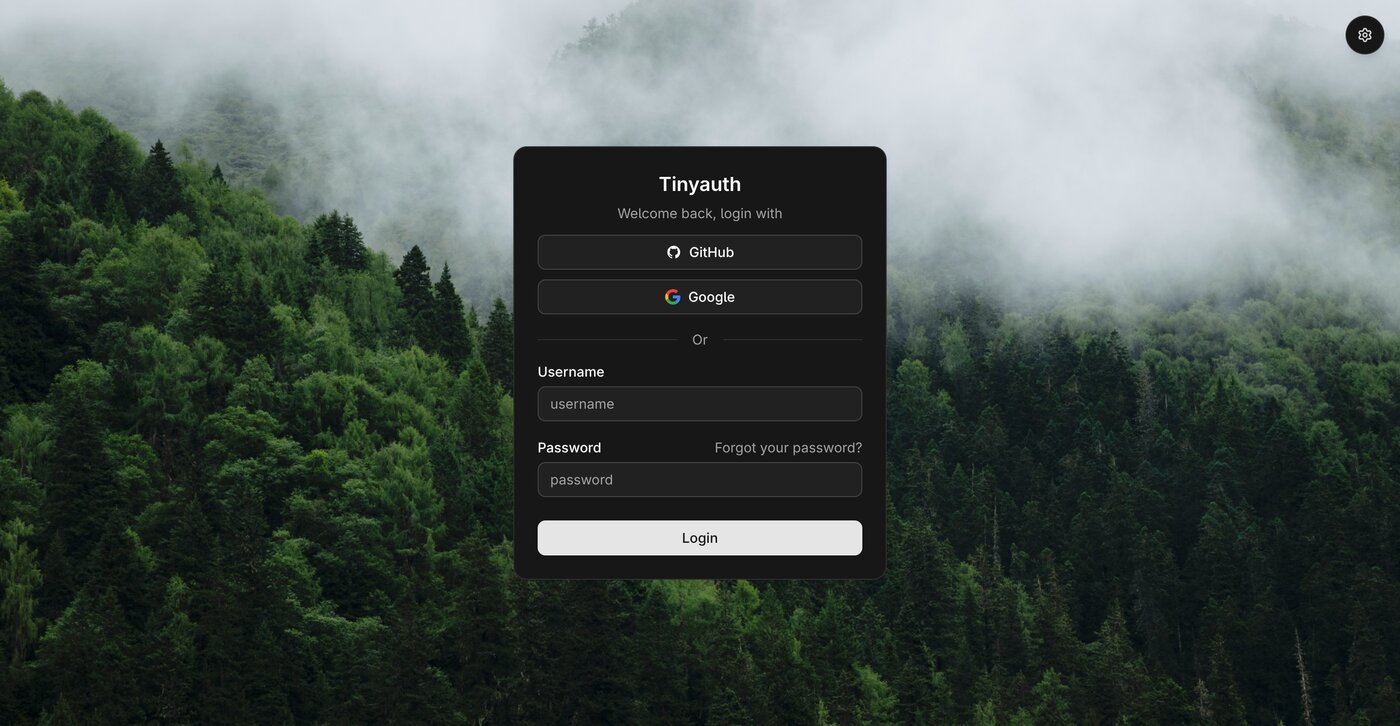
It works as a forward-auth middleware. Traefik, Caddy and Nginx ask Tinyauth “is this request allowed?” before proxying. The configuration is a middleware label on the protected service, exactly as in the project’s docker-compose.example.yml:
| |
Points that trip people up:
- The password is a bcrypt hash, and in Compose every
$must be doubled.$$2a$$10$$...is not a typo — a single$will be interpreted as variable interpolation and your login will fail with no useful error message. That one detail accounts for most “Tinyauth is broken” reports. TINYAUTH_APPURLmust match the browser-facing URL, because the session cookie is issued for that origin. Running it on a different hostname than users type in produces a redirect loop.- Users live in the environment or a data file, not in a database. Rotation is a redeploy; there is no self-service registration. That is intentional: Tinyauth is a gate, not a directory.
- Pair it with an upstream OIDC provider if you want SSO rather than local accounts — which is exactly how Pocket ID + Tinyauth combine, with Tinyauth acting as the middleware and Pocket ID as the source of identities.
Verdict: the highest value-per-megabyte tool in this article. Install it the day you discover an internal dashboard exposed on the internet with no login.
Hanko: Authentication as a Component You Drop In
Hanko is aimed at people writing applications rather than people running servers. Instead of asking you to redirect to a hosted login page, it gives you a custom web component (<hanko-auth>) plus a backend API, so sign-in UI appears inside your own layout.
The compose quickstart is honest about the moving parts — a migration job, the API, Postgres and a mail sink for local development:
| |
| |
Why choose it over the other two: email flows are first class. Verification links, magic links, OTP and password recovery are configuration, not code you maintain. Passkeys are supported alongside passwords, so you can migrate users gradually instead of forcing hardware keys on day one.
What to watch:
- The admin port must never be public.
8001exposes tenant and user administration. Bind it to localhost or a private interface; the same discipline applies to the Ziti controller in any overlay stack. - It is a library plus a service, not an IdP you point other apps at. If you need Jellyfin and Grafana to log in through it, Pocket ID is the correct tool.
- PostgreSQL is mandatory, so budget a database container and a backup routine. On a small VPS, that is the deciding factor against it.
Verdict: excellent if you are building a product and want authentication to be somebody else’s problem. Overkill for “I want a login on my NAS”.
Pitfalls and Migration Notes
- Never expose an admin interface publicly. Pocket ID, Tinyauth and Hanko all have elevated surfaces: Pocket ID’s admin account, Tinyauth’s data volume, Hanko’s
:8001admin API. Put them behind the same identity gate they protect, or on a VPN-only interface. - Passkeys are domain-bound. Moving from
id.home.lantoid.example.comrequires re-enrolment. Pick the final hostname before the first user signs up. - Cookie/redirect loops are almost always a proxy problem, not an application bug. Check that
APP_URL/TINYAUTH_APPURLmatches the public scheme and hostname, and that your reverse proxy forwardsX-Forwarded-ProtoandX-Forwarded-For. - Back up the encryption material, not just the database. Pocket ID’s data directory without its encryption key is a brick; Tinyauth’s bcrypt hashes are useless without the data volume.
- Do not chain two forward-auth layers. If Traefik already authenticates via one middleware, adding a second produces double redirects and confusing 401s.
- Audit
audclaims when migrating clients. Tokens from Keycloak carry realm-specific audiences that stricter OIDC clients reject. Test one client end-to-end before moving the rest.
Why Self-Host Your Identity Layer?
Authentication is the most sensitive service you will ever run, and it is the one most often outsourced. Keeping it on your own hardware means user records, email addresses and login timestamps never leave your infrastructure, and it removes per-MAU pricing from your cost model permanently. For a household or a small team, a 100 MB container replaces a subscription with a fixed VPS line item.
For heavier alternatives, see our comparisons of Authentik vs Keycloak vs Authelia, the Casdoor vs Zitadel vs Authentik breakdown, and the Logto vs SuperTokens vs Ory Kratos roundup. If your need is specifically protecting services behind a reverse proxy, the oauth2-proxy vs Pomerium vs Traefik forward-auth guide is the closest sibling to this article, and the Dex vs Kanidm vs Rauthy comparison covers the directory-oriented end of the market.
FAQ
Can I use Pocket ID and Tinyauth together? Yes, and it is a common pattern. Pocket ID issues identities over OIDC; Tinyauth enforces access in front of containers that cannot speak OIDC. Keep Pocket ID as the only source of truth and use Tinyauth purely as the enforcement point.
Do I need a database for these tools? Pocket ID embeds SQLite and Tinyauth stores no database at all. Hanko requires PostgreSQL. On a small VPS this is often the single reason to prefer the first two.
What happens if I lose my only passkey in Pocket ID? You need an administrative path back in, which is why you should enrol at least two passkeys per account (for example a hardware key plus a device passkey) and keep a recovery admin account documented somewhere offline.
Is Tinyauth suitable for public-facing applications? It is best treated as a gate for internal or semi-private services. For a public product with registration, email verification and per-user data, use a full authentication backend such as Hanko, or an IdP plus your own application logic.
How do I migrate users off Keycloak without downtime? Run the new provider in parallel, register a few low-risk clients, and verify token claims and refresh behaviour before touching critical applications. Keycloak’s export/import format does not port directly — expect to recreate clients rather than migrate them.
Which one should I choose if I only have one hour to spend? Tinyauth, if your problem is “unprotected containers”. Pocket ID, if your problem is “twelve different logins”. Hanko only if you are writing application code and need the sign-in UI itself.
💰 想测试你的市场判断力?我用 Polymarket 做预测市场交易——这是全球最大的预测市场平台,从大选结果到技术监管时间线,什么都可以押注。和赌博不同,这是真正的信息市场:你懂的信息越多,胜率越高。我靠预测技术相关事件的走向已经赚了不少。用我的邀请链接注册:Polymarket.com