You have a working prototype rendering a few million triangles, and now the product team wants it on Windows, Linux, macOS, Steam Deck, iOS, and a WebGPU-capable browser build. That is five graphics APIs — Direct3D 12, Vulkan, Metal, OpenGL, and WebGPU — and writing five hand-rolled backends means five codebases to debug every time a driver vendor ships a regression. A rendering abstraction layer exists precisely to stop that. The three serious open-source choices in 2026 are bgfx, Diligent Engine, and Magnum, and they are not interchangeable: they encode three different philosophies about who owns your renderer.
TL;DR / Quick Verdict
- Pick bgfx if you want the broadest backend coverage with the least ceremony. It is graphics-API agnostic, brings its own shader cross-compiler (
shaderc), and lets you keep your engine architecture — it explicitly calls itself “bring your own engine.” - Pick Diligent Engine if you are building a modern, D3D12/Vulkan-first renderer and want a framework, not just an abstraction. HLSL is the universal shading language, and you get real production samples for physically based rendering, shadows, and post-processing out of the box.
- Pick Magnum if you value modern C++, modularity, and plugin-driven extensibility. It is the only one of the three that is MIT-licensed and equally comfortable as an OpenGL/WebGL wrapper for data visualization as it is for games.
- Skip all three if you have one target platform only. A thin wrapper around Metal or D3D12 directly will beat any abstraction layer in both performance ceiling and debuggability.
Comparison Table: bgfx vs Diligent Engine vs Magnum (September 2026)
| Dimension | bgfx | Diligent Engine | Magnum |
|---|---|---|---|
| GitHub stars | 17,517 | 4,452 | 5,211 |
| Last commit | 2026-09-26 | 2026-09-25 | 2026-08-23 |
| Primary language | C++ (C99 API surface) | C++17 | C++11 |
| License | BSD-2-Clause | Apache-2.0 | MIT |
| Low-level APIs | D3D11, D3D12, Metal, GL 4.3+, GLES 3.0+, Vulkan, WebGL 2.0, WebGPU (Dawn) | D3D11, D3D12, Vulkan, Metal, WebGPU, GL/GLES, WebGL | GL 2.1–4.6, GLES 2.0–3.2, WebGL 1/2, plus a Vulkan port |
| Shading language | GLSL-like cross-compiled by shaderc | HLSL as universal source, plus GLSL/MSL/SPIR-V output | GLSL with a Python shader converter, plus SPIR-V tooling |
| Shipping tools | shaderc, texturec, geometryc | Shader compiler, PBR/IBL asset pipeline, Render State Packager | magnum-shaderconverter, magnum-imageconverter, pluginmanager |
| Build system | GENie-generated projects + convenience makefile; Conan package | CMake 3.20+ (recursive submodules) | CMake, designed as add_subdirectory subproject |
| Console support | PS4 (licensed devs), Xbox via UWP | Xbox via UWP, PS4/PS5 via licensed SDK | Desktop, mobile, web; consoles unsupported |
| Best fit | Shipping today, many platforms | Modern low-level renderer, PBR pipeline | Modular middleware, data visualization |
The star counts differ by a factor of four, but that is a popularity signal, not a capability signal. bgfx has been the default answer for hobby engines and tools for a decade; Diligent is the choice of teams that want a forward-renderer skeleton they can gut; Magnum has a smaller but unusually disciplined community that cares about compile-time correctness.
Decision Matrix: Use Case → Recommendation → Why
| Your situation | Recommended | Reason |
|---|---|---|
| Multi-platform indie game, small team, no dedicated graphics engineer | bgfx | One shader source, one API, 12+ platform targets; the shaderc round trip removes an entire class of shader bugs |
| Custom engine targeting D3D12 + Vulkan with bindless and GPU-driven pipelines | Diligent Engine | Built for explicit modern APIs first; legacy GL/D3D11 are the compatibility layer, not the core |
| Scientific visualization, 3D dashboards, CAD-style viewers | Magnum | Modular: pull in only the math, scene-graph, or text libraries you need; MIT license removes legal review friction |
| Web-first product shipping WebGPU and WebGL2 from the same codebase | bgfx | WebGPU via Dawn Native and WebGL 2.0 are first-class backends, not experimental forks |
| You need a full physically based rendering pipeline to study or fork | Diligent Engine | Reference-quality PBR, shadow, and post-processing samples ship in the repository |
| You want to embed a renderer into an existing Qt/GTK application | Magnum | First-class integration with popular windowing toolkits and a UI library |
| One platform only (say, Windows + D3D12) | None of the three | An abstraction layer is pure overhead when you have a single backend |
| Mobile + desktop + web, with strict binary-size budget | bgfx or Magnum | Both let you compile out unused backends; Diligent’s framework layers are heavier |
bgfx — The Agnostic Workhorse
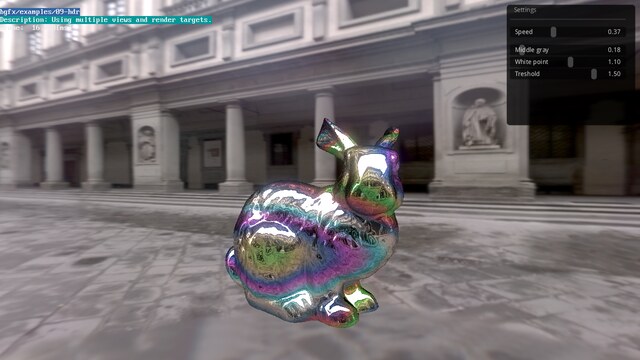
bgfx describes itself as “cross-platform, graphics API agnostic, bring your own engine/framework style rendering library,” and that last phrase is the whole design. It does not have a scene graph, a material system, or an asset pipeline that forces architectural decisions on you. It gives you a command-buffer-style API, a resource handle system, and a shader pipeline, then gets out of the way.
Its backend list is the widest of the three: Direct3D 11, Direct3D 12, Metal, OpenGL 4.3+, OpenGL ES 3.0+, Vulkan, WebGL 2.0, and WebGPU through Dawn Native, covering Android, iOS/iPadOS/tvOS, Linux, macOS, Raspberry Pi, UWP/Xbox, and WebAssembly via Emscripten. For a studio that needs a Switch-adjacent console plus web, that coverage is the entire argument.
Building the examples is deliberately low-friction — bgfx ships a convenience makefile on top of the GENie project generator:
| |
The --with-tools flag matters: it builds shaderc, texturec, and geometryc, which are the reason bgfx scales. You write one shader in a GLSL-like dialect, mark entry points for each stage, and shaderc emits the platform-specific bytecode or source for every backend you enable:
| |
The tradeoff is that bgfx is C99-first underneath. The API surface uses opaque handles and C-style functions, so modern C++ ergonomics (RAII wrappers, type-safe handles) are your responsibility. That is a feature for engine authors who already have opinions and a tax for application developers who do not.
Diligent Engine — The Modern Framework
Diligent is a “lightweight, high-performance graphics API abstraction layer and rendering framework,” and the second half of that sentence is what separates it from bgfx. It treats Direct3D 12, Vulkan, Metal, and WebGPU as the primary targets, with Direct3D 11, OpenGL, OpenGL ES, and WebGL maintained as legacy paths. Where bgfx hands you a command buffer and leaves, Diligent hands you a pipeline state object model, a resource transition barrier system, and a shader resource binding architecture designed around explicit APIs.
Its shader story is the second differentiator: HLSL is the universal shading language. You write HLSL once, and Diligent translates to GLSL, MSL, DXBC/DXIL, or SPIR-V depending on the backend. Teams coming from a DirectX background find this dramatically cheaper than porting shaders into a GLSL-like dialect.
The canonical build path is recursive clone plus CMake, per the project’s own instructions:
| |
On Windows the repository documents generator selection explicitly, for example cmake -S . -B ./build/Win64 -G "Visual Studio 18 2026" -A x64. One documented gotcha: the full path to the CMake build folder must not contain white spaces.
What you get beyond the abstraction layer is a set of production-grade samples: physically based rendering, image-based lighting, shadow mapping variants, and post-processing chains. If your goal is to study how a modern renderer should be laid out rather than to invent one from zero, Diligent is the shortest path — you can literally run a PBR sample, then start deleting.
Its Apache-2.0 license is the most permissive of the “modern” trio for patent-grant purposes, and the submodule structure (DiligentCore, DiligentTools, DiligentSamples) means you can vendor only the core if binary size is a concern.
Magnum — The Modular Middleware
Magnum describes itself as “lightweight and modular C++11 graphics middleware for games and data visualization,” and it is the most opinionated about code quality. It is the only one of the three under MIT, and it is explicitly designed to be pulled in as a CMake subproject rather than installed as a monolith:
| |
Or, inside an existing project, add the two repositories and let CMake do the work:
| |
That CORRADE_USE_PEDANTIC_FLAGS property is a small window into the project’s character: it is not required, but it turns on a strict warning set that most teams leave off precisely because their code would not survive it. Magnum also ships Corrade::Main, a portable entry point that abstracts main()/WinMain() differences across platforms, plus a plugin manager for loaders and a shader converter that rewrites GLSL for different GLSL/ES versions.
The strategic catch is backend coverage. Magnum’s core is a slim C++ wrapper over the OpenGL/WebGL family, with a separate Vulkan port and SPIR-V tooling. If your roadmap is D3D12-first or you need Metal today, Magnum is the wrong shape of tool. If your product is a desktop or browser data-visualization application, a CAD-style viewer, or an engineering tool with a 3D panel, its modularity is a genuine advantage — you can use the math and scene libraries without adopting a whole renderer.
Common Pitfalls When Adopting Any of Them
Shader cross-compilation is where projects die. Each library has a privileged shading language and a privileged toolchain. bgfx wants its GLSL-like dialect through shaderc; Diligent wants HLSL through its shader compiler; Magnum wants GLSL through magnum-shaderconverter plus SPIR-V tooling. Teams that try to keep hand-written per-platform shaders alongside the abstraction layer end up with two sources of truth — pick the toolchain and delete the others.
Coordinate and clip-space conventions are not portable. OpenGL-family backends historically use a different depth range and clip-space Y orientation than Vulkan and D3D. Every one of these libraries absorbs the difference, but the moment you write a render target readback, a pick ray, or a shadow matrix by hand, you are back to API-specific math. Budget time for a small platform-abstraction unit of your own on top, no matter which library you choose.
Debug layers are not optional. Vulkan validation layers and D3D12 debug layers catch resource-state mistakes that OpenGL silently tolerated for years. bgfx and Diligent both expose validation paths; leaving them off in CI is how a driver update becomes a launch-day bug. Wire validation into at least one CI job per backend.
Abstraction layers do not make you fast by default. All three add a command-buffer indirection between your game logic and the driver. The win is portability and reduced bug surface, not throughput. If you have one platform, a direct API renderer will always have a higher ceiling — measure before you assume the layer will not matter.
Licensing review is a real blocker for some companies. The three licenses differ: bgfx is BSD-2-Clause, Magnum is MIT, Diligent is Apache-2.0. Apache-2.0 includes an explicit patent grant, which some legal teams prefer; MIT and BSD-2 are shorter and simpler. All three are permissive, but check the vendored dependencies too — some third-party image and audio libraries are not.
Console certification paths are gated. bgfx supports PlayStation 4 for licensed developers, and Diligent documents UWP/Xbox and console SDK paths. If consoles are on your roadmap, verify console support before you build years of architecture on a library that cannot ship there. Magnum does not target consoles at all.
Mind the maintenance cadence. Commit recency is a proxy for liveness: bgfx and Diligent both pushed code within days of this article, while Magnum’s last push was about a month earlier. None of these is abandoned, but for a multi-year product, check that open issues against your target platform are actually being answered.
FAQ
Which one should I learn first if I am new to graphics programming?
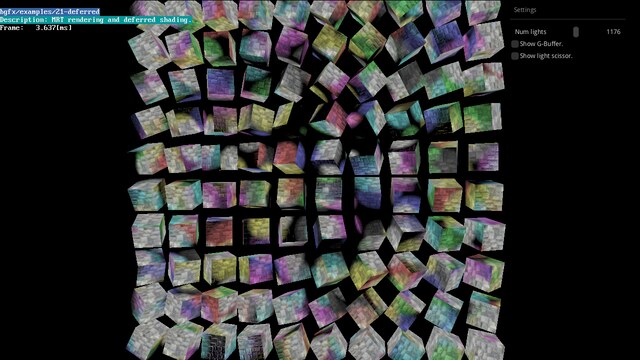
Start with Magnum or bgfx. Magnum’s documentation is unusually careful about explaining why a design exists, and Corrade gives you a clean platform abstraction to build on. bgfx’s example set is a compact tour of real rendering techniques — HDR, deferred shading, shadow maps, instancing — with one build command to run them all.
Can bgfx and Diligent both target WebGPU?
Yes, as of 2026 bgfx supports WebGPU through Dawn Native, and Diligent lists WebGPU among its supported APIs. Neither treats WebGPU as a toy: both expose it as another backend behind their abstraction, which is exactly the scenario that makes a rendering abstraction layer worthwhile in the first place.
Is an abstraction layer fast enough for a AAA-scale renderer?
If you need GPU-driven culling, mesh shaders, or bindless resource management at scale, you want a library that treats explicit APIs as primary rather than as an option. Diligent is the closest of the three to that target. Otherwise, the practical answer is that the abstraction cost is measurable but usually far smaller than the cost of maintaining multiple hand-written backends.
What happens when a driver vendor ships a regression?
Because the vendor’s code path is isolated in one backend, you can ship an update that switches affected users to another backend while you file the bug. That kind of graceful degradation is one of the strongest industrial arguments for using any of these libraries rather than a single hand-written API path.
Do I need to rewrite my shaders to adopt one of them?
Not necessarily, but you should. All three provide cross-compilation tooling, and the long-term maintenance cost of keeping shader source per-platform is higher than the one-time cost of moving to the library’s preferred language. Treat shader migration as part of the adoption project, not a follow-up.
How do these libraries handle asset pipelines?
bgfx ships texturec and geometryc for texture and mesh conversion, Diligent includes a PBR/IBL asset pipeline with a Render State Packager, and Magnum provides magnum-imageconverter and a plugin-based importer architecture. If you do not want to write and maintain converters yourself, weigh the bundled tooling heavily — it is often the difference between adopting a library in a week and adopting it in a quarter.
If your interest is the low-level side of this problem rather than the middleware layer, our Rust GPU abstraction comparison covers the same trade-off from the Rust ecosystem, and the Rust game engine roundup shows how these backends look from a framework’s point of view. For 2D-only products, our C++ 2D graphics library comparison is the more relevant starting point.
💰 想测试你的市场判断力?我用 Polymarket 做预测市场交易——这是全球最大的预测市场平台,从大选结果到技术监管时间线,什么都可以押注。和赌博不同,这是真正的信息市场:你懂的信息越多,胜率越高。我靠预测技术相关事件的走向已经赚了不少。用我的邀请链接注册:Polymarket.com