Nobody emulates a 1998 desktop because it is efficient. You do it because a piece of software only exists for Windows 98, or because a demo from 1994 does something with the VGA hardware that a modern machine simply will not reproduce. The emulator you pick decides whether that works on the first try or turns into a weekend of config archaeology. The three serious open-source choices in 2026 — 86Box, DOSBox-X, and PCem — split cleanly along one axis: how much of the original machine they choose to reproduce.
TL;DR / Quick Verdict
- Use DOSBox-X for DOS games and applications, Windows 3.x, and most Windows 9x scenarios. It is the easiest to configure, the best documented, and the only one of the three with official packages for Windows, macOS, Linux, and even DOS itself.
- Use 86Box when you need faithful reproduction of a specific machine — a particular Socket 7 board, a Sound Blaster model, a SCSI controller, an IBM PS/2 with Micro Channel architecture. It emulates hardware at a much lower level and lets you pick components individually.
- Use PCem if you want the leanest low-level emulator with a manageable configuration surface and you are willing to build it yourself with CMake. It is smaller and narrower than 86Box but very capable for its target era.
- Skip all three for arcade and multi-system preservation — that is MAME’s territory, and it covers thousands of machines the PC-focused emulators never will.
Comparison Table: 86Box vs DOSBox-X vs PCem (September 2026)
| Dimension | 86Box | DOSBox-X | PCem |
|---|---|---|---|
| GitHub stars | 4,846 | 3,744 | 1,936 |
| Last commit | 2026-09-28 | 2026-09-28 | 2026-09-26 |
| Primary language | C | C | C |
| License | GPL-2.0 | GPL-2.0 | GPL-2.0 |
| Emulation approach | Full low-level machine emulation with selectable components | DOS environment emulation with a pragmatic, accuracy-conscious core | Low-level machine emulation, narrower device list |
| Hardware scope | IBM PC 5150 (1981) through Mendocino-era Celeron and PCI systems | Original IBM PC through late-1990s configurations, plus PC-98 | Socket-era PCs with an emphasis on period-correct peripherals |
| Official packages | Windows, Linux, macOS | Windows, macOS, Linux (Flatpak, RPM), plus a DOS build | Source build; Windows binaries from releases |
| GUI | Qt-based interface inspired by hypervisor software | SDL interface with a graphical configuration tool | SDL interface with a settings dialog |
| Config file | Per-machine settings through the GUI, 86box.cfg | dosbox-x.conf, extensively documented | Per-machine settings, ROM-dependent |
| ROM / BIOS files | Required, sourced separately | Bundled with the application | Not included and deliberately not redistributed |
| MIDI / sound hardware | Windows MIDI, FluidSynth, emulated Roland modules, many sound cards | Sound Blaster and General MIDI emulation, configurable | Emulated sound cards, MIDI support |
| Networking | Emulated network adapters | IPX and TCP/IP support | PCAP-based networking; npcap on Windows |
| Best fit | Period-accurate hardware reproduction | Running DOS software with minimal friction | Lean low-level emulation with full component control |
Decision Matrix: Use Case → Recommendation → Why
| Your situation | Recommended | Reason |
|---|---|---|
| Run a DOS game from 1992 that refuses to start anywhere else | DOSBox-X | Its DOS environment emulation is tuned for exactly this and needs almost no configuration |
| Install Windows 98 SE to run period software and drivers | 86Box or DOSBox-X | Both handle Windows 9x; 86Box gives more control over the emulated chipset, DOSBox-X is faster to set up |
| Reproduce a bug that only appears on a specific Sound Blaster model | 86Box | Component-level selection is its core design feature, including sound card variants and IRQ/DMA behavior |
| Emulate an IBM PS/2 or another Micro Channel machine | 86Box | It emulates systems the other two do not target at all |
| Build the emulator yourself and keep dependencies minimal | PCem | CMake plus Ninja, a compact device list, no bundled ROM redistribution |
| Run DOS-era demoscene productions where timing is everything | 86Box | Low-level emulation of the actual hardware is what strict timing-sensitive software needs |
| Preserve a Japanese PC-98 title | DOSBox-X | It includes PC-98 support, which is unusual outside dedicated Japanese emulators |
| Play arcade boards and console hardware rather than PCs | None of the three | That is MAME’s domain, with far broader hardware coverage |
DOSBox-X — The Pragmatic Default
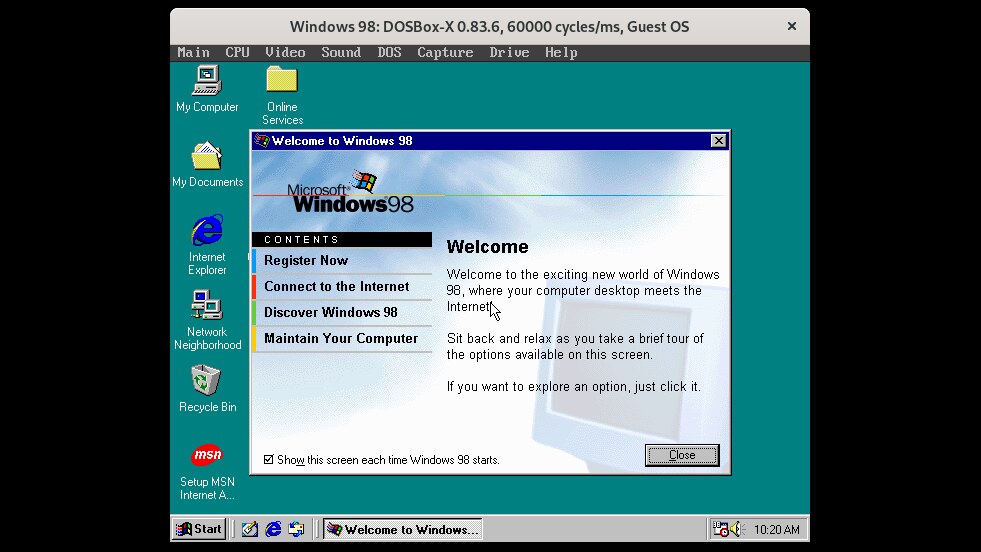
DOSBox-X began as a fork of the DOSBox SVN Daum branch and has since grown into a project with its own priorities: broader general emulation, better accuracy where accuracy matters, and a willingness to expose configuration that the upstream project hides. Its stated goal is to cover essentially every pre-2000 DOS and Windows 9x scenario — peripherals, motherboards, CPUs, the whole stack — and it supports Windows 3.x, Windows 9x, and ME as first-class targets rather than as experiments.
The practical advantage is packaging. DOSBox-X ships official builds for Windows, macOS, and Linux (including Flatpak and RPM packages), plus releases for DOS itself. The project states plainly that you should use official packages for normal use rather than its master branch, which is a refreshingly honest position for an emulator project. If you want to run a game tonight, you download a package and you are done.
Configuration lives in a text file, dosbox-x.conf, and the project maintains an extensive wiki covering both the file and usage patterns. A minimal working setup to mount a host directory and boot it is a handful of lines:
| |
Because it emulates a DOS environment rather than a specific motherboard, DOSBox-X has a different failure mode from the other two: you rarely fight BIOS or chipset configuration, but you may occasionally need to tune cycles, machine type, or sound card emulation to make a stubborn application behave. The machine= and cycles= settings in the configuration file handle the vast majority of cases, and the wiki documents which values suit which titles.
Its weakness is inherent to its design: it is DOS-first. If what you actually need is a 1996 machine with a particular SCSI controller and a specific video card in a specific slot, DOSBox-X will approximate that world rather than reproduce it faithfully.
86Box — The Machine Reproducer
86Box is a low-level x86 emulator that runs operating systems and software designed for IBM PC systems and compatibles from 1981 through fairly recent PCI-bus designs. Where DOSBox-X emulates a DOS environment, 86Box emulates machines: it exposes 8086-based processors up to the Mendocino-era Celeron with an explicit focus on accuracy, and it offers systems ranging from the original IBM PC 5150 through the IBM PS/2 line built on Micro Channel architecture.
That component granularity is the whole value proposition. You choose the machine, the video adapter, the sound card, the hard disk controller, and the network adapter individually. For anyone validating period software — a driver that expects a specific ISA sound card, an application that breaks on faster CPUs, a boot sequence that depends on a particular BIOS — this is the difference between “it runs” and “I can reproduce the reported behavior.”
The interface deliberately mimics mainstream hypervisor software, which means an onboarding experience that is familiar rather than arcane. Its README lists MIDI output to Windows’ built-in MIDI support, FluidSynth, and emulated Roland synthesizers — a detail that matters enormously if your target software produces music, and one that the other two handle less completely. The emulator also supports running MS-DOS, older Windows versions, OS/2, many older Linux distributions, plus systems like BeOS and NEXTSTEP.
Host requirements are modest and documented: a 64-bit Intel Core 2, AMD Athlon 64, or ARMv8 processor, at least 4 GB of RAM, Windows 7 SP1 or newer (Windows 11 on ARM), Ubuntu 16.04/Debian 9 or newer on Linux, or macOS 10.14 Mojave or newer. The project is candid that it needs more development help — its README links directly to an issue asking for contributors — which is worth knowing if you plan to depend on a long-abandoned device profile.
The catch is ROM files. Like every serious low-level PC emulator, 86Box needs BIOS images and option ROMs to boot an emulated machine, and those are obtained separately from the emulator itself. Whether you may redistribute or use a given ROM is a question about the ROM, not about the emulator, and it deserves a straight answer in your project documentation if you intend to ship a preconfigured setup.
PCem — The Lean Low-Level Option
PCem occupies the narrowest slice of the three and does it well. It is a low-level emulator with a smaller, carefully curated device list, per-machine peripheral documentation in its README, and a build process that assumes you know your way around a toolchain. The project’s documentation includes detailed tables mapping machines to supported controllers — for example which fixed disk adapters a given system accepts and which controller ROM files are required — which is exactly the level of specificity you want when reproducing period hardware.
It builds with CMake and Ninja in three commands:
| |
The README is blunt about the ROM situation: no copyrighted ROM files are included and none will be, and it explicitly asks users not to request them. You supply your own. That is a legal posture rather than a limitation, and it is consistent with how the rest of the emulation world handles BIOS images — but it does mean PCem is never a “download and run” proposition.
On Windows, PCAP-based networking requires installing npcap and placing the resulting wpcap.dll in the PCem directory in place of libpcap.dll — a documented manual step that will be familiar to anyone who has configured packet capture tooling before. Debug builds expose additional diagnostic options, and RelWithDebInfo unlocks further instrumentation, which makes PCem pleasant to profile when you are chasing an emulation bug.
Choose PCem over 86Box when you want fewer knobs, a smaller binary, and a build you control — and when the machines you care about are on its supported list. Choose 86Box when you need a machine or peripheral PCem does not emulate, or when you want the Qt interface and its broader system catalogue.
Common Pitfalls When Setting Up a Retro PC Emulator
ROM and BIOS files are a licensing question, not a technical one. PCem excludes them entirely and says so in capital letters; 86Box requires them as well; DOSBox-X bundles what it can lawfully distribute. Dumping ROMs from hardware you own is the defensible path for personal use, and redistributing copyrighted BIOS images is a different activity with different consequences. Decide your policy before you build an image you plan to share.
Emulation accuracy and host speed trade against each other. All three emulate CPUs in software, so a period-correct machine configuration can be slower than the host you are running it on — sometimes deliberately so. If a game runs too fast, you need to constrain cycles rather than throw hardware at the problem. Learn where your emulator exposes CPU timing before you spend an evening blaming the host.
Sound is where most setups break. General MIDI, a specific Sound Blaster mode, and Roland module emulation are three different subsystems with three different failure modes. 86Box gives you digital audio, MIDI output to FluidSynth or the host, and emulated Roland hardware; DOSBox-X handles General MIDI through configuration. Budget time for audio, because getting video perfect and audio wrong is the most common half-finished emulator setup.
Networking needs host-level configuration. Emulated network adapters are easy; getting packets out of the host is not. PCem’s PCAP approach on Windows requires npcap and a DLL replacement, and every emulator’s bridged or NAT mode has quirks around DHCP and IPX. If your goal is period multiplayer, plan for host firewall and capture-driver setup as part of the project.
Save states are not a universal safety net. Not every emulator in this class implements complete machine save states for every device combination. Relying on save states for a long session with an unusual sound card or SCSI controller is a good way to lose an afternoon’s progress. Save inside the guest application and keep disk images you can back up.
Disk images are the thing you will actually lose. Cycle through raw images, and treat them as your only durable artifact: copy them out, keep revisions, and never let a single image live only inside an emulator’s working directory. Whether you boot DOS, Windows 98, or OS/2, the image is the museum piece.
Do not assume a modern emulator replaces the old machine for every task. Low-level emulation is excellent for software but poor for measuring hardware-dependent timing that depends on analog behavior — CRT scan rates, floppy drive rotational latency, and some audio filter characteristics are approximated. If your work depends on those, a real machine plus a capture setup remains the honest answer.
FAQ
Which emulator is best for playing DOS games in 2026?
DOSBox-X for convenience and compatibility, 86Box when a game depends on specific hardware behavior. DOSBox-X ships official packages for Windows, macOS, Linux, and even DOS, and its DOS environment emulation is designed to make games start with minimal configuration. Use 86Box when a title needs a particular sound card, CPU speed, or video adapter to behave correctly.
Can I install Windows 98 or Windows XP in these emulators?
Windows 98 SE and ME are well-supported targets in both DOSBox-X and 86Box; 86Box is generally the better choice when you need a specific chipset and driver combination to work. Windows XP is outside most of this class of emulator’s design goals and is better served by general-purpose virtual machines. Note that no emulator in this article is a substitute for a hypervisor when you need modern guest support.
Do these emulators include the BIOS and ROM files they need to boot?
DOSBox-X bundles what it can lawfully distribute. 86Box requires ROM files obtained separately, and PCem explicitly excludes them and will not redistribute them. For personal use, dumping BIOS from hardware you own is the usual approach; redistributing copyrighted ROM images is a separate legal question.
Why would anyone use PCem instead of 86Box?
Smaller scope, smaller binary, and a build you fully control. PCem documents exactly which machines it supports and which controller ROM files each requires, and it builds with CMake and Ninja in three commands. If your target machine is on its list, the reduced configuration surface is a benefit rather than a limitation.
What about arcade machines and consoles?
That is MAME’s territory. MAME targets thousands of arcade boards, consoles, and computers, and it is the reference project for hardware preservation outside the PC world. The three emulators covered here are PC-focused: they emulate x86 machines from the IBM PC onward, not arcade hardware.
How do retro emulators differ from modern virtualization platforms?
Virtualization platforms are built to run current operating systems efficiently on your existing hardware; retro emulators are built to reproduce hardware that no longer exists, including its defects and timing quirks. If what you actually want is software running on infrastructure you control rather than resurrecting a 1996 desktop, the game server platform roundup and the open-source game engine comparison cover that adjacent territory.
💰 想测试你的市场判断力?我用 Polymarket 做预测市场交易——这是全球最大的预测市场平台,从大选结果到技术监管时间线,什么都可以押注。和赌博不同,这是真正的信息市场:你懂的信息越多,胜率越高。我靠预测技术相关事件的走向已经赚了不少。用我的邀请链接注册:Polymarket.com