Your Table Looks Right Until Someone Types a Name in Japanese
Every CLI starts the same way: hand-rolled printf with padded columns. It survives until the first value is wider than the guess, the first description needs to wrap, or the first user pastes in a string of double-width characters. Then the columns shear sideways and the output becomes unreadable — in the tool you use to debug everything else.
This is a solved problem with at least five maintained libraries behind it. The 2026 state of the art, verified live from GitHub, PyPI and npm: tablewriter (Go, 4,818★, last push 2026-09-22), comfy-table (Rust, 1,397★, 2026-09-25), cli-table3 (Node.js, 635★, 2026-04-19), tabulate (Python, 2,586★, 2026-03-11) and PrettyTable (Python, 1,747★, 2026-09-01). All five are MIT or BSD-style licensed, and every one of them does automatic width calculation — which is exactly where they diverge.
TL;DR — Quick Verdict: For Go services, tablewriter is the only serious option: v2 (v1.1.5) has pluggable renderers for ASCII, Markdown, HTML and streaming output. For Rust CLIs, comfy-table produces the best default look, but note it is in a feature freeze while the maintainer searches for a successor — fine for stable use, not for a roadmap. For Node scripts, cli-table3 is the pragmatic choice. In Python, tabulate if you need 30+ output formats (including Markdown and LaTeX), PrettyTable if you want a mutable table object with built-in sorting, styles and column-level control.
The Five Contenders at a Glance
| Library | Language | Stars | Last push | Latest version | Install | License |
|---|---|---|---|---|---|---|
| tablewriter | Go | 4,818 | 2026-09-22 | v1.1.5 (v2 line) / v0.0.5 (v1) | go get github.com/olekukonko/tablewriter@v1.1.5 | MIT |
| comfy-table | Rust | 1,397 | 2026-09-25 | crate comfy-table | cargo add comfy-table | MIT |
| cli-table3 | Node.js | 635 | 2026-04-19 | 0.6.5 | npm install cli-table3 | MIT |
| tabulate | Python | 2,586 | 2026-03-11 | 0.10.0 | pip install tabulate | MIT |
| PrettyTable | Python | 1,747 | 2026-09-01 | 3.18.0 | python3 -m pip install -U prettytable | BSD-style |
Decision Matrix: Pick in Ten Seconds
| Your situation | Pick | Why |
|---|---|---|
| Go CLI or service log summary | tablewriter | Renderers for ASCII, Markdown, HTML; streaming mode for long output |
| Go, upgrading an old tool | tablewriter v2 | v1 (v0.0.5) and v2 (v1.1.5) are different APIs — plan the migration |
| Rust TUI or CLI | comfy-table | Automatic content wrapping, clean defaults, actively pushed |
| Rust, long-term maintenance | comfy-table with caution | Feature freeze while a new maintainer is sought |
| Node script, colored columns | cli-table3 | Per-cell styling, custom border characters, familiar push() API |
| Python, generating docs or issues | tabulate | tablefmt="github" / "pipe" / "rst" / "latex_booktabs" |
| Python, sorting and styling a table object | PrettyTable | sortby, reversesort, TableStyle.MARKDOWN, PLAIN_COLUMNS |
| Python DataFrame output | tabulate | Reads pandas structures directly via headers="keys" |
| Rendering tables in a browser | none of these | Emit tablefmt="html" from tabulate, or render client-side |
tablewriter — Go’s De Facto Standard
The 4,818-star leader, and the only one of the five with a pluggable renderer layer. The v2 API reads like a pipeline:
| |
That produces standard Box-drawing output:
| |
Three things in that snippet are worth copying into your own code. Bulk() takes a slice of rows — [][]any in the README example — instead of forcing a call per row, which matters when you are dumping thousands of records. Render() writes to any io.Writer, so capturing a table into a buffer for tests is trivial: construct with tablewriter.NewTable(&buf) and assert on the string. And the header is a separate call from the data, which keeps formatting settings from bleeding into content.
The renderer layer is the real differentiator. Alongside the default blueprint renderer you can drive an HTML, Markdown, Colorized or Ocean (streaming) renderer, selected with options rather than by rewriting your data path:
| |
There is also a CSV entry point for quick one-liners over data files: tablewriter.NewCSV(os.Stdout, "test.csv", true).
The migration trap: the v1 API that most blog posts and older internal tools use (tablewriter.NewWriter(os.Stdout) plus Append) is pinned to v0.0.5. To get v2 you request @v1.1.5 explicitly. Because Go modules treat these as separate versions of the same module, a project can accidentally end up with both — one dependency compiling against v1 and your new code against v2, each rendering with different symbols. Fix the version in go.mod deliberately and delete any SetColWidth-era helpers while you are in there.
comfy-table — Rust’s Best-Looking Default
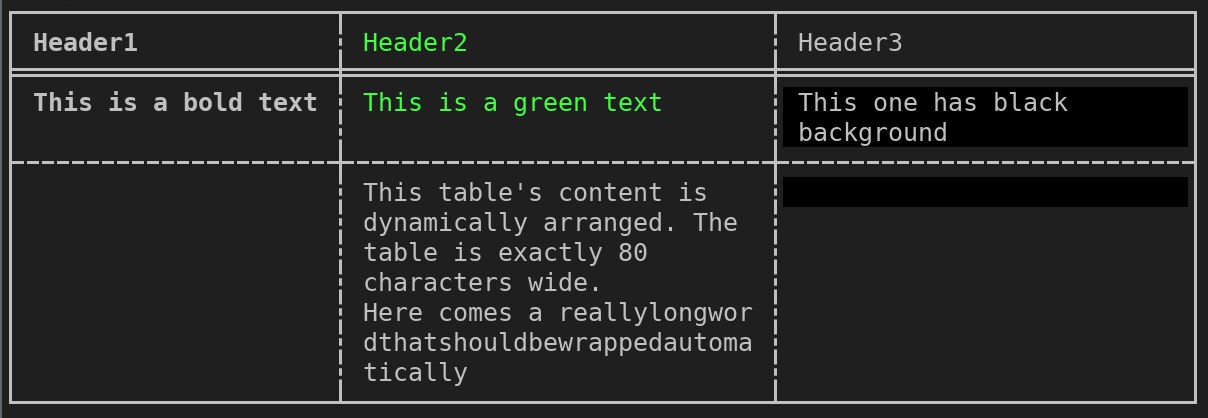
comfy-table’s pitch is that the default output is already what you wanted, including wrapping, and the code stays short:
| |
Two details stand out. The explicitly embedded \n inside the second row’s middle cell is rendered as three lines inside a single cell — the table recomputes its height instead of breaking the layout. And because Table implements Display, you print it with println!("{table}") rather than calling a render method; no io::Write plumbing needed for the common case.
The caveat a README rarely states this plainly: comfy-table documents “a search for a new maintainer” and a feature freeze until that happens. The library works, it was pushed in late September 2026, and the API is stable — but do not adopt it expecting new features. For a CLI whose table output is a solved, small part of the surface, that trade is usually acceptable; for a product where table rendering is a headline feature, weigh it carefully.
cli-table3 — The Node.js Workhorse
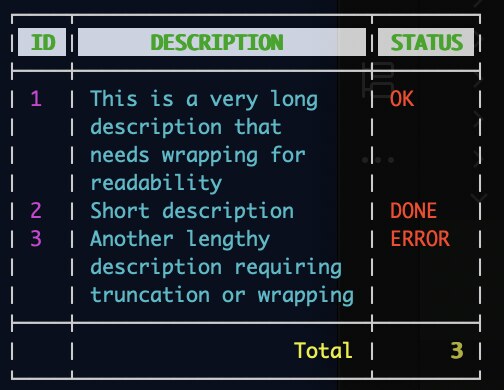
cli-table3 is the maintained descendant of the classic cli-table, and its API is deliberately imperative:
| |
colWidths is the part people miss: without it, every column is sized to its widest cell, so one long error message destroys the alignment you were trying to create. Setting explicit widths turns wrapping into a controlled behaviour instead of a surprise.
Border characters are fully replaceable, which is how people produce compact output for dense status displays:
| |
The README also covers multi-level headers by instantiating the table with a head array whose first element is an empty string, then pushing grouped rows. Note the version: cli-table3 is at 0.6.5 — still 0.x. Treat the API as stable-in-practice but not semver-protected, and pin it.
tabulate — When the Output Format Is the Feature
tabulate 0.10.0 does one thing extremely well: turn rows of data into text in a format someone else’s tool will parse. The core call is short:
| |
| |
The headers argument is where the flexibility lives. Passing "firstrow" promotes the first data row to the header, and "keys" uses a dictionary’s keys — which is how it consumes a list of dicts or a pandas DataFrame without an adapter:
| |
The format list is genuinely long, and it is the reason tabulate keeps winning in documentation pipelines: plain, simple, github, grid, simple_grid, rounded_grid, heavy_grid, mixed_grid, double_grid, fancy_grid, the matching *_outline variants, pipe, orgtbl, asciidoc, jira, presto, pretty, psql, rst, mediawiki, moinmoin, html, unsafehtml, latex, latex_raw, latex_booktabs, latex_longtable, textile and tsv. Generating a Markdown table for a GitHub comment and a LaTeX table for a paper from the same list is a tablefmt change.
One caution from the README: plain output uses no pseudo-graphics at all, so if you are piping into a log aggregator that strips border characters, that is your format — but do not expect it to be visually aligned in a proportional font.
PrettyTable — The Python Table Object
PrettyTable inverts the model: instead of a function that formats data, you get a mutable table you configure and print.
| |
Its two superpowers are styles and sorting. Styles are selected by name before printing:
| |
The built-in set includes DEFAULT (to undo a change), PLAIN_COLUMNS (borderless, good for shell pipelines), MSWORD_FRIENDLY, ORGMODE, RST for reStructuredText grid tables, and SINGLE_BORDER / DOUBLE_BORDER for heavier terminal borders.
Sorting is a table property, not a post-processing step:
| |
sortby works with get_string() or by setting the attribute, and reversesort=True flips the direction. That is plain lexicographic or numeric ordering of the column values — if your keys look like filenames (img10.png next to img2.png), you need a natural comparator rather than PrettyTable’s default, which is the exact problem covered in our natural sort libraries comparison.
Where Terminal Tables Quietly Break
1. Double-width characters are still the top source of misaligned output. CJK glyphs, emoji and combining marks do not occupy one column. A library that measures len() instead of display width will pad wrongly (wcwidth-style measurement is the correct approach). Test with real names, not Alice and Bob.
2. ANSI color escapes count as visible characters. If you inject color codes into cells after the library has measured them, columns shift. Use the library’s own styling hooks (tablewriter’s Colorized renderer, cli-table3’s per-cell style objects, comfy-table’s styling API) so width calculation and rendering stay in sync.
3. Explicit widths beat automatic ones in logs. Automatic sizing is wonderful interactively and awful in a log aggregator, where a single 400-character exception message turns one record into forty lines. Cap the width; let the library wrap.
4. Streaming matters more than you think. If output is long enough to matter, prefer a renderer or mode that flushes row by row — tablewriter’s Ocean renderer exists for exactly this. Buffer-everything approaches double peak memory for a table you are already printing to save memory on.
5. Version pinning is not optional for Go. Forgetting the @v1.1.5 suffix on a fresh go get silently pulls the v1 line you thought you left behind.
6. Feature freeze is not abandonment — but plan for it. comfy-table is frozen pending a maintainer handover. That is a maintenance risk to note in your dependency review, not a reason to rewrite working code.
7. Do not render from inside a tight loop. Building a new table object per iteration is cheap; recomputing widths for 50,000 rows is not. Batch rows and render once.
Where This Fits
Table rendering is the last mile of almost every self-hosted operations tool: migration reports, benchmark comparisons, inventory dumps. If you are building the progress side of the same CLI, our roundup of CLI progress bar libraries covers the other half of the terminal feedback loop, and if you are styling those tables, the Rust terminal color libraries comparison explains which crates keep escape codes out of your width math. For data-heavy tooling where the table is generated from a dataframe, the dataframe processing libraries comparison is the upstream decision that shapes everything downstream.
FAQ
What is the best terminal table library in 2026?
There is no single winner — it depends on the language. tablewriter (4,818★) for Go, comfy-table (1,397★) for Rust, cli-table3 for Node.js, and tabulate (2,586★) or PrettyTable (1,747★) for Python. All five handle automatic column width; pick by language fit and output format requirements rather than by star count.
Which library can output Markdown or LaTeX tables?
tabulate (0.10.0) is the strongest here, with formats including github, pipe, rst, mediawiki, orgtbl, jira, latex, latex_raw, latex_booktabs and latex_longtable. tablewriter v2 also ships a Markdown and HTML renderer, which is useful when a Go service needs to emit tables for a report.
Why are my table columns misaligned when cells contain Japanese or emoji?
Because the renderer is measuring character count instead of display width. Double-width characters occupy two terminal columns. Use a library that measures display width, and avoid injecting ANSI color codes after measurement — it desynchronizes padding from rendering.
Is comfy-table still maintained?
It received commits as recently as 2026-09-25, but the README documents a search for a new maintainer and a feature freeze in the meantime. Expect bug fixes without new features. It remains a reasonable choice for stable CLIs; treat the freeze as a long-term maintenance note.
tablewriter v1 and v2 — which should I install?
New projects should target v2 (go get github.com/olekukonko/tablewriter@v1.1.5), which provides NewTable, Header, Bulk, Render and pluggable renderers. Existing projects on the older NewWriter/Append API are pinned to v0.0.5. Because Go treats them as the same module at different versions, upgrade deliberately rather than letting go get decide.
Can I just use printf and pad the columns myself?
For two fixed-width columns, yes. The moment you need automatic wrapping, multi-line cells, double-width character handling, colored cells, Markdown output or per-column alignment, the library is smaller than the code you would write and test. The hand-rolled version is also where off-by-one padding bugs live for years.
💰 想测试你的市场判断力?我用 Polymarket 做预测市场交易——这是全球最大的预测市场平台,从大选结果到技术监管时间线,什么都可以押注。和赌博不同,这是真正的信息市场:你懂的信息越多,胜率越高。我靠预测技术相关事件的走向已经赚了不少。用我的邀请链接注册:Polymarket.com