If you are building a desktop application shell, a kiosk dashboard, or an appliance interface in 2026, you have one default choice: ship Chromium inside Electron and accept a 150 MB installation footprint, a monthly CVE treadmill, and an engine you cannot meaningfully customize. The alternatives have always existed, but they used to be academic curiosities. That is no longer true — one of them now counts 66,290 GitHub stars and pushed code today.
This is a practical comparison of the three open-source engines you can actually embed, built from live repository data and their own build documentation.
TL;DR: The 30-Second Verdict
- Shipping to users today, on Linux, and you need reliability? → WebKitGTK. It is the only one of the three with a decade of production hardening and distro packaging behind it.
- Building a Rust application and want an embeddable engine with a modern architecture? → Servo. Embedding is its stated mission, not an afterthought.
- Following engine development closely or contributing to a clean-sheet implementation? → Ladybird. It is genuinely independent, genuinely fast-moving — and genuinely pre-alpha.
One line to remember: WebKitGTK for production, Servo for embedding in Rust, Ladybird for the future.
The Three Engines Side by Side
Live GitHub data pulled on September 24, 2026:
| Ladybird | Servo | WebKitGTK (WebKit) | |
|---|---|---|---|
| Repository | LadybirdBrowser/ladybird | servo/servo | WebKit/WebKit |
| Stars | 66,290 | 38,031 | 10,177 |
| Last push | 2026-09-24 | 2026-09-24 | 2026-09-24 |
| Primary language | C++ | Rust | C++ / JavaScript |
| License | BSD 2-Clause | MPL-2.0 | BSD 2-Clause with LGPL-2.1 components |
| Maturity | Pre-alpha (developer-only) | Prototype, actively developed | Production, decades of hardening |
| JavaScript engine | LibJS | SpiderMonkey | JavaScriptCore |
| Process model | Multi-process: UI, per-tab WebContent, ImageDecoder, RequestServer | Multi-process capable | Multi-process (WebContent + Network) |
| Embedding story | Not designed for embedding | Explicitly designed for embedding | GTK widget API; WPE for headless/embedded |
| Platforms | Linux, macOS, Windows (WSL2), BSDs | Linux, macOS, Windows, Android, OpenHarmony | Linux (GTK), plus WPE on embedded Linux |
| Build system | CMake + Meta/ladybird.py | cargo + ./mach | CMake + Tools/Scripts/build-webkit |
| Best for | Contributing to a new engine | Rust apps that embed the web | Shipping a real product |
Use-Case Decision Matrix
| Your situation | Pick | Why |
|---|---|---|
| Electron app that is too heavy and you want GTK-native | WebKitGTK | Mature widget API, distro-maintained security updates |
| Kiosk/appliance UI with no desktop shell | WPE (WebKit) or WebKitGTK | Purpose-built for embedded rendering, EGL-friendly |
| Rust desktop app that already uses Tauri-style stacks | Servo | Same language, embedding-first API surface |
| You need the newest engine internals to contribute to | Ladybird | Small team, readable C++23 codebase, fast review |
| You need commercial DRM video playback | None of these cleanly | Widevine is not available in these engines |
| You need the full Chrome extension ecosystem | None of these | Engine-level extension APIs are not Chrome-compatible |
Ladybird: Truly Independent, Genuinely Pre-Alpha
Ladybird is the most-watched browser project in the world right now — 66,290 stars and code pushed the same day this article was written. It is the only major engine with no corporate parent and no lineage borrowed from an existing engine: LibWeb, its rendering engine, is a clean-sheet implementation.
Its architecture is modern by design. Ladybird runs a multi-process model with a main UI process, several WebContent renderer processes, a dedicated ImageDecoder process, and a RequestServer process. Image decoding and network connections happen out of process specifically to be robust against hostile content, and each tab gets its own sandboxed renderer process. The core libraries are inherited from SerenityOS: LibWeb for rendering, LibJS for JavaScript, LibWasm for WebAssembly, LibCrypto/LibTLS for transport security, LibHTTP for HTTP/1.1, LibGfx for 2D graphics and image decoding, plus LibUnicode, LibMedia, LibCore, and LibIPC.
Build requirements are substantial. You need Qt6.9 or newer (Debian 13’s Qt 6.8 is too old and configuration will fail), nasm, a C++23-capable compiler, CMake 3.30+, and a Rust toolchain. On Debian or Ubuntu:
| |
The ladybird.py script orchestrates configure, build, and launch in one command. Useful variants from the official documentation:
| |
Its developer tooling already looks like a real browser rather than a demo — here is the actual DOM inspector from the repository:
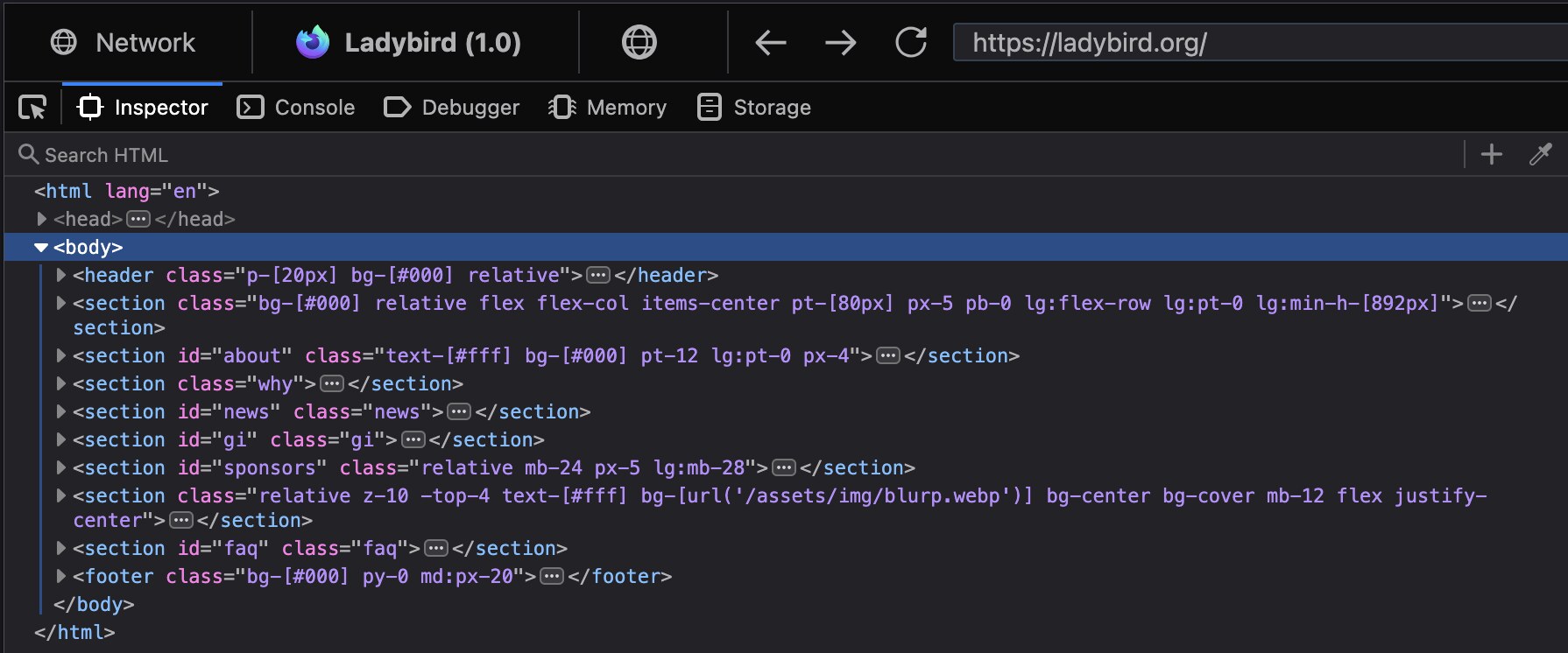
The honest caveat comes from the project’s own README: Ladybird is in a pre-alpha state and only suitable for use by developers. It is not embeddable, it is not packaged for end users, and you should not plan a product around it this year. What it is — a fully independent engine with a fast-moving team — makes it the most interesting long-term bet in this list.
Servo: An Engine Built to Be Embedded
Servo was originally a Mozilla research project and has since become a standalone organization with a clear identity. Its GitHub description says the quiet part out loud: Servo “aims to empower developers with a lightweight, high-performance alternative for embedding web technologies in applications.” That is a meaningfully different goal from Ladybird’s (build a browser) or WebKitGTK’s (power a platform).
Servo is written in Rust and licensed MPL-2.0, which is friendlier for embedding in commercial applications than a copyleft engine license would be. Its servoshell binary is the reference embedding target, and the build flow is the most automated of the three:
| |
The same two commands work on macOS (after Xcode and Homebrew) and on Windows with a Visual Studio toolchain. Servo also targets Android and OpenHarmony, which is unusual for a non-Chromium engine. It performs layout and rendering in parallel across multiple threads — the architectural idea it was founded on — and it is the only engine here whose build system is driven by cargo rather than a CMake/Ninja pipeline.
The practical caveats: Servo remains described as a prototype, web-platform conformance is a moving target, and if you need DRM-protected streaming media or a complete extension API you will not find it. For rendering your own UI in a Rust application, though, it is the most natural fit available.
WebKitGTK: The Boring, Correct Answer
WebKitGTK is the Linux port of WebKit exposed through a GTK widget API, and for anyone shipping an actual product it is the engine to beat. WebKit powers Safari, Mail, and the App Store on Apple platforms, and the WebKitGTK port has been maintained for well over a decade with a published security advisory process. When a zero-day lands, WebKitGTK gets patched on a schedule you can track — something none of the other options can offer.
The repository carries over 10,177 stars on GitHub, and the port-specific tooling lives under Tools/gtk. Building from source follows the same two-step shape as the others, with a helper script that resolves the dependency list for your distribution:
| |
For most teams the honest recommendation is not to build it at all: install the distro package (libwebkitgtk-6.0-dev on Debian/Ubuntu, webkitgtk6.0-devel on Fedora) and link against a version your distribution keeps patched. That single decision removes the largest ongoing maintenance cost in this comparison.
WebKitGTK matters for two deployment shapes. In desktop applications it gives you a real, mature rendering widget with hardware acceleration and solid accessibility support. On embedded Linux, the WPE port (wpewebkit) strips GTK in favour of a minimal backend designed for kiosks, set-top boxes, digital signage, and automotive displays — it can render straight into EGL without a desktop session at all. If you are building something that boots directly into a full-screen web UI, WPE is the technically correct answer.
Embedded and Kiosk Considerations That Actually Bite
Engine choice is only half the decision. These are the constraints that determine whether your appliance survives contact with production.
Memory and install footprint. Chromium-based shells commonly exceed 150 MB on disk and several hundred megabytes resident. WebKitGTK and WPE are substantially smaller and split into library packages, which matters when your appliance ships on a 2 GB eMMC module. Servo sits in between and is still moving.
GPU and rendering path. WebKitGTK and WPE support EGL-based rendering, which is what you want on an ARM board with a Mali or VideoCore GPU. Plan for a working EGL/GLES stack before you blame the engine.
Sandboxing. Ladybird’s per-tab sandboxed renderer processes are a genuine architectural advantage, and WebKit’s WebContent process separation is long-proven. If your kiosk renders any third-party content, process isolation is not optional — treat it as a hard requirement and verify it in your own deployment rather than trusting marketing copy.
Media codecs and DRM. None of these engines ships Widevine. If your use case requires Netflix-class protected playback, you need a commercial agreement and a supported engine, not a swap-in open-source build. For unencrypted H.264/VP8/AV1 playback, verify codec support per distribution build.
Update cadence. WebKitGTK tracks WebKit security releases and your distro ships them. Ladybird and Servo move fast in development but do not offer a consumer-grade update channel. Never ship a self-built engine without a documented process for rebuilding it after a security advisory.
Pitfalls and Hard Limits
- Build times are hours, not minutes. All three engines compile enormous C++ or Rust codebases. Budget disk space in the tens of gigabytes and use
ccache(Ladybird’s dependency list includes it for exactly this reason). - Qt6.9+ is a hard floor for Ladybird. Debian 13 ships Qt 6.8; configuration fails until you install a newer Qt or point
CMAKE_PREFIX_PATHat one. - Pre-alpha means pre-alpha. Ladybird’s own documentation says it is developer-only. Building it is a weekend project; shipping it is not a 2026 option.
- No Chrome extension compatibility. If your product depends on extension APIs, none of these engines is a drop-in replacement for Chromium.
- Engine licenses differ in ways that matter commercially. Ladybird and WebKit are BSD-2-Clause (with LGPL-2.1 components inside WebKit), Servo is MPL-2.0. Get counsel involved before shipping an embedded engine in a proprietary product.
- Do not judge engines on a synthetic benchmark. Cold-start, scroll smoothness, and video playback on your actual target hardware are the only numbers that predict user experience.
- Headless usage needs its own testing. Rendering to a framebuffer or EGL surface behaves differently from a windowed desktop session; verify your screenshot and print paths separately.
FAQ
Which open-source browser engine should I embed in a desktop app in 2026?
WebKitGTK, unless your application is written in Rust. It is the only option with production hardening, distro packaging, and a predictable security update channel. Servo is the better fit when your host application is Rust and you want an embedding-first API.
Is Ladybird ready to ship in a product?
No. Ladybird is explicitly pre-alpha and described by its maintainers as suitable only for developers. It is a remarkable engineering project with 66,290 stars and daily commits, but it is not embeddable and there is no stable release to target yet.
What is the difference between WebKitGTK and WPE?
They share the WebKit engine but target different deployment shapes. WebKitGTK exposes a GTK widget API for desktop Linux applications. WPE drops GTK for a minimal backend designed for embedded systems — kiosks, signage, set-top boxes, and automotive displays — and can render directly into EGL without a desktop session.
Can these engines play DRM-protected streaming video?
Not out of the box. None of them ships Widevine, so protected streaming services that require it will not work. Unencrypted H.264, VP8, and AV1 playback depends on how your distribution built the codec support, so test on your real target.
How long does it take to build a browser engine from source?
Budget two to six hours on a modern machine with many cores, plus significant disk space. WebKit and Ladybird are large C++ codebases; Servo is Rust with a large dependency tree. Enable ccache before your first build, because you will rebuild many times.
Do I have to build from source?
No — and for WebKitGTK you usually should not. Install the distribution package and let your distro handle security updates. Build from source only when you need a specific port (WPE), a patch, or a platform the packagers do not cover.
Why Embed Instead of Wrapping Chromium?
The case is not ideological, it is operational. A Chromium-based shell means shipping a browser runtime you do not control, patching it on someone else’s schedule, and accepting a footprint that rules out cheaper hardware. An embeddable engine lets you own the update path, integrate natively with your application’s process model, and deploy on appliances where a full desktop stack is not viable.
If your kiosk or dashboard renders your own interface, our self-hosted digital signage comparison of Anthias, Xibo, and Screenlite covers the application layer above the engine. If the web UI you are rendering is a development environment, the self-hosted web IDE comparison of code-server, Eclipse Che, and OpenVSCode is the relevant read. And for related front-end component choices, our browser code editor comparison covers the libraries that sit on top of the rendering layer.
💰 想测试你的市场判断力?我用 Polymarket 做预测市场交易——这是全球最大的预测市场平台,从大选结果到技术监管时间线,什么都可以押注。和赌博不同,这是真正的信息市场:你懂的信息越多,胜率越高。我靠预测技术相关事件的走向已经赚了不少。用我的邀请链接注册:Polymarket.com