Dental software is the worst-value category in clinical IT. A single-chair practice can pay more per year for a chairside charting module than it pays for an entire server, and the data you enter — full periodontal charts, radiograph history, treatment plans spanning years — leaves with you only if the vendor feels like exporting it. The open-source dental landscape is genuinely thin, which makes the projects that do exist worth knowing precisely. This is a field report on what actually runs in 2026.
TL;DR — the quick verdict: If you want a native desktop application with real chairside charting and no cloud dependency, use DinoDent (or its international sibling QDento). If you need a Windows client-server system with billing, agenda and a calendar web interface and you are comfortable on .NET, use DentneD. If you want offline-first multi-device access from phone, tablet and desktop with a self-hosted backend, use Apexo with PocketBase. All three are small projects maintained by one or two people — treat your choice as a commitment to participate, not to consume.
The Comparison Table
Star counts and last-commit dates were pulled from GitHub at the time of writing. Low star counts are normal in this niche; these are clinical tools, not developer trends.
| Project | Architecture | Platform / stack | Dental charting | Scheduling | Billing | Licence | Stars | Last commit |
|---|---|---|---|---|---|---|---|---|
| DinoDent | Native desktop, local SQLite file | C++ with Qt 6 | Yes, plus periodontal status | Yes | Invoices, debit/credit notes | GPL-3.0 | 35 | 2026-09-21 |
| DentneD | Client-server | C#, Windows client + server | Treatment and medical records | Yes, agenda + calendar web UI | Invoices and estimates | See repository | 86 | 2026-04-14 |
| Apexo | Offline-first app + self-hosted backend | Dart / Flutter + PocketBase | Yes, with photo attachments | Yes | Expenses and clinic records | GPL-3.0 | 23 | 2026-09-15 |
| OpenDentist | Web application | TypeScript | Patient charts and treatment plans | Multi-room agenda | Yes | MIT | 15 | 2026-09-15 |
| OpenMolar | Desktop (legacy) | Python | Yes | Yes | Partial | GPL | 55 | 2024-02-16 |
For context: Open Dental is the best-known open-source dental system and is far more mature than anything above, but it distributes its source outside GitHub and funds development through paid support contracts. The five projects in the table are the ones you can clone, audit, and run entirely on your own terms today.
Which One Fits Your Practice?
| Your situation | Recommended | Why |
|---|---|---|
| Single chair, one workstation, no network | DinoDent | One local SQLite database, no server to administer, native responsiveness |
| Practice outside Bulgaria needing DinoDent’s model | QDento | The project explicitly maintains an international variant without country-specific integrations |
| Windows office with a reception client and back-office server | DentneD | Client-server design, agenda and calendar web interface, multi-user from the start |
| Multiple chairs, dentists and devices including phones | Apexo | Built for offline operation with synchronisation across devices |
| Browser-only deployment with per-room agendas | OpenDentist | Web-first, MIT licensed, multi-room scheduling |
| Regulatory e-prescription integrations | DinoDent | Includes national health insurance fund API integrations and electronic prescription support |
DinoDent: Native, Local, and Surprisingly Complete
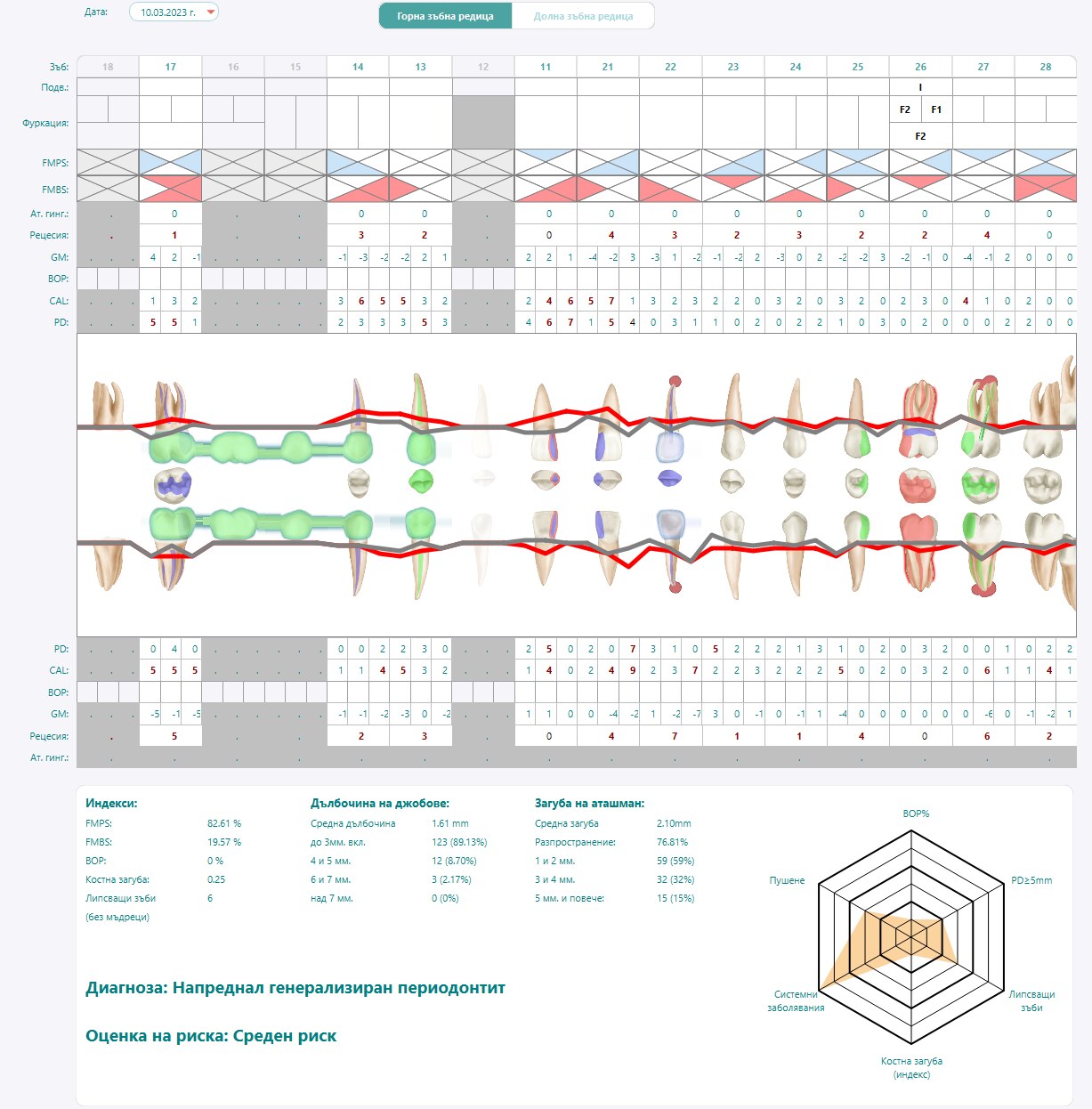
DinoDent is the most feature-complete of the group in clinical terms, and its architecture is deliberately unfashionable: a native Qt 6 desktop application writing to a local SQLite database. There is no server, no web stack, and no network dependency between the chair and the patient record. For a single-practice deployment that is a feature — nothing to administer, nothing to expose, and no “the internet is down so I cannot chart” failure mode.
The declared technology stack is worth reading before you commit, because it tells you exactly what a build will require:
| |
Translating that list to Debian or Ubuntu build dependencies looks like this:
| |
Two capabilities stand out for practices in Bulgaria: electronic prescription support and full NHIF (national health insurance fund) API integration, plus e-signature handling through the PKCS#11 standard using smart cards. If your jurisdiction has similar regulatory plumbing, that work is not something a generic practice-management tool will give you.
The storage decision is the one to think hardest about. A local SQLite file is easy to back up and impossible to corrupt through network partitions — but it also means the record lives on one device. Back it up on a schedule, test the restore, and store an encrypted copy off the premises:
| |
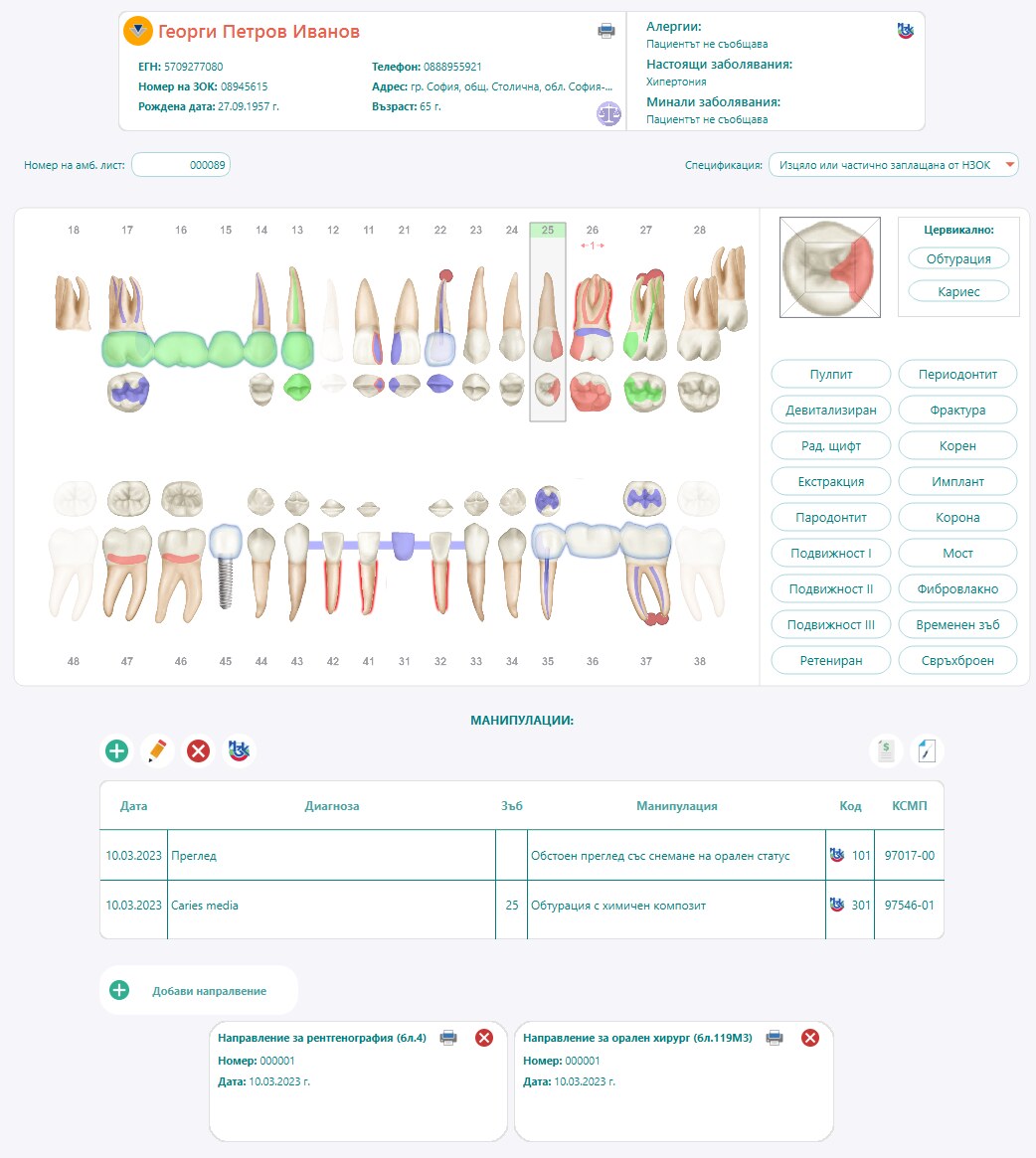
There is also a QDento variant for practices outside Bulgaria, which strips the country-specific health-insurance integrations and keeps the clinical core. If you are evaluating DinoDent from outside its home market, start there.
DentneD: The Windows Client-Server Option
DentneD is the most-starred project of the group and takes the traditional practice-software shape: a server holding the data, client machines in the surgery and at reception, and a Windows service for background work. Its feature list reads like a checklist written by someone who has actually run a clinic:
- Doctors records and support for more than one dentist
- Patient records with full medical records, attachments and notes
- Billing management with invoices and estimates
- Treatment lists and a scheduling agenda
- Customisable reports with PDF output templates
- A calendar web interface for staff who should not install a client
- Cloud backup scripts
- Multilanguage support and appointment reminders
The client-server architecture is what makes it suitable for a practice with several workstations: everyone reads and writes the same dataset, and access is controlled by user accounts. The trade-offs are equally clear — you are administering a server plus a fleet of Windows clients, and the project’s release cadence is slower than the others here (last commit April 2026), so plan your own upgrade and test strategy rather than waiting for upstream to fix your workflow.
The practical deployment shape for a small practice is:
| |
The calendar web interface is an underrated feature: it lets front-desk staff see the day without a client install, and it gives you a browser-only fallback if a workstation fails mid-session.
Apexo: Offline-First with a Self-Hosted Backend
Apexo is the only project here built around offline-first, multi-device synchronisation, which is exactly what a small clinic with one shared tablet in the surgery and another device at reception actually needs. It is written in Dart and Flutter, so the same application runs on Windows, Android, iOS, macOS and the web from one codebase.
Its backend design is deliberately minimal. The project documentation states that the backend should be PocketBase — and that a clean PocketBase installation with a superuser credential is enough, because the application creates the collections it needs on first login. That is an unusually low bar for a clinical application:
| |
The operational story that follows from this design is important to internalise before you rely on it:
- Backups are your responsibility and they are trivial — the PocketBase data directory plus uploaded attachment directories are the entire state. Copy both.
- Synchronisation is not a substitute for a backup. Offline edits sync when a device reconnects; they do not protect you from a deleted patient record.
- The application creates its own schema on first login. Point a new client at the wrong backend and you will get a second, empty set of collections. Keep one backend per practice.
- Attachments are the bulk of your data. Clinical photos dominate storage growth; measure them before you choose a disk.

Apexo is also the most actively released of the three (last commit mid-September 2026), with localisation contributions arriving from users in several languages — a good signal for a single-maintainer project.
Pitfalls Before You Migrate a Practice
- There is no migration path between these tools. None of the projects participates in a data-exchange standard for dental records. Decide your export format before you enter five years of clinical data, and test exporting it.
- Backups must be verified, not just scheduled. A nightly job writing to a directory nobody restores is theatre. Restore one backup per quarter into a scratch environment.
- Imaging lives outside the practice-management tool. Radiographs are typically stored in DICOM systems. If your imaging stack is not already self-hosted, the DICOM and PACS comparison is the piece you are missing.
- Regulatory integrations are country-specific. E-prescription and insurance-fund APIs are national. Confirm your jurisdiction’s requirements before assuming a project covers them, and prefer the international variant when it does not.
- Single-maintainer risk is real. Two of the three projects depend on one developer. Mirror the repository internally, keep your build toolchain documented, and be prepared to maintain a fork.
- Do not put a practice database on a laptop. Whatever architecture you pick, the record belongs on a machine with backups, a UPS, and a schedule — not on the device that walks out of the building.
Why Self-Host a Dental Practice?
Clinical records are among the most sensitive data a business holds, and dental practices generate more of it than most: full-mouth periodontal charts, radiograph histories, photographs, treatment plans, and payment records, all tied to identifiable people. Self-hosting changes the commercial relationship in three concrete ways.
First, the record stays yours. With a local SQLite database or your own server, you can export, query and audit your own data without asking a vendor for a favour or paying an export fee. When you change systems — and you will — that control is the difference between a migration and a fresh start.
Second, per-seat pricing disappears. Practice-management vendors charge per dentist, per chair, or per module. Open-source systems cost one server’s worth of infrastructure, so adding a hygienist workstation does not raise your software bill. For a growing multi-chair practice that is the single largest line-item saving.
Third, you stop being a passenger on someone else’s upgrade schedule. No vendor will move your interface to a new design mid-quarter, retire a feature you depend on, or change the terms under which you may continue to access your own records.
The same reasoning applies across clinical software generally. If you are planning a broader self-hosted clinical stack, the self-hosted EMR and EHR comparison covers the hospital-grade options, and the open-source veterinary practice management guide shows how the same pattern of small, focused projects plays out in an adjacent field. For the appointment and revenue side of the practice, the scheduling platforms comparison and the self-hosted invoicing guide fill the gaps these dental tools leave open.
FAQ
Is there a serious open-source alternative to commercial dental software? Yes, but the market is thin and fragmented. DinoDent, DentneD and Apexo are real, actively maintained systems that cover charting, scheduling and billing, and Open Dental is the long-established option with paid support. None of them matches the polish of a large commercial suite, so choose based on which gaps you can tolerate.
Can I run a dental practice entirely offline? With DinoDent, yes — a native desktop application with a local SQLite database needs no network at all. With Apexo, the application is designed to keep working offline and synchronise when a connection returns. DentneD requires a reachable server for multi-workstation use, but that server can live inside the practice.
How do I back up a dental practice database?
For SQLite-based systems, use the database engine’s own backup command (.backup) rather than copying the file while it is open, then encrypt and copy the result off-site. For client-server systems, dump the database server-side and version the configuration. Verify restores quarterly — an untested backup is not a backup.
What happens to my data if the maintainer abandons the project? Mirror the repository, document the build dependencies, and keep your database in a format you can read with standard tools. GPL-3.0 and MIT licensed projects can be forked and maintained by you or a contractor; the practical risk is not legal, it is build-environment drift.
Do these tools handle radiographs and intraoral images? They handle attachments and photographs to varying degrees, but DICOM radiographs belong in a dedicated imaging system. Plan a self-hosted PACS alongside your practice-management tool rather than expecting one application to do both well.
Which one should a single-dentist practice start with? DinoDent (or QDento outside Bulgaria) if you work on one workstation and want the most clinical depth with the least infrastructure. Apexo if you need the record on more than one device and prefer an offline-first model.
💰 想测试你的市场判断力?我用 Polymarket 做预测市场交易——这是全球最大的预测市场平台,从大选结果到技术监管时间线,什么都可以押注。和赌博不同,这是真正的信息市场:你懂的信息越多,胜率越高。我靠预测技术相关事件的走向已经赚了不少。用我的邀请链接注册:Polymarket.com