Cabal or Stack? How to Pick a Haskell Build Toolchain in 2026 (GHCup + Hpack Guide)
The hardest part of writing Haskell in 2026 is not monads. It is the pile of tools that has to be installed before main = putStrLn "hi" compiles: a GHC compiler, a package database, cabal, stack, hpack, ghcup, and the Haskell Language Server — all of which have overlapping responsibilities and none of which is the obvious entry point.
The single most common wasted week in Haskell onboarding is installing the distribution’s GHC, then stack, then cabal, then discovering that the three disagree about which compiler is current, that the language server refuses to start, and that half the tutorials assume a toolchain layout that your machine does not have.
Here is the version of the decision that actually holds up on a server in 2026, with live data from the repositories that ship these tools.
TL;DR — Quick Verdict
- Install GHCup first. Always. It is the layer that decides which GHC, cabal, stack, and HLS binaries exist and which one is active. Everything else is downstream of it. (Its GitHub repository now points to Codeberg — more on that below.)
- Default to
cabalfor normal development: cabal-install 3.18.1.0 was released 2026-07-29, the repository is working toward 3.19.0.0, and the modern solver pluscabal.projectis what most of the ecosystem publishes against. - Use
stackwhen you want reproducibility as the default: a Stackage snapshot pins all transitive dependencies at once. Stack’s latest stable is v3.11.1 (2026-06-13), with v4.1.0.1 in release candidate — so if you adopt Stack today, adopt it as a Stack 3 shop with a 4.x migration in your future. - Add
hpackif you dislike repeating yourself in.cabalfiles: describe the package once inpackage.yaml, and let it generate the.cabalfile. Stack supportspackage.yamlnatively.
Comparison Table (live repository data, September 2026)
| GHCup | cabal-install | Stack | Hpack | |
|---|---|---|---|---|
| Role | Toolchain installer/manager | Build tool + solver | Build tool + snapshot curator | Package description format |
| Repository | haskell/ghcup-hs → Codeberg | haskell/cabal | commercialhaskell/stack | sol/hpack |
| Stars (GitHub mirror) | 354 ★ | 1,744 ★ | 4,077 ★ | 667 ★ |
| Latest release | rolling | 3.18.1.0 (2026-07-29); master at 3.19.0.0 | v3.11.1 (2026-06-13); v4.1.0.1 RC | 0.39.6 |
| Last commit | 2026-09-04 (mirror) | 2026-09-18 | 2026-08-22 | 2026-06-08 |
| License | LGPL-3.0 | BSD-3-Clause | BSD-3-Clause | MIT |
| Pins compiler version | ✅ ghcup set ghc X | Per project via with-compiler | ✅ Snapshot → GHC | ❌ |
| Pins all dependencies | ❌ | Via cabal freeze / index-state | ✅ Stackage snapshot | ❌ |
| Multi-package projects | — | ✅ cabal.project | ✅ multi-package YAML | — |
| Config source of truth | GHCup metadata | *.cabal | stack.yaml + *.cabal | package.yaml → generated *.cabal |
| Also manages HLS | ✅ Yes | ❌ | Partially (Stack 3 + HLS) | ❌ |
Decision Matrix: Pick in 10 Seconds
| Your situation | Recommended | Why |
|---|---|---|
| Fresh machine, no Haskell at all | GHCup | One installer manages GHC, cabal, stack and HLS, with ghcup list as the source of truth |
| Application with a CI pipeline and no existing Stack config | cabal | cabal.project + index-state pinning is what library authors test against |
| You need bit-for-bit reproducibility across developers and CI | Stack | One Stackage snapshot pins the compiler and every dependency |
| You are tired of maintaining two package files | Hpack | Single package.yaml; Stack and cabal2nix read it natively |
| Editor integration keeps breaking | GHCup | Install HLS for the exact GHC version the project uses — mismatched HLS is the number-one cause |
| Regulated/locked-down build environment | Cabal + freeze file or Stack + vendored snapshot | Both produce a checked-in artifact that fully specifies the build |
| You already use Nix | haskell.nix on top of cabal | Evaluates cabal.project and produces derivations per component |
GHCup — The Layer That Decides Everything
GHCup installs and switches GHC, cabal, stack, and HLS, and it owns the shims that end up on your PATH. If your editor cannot find a toolchain, the fault is nearly always here, not in the project.
The installation is a download-and-run script (fetch it first, inspect it, then execute — never pipe shell downloads straight into an interpreter on a server you care about):
| |
Then the commands you will actually use, all documented by the project:
| |
The detail almost every tutorial misses: GHCup’s GitHub repository now carries the description !!! --- MOVED TO CODEBERG --- !!!. Development moved to Codeberg (codeberg.org/haskell/ghcup-hs, which resolves with HTTP 200), while the GitHub mirror still shows 354 stars and commits as recent as 2026-09-04. If your build pipeline scrapes GitHub for release information, it may be reading a mirror.
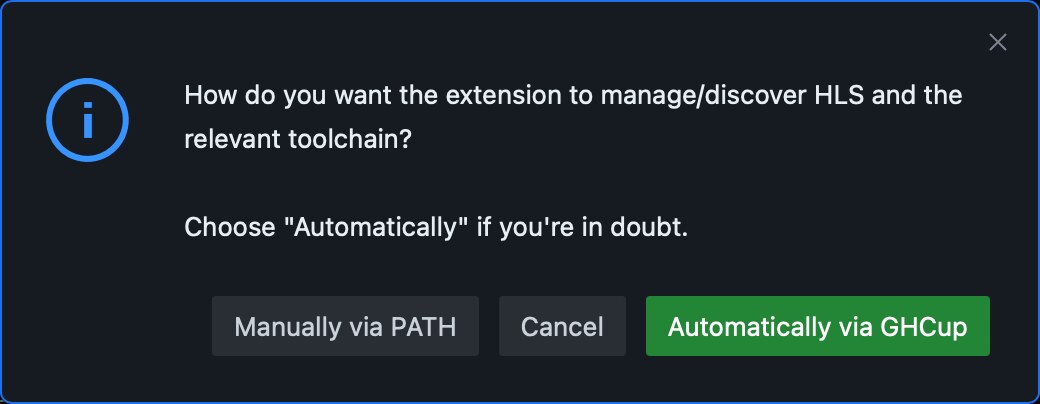
That dialog is the whole article in one screenshot: modern Haskell tooling expects you to choose between “Automatically via GHCup” and “Manually via PATH”. Every failure mode below comes from mixing the two answers.
Where it hurts: GHCup is a moving target by design — it tracks upstream releases, so the same ghcup install command can produce a different toolchain next month unless you pin explicit versions.
cabal — The Build Tool the Ecosystem Actually Publishes Against
cabal-install is the command-line front end for the Cabal library, and its job is dependency resolution plus build execution. Version 3.18.1.0 is the latest release (2026-07-29); the repository’s cabal-install.cabal already declares Version: 3.19.0.0, with a cabal-head pre-release tagged 2026-09-17. Two decades of BSD-3-Clause development, and it is still the default target for library authors.
A minimal, realistic package description — the header fields here mirror the real cabal-install.cabal metadata (same Cabal-Version, License, and Build-type conventions):
| |
Multi-package repositories are coordinated with a cabal.project file, which is also where you pin the Hackage index for reproducibility:
| |
The everyday loop:
| |
Where it hurts: the solver is a genuine constraint solver, and large, loosely constrained dependency sets can produce surprising plan revisions. index-state plus a freeze file turns “surprising” into “reproducible”.
Stack — Reproducibility as the Default Setting
Stack’s design choice is to pin the whole world through a Stackage snapshot: one line selects a curated set of package versions, and therefore the compiler too. The project’s own stack.yaml starts like this — note the snapshot’s GHC mapping in the comment:
| |
The @sha256:…,size suffix on each extra-deps entry is the interesting part: Stack pins overrides cryptographically, so a dependency cannot silently change under you. For an application, the minimal file is just a resolver plus your package:
| |
And the loop is deliberately uniform across machines and platforms:
| |
Version reality check for 2026: Stack’s latest stable release is v3.11.1 (2026-06-13), while rc/v4.1.0.1 (2026-08-22) is flagged as a pre-release. Stack 4 is coming. Any long-term decision should assume a major-version migration is on the roadmap — another reason the repository above pins its own Cabal via extra-deps instead of trusting the snapshot’s older version.
Where it hurts: snapshot curation means package availability lags Hackage. If your project needs a version that Stackage has not blessed, you fall back to extra-deps with hashes — which is safer but more work than simply asking cabal for the newest release.
Hpack — Write the Package Description Once
hpack replaces hand-maintained .cabal files with package.yaml, generating the .cabal file from it. The real package.yaml from the hpack repository shows the shape (spec 0.36.0 era, hpack 0.39.6):
| |
The design principles in the README are the pitch: do not make the user state the obvious, make sensible assumptions by default, give full control when needed, and do not force repetition. In practice that means dependency lists and GHC options are written once at the top and inherited by every stanza.
Tooling support is the reason it is worth adopting: Stack reads package.yaml natively, cabal2nix supports it, and for everything else the hpack executable generates the .cabal file. Hpack has been quiet — 667 ★ and a last commit in June 2026 — but it is specification-stable, and its output is ordinary Cabal that any tool can consume.
Where it hurts: generated files invite edits. Change the .cabal by hand and the next hpack run silently reverts you. Also note spec-version gating: new fields require bumping the spec version, so a fresh clone may refuse to build until you update it.

Pitfalls, Migration Notes, and Performance Traps
- Never build on a distribution-provided GHC.
apt install ghcgives you an old compiler in a location GHCup does not know about, and the resulting split-brainPATHis the root cause of most “HLS will not start” reports. Remove it, then let GHCup own the toolchain. - HLS must match the project’s GHC version. Install HLS through GHCup for that compiler. A newer language server pointed at an older compiler produces partial or absent diagnostics rather than a clean error.
- Do not hand-edit an hpack-generated
.cabalfile. Treat it as build output. If it is checked into git, keep thepackage.yamlas the source of truth and regenerate. - Pin the Hackage index in CI.
cabalwithoutindex-stateresolves against whatever the index contained at build time; two CI runs a week apart can produce different plans.cabal freezeor a fixedindex-stateis non-negotiable for reproducible builds. ~/.cabal/storeand~/.stackare the build cache. Cache them in CI keyed on the snapshot or freeze file, or every job recompiles the world. Do not cache them without a key — you will get silent staleness.- Snapshot lag is a feature, not a bug — until it blocks you. When Stack cannot find a package version, prefer adding a hashed
extra-depsentry over switching resolvers mid-project. - Stack 4 is in release candidate. Pin the Stack version in CI (
stack-versionin the setup action), and read the release notes before upgrading a build you depend on. - Mixing
cabal.projectandstack.yamlin one repository is legitimate but must be deliberate. Both can coexist, and both must be kept in sync — or one becomes a lie. - GHC 9.10.x changed the module layout for several boot libraries. If a build suddenly needs explicit dependency declarations after a compiler bump, that is the cause, not a broken solver.
FAQ
Do I need both cabal and Stack?
No, and running both as your primary build tool is a common way to create confusion. Install both through GHCup — they are cheap in disk terms — but pick one per project. The stable 2026 answer for libraries and services is cabal; choose Stack when snapshot-level reproducibility across machines is your priority.
What is GHCup and is it mandatory?
GHCup is the toolchain installer and switcher that manages GHC, cabal, stack, and the Haskell Language Server. It is not technically mandatory, but without it you are manually resolving compiler versions and PATH conflicts that GHCup exists to eliminate. Note that its repository has moved from GitHub to Codeberg while the GitHub mirror remains online.
Is Stack 4 available, and should I move to it?
Stack 4 is not released as stable. The v4.1.0.1 tag is a release candidate (2026-08-22), while v3.11.1 (2026-06-13) is the current stable line. Run Stack 3 in production and test Stack 4 in a branch if you want to be ready.
What does hpack actually do?
hpack converts a package.yaml file into a standard .cabal file. You get DRY package metadata — dependencies and ghc-options declared once instead of repeated per stanza — and the generated .cabal remains compatible with every tool that reads Cabal, including Stack, which reads package.yaml directly.
How do I make a Haskell build reproducible in CI?
Two viable routes. With cabal: commit cabal.project with a fixed index-state, plus a cabal.project.freeze file, and cache ~/.cabal/store keyed on the freeze file. With Stack: commit stack.yaml with an explicit resolver, and cache ~/.stack keyed on that snapshot. Both approaches produce identical builds across machines.
Why does my editor show no completions for Haskell?
Almost always a toolchain mismatch: the Haskell Language Server was installed for a different GHC version than the project uses. Run ghcup list to see what is installed and active, then install HLS for the project’s exact compiler version.
The Verdict
Install GHCup and let it own the toolchain — that single decision prevents the majority of Haskell environment failures. Then work with cabal for day-to-day development, because that is what the ecosystem publishes and tests against, and add index-state plus a freeze file the moment a second machine or CI joins the project. Reach for Stack when reproducibility and a uniform cross-platform command set matter more than freshness — while keeping an eye on the Stack 4 release candidate. Add hpack if maintaining .cabal stanzas by hand is costing you time; its generated output works with every tool in this article.
Continue with the rest of this Haskell series: Haskell web frameworks compared (Yesod vs Scotty vs Servant), Haskell testing frameworks (Hspec vs QuickCheck vs Tasty), and Haskell CLI libraries (optparse-applicative vs optparse-generic vs cmdargs).
💰 想测试你的市场判断力?我用 Polymarket 做预测市场交易——这是全球最大的预测市场平台,从大选结果到技术监管时间线,什么都可以押注。和赌博不同,这是真正的信息市场:你懂的信息越多,胜率越高。我靠预测技术相关事件的走向已经赚了不少。用我的邀请链接注册:Polymarket.com