Every .NET team has met the same bug. An appointment scheduled for 1:30 AM on a daylight-saving transition either vanishes or fires twice. A “recent orders” query returns rows from the wrong month because the server is in UTC and the report assumed local time. A payment settles a day late because DateTime.Now was captured on a machine whose clock drifted into a different time zone. The .NET base class library gives you DateTime, DateTimeOffset, and — since .NET 6 — DateOnly and TimeOnly, but none of them tell you which time zone a value belongs to, and none of them model calendar arithmetic honestly.
Three libraries fill that gap in 2026: NodaTime 3.3.4, TimeZoneConverter 7.2.0, and TimePeriodLibrary.NET 2.1.6. They solve different halves of the problem, and this guide shows where each one earns a place in your dependency list — with live package versions, real APIs, and the pitfalls that cost teams weekends.
TL;DR — Quick Verdict
Put NodaTime at the core of any application that stores, converts, or reasons about instants. It separates Instant, ZonedDateTime, LocalDate, and Duration so the compiler and the type system carry the meaning that DateTime throws away. Add TimeZoneConverter if you interoperate with Windows time zone identifiers — it is a 200 KB helper that makes "Eastern Standard Time" resolve correctly on Linux and in containers. Reach for TimePeriodLibrary.NET when your domain is calendar arithmetic — fiscal years, broadcast calendars, business-day counts, and period collection set operations, which NodaTime deliberately does not model.
If you only have time for one change this sprint: stop using DateTime.Now. Replace it with SystemClock.Instance.GetCurrentInstant() and store UTC. Everything else in this article follows from that single decision.
Side-by-Side Comparison: .NET Date and Time Libraries in 2026
| Dimension | NodaTime 3.3.4 | TimeZoneConverter 7.2.0 | TimePeriodLibrary.NET 2.1.6 |
|---|---|---|---|
| Primary purpose | Full date/time model | Windows ↔ IANA zone ID mapping | Calendar period arithmetic |
| NuGet package | NodaTime | TimeZoneConverter | TimePeriodLibrary.NET |
| Latest version | 3.3.4 | 7.2.0 | 2.1.6 |
| GitHub repository | nodatime/nodatime | mattjohnsonpint/TimeZoneConverter | Giannoudis/TimePeriodLibrary |
| Stars | 3,001 | 904 | 377 |
| Last commit | 2026-09-12 | 2025-12-15 | 2025-02-23 |
| License | Apache-2.0 | Other (see repo LICENSE) | MIT |
| Core types | Instant, ZonedDateTime, LocalDate, Duration, Period | TZConvert static helper | TimeRange, DateDiff, CalendarTimeRange |
| Time zone database | Bundled, ships its own tzdb | Delegates to OS / ICU | Delegates to BCL |
| JSON integration | Official System.Text.Json + Json.NET serializers | N/A | N/A |
| Calendar arithmetic | Partial (no fiscal calendars) | None | Extensive |
| Learning curve | Moderate | Very low | Low |
| Best fit | Service backends, scheduling, audit trails | Cross-platform zone lookup, legacy data | Billing cycles, HR, media scheduling |
The dependency footprints tell the story: NodaTime is a real modeling library you build on, TimeZoneConverter is a compatibility shim you keep for correctness, and TimePeriodLibrary.NET is a domain library you reach for when “how many business days in Q3” is a question your product asks.
Decision Matrix: Pick in Ten Seconds
| Your problem | Choose | Why |
|---|---|---|
| Timestamps in an API or database | NodaTime (Instant) | Unambiguous UTC point with no Kind guessing |
| Scheduling in a specific city | NodaTime (ZonedDateTime) | DST-aware arithmetic via DateTimeZoneProviders.Tzdb |
| Data received with Windows zone IDs | TimeZoneConverter | TZConvert.GetTimeZoneInfo works on Linux and in containers |
| Fiscal year, quarter, or broadcast calendar math | TimePeriodLibrary.NET | Purpose-built calendar period types |
| Business-day counts, working-hours windows | TimePeriodLibrary.NET (DateDiff) | Handles half-open ranges and calendar exclusions |
Minimal change to an existing DateTime codebase | TimeZoneConverter + DateTimeOffset | Fix the zone bug without a full refactor |
| Team has no bandwidth for a new API | DateOnly/TimeOnly from the BCL | Removes time-of-day confusion with zero dependencies |
NodaTime 3.3.4 — The Model That Stops Guessing
NodaTime’s central insight is that a timestamp, a calendar date, and a wall-clock reading are three different things, so they get three different types. Instant is a point on the timeline. LocalDate is a date with no time and no zone. ZonedDateTime is a wall-clock reading attached to a real time zone with a real offset.
| |
| |
Because NodaTime ships its own copy of the IANA time zone database, the offsets above do not change when the host OS is patched, when a container image lacks tzdata, or when the application runs on Windows. That reproducibility is why financial and scheduling systems migrate to it even when DateTimeOffset would technically suffice.
JSON serialisation is first-class through official serializer packages rather than hand-written converters:
| |
| |
The serialised form keeps the zone identifier, not just the offset. That single detail is what makes it possible to reschedule a meeting correctly after a DST transition instead of silently moving it an hour forward.

TimeZoneConverter 7.2.0 — 200 KB That Prevent an Outage
Windows has never used the IANA zone identifiers that Linux, Java, and every database convention prefers. Windows says "Eastern Standard Time"; the rest of the world says "America/New_York". Production code that hard-codes one form works locally and explodes in a Linux container.
.NET 6 and later added TimeZoneInfo.TryConvertWindowsIdToIanaId and TryConvertIanaIdToWindowsId, which help — but the mapping covers a subset of cases, and older target frameworks have nothing at all. TimeZoneConverter wraps the CLDR mapping tables in a tiny dependency:
| |
| |
Two rules make this library pay for itself. First, normalise at the boundary: whenever you accept a zone identifier from a client, a CSV import, or a partner API, convert it to IANA once and store only that form internally. Second, never assume the platform: the same string that resolves on Windows may throw TimeZoneNotFoundException on Alpine Linux, and TimeZoneConverter is the cheapest way to remove that class of failure.
TimePeriodLibrary.NET 2.1.6 — Calendar Arithmetic Done Properly
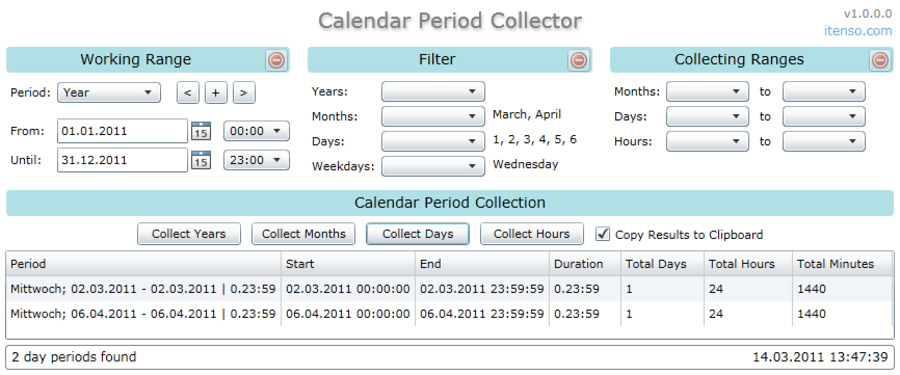
NodaTime models the timeline. It deliberately does not model the calendar abstractions that businesses actually invoice against: fiscal quarters, school terms, broadcast weeks, accounting calendars, and “working days between these two dates.” TimePeriodLibrary.NET fills that gap with period types that know how to intersect, subtract, and enumerate themselves.
| |
| |
The strength of the library is not any single method but the composition: TimeRange, CalendarTimeRange, TimePeriodCollection, and the Month, Week, and Quarter types interoperate, so overlapping shifts, blackout windows, and billing cycles can be modelled with set operations instead of hand-rolled if chains. The classic TimeRange(Invert/Subtract patterns that leak DST bugs are handled inside the library.
The Base Class Library in 2026: DateOnly, TimeOnly and DateTimeOffset
None of the three libraries removes the need to understand the BCL, and the BCL has improved.
DateOnly and TimeOnly (introduced in .NET 6) remove an entire category of bugs by letting a “birthday” or a “store opening time” exist without a time-of-day or a date attached. DateTimeOffset fixes the offset half of the problem that DateTime gets wrong — it records the UTC offset alongside the value, so serialisation round-trips are stable.
| |
What the BCL still does not give you is a value that carries both a wall-clock reading and the zone it belongs to, plus arithmetic that respects DST rules. That is exactly the gap NodaTime fills, and it is why the two coexist comfortably in the same solution.
Real-World Patterns: Persistence, Reporting and Audit Trails
Persist instants, render zones. Store an Instant (or a timestamp with time zone column) and convert to a zone only at the presentation layer. Entity Framework Core and Npgsql map NodaTime’s Instant directly, so the database stores one unambiguous value while each customer sees the time in their own zone.
Snapshot the offset for audit trails. When a legal or financial record must show “what the user saw,” store the wall-clock reading, the zone identifier, and the offset together. A ZonedDateTime serialised through the official serializer captures all three, which is what makes historical reconstruction possible years later.
Keep period math out of the domain model. Let TimePeriodLibrary.NET compute business-day counts and fiscal boundaries, then convert the resulting boundaries to Instant values for storage. Mixing the two roles in a single type is how teams end up shipping reports that shift by an hour twice a year.
Test across zones, not just in yours. A CI matrix that runs the suite with TZ=Pacific/Auckland and TZ=UTC catches transition bugs that never reproduce on a developer laptop.
Pitfalls That Cost Teams Weekends
DateTime.NowandDateTime.UtcNowreturn no zone information at all.Kindis a hint, not a guarantee; it is routinelyUnspecifiedafter a database round-trip.- DST gaps and overlaps are real. On a spring-forward day, 2:30 AM may not exist. NodaTime’s mapping API tells you which case you hit instead of silently shifting the value.
"W. Europe Standard Time"is not portable. Windows identifiers throw on Linux unless you resolve them first.- Ambiguous zone abbreviations.
"CST"maps to at least three different offsets depending on country. Store full identifiers, never abbreviations. - Container images without
tzdatafail at runtime, not build time. NodaTime’s bundled tzdb insulates you; otherwise addtzdatato the image explicitly. - Sorting mixed
DateTimeandDateTimeOffsetvalues is not safe. Convert both sides to UTC before comparing.
Related Reading and Ecosystem Notes
The date/time problem is one instance of a wider theme: strongly typed domain values instead of primitives. If that idea appeals, our .NET units of measure comparison covers UnitsNet and quantity types, and the C# serialization libraries guide explains how serializers decide which type information to preserve on the wire. For parsing human-written dates from other languages and runtimes, see the datetime parsing libraries comparison, which covers the same design tensions from the input side.
FAQ
Is NodaTime still the recommended date/time library for .NET in 2026? Yes. Version 3.3.4 is current, the repository received commits in September 2026, and the BCL still lacks a type that combines a wall-clock reading with its time zone and DST-aware arithmetic. NodaTime fills that gap and integrates with both System.Text.Json and Json.NET through official serializers.
Do I need TimeZoneConverter if .NET 6 has built-in IANA conversion?
The built-in TimeZoneInfo.TryConvertWindowsIdToIanaId covers common cases, but TimeZoneConverter ships a fuller CLDR mapping and works on older target frameworks. It also handles conversions in both directions with a simpler API, which is worth the roughly 200 KB when you exchange identifiers with Windows-hosted systems.
Can NodaTime and DateTime be used in the same codebase?
Yes, and they usually are. Keep Instant for storage and logic, and convert to DateTimeOffset only at boundaries that require BCL types, such as third-party libraries or legacy APIs. Isolate the conversion in a small adapter rather than sprinkling it through the domain layer.
How do I count business days between two dates in .NET?
Use DateDiff and period enumeration from TimePeriodLibrary.NET, or walk the range with GetDays() and skip weekends and holidays. Enumerating from NodaTime’s LocalDate works too, but a dedicated period library handles fiscal and broadcast calendars that the BCL does not model.
What is the single biggest date/time bug in .NET applications?
Calling DateTime.Now in server code. It captures the host’s local time with no zone information, so identical deployments produce different stored values depending on where the container is scheduled. Replace it with a UTC instant plus an explicit zone identifier at the boundaries.
💰 想测试你的市场判断力?我用 Polymarket 做预测市场交易——这是全球最大的预测市场平台,从大选结果到技术监管时间线,什么都可以押注。和赌博不同,这是真正的信息市场:你懂的信息越多,胜率越高。我靠预测技术相关事件的走向已经赚了不少。用我的邀请链接注册:Polymarket.com