Go has one of the strangest infrastructure stories in gaming: a 4,000-year-old board game whose entire online ecosystem runs on a handful of volunteer-operated servers. When those servers have a bad week — and they do — tens of thousands of players have nowhere to play, and every finished game they ever saved disappears with the domain.
That is exactly the kind of problem self-hosting solves. In this guide we compare the three pieces you actually need to run your own Go world in 2026: OGS for the online server itself, KataGo for the analysis engine, and Sabaki for the board client — plus two supporting tools (KaTrain and Pachi) that most players end up installing next.
TL;DR — Quick Verdict
If you want to host an online Go server for a club, run OGS — it is the only actively maintained open-source Go server stack with an official Docker build. If you want strong analysis on your own hardware, run KataGo — 5,100+ stars, precompiled binaries, and it works with every major Go client. If you just want to review your own games without a browser, install Sabaki — a fast SGF editor with a real engine interface that talks to KataGo directly. KaTrain beats Sabaki for pure training sessions; Pachi is the pick when you need a lightweight engine on old hardware with no GPU.
The Comparison Table (Live GitHub Data)
All star counts and “last push” dates below were pulled from the GitHub API on 2026-09-15.
| Tool | Role | Stars | Last Push | Runtime | Deploy Style | GPU Needed |
|---|---|---|---|---|---|---|
OGS (online-go/online-go.com) | Full online Go server + web client | 1,565 | 2026-09-14 | Node.js + Postgres | Official Dockerfile + docker-compose.yml | No |
KataGo (lightvector/KataGo) | GTP analysis engine | 5,107 | 2026-09-13 | C++ (OpenCL/CUDA/TensorRT/Eigen) | Precompiled binaries on releases | Recommended |
Sabaki (SabakiHQ/Sabaki) | Board GUI + SGF editor | 2,775 | 2026-09-13 | Electron (Node.js) | Release packages (.deb/.AppImage/.dmg/.exe) | No |
KaTrain (sanderland/katrain) | Training/review client bundling KataGo | 2,460 | 2026-09-03 | Python 3.11–3.13 | pip install . | Recommended |
Pachi (pasky/pachi) | Lightweight GTP engine | 557 | 2026-08-05 | C | Binary releases / source build | No |
Two things stand out. First, OGS is the only project in this table that is a server — the other four are clients or engines that run on a laptop. Second, KataGo and Sabaki ship updates within days of each other, which tells you how tightly the client/engine pair is maintained.
Decision Matrix: Pick in 10 Seconds
| Your Use Case | Recommended Tool | Why |
|---|---|---|
| Run a club server with accounts, ratings, and game archives | OGS | Only maintained server stack; Docker build included |
| Analyze your own games on local hardware | KataGo + Sabaki | Engine does the reading, Sabaki renders variations |
| Coach beginners / review with score graphs | KaTrain | All-in-one installer, adjustable strength bots |
| Old laptop, no GPU, no Docker | Pachi | Compiles anywhere, plays respectably |
| Long-term archival of your games | Sabaki | Uncompressed SGF you can read with any text editor |
| Bot account other people can challenge online | OGS + KataGo | Server handles matchmaking, engine answers over GTP |
OGS — The Only Real Online Go Server
OGS (Online-Go.com) is the reference open-source Go server: accounts, tournament ladders, correspondence games with 30-day clocks, chat, and a full SGF archive. Its repository ships an actual Docker build instead of a “please follow 40 wiki pages” install guide. Here is the official docker-compose.yml from the repository root, reproduced verbatim:
| |
That is the whole file — one service, one port, no hidden magic. The practical deployment looks like this:
| |
A few honest notes before you ship this to a club:
- This compose file covers the web tier only. A complete production site also needs a database, a WebSocket/real-time layer, and a reverse proxy in front. Treat 8080 as internal and put Caddy or Nginx in front of it with TLS.
- Pin your build.
build: .compiles whatevermaincontains that day. For a club server, check out a known-good commit and tag the resulting image so you can roll back. - Back up the database and the SGF store separately from the container. Game records are the whole point of running your own server; losing them is worse than downtime.
Because OGS is Node.js, the resource profile is modest: a 2 vCPU / 4 GB VPS handles a club-sized group of concurrent players comfortably, and the same host can then run a KataGo bot as a separate service (see below).
KataGo — Strong Analysis Without a Cloud Account
KataGo is a GTP engine. It has no window, no buttons, and no board — it reads Go positions on stdin and prints moves on stdout, which is exactly why it works with every client in this article. Installation is refreshingly boring:
| |
You also need a network file — KataGo ships the engine, not the weights. Download one from the releases page and keep it next to the binary, then wire it up with a config. The minimal GTP invocation pattern documented in the README is:
| |
Two real-world details the README is explicit about, and that trip people up:
- KataGo supports several compute backends — OpenCL, CUDA, and TensorRT builds are published separately, plus an Eigen build for machines without a usable GPU. Downloading the CUDA build on an AMD box is the single most common “it does not start” report.
- KataGo can imitate human play if you also load the human model
b18c384nbt-humanv0.bin.gzalongside a normal network. That is the feature to use when you want a sparring partner that plays like a 5 kyu rather than a machine that never blunders.
For a small club, run KataGo as a systemd service next to your OGS container so the bot is always online:
| |
Sabaki — The Board You Actually Stare At
Sabaki is an SGF editor and board GUI: variations, comments, coordinates, game trees, and an engine panel that shows candidate moves with visit counts. It runs everywhere Electron runs — Linux (.deb/.AppImage), macOS (.dmg), and Windows (.exe) — and it is the client most people pair with KataGo first because it never gets in the way.
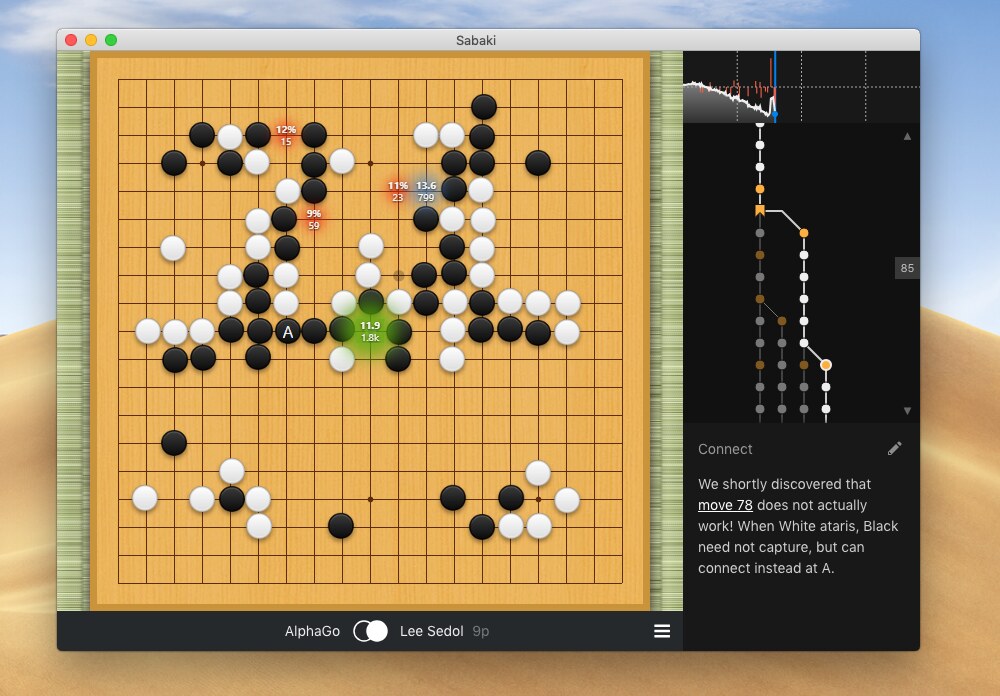
The workflow that makes Sabaki worth installing:
- Download the release for your platform from the repository’s releases page.
- Open Engines → Manage Engines, add a new engine with the full KataGo command line from the section above (binary +
-config+-model). - Load a game (SGF, or a reviewed game you saved), then hit the analysis toggle and step through the tree.
- Save the review as SGF. Comments and variations you add are plain text inside the file — you can diff them in Git, which is a genuinely nice property for anyone coaching a team.
If you would rather not maintain an Electron install, KaTrain takes the opposite approach: pip install . on Python 3.11–3.13 gives you an all-in-one package that bundles the engine, adjustable-strength opponents, and a review UI tuned for training. Sabaki is the editor; KaTrain is the coach.
Pachi — For Hardware That Should Not Be Running an Engine
Pachi is the old reliable option: a C engine that builds almost anywhere, ships binary releases, and by default includes a small convolutional network while still playing a credible game. It is the right answer for a Raspberry Pi club server, a 10-year-old laptop, or any machine where the OpenCL drivers are a lost cause. Its release notes include a warning worth repeating for every engine in this article: do not expose a GTP port to untrusted users. A GTP socket accepts arbitrary commands and can be told to analyze positions forever — put it on localhost or behind an authenticated proxy only.
Pitfalls: What Actually Breaks in Production
- Port 8080 collisions. The official OGS compose maps
8080:8080on the host. If something else already uses 8080, either change the left side ("9080:8080") or bind to loopback and let your reverse proxy handle the public port. - GPU driver roulette. KataGo’s README calls out specific broken configurations, including AMD Radeon RX 5700 series cards whose OpenCL drivers have been unreliable for years. If the engine starts and immediately produces nonsense evaluations, suspect the driver before you suspect the network file.
- Network/hash mismatch. A network file that does not match the engine version loads with errors or silently uses the wrong weights. Keep the model filename and the release notes you downloaded it from together.
- Uncommitted
build:drift. Because the OGS compose builds from the working tree,git pullon a live server changes your software. Track the commit hash you deployed. - No backups of SGF. Correspondence servers hold games that took months to finish. Snapshot the database and the SGF directory on a schedule, and test a restore once.
- GTP over the network. Bind engines to
127.0.0.1. If a bot must be reachable, put authentication in front of it — an open GTP port is a free CPU-burn endpoint.
FAQ
Do I need a GPU to run KataGo? No. KataGo publishes an Eigen build that runs on CPU only. It is dramatically slower than the OpenCL or CUDA builds, which matters for deep analysis but is fine for reviewing your own games or running a low-traffic club bot.
Can I run OGS on a small VPS? Yes. The official compose file exposes a single Node.js service on port 8080 and is happy with 2 vCPU and 4 GB of RAM for club-sized traffic. Add a database and a reverse proxy, then budget more disk for game records than for the application itself.
Is Sabaki enough on its own, or do I need KataGo? Sabaki edits and renders SGF and does nothing else. Analysis, candidate moves, and win-rate graphs all come from an attached engine. Install Sabaki first, then add KataGo through the engine manager when you want reviews.
What is the difference between OGS and KataGo? OGS is a server: accounts, matchmaking, ratings, archives. KataGo is an engine: it evaluates positions and suggests moves. They solve different problems, and a club usually ends up running both, with OGS serving humans and KataGo serving analysis and bots.
Which project should I trust with my long-term game archive? Store the canonical copy as SGF on your own disk, not inside any single website. Sabaki, KaTrain, and every engine in this article read and write SGF, so your games survive even if a server project stops being maintained.
How do these compare to just using an existing online server? Existing servers give you zero setup and a ready player pool. Self-hosting gives you control over accounts, retention, moderation, and uptime — plus the ability to run private tournaments and keep bot traffic off someone else’s infrastructure. For a club that plays weekly, the Docker Compose file above is a weekend project, not a migration.
For related reading, see our self-hosted chess platforms comparison for the same self-hosting analysis applied to a different board game, our game server platform guide if your club runs more than one game, and our MUD game engine comparison for text-based alternatives that run on the same kind of hardware.
💰 想测试你的市场判断力?我用 Polymarket 做预测市场交易——这是全球最大的预测市场平台,从大选结果到技术监管时间线,什么都可以押注。和赌博不同,这是真正的信息市场:你懂的信息越多,胜率越高。我靠预测技术相关事件的走向已经赚了不少。用我的邀请链接注册:Polymarket.com