There are still an estimated 200+ billion lines of COBOL running the world’s banking, insurance, and airline systems — and the average COBOL developer is over 45. The language is not the bottleneck anymore. The toolchain is. Compilers that only build on z/OS, editors with no autocomplete, and zero unit test infrastructure are what actually slow legacy teams down.
The good news: in 2026 the open-source COBOL toolchain is genuinely usable. GnuCOBOL 3.2 compiles COBOL to C on any Linux box. SuperBOL Studio 1.0 brings a real language server to VS Code. COBOL Check, governed by the Open Mainframe Project, gives you fine-grained unit tests with JUnit output. This guide covers all three with verified data, real Docker configs, and the trade-offs nobody documents.
TL;DR — The Quick Verdict
If you need to compile and run COBOL on Linux today, use GnuCOBOL 3.2. It is the only mature open-source COBOL compiler, and everything else in this ecosystem is built on top of it. If your developers live in an editor and you are working with large legacy copybook trees, add SuperBOL Studio — it is the only COBOL language server with real dialect-aware diagnostics. If you are touching business logic that runs money, add COBOL Check before you change a single line. A team that has all three has a complete, self-hosted, zero-license-cost COBOL pipeline. A team with only GnuCOBOL has a compiler and a prayer.
The 2026 COBOL Toolchain Comparison Table
All star counts and update dates below were pulled from GitHub at publish time (September 2026).
| Capability | GnuCOBOL 3.2 | SuperBOL Studio 1.0 | COBOL Check |
|---|---|---|---|
| Role | Compiler / runtime | Language server + VS Code extension | Unit testing framework |
| Repository | GNU project (SourceForge + git mirror) | OCamlPro/superbol-studio-oss | openmainframeproject/cobol-check |
| GitHub stars | 70 (official mirror) | 45 | 108 |
| Primary language | C (COBOL → C transpiler) | OCaml | Java |
| Latest release | 3.2 | 1.0.0 (July 2026) | 0.1.0 tag / rolling main |
| Last commit | Sep 2026 | Sep 9, 2026 | May 2026 |
| License | GPL-3.0 / LGPL-3.0 | AGPL-3.0 (OSS part) | Apache-2.0 |
| Dialects supported | COBOL85, COBOL2002/2014, IBM, Micro Focus, GCOS, RM/COBOL | Same set via GnuCOBOL (default, ibm, mf, gcos, cobol85) | Targets GnuCOBOL, IBM Enterprise COBOL, Micro Focus |
| Self-hostable | Yes (any Linux) | Yes (VS Code / Open VSX) | Yes (CLI + VS Code extension) |
| Reports | C output, LISTING, -f formats | Inline diagnostics | JUnit XML + HTML |
| Best for | Building and running COBOL | Editing and navigating COBOL | Testing and refactoring COBOL |
One number stands out: GnuCOBOL’s 70 GitHub stars hide the fact that it is the load-bearing compiler for this entire ecosystem. Star counts are a terrible proxy for COBOL tooling maturity. SuperBOL’s own documentation points at GnuCOBOL’s dialect configuration. COBOL Check certifies against GnuCOBOL as a target platform. Judge this stack by release cadence and documentation, not by stars.
Decision Matrix: Pick Your Tool in 10 Seconds
| Your situation | Use this | Why |
|---|---|---|
| Batch job on a Linux server, no 3270 terminal | GnuCOBOL 3.2 | Compiles to C, integrates with cron and systemd natively |
| Migrating 4,000-line copybook-heavy programs | SuperBOL Studio + GnuCOBOL | Dialect-aware completion across copybook search paths |
| Refactoring money-handling paragraphs | COBOL Check + GnuCOBOL | Paragraph-level assertions, JUnit reports for CI |
| Reading EBCDIC mainframe extracts in Spark | Cobrix | Spark data source for mainframe record layouts |
| Parsing COBOL into a graph for documentation | ProLeap or KOOPA | Purpose-built COBOL parsers for Java and Kotlin |
| Free CI for COBOL on GitHub Actions | GnuCOBOL in a container | cobc available in any Debian image you build |
GnuCOBOL 3.2 — The Compiler That Does the Heavy Lifting
GnuCOBOL is the only production-grade open-source COBOL compiler. It translates COBOL source into C, then hands it to your system C compiler. That one design decision is why it runs everywhere: x86, ARM, RISC-V, inside Alpine, inside a scratch container.
The current stable release from GNU’s FTP is gnucobol-3.2.tar.gz. The canonical install is a source build — autoconf, configure, make, and critically make check, which runs the compiler’s own regression suite:
| |
For reproducible builds, containerize it. This Dockerfile follows the dependency set the community GnuCOBOL image uses (libdb, ncurses, gmp, autoconf), modernized to a supported base image:
| |
Then a real compilation, using the classic GnuCOBOL flags. -x builds an executable, -free switches to free-format source, and -I adds a copybook search path:
| |
| |
Where GnuCOBOL falls down: it is a compiler, not an IDE. You get diagnostics and a listing, and nothing else. There is no completion, no go-to-definition, and no rename across copybooks. That is exactly the gap SuperBOL fills.
SuperBOL Studio 1.0 — Editor Intelligence for Legacy Sources
SuperBOL Studio is the open-source half of OCamlPro’s commercial SuperBOL offering, released as version 1.0.0 in July 2026 and updated as recently as September 9, 2026. It ships as a Visual Studio Code extension (also on Open VSX) plus the LSP server behind it, written in OCaml.
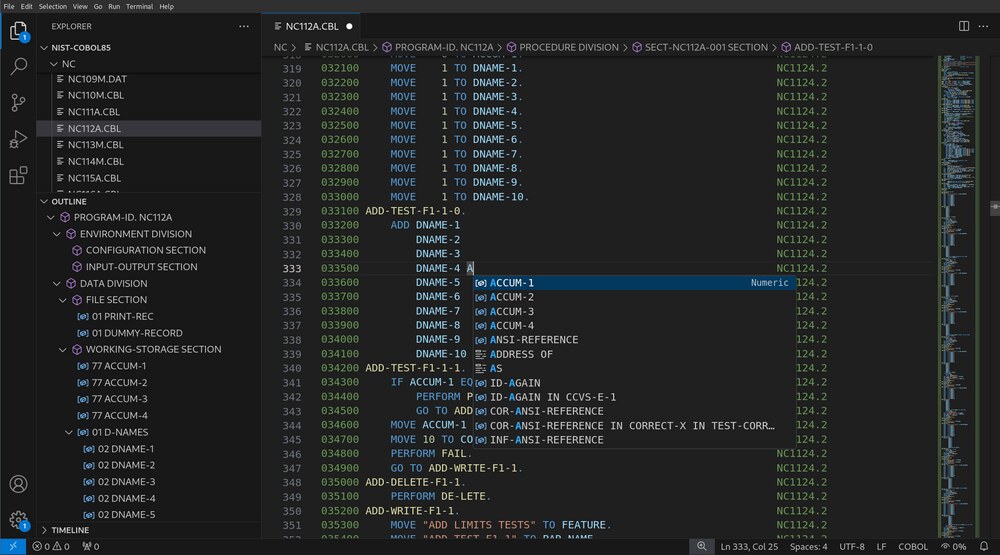
Its headline features, from the project’s own documentation:
- IntelliSense for COBOL keywords, user-defined data items, paragraph names, and full COBOL sentences — press
Ctrl+Spaceinside a program. - Dialect switching via
superbol.cobol.dialect, with adefaultvalue matching GnuCOBOL’s. Documented dialect families includeCOBOL2014,IBM, Micro Focus (mf), andGCOS. - Source-format handling via
superbol.cobol.sourceFormat, whereautomakes the server guess betweenfixedandfreeformat. - Copybook resolution across real search paths, which is the single hardest problem when editing legacy code.
- Syntax diagnostics scoped deliberately to the
COBOL85dialect, with reporting disabled for other dialects to avoid false errors — re-enableable with the Force Syntax Diagnostics flag.
Everything lives in .vscode/settings.json. This is the configuration shape the project documents:
| |
The file-relative flag is the important one. When it is true, that search path entry is resolved relative to the directory of each main source program rather than the project root — which matches how many legacy codebases actually lay out per-application copybook folders.
Install it from the Marketplace or Open VSX by searching superbol, or sideload the .vsix via Extensions → ⋅⋅⋅ → Install from VSIX.
COBOL Check — Unit Tests for Code Older Than Your Team
COBOL Check is the project that changes the economics of legacy work. It lives under Open Mainframe Project governance, is written in Java, and provides fine-grained unit testing at the same conceptual level as pytest, RSpec, or JUnit — but for COBOL paragraphs.
Its documented feature set:
| Feature | What it buys you |
|---|---|
| Fine-grained assertions | Test an individual paragraph in isolation, not a whole load module |
| Stubs and mocks | Replace external calls (CICS, DB2, VSAM) during tests |
| Mock perform verification | Assert that a PERFORM actually happened |
| JUnit XML output | Existing CI dashboards show COBOL test results for free |
| HTML report | Human-readable results for auditors and reviewers |
| VS Code extension | Run and see results without leaving the editor |
The core idea, in the project’s own framing: commercial COBOL tools can only exercise a whole load module, so you cannot microtest a single paragraph. COBOL Check removes that ceiling — and once fine-grained tests exist, incremental refactoring of 30-year-old code becomes safe instead of terrifying.
Test suites are written as separate COBOL source files (.CUT test suite files) that reference your production program, wrap calls in named test cases, and assert with EXPECT:
| |
Because the runner is Java and the output is JUnit XML, wiring it into a pipeline is a one-liner. Any CI system that reads JUnit reports — Jenkins, GitLab CI, GitHub Actions, Buildkite — will pick up COBOL test results with no custom glue:
| |
Where COBOL Check falls down: the toolchain around it is Java-centric, and the wiki (not the README) is the real documentation. Budget an afternoon for the first working suite. Also, its own release cadence is slower than SuperBOL’s — last commit in May 2026 versus September 2026 — so pin to a commit rather than chasing main.
The Supporting Cast: KOOPA, ProLeap, Cobrix, TypeCobol
The three tools above are the core. Four more round out the ecosystem, and each solves one narrow problem extremely well:
| Project | Stars | Language | What it is for |
|---|---|---|---|
krisds/koopa | 58 | Kotlin | COBOL parser and code analyzer for Kotlin/JVM pipelines |
uwol/proleap-cobol-parser | 207 | Java | ANTLR-based COBOL parser, the most-starred parser here |
AbsaOSS/cobrix | 170 | Scala | Spark data source for mainframe and EBCDIC record layouts |
TypeCobolTeam/TypeCobol | 86 | Java | COBOL with static typing and modern constructs, compiles down to standard COBOL |
Cobrix is the sleeper pick. If your modernization strategy is “get mainframe extracts into a lakehouse,” Cobrix reads EBCDIC files, packed decimals, and copybook-described record layouts directly as a Spark data source. It was updated as recently as September 10, 2026, with 170 stars — active and it solves a problem nothing else solves cleanly.
ProLeap remains the reference parser if you are building tooling rather than running COBOL. KOOPA is the better choice if your team is Kotlin-first. TypeCobol is the only tool here that tries to fix COBOL itself by adding type safety, and it is worth reading even if you never adopt it.
Pitfalls and Migration Gotchas
These are the mistakes that cost teams weeks. Every one of them is avoidable.
1. Fixed-format versus free-format will break you silently. Legacy COBOL is fixed-format: columns 1–6 are sequence numbers, column 7 is the indicator area, and the code area starts at column 8. GnuCOBOL defaults to fixed-format, and superbol.cobol.sourceFormat: "auto" guesses. When the guess is wrong you get bizarre syntax errors on lines that look fine. Set the format explicitly in both cobc -free and the editor setting the moment a program misbehaves.
2. Copybook search paths are the real migration cost. Copybooks are COPY-included fragments. Real codebases scatter them across per-application folders, and every tool resolves them differently. Fix this once: build an explicit list, set -I on cobc and superbol.cobol.copybooks in the editor, and check in a .vscode/settings.json so the whole team gets the same resolution.
3. Dialect flags change semantics, not just syntax. -std=ibm, -std=mf, and -std=gcos alter how arithmetic rounding, SIGN handling, and string comparisons behave. Never mix dialects inside one build. Compile everything with one dialect flag and treat a dialect change as a migration project with tests.
4. EBCDIC will corrupt your data if you skip conversion. GnuCOBOL runs on ASCII Linux hosts. Mainframe extracts are EBCDIC. Read those files with a tool that understands the layout (Cobrix) or convert explicitly — never eyeball-parse them.
5. make check is not optional. GnuCOBOL’s regression suite catches C-compiler and library mismatches that only appear at link time. Skipping it is how you end up with a compiler that builds programs that quietly produce wrong numbers.
6. Pin versions on both sides. SuperBOL ships fast (1.0.0 in July 2026, commits in September 2026). GnuCOBOL changes dialects across minor versions. Pin gnucobol-3.2 by exact tarball URL and pin the SuperBOL extension version in your workspace recommendations.
Why Self-Host Your COBOL Toolchain?
The commercial COBOL tooling market is priced for mainframe budgets. A single compiler license can cost more per seat than a full developer workstation, and the licensing model assumes you are running z/OS anyway. For a shop that has already moved to Linux, paying enterprise license fees to edit and test code you already own is pure overhead.
Self-hosting this stack costs nothing and takes an afternoon. GnuCOBOL is GPL/LGPL and builds from a GNU tarball. SuperBOL’s open-source component is AGPL-3.0. COBOL Check is Apache-2.0 under the Open Mainframe Project. You can put the whole thing in a container, run CI on GitHub Actions with no per-seat cost, and keep your source on your own infrastructure.
If you are already running self-hosted developer infrastructure, this slots in cleanly. Our self-hosted build systems comparison covers how to structure the build layer, our JVM build tools guide explains the Gradle setup COBOL Check depends on, and our Compiler Explorer and code analysis guide shows how to stand up a shared code-inspection service for your team. and our code quality platform comparison covers the broader toolchain story.
FAQ
Is GnuCOBOL a full replacement for IBM Enterprise COBOL?
No, and anyone who tells you otherwise is selling something. GnuCOBOL 3.2 supports a very broad dialect set — COBOL85, COBOL2002/2014 features, IBM, Micro Focus, and GCOS — and it compiles and runs correctly for the overwhelming majority of batch and business-logic programs. What it does not provide is the mainframe runtime environment: CICS transaction services, native DB2 interfaces, JCL, and SMF records are external to the language and must be emulated or replaced. Treat GnuCOBOL as a replacement for the compiler and language runtime, and plan separately for the surrounding mainframe services.
Can I run GnuCOBOL in Docker for CI?
Yes, and this is the recommended setup. GnuCOBOL builds from a GNU release tarball with a small dependency set (libdb-dev, ncurses, gmp, autoconf, gcc, make), which means a Debian-based build stage takes a couple of minutes to bake. Build the compiler in a base layer, cache the image, and your per-commit CI time drops to just the cobc invocation. A GnuCOBOL container plus a JUnit-reading test step gives you a complete COBOL pipeline with no proprietary components.
Does SuperBOL Studio require the commercial SuperBOL product?
No. OCamlPro/superbol-studio-oss is the open-source portion and includes the VS Code extension and the language server behind it, released as version 1.0.0 in July 2026 and actively maintained. The commercial product adds vendor-supported dialects and enterprise support; the open-source extension delivers IntelliSense, dialect configuration, copybook resolution, and syntax diagnostics for the COBOL85 dialect. For most teams, the open-source half is the useful half.
How do I unit test COBOL paragraphs without a mainframe?
Use COBOL Check. It is governed by the Open Mainframe Project, is Apache-2.0 licensed, and provides paragraph-level assertions, stubs, mocks, mock PERFORM verification, and both JUnit XML and HTML reports. Because the runner is Java and the output is JUnit XML, it plugs into any CI system that already reads test reports. This is the same capability commercial COBOL test tools charge for, at zero license cost.
What is the actual fastest path to a working COBOL dev environment?
Four steps, about an hour. First, build GnuCOBOL 3.2 from the GNU tarball and run make check. Second, install the SuperBOL Studio extension and a COBOL syntax highlighting theme. Third, create .vscode/settings.json with explicit sourceFormat, dialect, and copybooks entries so the editor and compiler agree. Fourth, add one COBOL Check suite against a single paragraph, and wire it into CI with a JUnit report step. That gives you compile, edit, and test — the full loop — entirely from open source.
Which dialect flag should I use for legacy Micro Focus code?
Use -std=mf in GnuCOBOL and set "superbol.cobol.dialect": "mf" in your editor settings. The two must match: the compiler flag governs runtime semantics while the editor setting governs diagnostics, and a mismatch means your editor validates code the compiler will interpret differently. If your codebase spans dialects, split it into separate build targets rather than trying to satisfy both with one configuration.
💰 想测试你的市场判断力?我用 Polymarket 做预测市场交易——这是全球最大的预测市场平台,从大选结果到技术监管时间线,什么都可以押注。和赌博不同,这是真正的信息市场:你懂的信息越多,胜率越高。我靠预测技术相关事件的走向已经赚了不少。用我的邀请链接注册:Polymarket.com