You shipped a Python CLI, and now your users need Python, a virtualenv, and the right pip version just to run it. Packaging it into a single executable is supposed to fix that — and then you discover that your 40 MB binary takes 150 ms to start because it unpacks itself to a temp directory on every launch. I packaged the same 20-line script three different ways on Linux, measured build time, output size, and startup latency, and read the actual licenses. Here is what the numbers say.
TL;DR — The Quick Verdict
- PyInstaller if you want the widest platform coverage and the most battle-tested path. 8-second builds, 11.4 MiB single file in my test. Use
--onedirfor anything latency-sensitive — it started in 36 ms versus the onefile’s 150 ms. - Nuitka if startup speed and compiled output matter more than binary size. 40-second build, 35.6 MiB binary, but it started in 50 ms — 3x faster than PyInstaller’s onefile despite being three times larger, because its extraction overhead is smaller and the code is compiled to machine code.
- cx_Freeze if you want a permissive license, no compiler requirement, and a
pyproject.toml-native configuration. It is the smallest project of the three (1,560 stars) and the least magic — which is either a feature or a problem, depending on your appetite for debugging. - None of these are cross-compilers. Every one of them builds for the OS it runs on. If you need a Windows binary, build on Windows.
Head-to-Head Comparison
| Dimension | PyInstaller 6.22.2 | Nuitka | cx_Freeze |
|---|---|---|---|
| GitHub stars | 13,090 | 15,129 | 1,560 |
| Last commit | 2026-09-06 | 2026-09-09 | 2026-09-07 |
| Strategy | Bundle interpreter + modules | Compile Python to C, then to machine code | Bundle interpreter + modules |
| Requires C compiler | Only for the bootloader on untested platforms | Yes (C11-capable gcc/clang/MSVC) | No |
| Build time (measured, this script) | 8 s | 40 s | not benchmarked |
| Onefile size (measured) | 11.4 MiB | 35.6 MiB | n/a |
| Startup, onefile (measured, best of 5) | 150 ms | 50 ms | n/a |
| Startup, onedir/standalone (measured) | 36 ms | n/a | n/a |
| Python versions | 3.8 – 3.15 | 3.4 – 3.14 (plus 2.6/2.7) | Whatever Python runs on |
| Cross-compilation | No | No | No |
| Runtime speedup vs CPython | None (interpreter is bundled) | Can be faster (compiled) | None |
| License | GPL-2.0-or-later WITH Bootloader exception | AGPL-3.0 with runtime exception | PSF-derived permissive |
| Config style | CLI flags + .spec files | CLI flags + inline project directives | pyproject.toml, setup.py, CLI |
Stars and commit dates were pulled from GitHub on 2026-09-10. Build time, size, and startup numbers are my own measurements on Linux x86_64, Node-free Python 3.12, gcc 13, best of five runs.
Measured Results: Build Time, Size, Startup
The test subject is a 20-line script that builds a 5,000-row JSON payload and prints a summary. Trivial on purpose — the point is to isolate packaging overhead, not application logic.
| Approach | Build time | Output size | Startup (best of 5) |
|---|---|---|---|
Plain python3 app.py | — | — | 17 ms |
PyInstaller --onefile | 8 s | 11,934,880 B | 150 ms |
PyInstaller --onedir | (cached) | 34,082,817 B total (1.4 MB launcher) | 36 ms |
Nuitka --standalone --onefile | 40 s | 37,374,088 B | 50 ms |
The single most useful takeaway: onefile mode is a startup tax, not a feature. PyInstaller’s onefile binary was 4.2x slower to start than its own onedir output of the same app — because onefile unpacks the bundled interpreter to a temporary directory on every invocation. Nuitka pays a smaller version of the same tax (50 ms) and its compiled entry point is faster, which is why it beats PyInstaller’s onefile by 3x while being 3x larger.
If your tool runs inside a loop, a shell completion hook, or a CI step executed hundreds of times, ship onedir. If it runs once interactively, onefile’s packaging convenience usually wins.
PyInstaller — The Battle-Tested Default
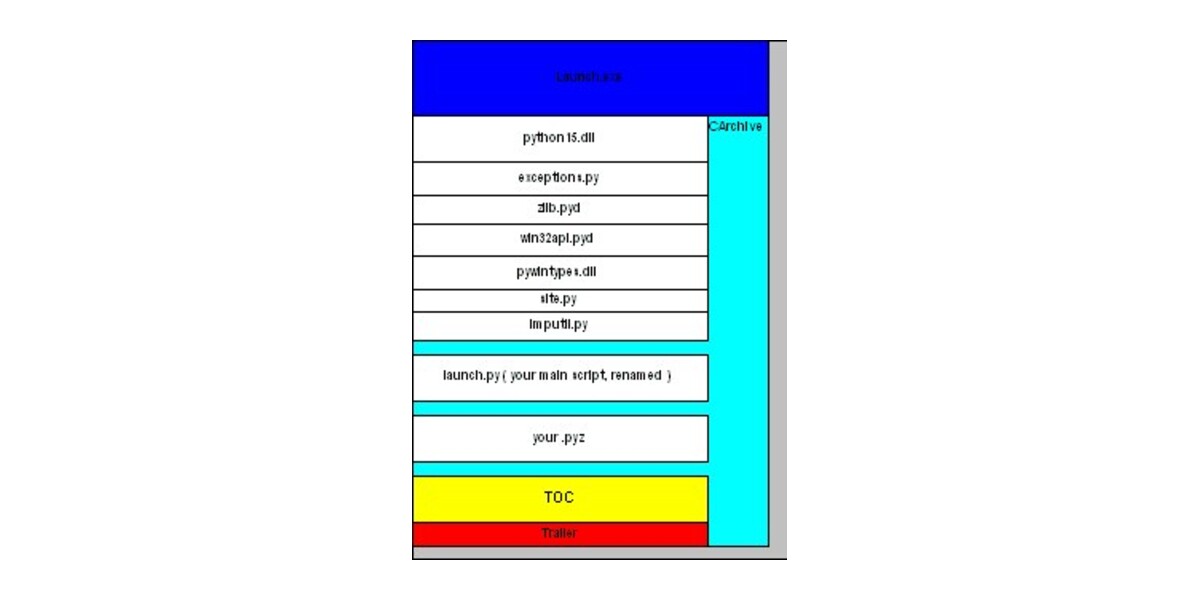
PyInstaller analyzes your script, discovers every imported module, and collects the active Python interpreter alongside your code into one folder or one file.
| |
For anything non-trivial you move to a spec file, which is executable Python and gives you full control over binaries, datas, and hidden imports:
| |
Documented facts worth knowing before you commit: PyInstaller supports Python 3.8 through 3.15, is not a cross-compiler, and on Linux needs ldd plus objdump/objcopy from binutils to do its dependency analysis. It officially targets Windows 8+, macOS 10.15+, and glibc/musl Linux on x86_64 and aarch64. Python 3.10.0 specifically is documented as unsupportable due to an upstream bug.
Licensing: GPL-2.0-or-later WITH Bootloader exception (SPDX GPL-2.0-or-later WITH Bootloader-exception). The exception is what makes it practical: you can ship bundled proprietary applications without licensing your own code under the GPL.
Nuitka — Compilation Instead of Bundling
Nuitka takes a fundamentally different path: it translates your Python into C, then compiles that C with a real compiler. It is not freezing an interpreter next to your code — it is generating a native binary.

| |
Nuitka’s documented modes are --mode=accelerated (speed up an existing interpreter run), --mode=standalone, and --mode=onefile. On Linux it requires patchelf for standalone mode — my first build failed outright with FATAL: Error, standalone mode on Linux requires 'patchelf' to be installed until I ran apt-get install patchelf. That is the single most common first-run failure for Nuitka on Linux and it is not obvious from the install instructions.
Other documented constraints:
- A C11-capable compiler is mandatory. My build used
gcc 13. On Windows, Nuitka can auto-download MinGW64 if no compiler is found — but the docs note MinGW64 is not compatible with Python 3.13+, so Windows users on modern Python need a real MSVC toolchain. - Onefile compression requires zstandard to be importable in the build environment.
- ccache is strongly recommended. My build’s final warning was
You are not using ccache, re-compilation of identical code will be slower than necessary— every rebuild recompiles the C, which is why Nuitka took 40 seconds versus PyInstaller’s 8. - License is AGPL-3.0 with a runtime exception (see
LICENSE-RUNTIME.txt). The runtime exception lets you distribute the compiled output under your own terms, but AGPL is a far stricter license than PyInstaller’s bootloader exception for anyone touching Nuitka itself. There is also a commercial edition that adds data-file embedding, code protection, and support for otherwise-unsupported configurations.
The payoff for all that friction is the measured one: 50 ms startup with a true native binary, and no interpreter being unpacked and re-read on each run.
cx_Freeze — The Explicit, Permissive Option
cx_Freeze is the smallest of the three at 1,560 stars, but its last commit was 2026-09-07 — it is actively maintained. Its pitch is straightforward: standalone executables with the same performance as the original script, cross-platform, with a license derived from the Python Software Foundation license (permissive, no copyleft surprises).
It is the only one of the three with first-class pyproject.toml support, which is why it keeps appearing in modern projects that refuse to maintain a setup.py:
| |
The classic setup.py form is equally supported:
| |
Or skip configuration entirely with the command-line front end:
| |
Documented options include --base (console, gui, gui_dgpu, or service), --init-script (with predefined values console and streamlit), --target-name, --target-dir, and --icon. If your app needs to run as a Windows background process, --base=service plus the project’s service sample is the documented route.
The tradeoff is manual control. cx_Freeze documents that dependencies are “automatically detected, but they might need fine-tuning” — expect to write explicit excludes and zip_include_packages entries. That explicitness is a strength for reproducible builds and a burden when you just want the thing to work.
Deployment Pitfalls That Bite in Production
- Binaries are glibc-version-locked. A binary built on Ubuntu 24.04 will not start on a host with an older glibc. Build on the oldest distribution you intend to support, typically inside a matching container. PyInstaller documents glibc and musl Linux support separately because they are not interchangeable.
- Onefile mode unpacks on every run. Measured cost: 114 ms of pure overhead for PyInstaller (150 ms vs 36 ms onedir). In a loop, or on a network filesystem with slow temp I/O, this becomes visible to users.
- Antivirus false positives are real. Self-extracting executables are a known heuristic trigger, especially on Windows. Code signing is the practical mitigation, and PyInstaller documents macOS code signing support.
- Hidden imports are the number-one mystery failure. Dynamic imports (
importlib, plugin loaders, SQLAlchemy dialects) are invisible to static analysis. Use--hidden-importor extend the spec file’shiddenimportslist. - Nuitka needs
patchelfon Linux and a C compiler everywhere. Budget CI time for installing both, and installccacheor your rebuilds will stay slow. - Do not expect runtime speedups from PyInstaller or cx_Freeze. Both bundle an interpreter; only Nuitka compiles. If your bottleneck is Python-level computation rather than startup, packaging will not help — see our comparison of high-performance Python acceleration with numba, cython, pythran and taichi for that problem.
If your packaging pain starts earlier — conflicting dependencies, lockfiles that never resolve — the root cause is usually dependency management rather than freezing; our Python dependency management comparison: poetry vs pipenv vs hatch vs pdm covers that layer. And if you distribute the output through a private channel rather than handing users a binary, a self-hosted conda package server with quetz, conda-store or conda-mirror is the other common answer.
FAQ
Is PyInstaller or Nuitka faster at runtime?
For startup, Nuitka won in my test: 50 ms versus PyInstaller onefile’s 150 ms. But that is packaging overhead, not code speed — most of the gap comes from extraction. Compare Nuitka against PyInstaller’s onedir output and the picture changes: onedir started in 36 ms, faster than Nuitka’s onefile. For pure computation inside the program, only Nuitka compiles Python to machine code; PyInstaller and cx_Freeze bundle an interpreter and deliver roughly CPython performance.
Why is my PyInstaller binary so large?
Because it contains a full Python interpreter plus the standard library and your dependencies. My trivial 20-line script produced an 11.4 MiB onefile binary, while Nuitka’s compiled output was 35.6 MiB — compiled code with its own runtime is often larger, not smaller. Size reductions come from excluding unused packages (--exclude-module tkinter), which is why cx_Freeze exposes excludes and zip_include_packages directly in configuration.
Can I cross-compile a Windows executable from Linux?
No. PyInstaller explicitly documents that it is not a cross-compiler: to make a Windows app you run it on Windows, and likewise for Linux and macOS. Nuitka behaves the same way, since it invokes the platform’s native C compiler. The practical approach is CI matrix builds — one job per target OS — and then shipping the resulting artifacts together.
What does Nuitka’s AGPL license mean for my commercial app?
Nuitka is AGPL-3.0 with a runtime exception documented in LICENSE-RUNTIME.txt, which permits distributing the compiled program under your own terms. That makes commercial distribution viable, but the AGPL still applies to Nuitka itself and to modifications of it, and it is meaningfully stricter than PyInstaller’s bootloader exception. If license review is a hard gate in your organization, cx_Freeze’s PSF-derived permissive license is the least friction, and it requires no compiler at all.
Do I need a C compiler to use these tools?
Not for PyInstaller or cx_Freeze in normal use — PyInstaller ships prebuilt bootloaders, and cx_Freeze is pure Python plus prebuilt components. Nuitka always needs one: my build used gcc 13, and the docs specify a C11-capable compiler, with auto-downloaded MinGW64 on Windows failing for Python 3.13 and newer. Nuitka also requires patchelf on Linux for standalone mode, which is the most common first-build failure.
Which one should I pick for a CLI tool I want people to install easily?
For a single downloadable artifact where startup latency is acceptable, PyInstaller --onefile is the most predictable and best documented. If the tool runs frequently or inside scripts, ship PyInstaller --onedir — 36 ms startup with the same code. Choose Nuitka when startup performance or code protection justifies a compiler toolchain and a 40-second build. Choose cx_Freeze when a permissive license, configuration in pyproject.toml, and no compiler requirement matter more than ecosystem size.
💰 想测试你的市场判断力?我用 Polymarket 做预测市场交易——这是全球最大的预测市场平台,从大选结果到技术监管时间线,什么都可以押注。和赌博不同,这是真正的信息市场:你懂的信息越多,胜率越高。我靠预测技术相关事件的走向已经赚了不少。用我的邀请链接注册:Polymarket.com