Bash was designed in 1989, and most developers are still typing into a 37-year-old command-line experience: no autosuggestions, no syntax highlighting, output that is plain text you have to pipe through grep, awk, and sed by hand. The three serious alternatives in 2026 — Nushell (40,391 GitHub stars), Fish (34,108), and Xonsh (9,628) — each attack the problem from a completely different angle: structured data, out-of-the-box usability, and Python. All three are actively maintained with commits this month. This guide tells you exactly which one to switch to — and which one to avoid — based on how you actually work.
TL;DR — Quick Verdict
- Choose Nushell if your daily work involves processing data — logs, JSON, CSV, file listings — because its structured pipelines replace most
jq/awk/sedincantations with one readable command. - Choose Fish if you want the best interactive experience with zero configuration — autosuggestions and syntax highlighting that just work, plus a web-based config UI.
- Choose Xonsh only if you live in Python and want Python expressions and shell commands in the same prompt. Otherwise its startup cost and syntax ambiguity are not worth it.
Comparison at a Glance
| Dimension | Nushell | Fish | Xonsh |
|---|---|---|---|
| License | MIT | GPLv2 (4.x: GPLv2) | BSD-2 |
| Core language | Rust | C++ → Rust core (4.x) | Python |
| GitHub stars (Sep 2026) | 40,391 | 34,108 | 9,628 |
| Last commit | Aug 2026 | Aug 2026 | Sep 2026 |
| Philosophy | Structured data pipelines | Interactive usability first | Python + shell hybrid |
| POSIX compatible | No | No | Partial |
| Bash script portability | None (new syntax) | None (new syntax) | None (Python syntax) |
| Autosuggestions | Yes | Yes (native) | No (add-on) |
| Syntax highlighting | Yes | Yes (native) | Minimal |
| Structured output (tables/JSON) | Native — core feature | Via plugins | Via Python objects |
| Built-in config UI | No | Yes (fish_config web UI) | No |
| Cross-platform (Win/macOS/Linux) | Yes | Yes | Yes |
| Learning curve | Steep | Gentle | Moderate |
| Startup time | Fast | Fast | Slow (Python interpreter) |
Decision Matrix
| Use case | Recommended shell | Why |
|---|---|---|
| Daily driver for a developer who parses logs/JSON/CSV | Nushell | Structured pipelines make data munging one-liners instead of regex soup |
| Non-technical-to-mid user who wants a better terminal with no config | Fish | Best defaults in the industry; autosuggestions and highlighting are on by default |
| Python developer who wants objects and shell commands together | Xonsh | Real Python at the prompt; shell commands drop into Python expressions |
| You must stay compatible with bash scripts | None — keep Bash | All three break POSIX compatibility; keep bash as the script runner |
| SSH to many servers and want a consistent experience | Fish or Nushell locally | Use them as your local interactive shell; servers keep running bash for cron and automation |
| CI pipelines and cron jobs | Bash/sh | None of the three is installed on CI runners by default — do not depend on them in scripts |
Nushell — A Shell Where Everything Is Data (40,391★, last commit Aug 2026)
Nushell, written in Rust, starts from a radical premise: command output should be structured data, not text. When you run ls, you get a table with name, size, type, and modified columns. When you run ps, you get rows you can sort, filter, and shape with built-in commands — no awk field-number archaeology.
| |
The pipeline model is what makes it addictive: $in gives you the current value, closures ({ |x| ... }) replace awk/xargs gymnastics, and commands like from json, to json, from csv, and into int convert between formats on the fly. Config lives in ~/.config/nushell/config.nu — itself a Nu script, so aliases, environment variables, and custom commands are all defined with the same syntax you use at the prompt.
Install it safely: brew install nushell (macOS), apt install nushell (Ubuntu 24.04+), cargo install nu (from source), or download a prebuilt binary from the GitHub releases page. Then run nu once; it will create a config directory with commented defaults.
The honest trade-offs: the structured pipeline is a new mental model — you will re-learn how to compose commands, and external POSIX tools like grep still return plain text that needs explicit conversion with from text or lines. Script portability to bash is zero, so your existing shell scripts stay on bash while you use Nu interactively. The ecosystem is younger, but the built-in command set is broad enough that most daily work never leaves it.
Fish — The Shell That Just Works (34,108★, last commit Aug 2026)
Fish (the friendly interactive shell) optimizes for one thing: the interactive experience. It ships with autosuggestions (grayed-out completions from your history that you accept with the right arrow), syntax highlighting that catches mistakes as you type, a menu-driven tab completion system, and universal variables that persist across sessions. The 4.x line brought a rewritten Rust core, which fixed the historical performance complaints while keeping the exact same feature set.
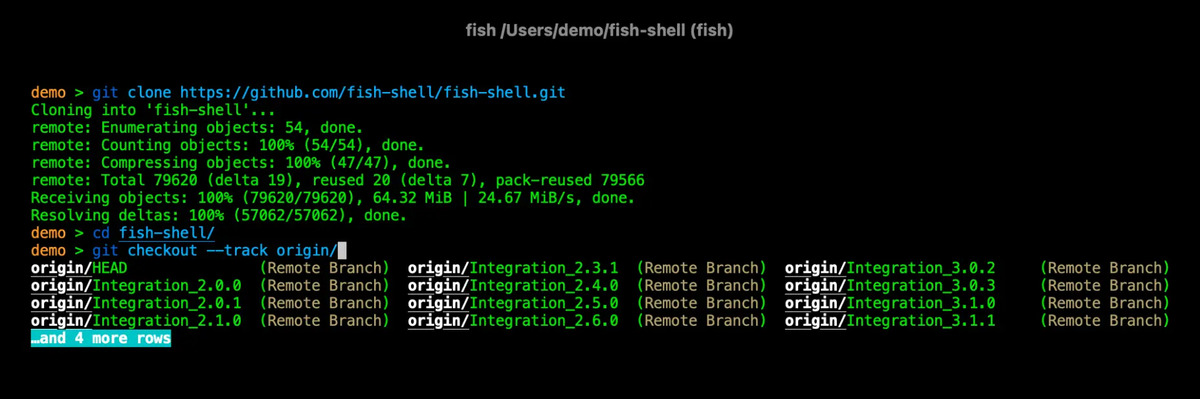
The killer feature for newcomers is fish_config, a web-based settings UI served from your terminal:
| |
That alone removes the “spend a weekend configuring your prompt” tax that keeps people on bash. Variables use a different scoping model (set -g, set -l, and $fish_pid), command substitution is (cmd) without a dollar sign, and conditionals use if ... end instead of if ...; then ...; fi:
| |
The honest trade-offs: fish is not POSIX-compliant, so bash scripts fail under fish — run them with bash script.sh or a shebang. Some bash-isms (like $(cmd), $VAR, and export) trip up migrating users daily. The plugin ecosystem (fisher, oh-my-fish) is smaller than zsh’s, though the built-in defaults mean you need far fewer plugins anyway. For the majority of users — including everyone who mostly wants a better interactive terminal — fish remains the lowest-friction upgrade you can make today.
Xonsh — Python at Your Fingertips (9,628★, last commit Sep 2026)
Xonsh is a Python-powered shell: every prompt is a hybrid where you can type either shell commands or Python expressions, and the parser decides which is which. You can compute with real Python objects and then hand the result to a shell command in the same line:
| |
If your daily work is Python-heavy — data exploration, scripting, glue code — xonsh collapses the boundary between “shell” and “Python REPL” that normally forces you to bounce between the two. Functions, loops, imports, and even asyncio all work at the prompt.
The honest trade-offs: every Python interpreter startup costs you time, so xonsh feels sluggish compared to fish or nu — and if you mainly run git/ssh/docker commands, you pay that cost for no benefit. The subprocess/Python mode disambiguation occasionally misreads intent (a command that looks like Python gets parsed as Python), and the community is small enough that niche questions go unanswered. Xonsh is a specialist tool: it earns its keep exactly when Python is your primary language.
Pitfalls: What Actually Goes Wrong When You Switch
- None of the three runs your bash scripts. This is the #1 migration mistake. Keep
#!/bin/bashscripts untouched, keep cron and CI on bash/sh, and use the new shell only for interactive work. Migrating scripts is a separate, deliberate project. - Don’t change your login shell on servers.
chsh -s /usr/bin/nushellon a remote box where the shell isn’t in/etc/shells(or isn’t installed at all) can lock you out of SSH sessions. Use the new shell interactively on your local machine; on servers, just typenuorfishwhen you want it. - Nushell’s structured data stops at the process boundary. External commands still emit text. You will need
from json,from csv,lines, andinto intto convert — the commands exist, but forgetting them produces confusingstring-typed pipelines. - Fish syntax traps.
$(cmd)and$VARdo not behave like bash;exportis not a command; andVAR=value cmdprefix assignment doesn’t exist (useenv VAR=value cmd). Expect a 1–2 week adjustment period. - Xonsh startup latency compounds in scripts. If you put xonsh in a hot loop or use it as a script runner, the Python interpreter overhead dominates. Use it for interactive exploration, not for the thing cron runs at 3 a.m.
- Terminal multiplexer interaction. All three shells work fine inside tmux — the escape-key and paste behaviors are well-tested — but if you switch shells and tmux bindings at the same time, you will not know which layer is misbehaving. Change one thing at a time; our terminal multiplexer guide for tmux, screen, and abduco helps you isolate the layers.
- Prompt customization rabbit hole. Nushell config is a Nu script, fish config is fish syntax, and xonsh config is Python — none of your existing bash/zsh prompt snippets port. Budget an hour to re-create your prompt, or just use the defaults for a week first. For framework-based setup, our shell customization frameworks comparison (oh-my-zsh, starship, bash-it) shows how starship gives you one prompt config across every shell, including all three of these.
- Pair with a good terminal emulator. The shell is only half the experience — a modern emulator with ligatures, panes, and fast scrollback multiplies the benefit. See our Ghostty vs Alacritty vs WezTerm terminal emulator comparison before you commit to a setup. And for keyboard-driven file navigation, terminal file managers (ranger, nnn, lf, broot) integrate cleanly with all three shells.
How to Try All Three Without Committing
The zero-risk path: install all three side by side and use chsh for nothing.
| |
Use each for a full workday before deciding. A weekend is not enough — the learning curve means day one feels awkward no matter which one you pick. After a week, the shell that makes you stop reaching for awk and jq is the one to keep.
FAQ
Is Nushell compatible with bash scripts? No. Nushell has its own syntax and structured pipeline model; bash scripts do not run under Nu. Keep bash for scripting and cron, and use Nushell interactively or for new Nu-native automation.
Does Fish support autosuggestions out of the box? Yes — autosuggestions and syntax highlighting are built in and enabled by default, which is Fish’s main differentiator. Nushell added autosuggestions too, but Fish’s implementation is the most polished.
Which modern shell is fastest? Fish (with the Rust 4.x core) and Nushell both start in well under 100 ms on modern hardware. Xonsh is noticeably slower because it boots a full Python interpreter — usually 300–800 ms depending on your environment.
Can I use Nushell for data analysis without jq?
For most JSON/CSV/table work, yes. Nushell’s open, from json, where, select, group-by, and to json cover the majority of what people use jq for, with the advantage that the syntax is consistent with the rest of the shell rather than a separate mini-language.
Will changing my shell break my dotfiles?
Your .bashrc, .zshrc, and ~/.profile are simply not read by these shells. Nushell reads config.nu and env.nu, Fish reads config.fish, and Xonsh reads .xonshrc. Your old dotfiles stay untouched (and still apply to any bash you invoke), but you will need to recreate your aliases and environment exports in the new shell’s config file.
Are Nushell, Fish, and Xonsh free and open source? All three are fully open source — Nushell is MIT-licensed, Fish is GPLv2, and Xonsh is BSD-2-Clause. None of them phone home or require an account.
💰 想测试你的市场判断力?我用 Polymarket 做预测市场交易——这是全球最大的预测市场平台,从大选结果到技术监管时间线,什么都可以押注。和赌博不同,这是真正的信息市场:你懂的信息越多,胜率越高。我靠预测技术相关事件的走向已经赚了不少。用我的邀请链接注册:Polymarket.com