You will spend roughly 5,000 hours in your editor over the next decade. Modal editors promise to make those hours faster, but choosing between them is harder than ever: Neovim crossed 102,000 GitHub stars in 2026, Helix sits at 46,000 with a design philosophy that rejects plugins entirely, and Kakoune — the oldest of the three — quietly redefines what “editing” means with its client-server model and native multi-cursor workflow. Pick wrong and you will fight your own tooling for years. This guide breaks down exactly what each editor gets right, where it hurts, and who should choose what.
TL;DR — Quick Verdict
- Choose Helix if you want a blazing-fast, batteries-included modal editor with built-in language server (LSP) integration, tree-sitter syntax highlighting, and zero config to make it usable — and you do not care about plugin ecosystems.
- Choose Neovim if you want total control: the largest plugin ecosystem in terminal editing, Lua-based configuration, and a tool you can shape into anything — and you are willing to invest days in configuration.
- Choose Kakoune if you think in selections, not cursors — its orthogonal multi-cursor model is the most novel editing paradigm of the three, and its client-server architecture makes remote work feel local.
Feature Comparison at a Glance
| Feature | Helix | Neovim | Kakoune |
|---|---|---|---|
| GitHub stars (2026-09) | 46,040 | 102,043 | 11,045 |
| First release | 2020 | 2014 | 2011 |
| Config language | TOML | Lua (init.lua) | kakrc (Lisp-like DSL) |
| Plugin system | None (by design) | Massive (Lazy.nvim, 30k+ plugins) | Minimal (kak scripts) |
| Built-in LSP support | Yes, first-class | Via plugins (lspconfig) | Via plugins (kak-lsp) |
| Tree-sitter highlighting | Built-in | Via plugins | Via plugins |
| Multi-cursor / multi-selection | Selection-first (one cursor) | Single cursor (multi-cursor via plugins) | Native multi-selection |
| Client-server architecture | No | No | Yes |
| Language | Rust | C + Lua | C++ |
| License | MPL-2.0 | Apache-2.0 / Vim | Unlicense |
| Last push (2026) | Aug 25 | Aug 31 | Aug 19 |
Decision Matrix — Use Case → Tool → Why
| Use Case | Recommended Editor | Reasoning |
|---|---|---|
| Fresh start, no config patience | Helix | Works beautifully out of the box; LSP and formatting configured in a single TOML file |
| Deep customization, scriptable editing | Neovim | Lua config + plugin ecosystem with no ceiling |
| Heavy remote/SSH editing | Kakoune | Client-server model keeps your session on the server; clients reconnect instantly |
| Editing configs and small files on servers | Helix | Single static binary, instant startup, no plugin manager to maintain |
| Team where everyone customizes differently | Neovim | Dotfiles culture, reproducible configs, years of tutorials |
| Learning modal editing from scratch | Helix | Modern keybindings, no legacy modes, discoverable via :tutor |
Why Modal Editing Still Wins in 2026
The core insight behind all three editors is that your keyboard should not require you to lift your hands from the home row. In a modal editor, keys do different things depending on mode: navigation keys move the cursor, editing keys modify text, and a command mode handles file operations. Studies of experienced developers consistently show modal editing reduces edit time by 20-40% once muscle memory develops — mostly because compound operations like “delete inside quotes” (di" in Vim-family, d i " in Kakoune) collapse three or four discrete actions into one.
The three editors differ dramatically in how they implement this idea. Neovim is a faithful descendant of Vim’s model: verb-object grammar, modes, and registers. Helix inverts the grammar: selection-first editing means you select first, then act — x selects a word, then d deletes it. Kakoune goes further: every command acts on the current selection, and multiple selections are a first-class primitive, not an afterthought.
Helix — Batteries-Included Modal Editing
Repository: helix-editor/helix — 46,040 stars, last updated August 25, 2026.
Helix is written in Rust and embraces a radical constraint: no plugin system. Instead of extensibility, it ships with everything a working editor needs built in — an embedded language server client with auto-install of language servers, tree-sitter highlighting and text objects, a built-in fuzzy file picker, and multi-cursor support. The result is an editor that works the day you install it.
Install it with your package manager or build from source:
| |
Configuration lives in a single config.toml file — no plugins, no package manager, no dependency hell:
| |
Language servers are configured per-language in languages.toml; Helix can even auto-download common ones on first use. For TypeScript, that is:
| |
Where Helix shines: instant startup, zero maintenance, and a keybinding scheme designed by people who studied what Vim users actually do (for example, x extends selection to the next word — the single most common Vim operation). Where it hurts: you cannot add that one plugin your workflow depends on; if Helix lacks a feature, your options are a config workaround or a GitHub issue.
Neovim — The Extensible Workhorse
Repository: neovim/neovim — 102,043 stars, last updated August 31, 2026.
Neovim is the most-starred text editor on GitHub, full stop. It is a hard fork of Vim that replaced Vimscript with Lua, added an asynchronous API, and became the foundation of an entire ecosystem: Lazy.nvim (plugin manager), nvim-lspconfig, telescope, treesitter, and thousands of plugins. Its power is also its tax — a serious Neovim setup is a project in itself.
Install options:
| |
A minimal but modern init.lua:
| |
Where Neovim shines: absolutely no ceiling. Whatever editing workflow you can imagine — structural search-and-replace, remote pair programming, custom language tooling, terminal-integrated debuggers — someone has built it, and if not, you can write it in Lua in an afternoon. Where it hurts: the learning curve is real. Expect a weekend of setup, and expect your config to occasionally break after updates. The ecosystem rewards investment, but it demands it first.
Kakoune — Selections as a Way of Life
Repository: mawww/kakoune — 11,045 stars, last updated August 19, 2026.
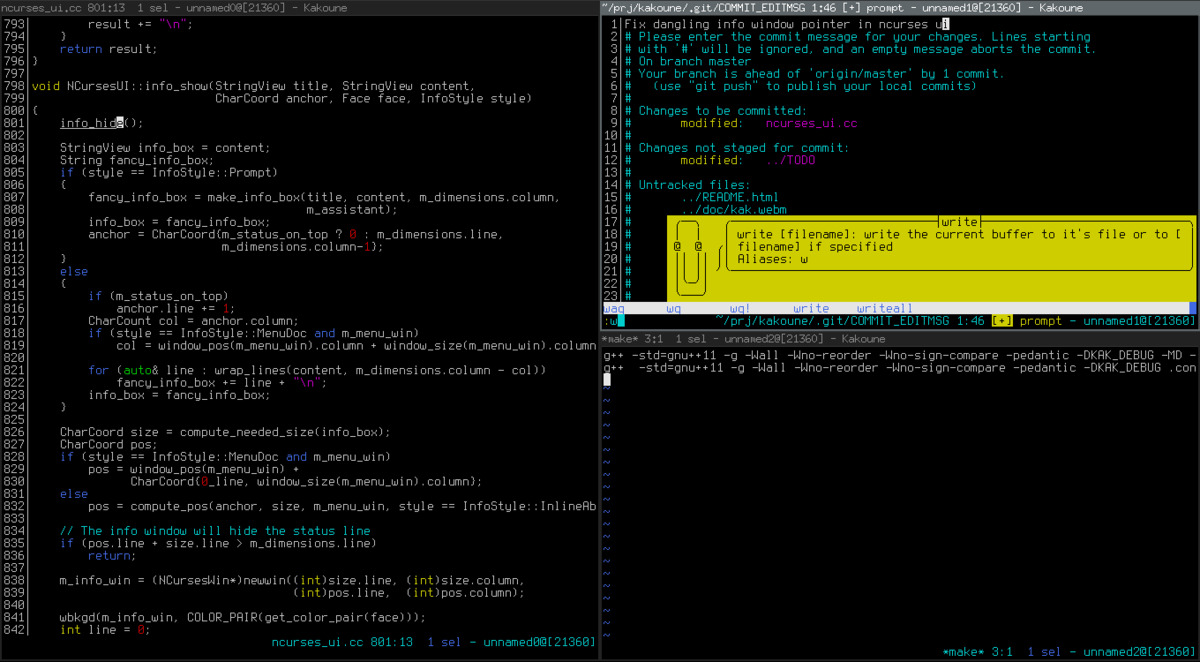
Kakoune is the philosophical outlier. Its model is “first, select; then, act”: every keystroke acts on the current selection, and selections can multiply with one command. Delete every occurrence of a word across the file? Select the word, press s (select all matches), then d — done. Its client-server architecture means your editing session runs as a daemon; you connect with lightweight clients, and multiple terminals can share one session.
| |
Configuration is a Lisp-flavored DSL in kakrc:
| |
Remote editing with Kakoune is unlike anything else: the server keeps the buffer state on the remote machine, so you can attach, edit, detach, and reattach without ever holding a session hostage to a flaky SSH connection — a genuinely unique advantage for server-heavy workflows.
Where Kakoune shines: multi-selection editing is transformative once it clicks, and the client-server model is unmatched for remote work. Where it hurts: the smallest community of the three, fewer language integrations, and its keybinding model requires unlearning Vim muscle memory rather than extending it.
Pitfalls and Migration Notes
- Do not migrate by porting muscle memory. Helix deliberately removed Vim’s
w/bword-motion keys; Kakoune’s default keys are positional, not mnemonic. Give each editor two weeks of undivided use before judging it. - Neovim config rot is real. Pin your plugin versions (
Lazy.lockis your friend) and test upgrades in a scratch config before applying them. A brokeninit.luaon a deadline is a self-inflicted wound. - Helix’s no-plugin stance is absolute. Check that every workflow you depend on is covered before switching: if you live in a plugin for TODO highlighting, git blame, or custom snippets, Helix may not have an equivalent.
- Kakoune’s client-server model changes process expectations. Background the server with
kak -d, or your editor dies when the terminal closes. Most newcomers lose sessions exactly once. - Terminal multiplexers still matter. All three editors assume a capable terminal. Pair them with a proper multiplexer — see our terminal multiplexer comparison — and a modern emulator like those covered in our Ghostty vs Alacritty vs WezTerm guide.
- All three run great over SSH. If your daily driver is a remote box, test latency-sensitive keystrokes early — Kakoune’s client-server model and Helix’s Rust performance both handle high-latency links far better than you might expect.
Why Terminal Editors Deserve a Second Look in 2026
Every year, someone declares the terminal dead. Every year, terminal editors keep growing — Neovim added more stars in the last twelve months than most editors have total. The reasons are practical: terminal editors use a fraction of the memory of Electron-based alternatives, work identically over SSH and locally, compose perfectly with the rest of your shell toolchain, and — with the modern trio above — now ship features (native multi-cursor, built-in language servers) that GUI editors charge subscriptions for.
The terminal is also where the rest of your workflow lives. If you already manage git from the terminal — or use a terminal git TUI like the ones in our lazygit vs gitui vs tig comparison — an editor that speaks the same language removes an entire class of context switches. Your editor, your terminal, and your git client form one continuous interface; choosing all three from the same philosophy pays compounding dividends.
FAQ
Which modal editor is fastest to learn in 2026?
Helix. Its selection-first model maps directly to how beginners already think (“select the word, then do something with it”), the keybindings are documented in an interactive :tutor, and there is no configuration step between installation and productivity. Neovim requires learning Vim’s verb-object grammar plus configuration; Kakoune’s model is simple but unconventional.
Can I use my Vim plugins in Neovim? Mostly, yes. Neovim supports Vimscript plugins for compatibility, but the modern ecosystem is Lua-native: Lazy.nvim, telescope, and nvim-lspconfig have no Vimscript equivalents. Plan to migrate your key plugins to Lua versions during a transition.
Does Helix support language servers for all major languages? Helix supports LSP for 50+ languages out of the box and will auto-install common servers (typescript-language-server, rust-analyzer, pyright) on first use. Languages without a server still get tree-sitter highlighting and syntax-aware motions.
Is Kakoune still actively maintained in 2026? Yes — the repository saw its latest commit on August 19, 2026, and the project has maintained steady development for over a decade. Its community is smaller than Neovim’s, but it is consistent and the core is stable.
Which editor is best for pairing with tmux or Zellij? All three. Neovim has the deepest ecosystem of tmux integrations (plugins that sync navigation between splits); Helix works flawlessly because it has no external state to sync; Kakoune’s client-server model arguably replaces part of what a multiplexer does, since clients can attach to a session from anywhere.
Do these editors work on Windows? Helix and Neovim both ship official Windows builds and run well in Windows Terminal or WSL. Kakoune is Unix-first; Windows users typically run it under WSL. For cross-platform teams, Neovim and Helix are the safer choices.
💰 想测试你的市场判断力?我用 Polymarket 做预测市场交易——这是全球最大的预测市场平台,从大选结果到技术监管时间线,什么都可以押注。和赌博不同,这是真正的信息市场:你懂的信息越多,胜率越高。我靠预测技术相关事件的走向已经赚了不少。用我的邀请链接注册:Polymarket.com