The most popular Java Excel library in China just announced it is entering maintenance mode — no new features, ever. The 33,000-star project that Alibaba built to fix Apache POI’s memory problems has told its users to start planning a migration. If your service reads or writes .xlsx files, this decision affects you whether you use that library or not, because the alternatives are the two very different tools it was designed to replace. This guide compares Apache POI, EasyExcel, and FastExcel with live repository data and real code, so you can pick before the migration wave hits.
TL;DR / Quick Verdict
If you need full fidelity — formulas, charts, pivot tables, macros, old .xls files — nothing beats Apache POI; it is the only one of the three that can honestly claim “everything.” If you need to stream huge datasets (millions of rows) with low heap, FastExcel is the fastest path for writing, and EasyExcel still has the best documented reading pipeline. If you are on EasyExcel 4.x today, start a low-priority migration plan: the library is stable, but it is frozen, and the safest target for write-heavy workloads is FastExcel.
Quick Comparison Table
| Criteria | Apache POI | EasyExcel | FastExcel |
|---|---|---|---|
| GitHub stars | 2,265 (Apache mirror) | 33,661 | 912 |
| Last push | 2026-08-27 (active) | 2024-10-29 (maintenance) | 2026-08-25 (active) |
| License | Apache 2.0 | Apache 2.0 | Apache 2.0 |
| Read support | .xls + .xlsx | .xlsx (.xls via POI SAX) | Write-only |
| Write support | Full (formulas, charts, pivot, macros) | Basic write + fill templates | Streaming writer |
| Memory profile | High (DOM for non-streaming) | Low (SAX-based rewrite) | Lowest (streaming) |
| Streaming API | Yes (SXSSF, with caveats) | Yes (built-in) | Yes (core design) |
| Thread safety | Workbook not thread-safe | Per-row listener model | Multithreaded worksheets |
| Active development | Yes | No (maintenance mode) | Yes |
| Java requirement | Java 8+ | Java 8+ | Java 8+ |
Decision Matrix
| Use Case | Recommended | Why |
|---|---|---|
Read 100K+ row .xlsx files with low heap | EasyExcel | SAX-based row listener; the documented 75 MB file in ~23 s with 16 MB heap is still class-leading |
| Write huge export sheets without OOM | FastExcel | POI non-streaming is ~10× slower and uses ~12× heap in the official benchmark |
Parse or generate legacy .xls files | Apache POI | HSSF is the only mature .xls implementation of the three |
| Formula evaluation, charts, pivot tables | Apache POI | No contest — the other two do not implement the formula engine |
| Parallel export of many worksheets | FastExcel | Each worksheet can be written by its own thread |
| You already run EasyExcel 4.x in production | Stay (for now) | It still gets bug fixes; plan a migration, do not panic-migrate |
Apache POI — The 20-Year-Old Workhorse
Apache POI is the Java API for Microsoft documents, and for spreadsheets specifically it has been the default choice since the 2000s. The GitHub mirror shows 2,265 stars (the real project lives at Apache), with the last commit on 2026-08-27 — the Apache project itself is as active as ever. Its scope is unmatched: .xls (HSSF) and .xlsx (XSSF), a full formula evaluation engine, charts, pivot tables, conditional formatting, digital signatures, and even a macro-capable user model.
The cost of that scope is memory. The classic DOM-based API loads an entire workbook into heap. From the official quick guide, creating a workbook is deceptively simple:
| |
For large files, POI offers SXSSFWorkbook, its streaming variant. It works, but as FastExcel’s maintainers point out, it has real limitations: a sliding window that prevents you from accessing cells above the current write position, writes to a temporary file, and disables shared strings by default, which bloats file size unless you accept much higher heap usage.
| |
Choose POI when you need correctness and completeness over memory economy — financial reports with formulas, templates that must round-trip through Excel exactly, or anything involving legacy .xls files.
EasyExcel — Frozen but Still Fast
EasyExcel is Alibaba’s rewrite of POI’s .xlsx parsing. The headline numbers from its own README are still remarkable: 16 MB of heap to read a 75 MB Excel file (460,000 rows × 25 columns) in 23 seconds with version 3.2.1+, compared to roughly 100 MB for the same file through POI’s SAX API. The library rewrote the OOXML unzip-and-parse pipeline so that only the current row’s data model lives in memory.
The critical 2026 news: the EasyExcel team announced the project is entering maintenance mode. Bug fixes will continue, but no new features will be added, and the team explicitly encourages users to evaluate alternatives. At 33,661 stars it remains the most-starred Java Excel library on GitHub, and the last push was 2024-10-29 — a long gap that confirms the announcement.
The reading model is a row listener:
| |
| |
EasyExcel remains the best choice for read-heavy pipelines — report imports, bank statement ingestion, any workload where rows arrive as a stream. Just do not build new feature-dependent code on top of it.
FastExcel — The Streaming Writer That Scales
FastExcel (org.dhatim) is a focused alternative created specifically to fix what the maintainers saw as POI’s streaming shortcomings: temporary files, the sliding window, and shared-string overhead. It is write-only, with a deliberately small API surface, and it is fast. The project’s own benchmark — 100,000 rows × 4 columns — shows POI non-streaming is about 10× slower and uses 12× more heap; POI’s streaming API is roughly on par on speed but keeps only 100 rows in memory at the cost of the limitations above.
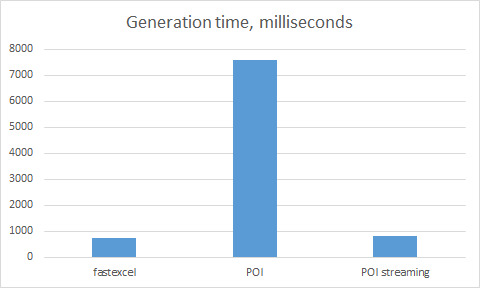
Its defining feature is multithreading: each worksheet can be generated by a different thread while shared strings and styles are fully synchronized. For export services that produce many sheets in parallel, that is a genuine architectural win.
| |
| |
At 912 stars with commits as recent as 2026-08-25, FastExcel is small but actively maintained. It does not read files, has basic style support only, and no chart support — but if your bottleneck is writing big exports, it is currently the best tool for the job.
Pitfalls and Migration Notes
- EasyExcel’s maintenance mode is not a breakage. Version 4.0.3 keeps receiving bug fixes. The risk is ecosystem drift: dependencies, JDK updates, and integration patterns will move on without it.
- The classic OOM trap: wrapping a large
XSSFWorkbookin a servlet and writing it to the response is the #1 production incident. Always stream: SXSSF for POI, the row listener for EasyExcel, or FastExcel’s output-stream model. - Date cells are a lie. Excel stores dates as serial numbers. Every library will hand you a raw double unless you explicitly set a date format; normalize dates at the model boundary, not in the UI.
- Do not mix DOM and streaming. Reading a workbook with
XSSFWorkbookand then converting toSXSSFWorkbookdefeats the purpose; pick one memory model per pipeline. - Cell styles are shared resources. Creating a new style per row in a loop is the quiet performance killer in both POI and FastExcel — cache styles and reuse them.
- Verify the file opens in Excel. Just because the bytes are written does not mean the package is valid. Add a smoke test that opens the output with a reader library before promoting an export pipeline.
- Watch row limits.
.xlsxhard limit is 1,048,576 rows; exporting past it fails in all three libraries. Split multi-million-row exports into multiple sheets.
If you are building document pipelines, also see our Java PDF library comparison for the sibling problem in the PDF world, our cross-language spreadsheet generation guide for how other ecosystems solve the same problem, and the Python PDF tooling roundup if your data team lives in Python.
FAQ
Is EasyExcel being discontinued?
No. The Alibaba team announced maintenance mode in the README: bug fixes continue, but no new features will be added. It is not end-of-life, but you should treat it as frozen and avoid building new feature-dependent code on it.
Which Java Excel library uses the least memory?
For reading, EasyExcel (SAX-based row listener, ~16 MB heap for a 75 MB file). For writing, FastExcel streams cells directly to the output stream and has the lowest footprint of the three in its official benchmark.
Can FastExcel read Excel files?
No. FastExcel is write-only. For read-heavy workloads, pair it with EasyExcel for parsing or POI for full-fidelity reads.
Is Apache POI still the best choice in 2026?
For anything involving formulas, charts, pivot tables, legacy .xls files, or digital signatures — yes, POI is still the only complete option. For simple large exports, its non-streaming API is the slowest and heaviest of the three, so use SXSSF or pick FastExcel.
Do these libraries support Java 21 / the newest LTS?
All three target Java 8+ and run fine on modern JDKs. EasyExcel’s maintenance mode means it may lag on future JDK changes, which is another argument for planning a migration on write-heavy paths.
Which library should I migrate EasyExcel 4.x users to?
For reading pipelines, there is no drop-in replacement with equivalent streaming ergonomics — stay on EasyExcel for now. For write-heavy exports, FastExcel is the lowest-friction target. Only migrate when you have a concrete feature or JDK driver; panic-migrating a working system is a bigger risk than maintenance mode.
💰 想测试你的市场判断力?我用 Polymarket 做预测市场交易——这是全球最大的预测市场平台,从大选结果到技术监管时间线,什么都可以押注。和赌博不同,这是真正的信息市场:你懂的信息越多,胜率越高。我靠预测技术相关事件的走向已经赚了不少。用我的邀请链接注册:Polymarket.com