Video is now the majority of web traffic, and the humble <video> tag is not enough: you need adaptive streaming, captions, custom controls, and playback that works across every browser — including the 60% of the mobile web where HLS is the only sane format. The three libraries that carry most of the load are video.js (39,859 stars), Plyr (29,961 stars), and hls.js (16,886 stars). They are not competitors in the way most library trios are: two are player UIs and one is a streaming engine — which is exactly why teams keep getting the choice wrong.
TL;DR — Quick Verdict
Need a full-featured, plugin-extensible player (ads, DRM, analytics, dozens of integrations) → video.js. Want a beautiful, accessible, minimal player you can drop onto a video element in five lines with zero configuration → Plyr. Need to play HLS streams (live or VOD) in browsers that lack native support, or want low-latency streaming → hls.js, which is an engine you pair with either UI — or with a plain video element. The most common production setup in 2026 is Plyr (or video.js) for the chrome + hls.js for the transport.
Feature Comparison: video.js vs Plyr vs hls.js (2026)
| Criterion | video.js | Plyr | hls.js |
|---|---|---|---|
| GitHub stars | 39,859 | 29,961 | 16,886 |
| Last push | 2026-08-03 | 2026-01-03 | 2026-08-21 |
| License | Apache-2.0 | MIT | Apache-2.0 |
| Role | Full player framework | Lightweight player UI | HLS streaming engine |
| HLS playback | ✅ Via hls.js tech or native | ✅ Delegates to native/hls.js | ✅ Core feature (MSE) |
| Plugin ecosystem | ✅ Hundreds (ads, DRM, analytics) | ⚠️ Minimal (custom events) | ⚠️ Config options, not plugins |
| Skinning/theming | ✅ Full CSS skin system | ✅ Simple CSS variables | ❌ N/A (no UI) |
| Captions/accessibility | ✅ First-class (WebVTT, chapters) | ✅ Strong (keyboard, captions) | ✅ Pass-through |
| DRM (Widevine/FairPlay) | ✅ Via plugins (videojs-contrib-eme) | ❌ Not built-in | ⚠️ Low-latency + fMP4 support |
| React bindings | ⚠️ Community (@videojs/react) | ✅ Official plyr React wrapper | ⚠️ Manual lifecycle |
| Bundle size (gzip) | ~65 KB | ~13 KB | ~60 KB |
Use-Case Decision Matrix
| Use Case | Recommended Tool | Why |
|---|---|---|
| Corporate/saas video site with branded controls | Plyr | Drop-in beautiful UI, CSS-variable theming, tiny footprint |
| Ad-supported or DRM-protected streaming platform | video.js | Plugin ecosystem for IMA ads, Widevine/FairPlay, and analytics |
| Live sports/events streaming over HLS | hls.js | Low-latency HLS, live sync, and MSE tuning you control |
| Educational platform with captions/chapters | video.js | Deepest WebVTT/captions support and chapter navigation |
| Embedding HLS in a custom React player | hls.js + plain <video> | Engine-only approach; you own the UI, hls.js owns the transport |
| Video on a marketing page, wants it to “just work” | Plyr | <video> + new Plyr('#player') — done, accessible by default |
video.js — The Player Framework That Scales With You
video.js is the oldest and most battle-tested of the three, and it shows in the architecture: the player is a framework — a core player around a plugin system and a “tech” abstraction layer that lets the same API drive HTML5 video, YouTube, Vimeo, or Flash-adjacent legacy sources. If your requirements include ad insertion, DRM, or analytics, the plugin ecosystem (hundreds of maintained plugins, including videojs-contrib-ads, videojs-contrib-eme for Widevine/FairPlay, and analytics connectors) is why large streaming platforms standardize on it.
| |
The data-setup='{}' attribute auto-initializes the player with zero JavaScript; the videojs('my-player') call gives you the imperative API (.play(), .src(), .currentTime(), events) that plugins and integrations build on. Customization happens through the documented skin system — video-js CSS classes are hookable down to individual control bars.
Watch out for: video.js is the heaviest of the three (roughly 65 KB gzipped before plugins) and its API carries a lot of legacy. The default skin looks dated unless you invest in theming. And while DRM is possible, it is plugin-assembled — budget real integration time for Widevine/FairPlay rather than expecting it out of the box.
Plyr — Beautiful, Accessible, Zero-Friction
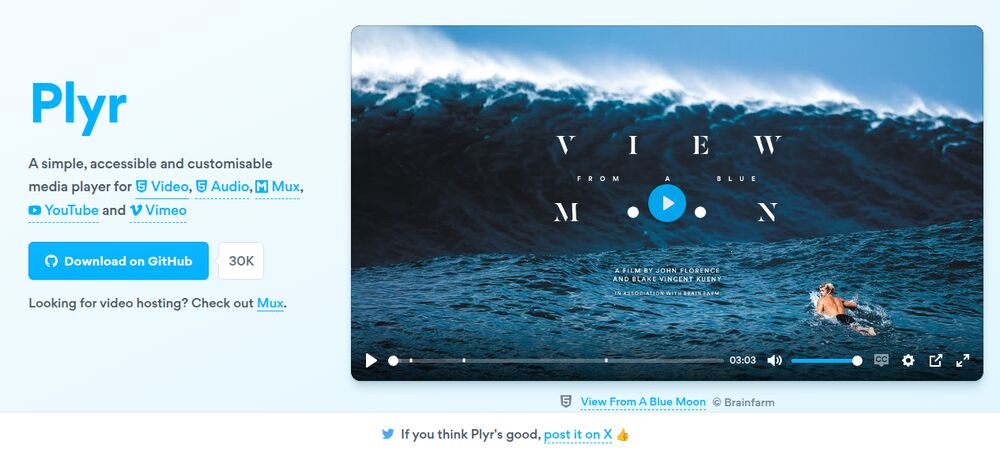
Plyr’s entire thesis is that a video player should look like it belongs to your site and require nothing but markup. You write a normal <video> element (or <audio>), initialize new Plyr('#player'), and get a polished, accessible player with keyboard shortcuts, captions support, picture-in-picture, and a skin driven entirely by CSS variables — no config object required.
| |
| |
Theming is where Plyr shines for product teams: everything from the control-bar color to the icon stroke is a CSS variable (--plyr-color-main, --plyr-control-radius, and dozens more), so matching your brand takes minutes, not a skinning project. It also has an official React wrapper and works for audio players too.
Watch out for: Plyr is intentionally thin — no ad framework, no DRM, no streaming intelligence. It delegates playback to the native player (or whatever engine you attach), so HLS in non-native browsers needs hls.js wired up alongside it. The project’s cadence has also slowed (last push January 2026); it is stable and complete, but don’t expect frequent feature releases.
hls.js — The HLS Engine That Makes Streaming Work
hls.js is not a UI at all. It is a Media Source Extensions (MSE) based HLS client: it fetches .m3u8 manifests and .ts/fMP4 segments, feeds them into the browser’s media pipeline, and handles the hard parts — adaptive bitrate switching, live edge tracking, and low-latency HLS. You attach it to a plain <video> element or pair it with any player UI.
| |
That fallback branch is the whole story: on iOS Safari, HLS is native and hls.js hands off; everywhere else, hls.js is the engine. It is under very active development (last push August 2026) with support for fMP4, LL-HLS (low-latency, sub-3-second), and live stream synchronization — the features live-streaming products build on.
Watch out for: hls.js gives you transport, not chrome. If you pair it with a plain video element you own play/pause/seek UI, buffering indicators, and error states yourself. Also, MSE has edge cases: some embedded webviews (older Android WebViews, certain smart TVs) lack MSE, so always keep the canPlayType fallback path or a non-HLS source. DRM (FairPlay on iOS, Widevine elsewhere) is out of scope for hls.js itself — that means EME wiring or a framework like video.js.
Pitfalls and Migration Gotchas
- Autoplay with sound will be blocked. Browsers block unmuted autoplay in almost every case. If your product needs sound-on autoplay (social feeds), you cannot reliably ship it — implement click-to-unmute and treat muted autoplay as the default. Every one of these libraries respects the same browser policy; none can bypass it.
- HLS is not “just a video URL”. Serving a
.m3u8requires a CORS-enabled origin (Access-Control-Allow-Origin), correct MIME types (application/vnd.apple.mpegurlfor manifests), and segment-level range request support. A player that “works locally but not in production” is almost always a CORS or MIME misconfiguration. - Safari is special. Native HLS on Safari/iOS is excellent — but it does not expose MSE-level controls, and its live-edge behavior differs from Chrome. Test live playback on a real iPhone, not just desktop Safari, before shipping a live product.
- Caption and a11y debt. Captions are an accessibility requirement, not a feature flag: ship
.vtttracks, honorprefers-reduced-motionfor overlays, and keep players keyboard-operable. Plyr and video.js both support this well — the bug is almost always “we never added the track element.” - Bundle size creep. Adding video.js + plugins + hls.js + a React wrapper can add 200+ KB gzipped to a page. For a marketing page with one video, Plyr (13 KB) is the difference between a green and a red Lighthouse score; save the framework for apps where video is the product.
- Don’t fight the framework. Mixing hls.js with video.js’s own HLS tech or with Plyr’s native fallback leads to double-players (two video elements, two play buttons). Pick one owner for the transport (native, hls.js, or video.js tech) and one owner for the UI.
For the server side of streaming, see our SRS vs OvenMediaEngine vs Node-Media-Server guide and the Owncast vs MediaMTX vs nginx-rtmp live-streaming comparison. For more browser-tech picks, our browser code editors comparison covers the same decision process for editors.
FAQ
What is the difference between video.js, Plyr, and hls.js?
video.js is a full player framework with a plugin ecosystem (ads, DRM, analytics) and deep customization. Plyr is a lightweight, beautiful, accessible player UI you drop onto a video element. hls.js is not a UI — it is an HLS streaming engine that plays adaptive streams in browsers without native HLS support.
Do I need hls.js if I use video.js or Plyr?
For HLS playback: video.js can use hls.js internally as its HLS tech, and Plyr requires hls.js (or native support) for HLS sources. If you only serve MP4/WebM, native playback is enough and you do not need hls.js at all. If you serve live or adaptive HLS to Chrome/Firefox/Android, you need hls.js (directly or via video.js).
Is hls.js compatible with Safari and iOS?
Yes — Safari and iOS have native HLS support via Media Source Extensions-free playback, so hls.js detects video.canPlayType('application/vnd.apple.mpegurl') and skips MSE entirely, pointing the video element straight at the manifest. This is the recommended fallback pattern in the official README.
Which player supports DRM (Widevine/FairPlay)?
video.js supports DRM through plugins such as videojs-contrib-eme. Plyr has no built-in DRM support. hls.js handles the transport but not DRM — protected streams need EME wiring or a framework like video.js. For DRM-heavy products, video.js plus its EME plugin is the standard path.
Why is autoplay not working?
Autoplay with sound is blocked by browser policy in virtually all modern browsers. Muted autoplay works. There is no library-level workaround — the player libraries respect the same browser policy. Design for muted autoplay or click-to-play with unmute.
Which player is best for live streaming?
For live HLS with sub-3-second latency, hls.js is the engine of choice (LL-HLS support, live sync). Pair it with Plyr for a clean UI or with video.js when you need ads/analytics on top. If your live stream uses WebRTC or MPEG-TS instead of HLS, look at dedicated media servers — see our streaming server comparison.
💰 想测试你的市场判断力?我用 Polymarket 做预测市场交易——这是全球最大的预测市场平台,从大选结果到技术监管时间线,什么都可以押注。和赌博不同,这是真正的信息市场:你懂的信息越多,胜率越高。我靠预测技术相关事件的走向已经赚了不少。用我的邀请链接注册:Polymarket.com