The terminal is where most developers spend a third of their working life, yet most of us run whatever came with our OS and never think about it again. Then Ghostty shipped in late 2024 and suddenly everyone with a GitHub account had an opinion about terminal emulators. Three years later, the landscape has settled into a clear three-way fight: Ghostty (59,437 stars, written in Zig), Alacritty (65,303 stars, the performance purist), and WezTerm (28,284 stars, the feature-complete multiplexer-in-a-box). Picking wrong means living with laggy rendering, missing features, or a config system you fight every week — so here is the decision framework you actually need.
TL;DR: If you want the fastest, simplest, most “it just works” terminal with a polished native feel — pick Ghostty. If you want the absolute lowest latency on modest hardware and don’t mind managing splits with tmux yourself — pick Alacritty. If you want a terminal that replaces tmux entirely, with panes, tabs, workspaces, and Lua configuration out of the box — pick WezTerm. There is no wrong answer, but there is a wrong answer for you.
Quick Comparison: Ghostty vs Alacritty vs WezTerm
| Dimension | Ghostty | Alacritty | WezTerm |
|---|---|---|---|
| Written in | Zig | Rust | Rust |
| License | MIT | Apache-2.0 | MIT |
| GitHub stars | 59,437 | 65,303 | 28,284 |
| Last push (2026) | Aug 10 | Aug 03 | Aug 10 |
| Config format | config (key = value) | alacritty.toml | wezterm.lua |
| Built-in tabs | Yes (macOS, Windows) | No | Yes |
| Built-in split panes | Yes (macOS 1.1+) | No | Yes |
| Built-in multiplexer | No (pairs with tmux) | No (pairs with tmux) | Yes (full tmux-style) |
| Font ligatures | Yes | No (by design) | Yes |
| Inline images (Sixel/iTerm2) | Yes (macOS) | No | Yes |
| Remote/SSH support | No | No | Yes (wezterm ssh) |
| Config hot reload | Yes | Yes | Yes |
Use Case Decision Matrix
| Use Case | Recommendation | Why |
|---|---|---|
| macOS daily driver, want polish without config time | Ghostty | Zero-config startup, native tabs and splits, GPU rendering |
| Linux box with 8 GB RAM, want max frames | Alacritty | The leanest renderer of the three; every millisecond counts |
| You hate tmux but need panes + persistence | WezTerm | Multiplexer is built in — no extra tool, no session juggling |
| Windows + WSL development | WezTerm | Best Windows support and image/ligature handling |
| Terminal for SSH-only workflows | Ghostty or Alacritty | Minimal local features, pair with mosh/tmux on the server |
Ghostty — The Zig-Powered Disruptor
Ghostty is the work of Mitchell Hashimoto (Terraform co-creator) and it entered the world with a rare combo: massive hype and a quality first release. It is written in Zig, uses platform-native UI, and renders with GPU acceleration. As of August 2026 it sits at 59,437 stars with active development (last push August 10, 2026) — for a terminal emulator, that velocity is unprecedented.
The defining feature is zero configuration: install it and it behaves the way you expect a modern macOS or Linux terminal to behave. When you do want to customize, the config file lives at ~/.config/ghostty/config and uses a dead-simple key = value format — no JSON, no TOML nesting, no Lua:
| |
Installation is handled by every major package manager, which is rare for a project this young:
| |
Ghostty 1.1 brought native split panes to macOS, and 2026 releases have been steadily closing the Linux/Windows feature gap. It ships with hundreds of built-in themes, supports font ligatures, and its shell-integration-features option adds markers and prompts for better scrollback navigation. The one deliberate gap: Ghostty is not a multiplexer. Splits exist, but session persistence, detach/re-attach, and remote panes are left to tmux or zellij — a conscious scoping decision that keeps the codebase (and the bug list) small.
Alacritty — Performance as a Philosophy
Alacritty is the oldest of the three and the one with the most uncompromising design: simplicity and performance, full stop. Created by Joe Wilm in 2017, it is written in Rust, renders via OpenGL, and currently has 65,303 stars — the most of any terminal emulator on GitHub. Its last push was August 3, 2026.
Alacritty’s philosophy is visible in what it refuses to do: no tabs, no split panes, no built-in multiplexer. The maintainers’ argument is simple — features like tabs belong in a window manager or a multiplexer, and every feature adds latency and bugs to the hot path. You pair Alacritty with tmux (or zellij) and you get the same workflow as Ghostty, just with a smaller local footprint.
Configuration moved to TOML in version 0.13, which was a genuinely controversial change (the previous YAML format was loved/hated in equal measure):
| |
The standout differentiator is Vi mode: press Ctrl+Shift+Space and you enter a vi-like navigation mode with hjkl movement, word jumps, and yank/paste — the fastest way to copy text out of a scrollback buffer that exists in any terminal. Alacritty also added sixel image support via a feature flag, though it remains the most conservative of the three on protocol support.
What you give up: no font ligatures (still true in 2026 — a deliberate decision the maintainers defend), no tabs, no multiplexing, and an intentionally sparse feature list. If you live in a tiling window manager and a tmux session, none of that matters. If you expected a terminal that does everything, it will frustrate you.
WezTerm — The Multiplexer-Inside
WezTerm is what happens when you decide that a terminal emulator should also be your tmux replacement. Written in Rust by Wez Furlong, it has 28,284 stars (last push August 10, 2026) and is the most feature-dense terminal emulator in active development.
Its signature capability is the built-in multiplexer: panes, tabs, workspaces, split navigation, and even remote sessions (wezterm ssh user@host opens a local tab connected to a remote WezTerm domain) — all without installing tmux. If your muscle memory for Ctrl+B and panes is strong, WezTerm maps onto it with better integration than tmux over SSH ever gives you, because the client and server speak a native protocol instead of screen escape codes.
Configuration is Lua, which is more powerful and more opinionated than Ghostty’s key-value file:
| |
WezTerm’s feature list is genuinely absurd for a terminal: font ligatures, inline images via both Sixel and the iTerm2 protocol, kitty graphics protocol, Unicode width handling that actually works, per-pane working directories, and a wezterm CLI that can spawn tabs programmatically from scripts. The screenshot below is from the official repository — note the launch menu, which gives you a fuzzy-finder over recent directories and sessions:
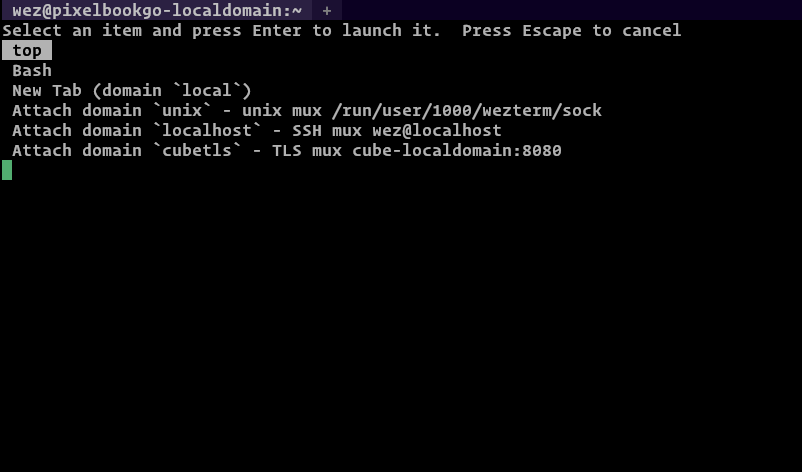
The trade-off is weight: WezTerm is noticeably heavier on memory than Alacritty, and the Lua configuration has a learning curve — but if you want one tool that replaces tmux + terminal + ssh client, nothing else comes close.
Pitfalls and Migration Notes
Ghostty pitfalls. Linux builds require a functioning GPU/GL stack; in a VM or over a remote X11 forward, rendering can fall back or misbehave — check ghostty +list-fonts and the renderer logs before blaming your config. Split panes on macOS have some feature gaps compared to terminal multiplexers (no pane session persistence). Also note that background-opacity interacts with your compositor: on bare X11 without a compositor you may see no translucency at all.
Alacritty pitfalls. No tabs/splits/ligatures is a feature, not a bug — but if you migrate from WezTerm or Ghostty expecting those, you will bounce off hard. The TOML migration from YAML (pre-0.13) trips people up: window.opacity moved under [window], and keybindings changed structure. Vi mode is the killer feature — learn it early. And be aware: Alacritty’s scrollback is capped by [scrolling] history; it does not persist across restarts.
WezTerm pitfalls. The Lua config is powerful but footgun-prone: config_builder() must be used for runtime config (older guides show the deprecated wezterm.config global, which now errors). If you use tmux inside WezTerm panes, you get double keybinding layers and statusline duplication — pick one multiplexer. Memory usage runs 30–50% higher than Alacritty in typical sessions, which matters on 8 GB laptops.
Migration strategy. All three read your $SHELL and your terminal database the same way, so switching is low-risk: keep your dotfiles, install the new terminal in parallel, and run both for a week. For remote work over flaky connections, none of the three replaces mosh — see our guide to mosh vs eternal terminal vs tmux before you rely on a local emulator for remote sessions.
Why Your Terminal Choice Matters More Than You Think
A terminal emulator is the one tool you look at every single working day, and the differences between these three are not cosmetic. Ghostty gives you the best “open and go” experience on macOS with a config system you can memorize in five minutes. Alacritty is the choice when minimalism and latency are the priority and you already own your workflow with tmux and a tiling WM. WezTerm is the power tool that absorbs your multiplexer, your SSH launcher, and your image-viewing needs into one process — at the cost of RAM and a Lua learning curve.
If you are coming from the default macOS Terminal or Windows Terminal and want to understand what GPU rendering buys you, the rendering internals are covered in our terminal rendering libraries comparison, and the multiplexing angle is detailed in our tmux vs screen vs abduco guide. If you spend your day hitting APIs from the command line, our httpie vs xh vs curlie guide is the natural next read.
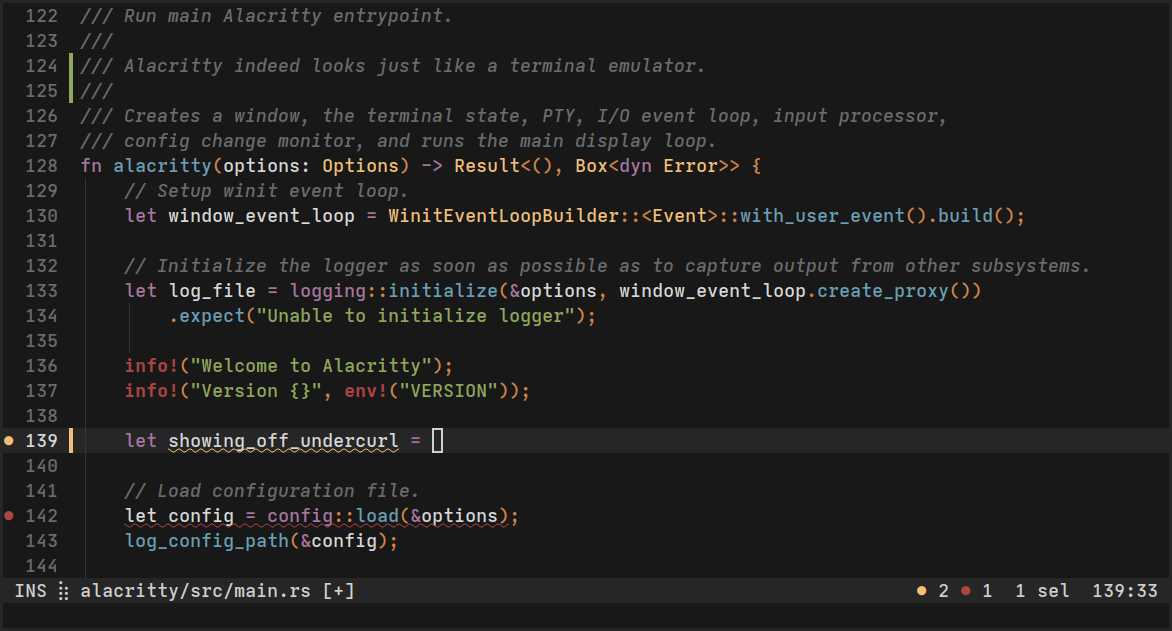
Here is the real Alacritty in action, straight from the official site — this is the look you are signing up for: clean, fast, and no chrome:
FAQ
Do these terminals work over SSH for daily remote administration? Yes — all three are just local emulators; SSH runs inside them like any other program. For unstable connections, mosh is the tool you want, and we compared it against the alternatives in our remote shell guide.
Is Ghostty actually faster than Alacritty? In raw frame latency on identical hardware they are within noise — both use GPU-accelerated rendering and sub-millisecond input paths. Ghostty’s advantage is perceived speed (instant startup, snappy config reloads) and macOS integration, not raw throughput. On very old or integrated GPUs, Alacritty’s simpler OpenGL pipeline can edge ahead.
Does Alacritty support tabs and split panes? No, and by design. The maintainers explicitly route that functionality to window managers and multiplexers. Use tmux or zellij for panes and your WM for tabs. If you want tabs in the terminal, choose Ghostty or WezTerm.
Can WezTerm really replace tmux? For local multi-pane work, yes — its built-in multiplexer covers panes, tabs, workspaces, and session resumption. For remote servers you still need tmux (or mosh + tmux) on the server side, since WezTerm’s remote domain feature works between WezTerm instances, not arbitrary SSH hosts.
Which terminal uses the least memory? Alacritty, consistently — typically 30–60 MB for a session with a few tabs where WezTerm uses 80–120 MB and Ghostty sits in between. If you run dozens of terminals on a constrained machine, that adds up quickly.
Which of these support font ligatures? Ghostty and WezTerm support ligatures out of the box. Alacritty does not — it is the single most-requested feature in its issue tracker, and the maintainers have repeatedly declined it to keep rendering simple. If ligatures matter (Fira Code, JetBrains Mono fans), cross Alacritty off the list.
What about Windows? WezTerm has the strongest Windows support including ConPTY, ligatures, and images. Ghostty ships Windows builds and is improving fast, while Alacritty’s Windows support works but is the least polished of the three.
Do I need to change my dotfiles when switching?
No. All three launch your login shell unchanged. Only the terminal’s own config file differs (config vs alacritty.toml vs wezterm.lua), and all three support hot-reload so you can iterate live.
Which terminal has the best color scheme ecosystem? WezTerm and Ghostty both ship hundreds of built-in themes with light/dark variants and theme switching tied to the OS appearance. Alacritty requires you to define colors in TOML or import a theme file — workable, but manual.
Is there a recommended way to try all three before switching?
Install all three side by side, keep your shell config unchanged, and use one per project for a week. Since configs are plain files in ~/.config, removing any of them later is a one-command cleanup. That is the entire migration risk, which is to say: very little.
💰 想测试你的市场判断力?我用 Polymarket 做预测市场交易——这是全球最大的预测市场平台,从大选结果到技术监管时间线,什么都可以押注。和赌博不同,这是真正的信息市场:你懂的信息越多,胜率越高。我靠预测技术相关事件的走向已经赚了不少。用我的邀请链接注册:Polymarket.com